Every time you wake up in the middle of the night in the dark forest and leave your tent, you feel slight discomfort, no matter how experienced a camper you are. But it’s not the dark forest that causes it. It’s the unknown that triggers the sympathetic response. You simply don’t know if some threat is lurking in that darkness.
In professional life, that means living in a constant state of stress and anxiety, with impaired working memory. Not exactly a recipe for success, is it?
In change management, specifically, the root cause is the T-Shape Dissonance.
T-Shape Dissonance in Change Management
Anette Jacobs, one of the recent guests in CTO Academy’s Expert Q&A sessions, published an insightful post on LinkedIn on this subject. In her own words, it is „a reflection on how lack of clarity and unspoken shifts in decisions can create a hidden emotional and cognitive load in relationships and workplaces, and how attempts to restore understanding can sometimes deepen disconnection instead of easing it.“
Whenever we talk about change management, this exact problem surfaces.
The reason it causes friction in organizations is that leaders, used to sudden pivots, automatically assume that the same applies to their direct reports. However, such a mindset isn’t universal. For many, a sudden change without a clear context triggers a sympathetic response.
The solution seems simple enough: Remove the “unknown” (dissonance) from the equation, and you restore the resonance. While that is undoubtedly the fact, the more immediate question is not the What or How, but When.
You see, the problem is that, by the time you start explaining the Why, the shift is already underway. In other words, you’ve been reactive instead of proactive.
To make things more difficult, in some instances, people who absorb ambiguity and, therefore, pivot with ease often struggle to convey the Why in an understandable manner, which just adds to the problem instead of solving it.
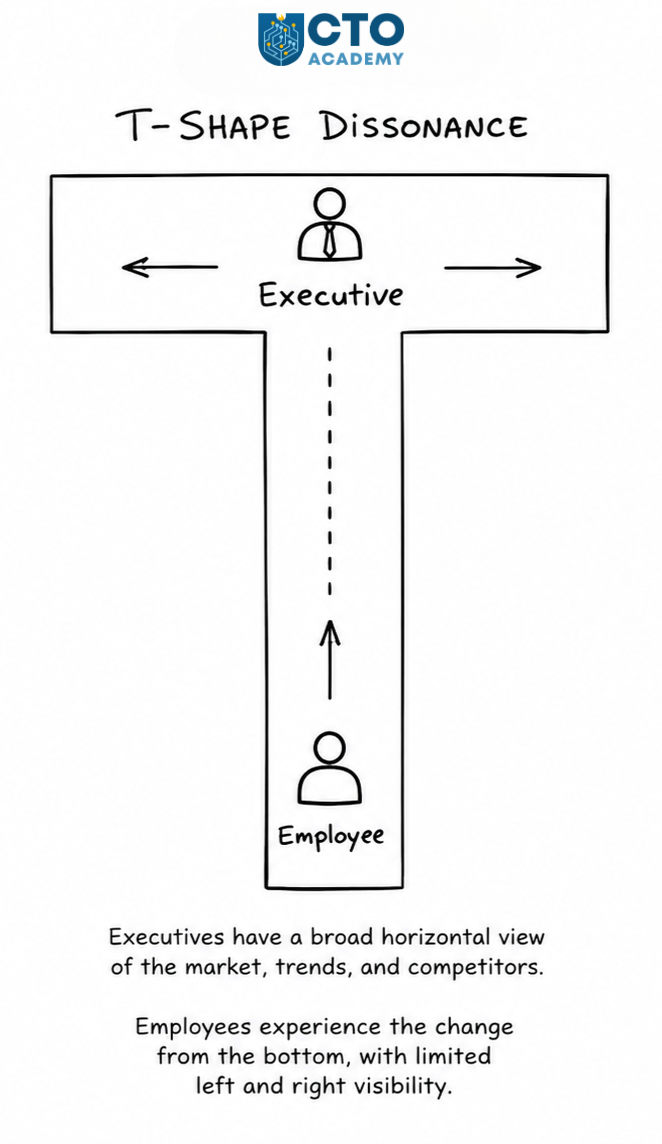
At the core of this problem are different perspectives and expectations. You can observe it as a T-Shape Dissonance. Top-level executives, standing at the top of the vertical, look left and right while setting the stage for the change. They expect people to simply follow their lead. However, employees experience that same change from the bottom of the vertical, with left and right views often blocked or, at the very least, seriously limited.
The Solution is Timing
You’ll often hear people mention the military way of leadership as the most effective. It’s quick, simple, and straightforward, with no need for additional explanation. A unit can move left, right, front, and back in an instant, no questions asked. That’s the definition of agility, something we all strive for.
The reason for that lies in basic training, when soldiers prepare for different scenarios. So before they hit the battlefield, their brains are programmed to expect sudden pivots. At the same time, they know Why they need to execute a certain maneuver or tactic.
Recall any of your personal onboarding processes and early stages of your career. Have you ever even heard about change management at that career stage? Did anyone organize thematic workshops? Did anyone train you for different scenarios or specific courses of action, in case of sudden pivots or a fundamental change in a strategy?
As a leader, you must never forget your roots; the place from which you emerged to the leadership role. It is that exact bottom of the vertical with left and right views blocked or limited.
Good leaders remember that feeling. Bad leaders choose to ignore it.
“Digital transformation” got popular faster than it got precise, so it’s used to describe everything from “move to cloud” to “launch a new app” to “replace SAP” to “start using AI.” And lately, we are hearing more about the fatigue than the success.
Digital transformation fatigue isn’t a “change management” problem. It’s what happens when leaders increase the volume and disruption of change without:
Increasing the organization’s ability to absorb that change.
Producing outcomes that justify the cost.
Teams stay busy, stakeholders stop believing, adoption stalls, and the transformation narrative quietly turns into a punchline.
But the fix isn’t motivational. It’s architectural.
In this piece, we’ll redefine digital transformation in a way that can’t be reduced to “adopting tools,” then break down the six failure mechanisms that create fatigue by design, including what changes when you’re operating in OT-heavy environments where uptime and safety rewrite the rules. Finally, you’ll get a quick diagnostic checklist to assess if you are accidentally manufacturing fatigue, plus a 90-day reset plan that restores credibility without pausing transformation entirely.
TL;DR
Digital transformation is not “adopting tools.” It’s redesigning the value-creation system (customer journeys, operating model, and control systems) so outcomes are produced by software, data, and automation at scale.
Transformation fatigue isn’t a morale issue. It’s a systemic failure mode: change load rises, but outcome proof and absorption capacity don’t.
Most fatigue is manufactured by six leader-driven mechanisms: initiative overload, output obsession, tech-first sequencing, operating model mismatch, ownership fog, and underfunded change absorption.
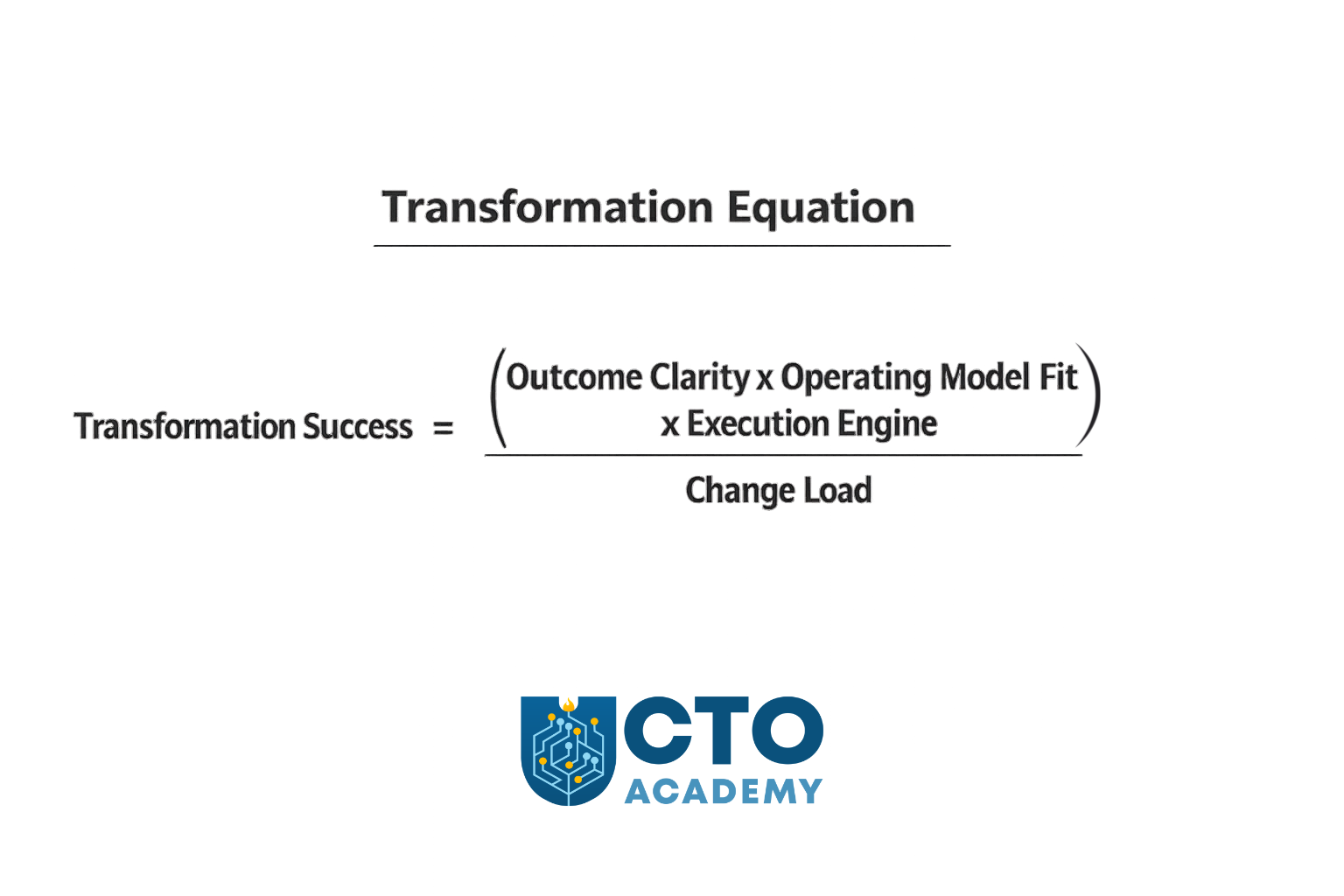
Use the Transformation Equation to govern decisions: Success = (Outcome Clarity × Operating Model Fit × Execution Engine) ÷ Change Load. If the denominator grows faster than the numerator, fatigue becomes inevitable.
Run transformation as three portfolios with WIP caps: Run Better (reliability/security/cost), Change the Business (platform/data/automation), Grow the Business (revenue/conversion/retention). Govern them differently.
Add the missing governance layer: an Absorption Budget (quarterly cap on how many teams/functions you can disrupt) + an absorption plan for any initiative you want to scale (training, workflow redesign, adoption KPIs, rollback, operational impact).
IT vs OT: same failure mechanisms, but OT has harsher penalties (uptime/safety constraints, site variability, constrained change windows). Treating OT like “IT in factories” creates multi-year distrust.
The practical fix is a 90-day reset: regain control (WIP caps + absorption budget), re-anchor to outcomes/ownership, then prove the new system with 1–2 lighthouse value streams.
NOTE: This tutorial is an extension of a Module-8 lecture on Digital Transformation, delivered by Sally Eaves, in CTO Academy’s Digital MBA for Technology Leaders.
Table of Contents
Let’s begin with the new CTO/CDO/CDTO/VP-grade definition of digital transformation that is harder to misuse/misunderstand than the commonly used (generic) one you can find in Google’s AI Overview:
The Correct Definition of Digital Transformation
Digital transformation is the deliberate redesign of a company’s value creation system—its customer journeys, operating model, and control systems—so it can deliver measurable outcomes (growth, speed, efficiency, resilience) through software, data, and automation at scale.
CTO Academy
In other words, it is a process of converting a business from “people moving work through tools” to “systems moving work through software, data, and automated decisioning,” with measurable impact on unit economics, time-to-value, and risk.
This pulls the concept away from “integrating technologies” and toward the core reason: compounding advantage (faster learning loops, lower marginal cost, better control).
What This Definition Changes (vs the generic one)
Most definitions of digital transformation start with “adopting digital technologies.” That’s the wrong starting point. Technology is an input. Transformation is an outcome. And the outcome is not “being more digital.”
When properly defined, digital transformation forces clarity on three things:
Business reason for change
Operating model required to execute it
Proof that the change is working
Let’s break it down for better clarity.
1. It’s outcome-first, not technology-first
The generic definition people commonly use starts with “integration of digital technologies.” The correct one, on the other hand, starts with “redesign of value creation” and insists on measurable outcomes.
Translation: If you can’t name the outcome, it’s not transformation — it’s modernization.
Therefore, a transformation is only a transformation if it changes at least one of:
TIP: The moment you define it this way, you can also define why it fails.
2. It makes the “operating model” non-optional
Most failures (and fatigue) happen when the org tries to bolt new tech onto the old operating model.
So the definition explicitly includes:
Customer journeys/value streams.
Operating model (decision rights, teams, funding, governance).
Control systems (risk, compliance, security, observability).
3. It recognizes the “price of change”
Transformation is not what you build. It’s what the organization can absorb, adopt, and operationalize without breaking. If adoption and repeatability aren’t designed in, you’re creating fatigue by design.
Transformation fatigue is, therefore, the tax you pay when the change rate exceeds absorption capacity. So the definition implies a constraint: “at scale” means it has to be repeatable, governable, and adoptable — not just a pilot.
What Transformation is Not
You’ll avoid a lot of confusion by calling these out early:
Not “cloud migration.” That’s one enabler, not the goal.
Not “agile adoption.” Agile is a delivery method; transformation is a business redesign.
Not “ERP replacement.” That might be necessary, but it’s rarely sufficient.
Not “AI strategy.” AI can accelerate value if data/process foundations exist.
Not “digitizing existing processes.” Sometimes you must delete steps, not automate them.
4 Key Aspects of the Digital Transformation Framework
As a leader responsible for the transformation, you want a clean framework that maps to execution:
Value model redesign What value are we optimizing: growth, cost-to-serve, time-to-market, resilience, compliance, safety?
Operating model redesign How decisions get made, how teams are structured, how funding works, what gets measured.
Digital execution engine Delivery capability: platform, data products, automation, CI/CD, reliability, security by design.
TIP: That last one is the missing piece in most definitions, and it’s where fatigue lives.
The 4 Drives of the Framework
Instead of “efficiency/agility/experience/data-driven,” which are so broad they’re unfalsifiable, it is better to use “board-level proofs”:
Cycle time compression Time from idea → production → measurable impact goes down.
Marginal cost reduction Cost-to-serve per customer/order/ticket goes down through automation.
Reliability and risk control Fewer incidents, faster recovery, better auditability/security posture.
Learning velocity Faster experimentation and decision-making using trustworthy data.
As you can see, these are measurable, and they map directly to portfolio decisions.
Rule of thumb: If you can roll it back without affecting business performance, it wasn’t transformation.
Digitization vs Digitalization vs Transformation (a useful distinction)
Digitization converts analog into digital.
Digitalization applies digital tools to existing processes.
Both can matter, but they rarely change the business model or unit economics on their own.
Transformation is different: it changes how value is created and how reliably the organization can change itself.
What Are Companies Actually Buying (when they hire someone to “design and kick off digital transformation”)?
They’re buying a leader who can do four things, in this order:
1. Create a shared “North Star” that the business agrees to pay for
What value are we pursuing (growth, speed, cost, resilience)?
Which parts of the business are in scope (customer acquisition, fulfillment, underwriting, supply chain, finance, HR)?
What “capabilities” must exist at the end? (e.g., omnichannel pricing, real-time inventory visibility, self-serve onboarding, automated compliance evidence)
They want to see: a Transformation Thesis (1–2 pages) + a capability map that ties tech change to business outcomes.
2. Turn it into a portfolio, not a program
Transformation fails when it’s treated as one massive program with a single finish line. A better model is 3 portfolios running in parallel:
Run Better: reliability, security, cost, operational excellence.
Change the Business: process redesign, data/automation, platform upgrades.
Grow the Business: new product lines, monetization, digital channels.
They want to see: a 12-18-month transformation portfolio with funding slices and measurable outcomes.
3. Build the “digital engine” (the organizational capability to change)
This is the part most execs underestimate. Tools don’t transform; operating systems do. And key components are:
Product operating model (teams aligned to outcomes, not projects).
Modern delivery (CI/CD, test automation, release discipline).
“Fatigue” as a Systemic Failure Mode, Not a Morale Issue
Fatigue is usually interpreted as “people don’t like change.” That’s too simplistic.
A more accurate framing for senior leaders is this:
Transformation fatigue is the cost of change without compounding outcomes. It spikes when leaders increase the volume and disruption of change without increasing the organization’s ability to absorb and operationalize it.
When that happens, the organization experiences constant upheaval and still can’t point to the value. And it’s usually a consequence of one or more failure mechanisms.
The Six Failure Mechanisms Leaders Accidentally Design In
These aren’t generic “reasons transformations fail.” They’re mechanisms, or patterns that consistently produce the same three outcomes:
Stalled value
Low adoption
Organizational exhaustion
Now, most orgs have 1–2 primary failure modes; fix those first. Let’s explain these failure mechanisms in more detail.
#1: Initiative Overload (no WIP limits, no “stop doing”)
When transformation becomes an umbrella for everything, it becomes unfundable, unstaffable, and ungovernable.
The tell-tale sign is that the initiative list keeps growing, but nothing ever stops.
This creates constant context switching, fragile dependencies, and a permanent sense of urgency without any notable momentum.
The fastest way to correct this is to cap transformation work-in-progress and make stopping work a leadership responsibility.
#2: Output Obsession (shipping without outcome ownership)
Features ship. Platforms launch. Migrations complete. And the business still asks: “What changed?”
When success is defined by delivery artifacts, the organization loses the one thing that sustains belief: measurable outcomes.
So if you keep hearing: “We’re busy, and nothing improves,” this is it.
To fix it, ensure that every initiative has one outcome metric, one business owner, and one technology owner.
#3: Tech-first Sequencing (tools before value-stream redesign)
Cloud, ERP, data platform, AI — chosen as a strategy instead of being enablers of the strategy.
This typically creates friction because the operating model and workflows remain unchanged. You are basically adding new tools to old workflows, consequently causing higher cognitive load, slower execution, and more rework.
What you should do instead is start with value streams and design the minimal foundations required to move the metric.
#4: Operating Model Mismatch (modern work funded and governed like projects)
A product operating model can’t be executed through a project governance mindset. Platform work can’t survive quarterly “project justification.” Data ownership can’t be a committee.
If any of this is true, it creates handoffs, scope churn, slow decision-making, and fragile accountability.
To correct it, fund products/platforms as persistent capabilities with clear ownership and measurable SLAs.
#5: Ownership Fog (IT “delivers,” business “sponsors”)
Transformation fails when it’s treated as an IT program with business endorsement.
Without explicit decision rights and shared accountability, business units opt out. Delivery teams become service providers. Politics fills the vacuum. You end up with alignment theater, escalation culture, and local workarounds.
To prevent this from happening, or flip the table:
Define decision rights.
Create joint ownership.
Make trade-offs visible.
#6: Change Absorption is Underfunded (enablement is an afterthought)
Training, comms, workflow redesign, and adoption measurement are treated as “nice to have.” However, it’s not a soft issue. It is an execution dependency. It creates low adoption, shadow processes, and the well-known postulate of “the new way is harder than the old way.”
The only way around it is to make enablement a first-class workstream with adoption KPIs.
The Transformation Equation (the model most programs are missing)
Digital transformation equation
Most transformations fail because leaders treat execution as the primary problem. Execution matters, but it’s downstream of design.
The Transformation Equation:
Transformation Success = (Outcome Clarity × Operating Model Fit × Execution Engine) ÷ Change Load
Outcome clarity: the metric you’re trying to move and how you’ll prove it
Operating model fit: ownership, funding, decision rights, governance
Important: Each portfolio needs its own metric set and governance cadence. If you govern “Grow” like “Run Better,” you’ll slow it down. If you govern “Run Better” like “Grow,” you’ll destabilize operations.
Portfolio Triad KPIs and Governance Cadence (Table 1)
Portfolio
Primary executive intent
Example KPIs (pick 3–5, don’t boil the ocean)
Governance cadence
Run Better (reliability, security, cost-to-serve)
Reduce operational drag and risk while freeing capacity
Monthly risk + reliability review; weekly ops/health check for hotspots
Change the Business (process redesign, platform, data/automation)
Increase the organization’s ability to change safely and repeatedly
Lead time for change, deployment frequency (where relevant), % automated workflow steps, platform adoption (active usage), reuse rate, data quality SLAs, integration cycle time
Rule of thumb: If you use the same cadence and success criteria for all three portfolios, you’ll either slow growth to a crawl and/or destabilize operations.
The Absorption Budget (the missing governance layer)
Transformation fatigue is what happens when the change load exceeds the organization’s capacity to absorb it. Most leaders don’t manage that capacity explicitly; they discover it after adoption stalls.
The Absorption Budget (definition) Every quarter, define the maximum number of teams/functions that can be meaningfully disrupted. That number becomes your “absorption budget,” and it caps concurrent transformation load.
CTO Academy
Require an absorption plan for every initiative
Before an initiative is approved to scale, it needs an absorption plan that answers:
Training + comms: who needs to learn what, by when, and how will we support them?
Workflow redesign: what will change in day-to-day work (not just in tooling)?
Adoption KPI + rollback plan: how will we measure real adoption, and what happens if it fails?
Operational impact assessment: what breaks if this change lands poorly? (especially in OT contexts)
The executive benefit of an absorption budget
It turns the transformation from “who can yell loudest gets priority” into a capacity-managed system:
Fewer initiatives, higher throughput
Faster time-to-first-win
Higher adoption and less rework
Lower burnout and attrition risk
IT vs OT: Same Failure Mechanisms, Different Penalties
Many executives treat OT transformation like “IT, but in factories.” That’s how you create multi-year distrust.
OT environments introduce constraints that change the failure profile:
Availability and safety dominate.
Site variability is real.
Change windows are constrained.
Legacy and vendor ecosystems are sticky.
The question everybody asks is: Where do IT leaders get OT transformations wrong?
If you do any of the following, expect pilot purgatory:
Assuming a rollout template will scale across sites unchanged.
Pushing IT security/change practices that OT operations can’t tolerate.
Treating IT/OT collaboration as integration work instead of a shared operating model.
Bottom line, in IT, bad sequencing causes delays and cost overruns. In OT, on the other hand, bad sequencing can create downtime, safety exposure, and long-lived resistance to future change.
The 90-Day Fatigue Reset Plan (without pausing transformation)
Keep in mind that the following plan does not mean “slow down.” It means “reduce unabsorbed change and restore outcome credibility.”
The 90-Day Reset Plan
Days 1–15: Stop the bleeding
Freeze net-new initiatives unless they replace something already in-flight.
Publish a Stop/Start/Continue list at exec level (make trade-offs explicit).
Stand up the Portfolio Triad (Run Better/Change/Grow) and assign owners.
Set portfolio WIP caps (maximum concurrent initiatives per portfolio).
Define your quarterly Absorption Budget (max teams/functions that can be disrupted).
Days 16–45: Re-anchor to outcomes and ownership
For every initiative: one outcome metric, one business owner, one tech owner.
Require an absorption plan to scale (training + workflow redesign + adoption KPI + rollback).
Kill/merge anything that can’t meet this bar.
Define decision rights and governance cadence (monthly outcomes, weekly delivery where needed).
Days 46–90: Prove the new system works
Run 1–2 lighthouse value streams that must move a business metric in <6 months.
Stand up enablement as a first-class workstream (training, comms, office hours, adoption dashboards).
For OT: define rollout-by-site strategy + change windows + safety gating + operational impact assessment.
Remember: Your goal in the first 15 days isn’t progress — it’s control.
What does a “lighthouse value stream” actually mean?
A lighthouse is not a pilot. It’s a cross-system value stream that forces alignment, proves the operating model, and moves a business metric in under six months, while producing reusable capabilities (data pipeline patterns, identity/access patterns, deployment discipline, observability, audit evidence).
A Quick Diagnostic: Are You Manufacturing Fatigue?
If three or more are true, you don’t have a “change management problem.” You have a transformation design problem.
Symptoms Checklist
You have 10+ transformation initiatives live, and none have stopped.
Success is measured by milestones, not business outcomes.
Adoption is assumed, not measured.
Digital is “owned by IT,” with the business sponsoring.
Pilots exist, scaling doesn’t.
OT rollouts are treated like IT rollouts.
Enablement has no budget, no owner, and no KPIs.
Symptom-to-Mechanism Mapping (Table 2)
Symptom you see in the org
Most likely failure mechanism
What leaders usually do (wrong)
First corrective action (high leverage)
“We’re running 10–20 initiatives, and everything is late.”
#1 Initiative overload
Keep adding programs to satisfy stakeholders
– Set portfolio WIP limits – Publish a Stop/Start/Continue list tied to capacity
“We shipped a lot…but the business asks what changed.”
#2 Output obsession
Report milestones, launches, and migrations as successes
– Require one outcome metric per initiative – Name one business owner + one tech owner
“Adoption is low. People go back to spreadsheets and email.”
#6 Underfunded absorption
Treat enablement as comms/training “later”
– Create an enablement workstream with adoption KPIs (active usage, process compliance, time-to-proficiency)
“Every initiative needs 6 approvals, and decisions take weeks.”
#5 Ownership fog (and operating model mismatch)
Create committees instead of decision rights
– Define decision rights (who decides/when/with what data) – Run a monthly outcomes review
“We’re modernizing platforms, but delivery speed isn’t improving.”
#4 Operating model mismatch
Fund product/platform work like projects; rotate teams
– Move funding to persistent teams (products/platforms) with measurable SLAs and clear ownership boundaries
“Cloud/ERP/data platform was the strategy. Value is ‘later.’”
#3 Tech-first sequencing
Start with the tool rollout, assume value will follow
– Pivot to value streams: pick 1–2 lighthouses and build only the minimal foundations needed to move a metric
“We have pilots everywhere, but nothing scales.”
#1 Overload + #3 Tech-first + #5 Ownership fog
Treat pilots as progress; avoid hard choices
– Enforce a pilot exit bar (adoption + metric movement + repeatable pattern) – Kill pilots that don’t qualify
“Teams are burning out; our best people are always ‘on transformation.’”
#1 Overload + #6 Absorption gap
Overload top talent; run transformation as extra work
– Create an absorption budget (max disruption per quarter) – Rebalance staffing so transformation isn’t “after hours”
“Data is ‘strategic’, but nobody trusts the numbers.”
#4 Operating model mismatch
Treat data as a platform project without ownership
– Move to data products: named owners, quality SLAs, and metrics tied to decisions (not dashboards)
“Security/compliance keeps blocking delivery.”
#5 Ownership fog (control systems not designed)
Handle risk late via gatekeeping
– Shift to built-in controls: threat modeling early, automated evidence, clear exception process with risk acceptance
“OT teams reject changes; sites diverge; rollout is chaotic.”
OT penalty on #3 and #6
Apply IT rollout patterns to OT realities
– Roll out by site archetype, design change windows, and include operators in workflow redesign – Measure adoption and operational impact
“Incidents increased after releases; reliability is worse.”
#3 Tech-first + #4 Operating model mismatch
Optimize for shipping, underinvest in reliability
– Add SLOs/operability to the definition of done – Fund reliability as part of the transformation portfolio (“Run Better”)
This is how you should use this table in leadership meetings:
Pick the top 3 symptoms causing the most pain.
Treat the matching mechanisms as your “primary failure mode.”
Remember, don’t just manage symptoms; remove the mechanism.
Key Takeaways
Your job isn’t to “drive digital transformation.”Your job is to redesign the system so outcomes are produced by software, data, and automation, without exceeding the organization’s capacity to absorb change.
If your organization is experiencing digital transformation fatigue, don’t start by asking how to persuade people to embrace change. Instead, start by asking a harder question: what have we designed that makes fatigue the rational response?
Fatigue isn’t random. It’s the predictable result of:
Too much concurrent change.
Success measured as output instead of outcome.
New technology layered onto an old operating model.
Unclear ownership and decision rights.
An underfunded absorption engine (enablement, training, workflow redesign, adoption measurement).
Redefine transformation as what it actually is: a redesign of the value-creation system so outcomes are produced by software, data, and automation at scale. Then use the Transformation Equation as your governance model: increase outcome clarity, operating model fit, and execution capability, or reduce change load. That’s how you restore belief.
The goal isn’t less transformation. The goal is less unabsorbed transformation and more compounding outcomes.
When you get that right, fatigue stops being a morale crisis and becomes what it should be: an early warning indicator you know how to act on.
Frequently Asked Questions (FAQ)
What’s the simplest way to tell “transformation” from “modernization”?
If you can’t point to a measurable shift in unit economics, cycle time, reliability/risk, or learning velocity, it’s probably modernization. Transformation changes how value is created and proven—not just what systems you run.
Why does transformation fatigue happen even when teams are delivering a lot?
Because output is not an outcome. When leaders increase initiative volume and disruption but don’t increase outcome clarity and absorption capacity, the org experiences constant change without compounding results—so belief collapses.
Which failure mechanism creates the most damage most often?
Initiative overload is the multiplier. Too many concurrent initiatives drive context switching, dependency gridlock, and “permanent urgency,” which then worsens every other failure mechanism (output obsession, tech-first sequencing, adoption failure, etc.).
How do I reduce fatigue without “slowing down transformation”?
Don’t slow down—reduce unabsorbed change. Use portfolio WIP caps, define a quarterly Absorption Budget, and require an absorption plan (training, workflow redesign, adoption KPIs, rollback, operational impact) before scaling. This typically increases throughput by removing thrash.
What’s a practical “absorption plan” template?
At a minimum, it answers four questions: 1) Who needs to change behavior, and what do they need to learn? (training + comms) 2)What changes in day-to-day workflow beyond the tool/UI? (workflow redesign) 3) How will we measure real adoption, and what’s the rollback if it fails? (adoption KPI + rollback) 4) What breaks if this lands poorly (especially OT)? (operational impact assessment)
What’s the biggest difference between IT and OT transformation risk?
In OT, the system constraints are different: availability and safety dominate, sites vary, change windows are constrained, and legacy/vendor ecosystems are sticky. The same leadership mistakes (especially tech-first sequencing and underfunded absorption) carry higher penalties: downtime, safety exposure, and long-lived distrust.
How do I pick a “lighthouse value stream” that actually proves something?
A lighthouse isn’t a pilot. It must (a) be cross-system, (b) force alignment on ownership and decision rights, (c) move a business metric in <6 months, and (d) produce reusable capabilities (delivery discipline, data patterns, observability, audit evidence).
What should I do first if I suspect we’re “manufacturing fatigue”?
Start with control, not progress: freeze net-new work unless it replaces something, publish Stop/Start/Continue, stand up the Portfolio Triad, set WIP caps, and define the quarterly Absorption Budget. Then re-anchor every initiative to one outcome metric with one business and one tech owner.
Remote work is slowly evolving into the so-called, workation, a concept that refers to a modern work arrangement that combines professional responsibilities with travel or leisure activities.
Workation (work + vacation) describes professional activities conducted in non-traditional environments through digital connectivity. It is characterised by:
Location fluidity or execution of core job functions from co-working spaces, cafes or travel destinations.
Tech dependency or reliance on cloud tools and collaboration software.
We are talking about the more loose understanding and adoption of the concept on an individual level rather than a company-organised event like SWISS Airlines’ in Mallorca which could be categorised as a team-building initiative.
Leaders already struggle to manage distributed teams where employees work from their home “offices”. They can’t use in-person oversight and centralised decision-making as they would in a traditional office setup. Modern remote environments demand proficiency in digital communication, decentralised team coordination and outcome-based performance metrics.
Add workations to the mix, and team management becomes significantly more challenging, with potentially half the team dispersed across the globe, working from beach hammocks and mountaintop base camps. Connectivity issues, exhaustion, burnout, disinterest, distractions, increased security risks…we can go on like this for an entire page.
“Companies have recognised the importance of leading teams remotely and realised that many executives who were very successful in leading in a face-to-face environment are not necessarily effective in a virtual environment”
Gianluca Carnabuci, professor of organisational behaviour at ESMT Berlin
In other words, technology leaders are missing the critical skills necessary to address the challenges of this new paradigm.
Addressing The Skill Gaps in Remote Leadership Through Contemporary Technology Leadership Programs
Traditional MBA programs often fail to focus on the challenges of virtual environments, such as combating isolation, preventing burnout and building trust through digital channels.
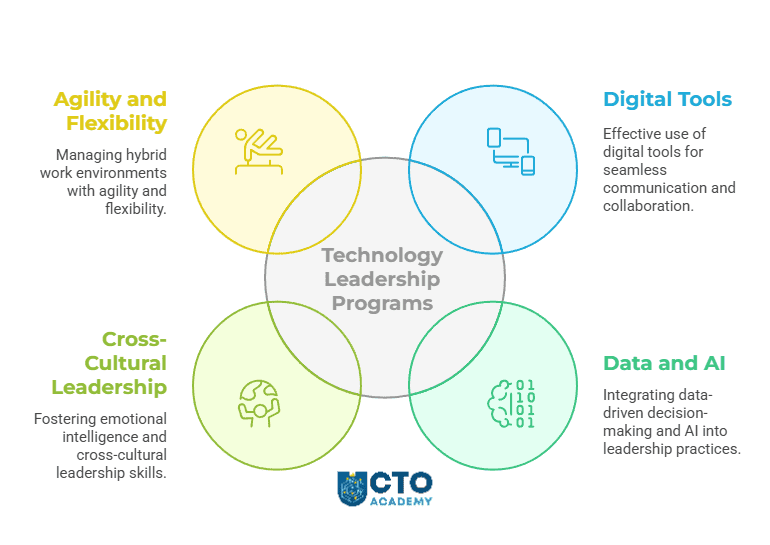
Tech-focused online programs, on the other hand, fill this gap by integrating coursework in emotional intelligence, digital empathy, remote conflict resolution and automated workflows. These competencies are critical as studies show that communication breakdowns are at the very top of workplace challenges in remote and hybrid environments.
But communication is just one out of the four main challenges of remote team leadership that technology leadership programs address:
In one of our recent peer-to-peer sessions, for instance, seasoned fractional CTO Stephen Morris emphasised the importance of frequent communication with distributed teams. He highlighted that a CTO’s role involves constant communication, as well as acting as a liaison, organiser and unblocker. “I’d say I communicate almost daily with all the teams”, he explained, “because that’s what you do as a CTO”.
While this requires significant time, it’s crucial for effective leadership. As teams grow and become more distributed, the focus shifts towards managing team leaders rather than individual contributors. “Obviously, you’re managing the team leaders rather than the individuals”, Morris added. “Ultimately, the frequency and nature of communication depend on the size and structure of the team and the overall organisation”, he concluded.
Tech MBAs equip you with the skills to leverage emerging technologies strategically. This includes streamlining remote operations through optimised workflows and automation. Furthermore, you’ll learn to choose the most effective communication channels for different situations. For example, utilise asynchronous tools for quick status updates but prioritise video conferencing for complex discussions.
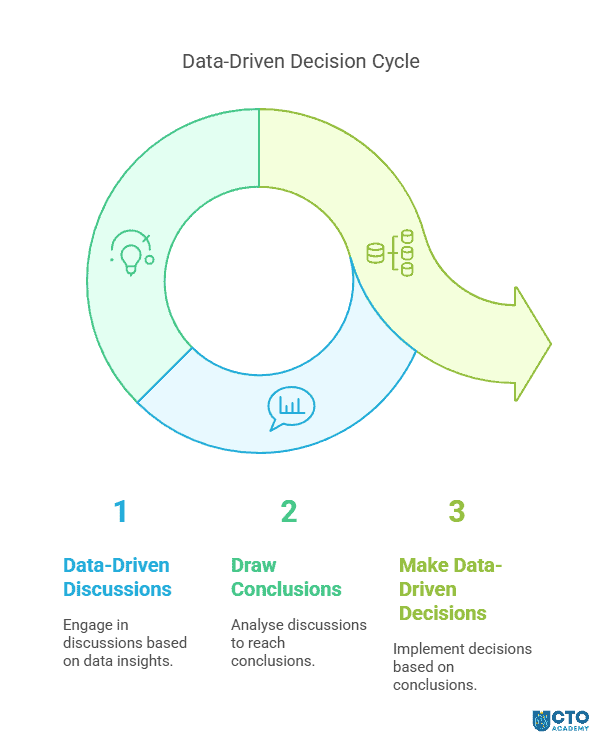
This dialogue (discussions) must eventually produce operational decisions. But for any of that to be effective, it must be based on data.
Data-Driven Decision-Making and AI Integration
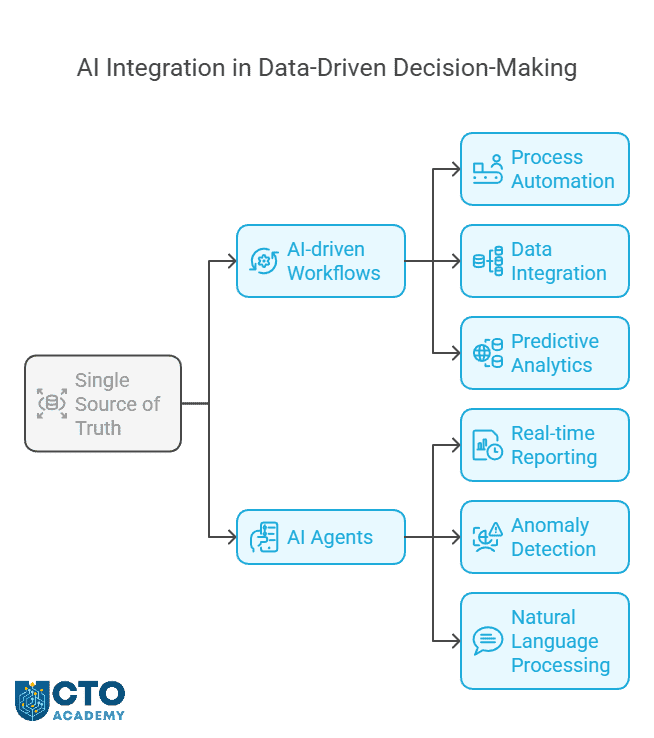
The effectiveness of distributed teams relies on well-organised centralised systems for communication, data gathering and processing. For example, team members must have seamless access to the central nervous system (a single source of truth) and the necessary analytical tools but, at the same time, leaders must be able to monitor productivity.
However, it’s not exactly a straightforward process.
Firstly, to organise such a system, you need to possess extensive knowledge in operational data modelling, advanced analytics, data hierarchy and AI integration. Secondly, you need to know how to utilise the data in business decisions on the one hand and performance monitoring on the other; that is, understanding which data matter for which business operation including remote team management.
This is exactly why the curricula of technology leadership programs go into detail about AI-powered data-driven business reasoning and the decision-making process itself.
Unfortunately, AI-enhanced data and analytics can get you only so far because there is one critical trait AI and databases don’t possess and that’s emotional intelligence.
Emotional Intelligence
In the office, subtle tell-tale signs that something is wrong with the team’s dynamics are easy to spot. In the remote setting, on the other hand, these sometimes subtle nonverbal cues are masked.
The Tech MBA curricula provide practical insights into empathy and emotional intelligence in the leadership context that enable leaders to spot these changes in a remote or hybrid work environment. Lectures cover critical topics such as:
Careful use of empathy tools
Open questions techniques in the context of cross-cultural team management
Active listening
Distinction between compassion and empathy
However, they also examine the concept of “empathy in action”, outlining how to understand and help employees, appreciate different perspectives, engage in healthy debates and make recommendations for success. Often, this requires a healthy dose of flexibility.
Agility and Flexibility in Hybrid Work Management
Hybrid work management requires leaders who can seamlessly shift between remote and in-person work dynamics. That’s the reason why Tech MBAs emphasise:
Flexible work models that prioritise employee autonomy and well-being.
Case studies on successful remote-first companies to illustrate best practices in digital leadership.
Agile methodologies for iterative management and rapid problem-solving in hybrid work environments.
Conclusion
While remote work offers benefits like access to global talent pools, it also introduces unique leadership challenges. One of the biggest is balancing productivity demands with employee well-being.
Employee well-being is no longer just a topic of empirical studies; it’s a core demand of today’s workforce. This generation prioritises work-life balance, flexibility and mental health, marking a significant shift from the traditional job paradigm. Leaders must, therefore, adapt to these evolving expectations to attract and retain top talent in the remote work landscape.
However, to achieve that, they (leaders) must obtain a new set of skills and the only place where they can learn them is the curriculum of technology leadership programs and Tech MBAs.
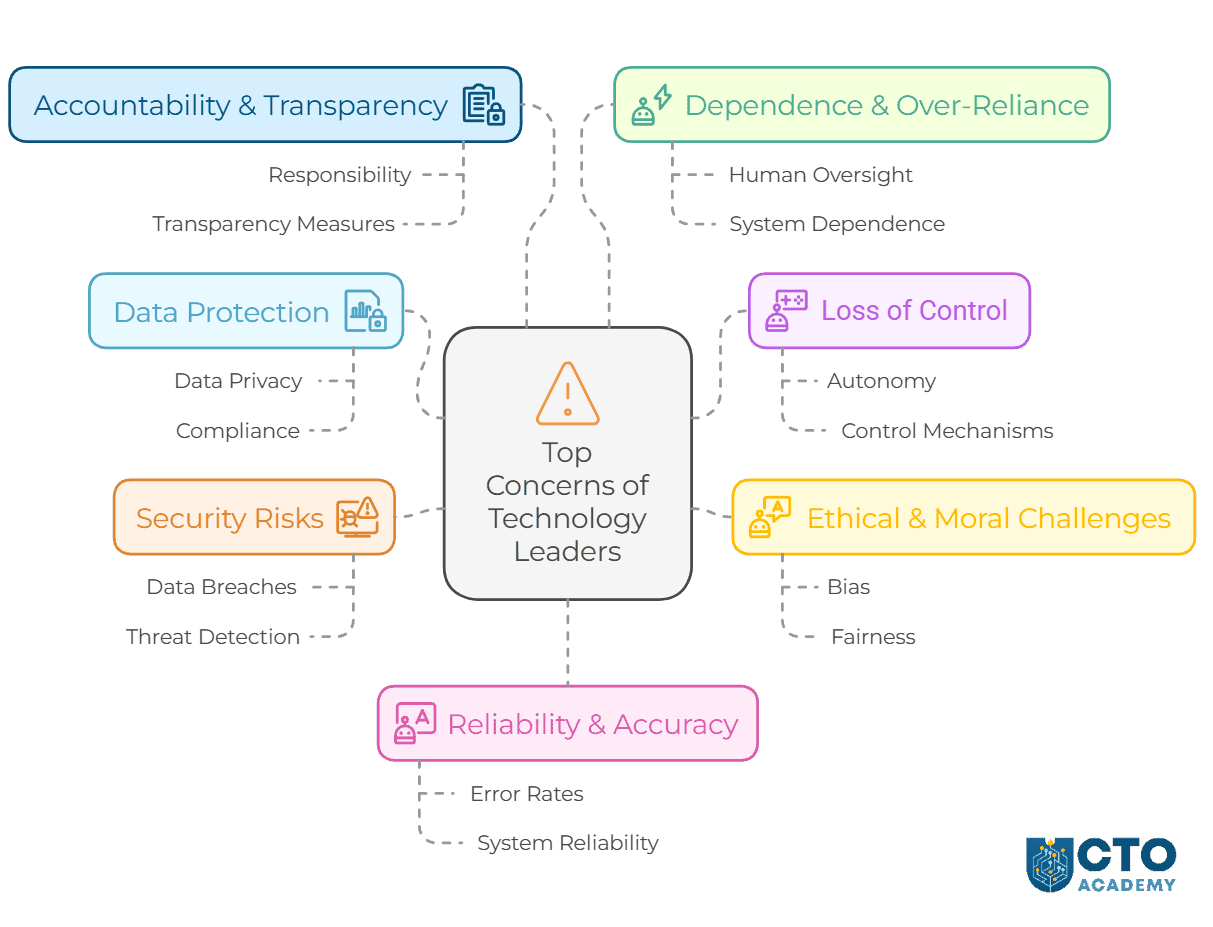
Artificial Intelligence is evolving beyond narrow, task-specific applications into agentic AI—systems capable of making autonomous decisions, adapting to dynamic environments and taking independent actions to achieve goals. This paradigm shift presents unprecedented opportunities for automation, efficiency and innovation. However, as organisations move toward deploying AI agents in critical operations, technology leaders must address several fundamental concerns.
For CTOs and tech executives in general, the question is no longer whether to implement agentic AI but how to do so responsibly and securely. The risks of unchecked autonomy, biased decision-making and unpredictable behaviour demand a structured approach to AI governance, validation and human oversight.
This article explores the core challenges of agentic AI, backed by real-world case studies, and outlines the best mitigation strategies to ensure safe, accountable and effective AI deployment.
When users share data with AI chatbots, it is stored on the servers of companies like OpenAI, Microsoft and Google—often without a straightforward way to access or delete it. This raises concerns about sensitive information being shared with chatbots like ChatGPT that could unintentionally become accessible to other users.
By default, ChatGPT saves chat history and uses conversations to improve its models. While users can manually disable this feature, it’s unclear whether the setting applies to past conversations retroactively or if it’s working at all because it is virtually impossible to audit data that OpenAI and other providers use to train their models.
Technology leaders face a dilemma here: We either act in good faith and use products or ban the use of Gen AI tools as Samsung did. If we do use those products, we must accept three possibilities:
Employees may input confidential information into AI without realising it could be stored or used for future model training.
Even with data governance policies in place to prevent sensitive data from being shared with external AI services, history taught us that providers often ignore those rules because data is a commodity.
Due to a lack of visibility and access control, a company’s secrets could be exposed without a clear way to delete or retract them.
This is what we can do to at least minimise exposure:
Use role-based access controls (RBAC) to limit data access to only necessary personnel or AI modules.
Implement access controls and encryption at all levels to prevent AI from having unrestricted access to sensitive data.
Instead of centralising all user data, AI can learn from noise-injected distributed datasets without exposing raw information. This prevents raw data exposure but does not affect AI capabilities.
Train AI models in secure environments with masked or anonymised data (synthetic data instead of real user information w/ Zero Trust architectures).
Ensure that AI-driven data processing aligns with compliance requirements (requires AI explainability functionality).
That’s, unfortunately, the reality because we have limited control over data protection when using a third-party SaaS. But what can we do to prevent Agentic AI systems from acting erratically?
2. Loss of Control
Agentic AI systems and AI in general could act unpredictably. Often, this refers to pursuing objectives misaligned with our intentions. This concern is even more emphasised in high-stakes scenarios because we entrust a complex code with the “black box” feature to make decisions on our behalf.
The malfunctioning can cause an array of implications. For example:
Risk of harmful outcomes.
Inability to intervene effectively.
Potential cascading failures.
On March 18, 2018, an Uber self-driving test vehicle in Tempe, Arizona, struck and killed a pedestrian, Elaine Herzberg. This was the first recorded fatality involving a fully autonomous vehicle, raising serious concerns about loss of control in AI-driven systems. The vehicle’s onboard AI was designed to detect and react to obstacles autonomously, but a failure in decision-making and override mechanisms led to a tragic accident.
The AI incorrectly classified the pedestrian as an unknown object rather than a human, delaying its response. To make things worse, Uber had disabled the vehicle’s built-in emergency braking system, relying entirely on AI-driven decision-making. However, the system was tuned to reduce false positives, meaning it hesitated before deciding to stop which turned out to be a fatal miscalculation.
A human safety driver was present but not paying attention at the critical moment, as AI was expected to handle the situation. The software did eventually order the car to brake 1.3 seconds before the collision but it was too late.
This incident just goes to show that blind reliance on Agentic AI — programmed by humans — can have devastating outcomes.
Mitigation Strategies for Loss of Control in Agentic AI
1. Goal Alignment and Robust Objective Design
Ensure AI systems have clearly defined objectives that align with human values and intentions.
Use techniques such as reward modelling to guide the system’s behaviour toward desired outcomes.
Regularly test the system in diverse scenarios to ensure its objectives remain aligned.
A good example is OpenAI’s approach with reinforcement learning from human feedback (RLHF). This method uses active human guidance to shape the system’s behaviour, ensuring that its autonomous decisions align with human intentions.
2. Control Mechanisms and Fail-Safes
Build robust mechanisms for human oversight, such as kill switches, manual overrides or adjustable autonomy levels.
Ensure that all systems have multiple layers of control to ensure humans can intervene and regain control if the AI behaves unexpectedly.
As much as it can be difficult sometimes, following industry standards and regulatory frameworks ensures the safe development and deployment of agentic AI. That said, both developers and end users should continuously work with policymakers and standards organisations to enforce safety protocols and regular audits.
And the prerequisite for that is monitoring and updating; in other words, deploying systems with continuous monitoring capabilities to detect and address deviations from expected behaviour. For example, AWS and Azure allow developers to update and retrain deployed models to maintain performance and control.
3. Ethical and Moral Challenges
Agentic AI systems face ethical dilemmas, such as deciding whose safety to prioritise or whether to follow instructions that conflict with moral principles. Decisions may not align with societal values, leading to public backlash or regulatory scrutiny.
To mitigate this, Facebook implemented fact-checking partnerships with third-party organisations to address misinformation and started conducting regular ethical reviews to identify and mitigate unintended harms. Additional tools were developed to prioritise high-quality information and limit the spread of harmful content.
Mitigation Strategies
1. Embedding Ethical Frameworks
Google’s AI Principles explicitly prohibit building AI systems that cause harm or reinforce bias, ensuring ethical guardrails. They collaborated with ethicists, domain experts and diverse stakeholders to define moral principles and embed them into the AI’s decision-making algorithms.
2. Value Alignment through Human-Centric Design
As we already said, OpenAI employed RLHF for ChatGPT, which involves training the model to align its responses with user-defined ethical standards. It is a proven approach to ensure AI systems reflect human values. It is done through regular feedback from diverse groups of users because it’s imperative to have an AI system that reflects a broad range of perspectives.
3. Ethical Audits and Impact Assessments
Microsoft’s AI, Ethics, and Effects in Engineering and Research (Aether) committee regularly reviews the company’s AI projects for ethical risks. The committee conducts regular ethical audits andAI impact assessments (AIIAs) to evaluate the social, environmental and moral implications of AI deployments. This is the practice that can be utilised by every organisation simply by establishing independent review boards to assess ethical risks and provide actionable recommendations.
4. Bias Mitigation
Already mentioned IBM’s Watson Health faced criticism for recommending different cancer treatments based on biased training data. The company addressed this by revising datasets and involving clinicians in the training process.In other words, to eliminate bias from the algorithms:
Autonomous vehicle companies like Waymo conduct ethical scenario testing to evaluate how their systems handle life-critical situations, that is, whom to prioritise in a potential collision. They do that in simulated environments to explore how they respond to ethical dilemmas before deployment. These simulations mimic real-world ethical conflicts and analyse the system’s decision-making process.
4. Security Risks
Agentic AI systems can be manipulated, hacked or even weaponised, with autonomous decision-making amplifying their destructive potential. We all saw that ChatGPT-powered gun on YouTube, didn’t we?
In 2020, the SolarWinds cyberattack demonstrated the risks associated with compromised AI supply chains. Malicious actors injected malware into the Orion software platform, impacting thousands of clients, including government agencies.
This case demonstrated a serious lack of robust monitoring in the software update process and insufficient measures to detect and prevent supply chain attacks. To mitigate this and reestablish trust, the company had to implement code-signing practices and enhanced monitoring tools while partnering with security agencies and third-party audits.
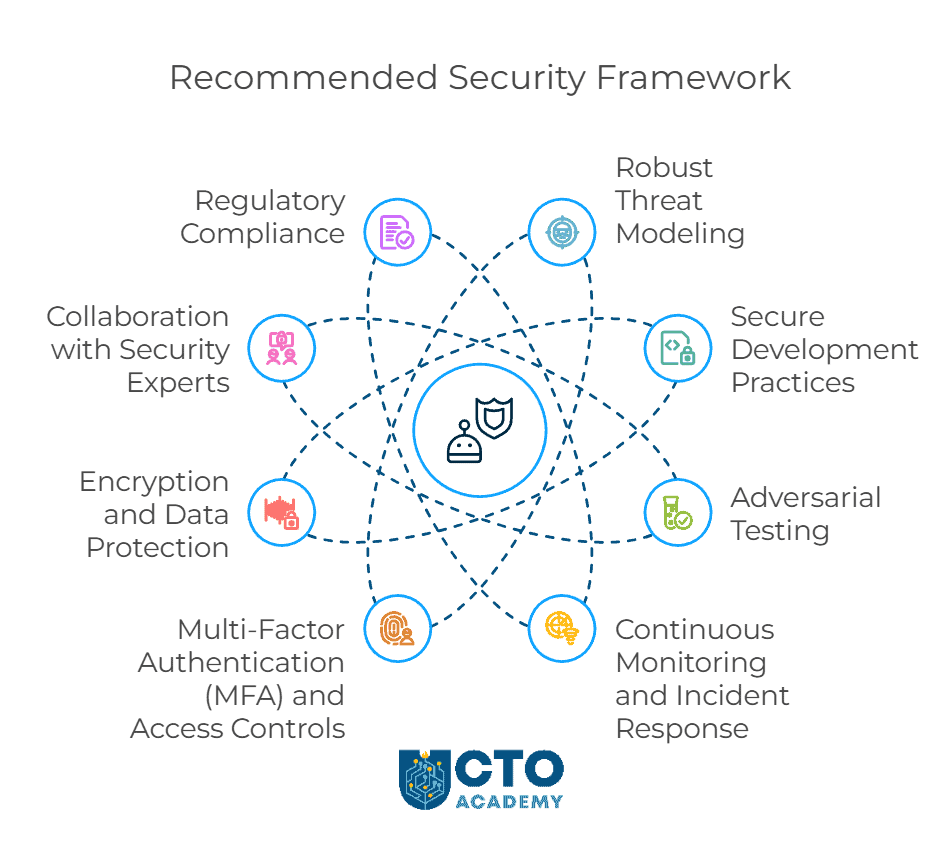
Mitigation Strategies for Security Risks in Agentic AI
OpenAI adopted secure development practices to minimise risks in GPT-based models, including API rate-limiting to prevent misuse. They employ techniques such as differential privacy and secure multiparty computation to protect sensitive data used in AI training and deployment.
3. Adversarial Testing
Tesla tests its autonomous vehicle systems against adversarial inputs, such as altered road signs, to ensure the AI behaves correctly in manipulated environments. They use adversarial examples to evaluate how the system reacts to maliciously crafted inputs. These simulations of real-world attacks have two goals:
Test the AI system’s resilience.
Identify vulnerabilities.
4. Continuous Monitoring and Incident Response
By default, AI systems should integrate robust monitoring and alert mechanisms, enabling swift responses to potential security threats. They detect anomalies and security breaches that are sent to dedicated incident response teams that utilise protocols to address security incidents as they occur.
5. Multi-Factor Authentication (MFA) and Access Controls
Back to basic cybersecurity – limit access to AI systems and their underlying infrastructure using strong authentication methods and role-based access controls. Zero-trust policies are still the best first line of defence.
The additional mitigation strategies are:
Encryption and Data Protection
Collaboration with Security Experts
Regulatory Compliance
5. Accountability and Transparency
It’s often difficult to understand or explain the decisions made by complex AI systems, creating a “black box” problem. This causes challenges in assigning responsibility for errors or harm and complicates regulatory compliance and legal proceedings.
Judges and lawyers could not understand how COMPAS reached its conclusions.
The AI disproportionately predicted higher recidivism rates for Black defendants.
The system operated as a “black box,” with no independent review.
Based on this case, AI models in legal decision-making now require:
Transparent documentation,
AI tools used in courts must pass fairness assessments before deployment and
Most importantly, many jurisdictions banned fully automated risk assessments without human review.
So by implementing explainability, auditing, human oversight, regulatory compliance and stakeholder engagement, AI systems can become more accountable and transparent.
Recommended Tools, Techniques, Practices and Frameworks for Improved Accountability and Transparency of Agentic AI Solutions
Use model-agnostic techniques like LIME (Local Interpretable Model-Agnostic Explanations) or SHAP (Shapley Additive Explanations) to provide insights into AI decisions.
Publish transparency reports about how AI models impact users.
6. Dependence and Over-Reliance
Tesla’s Autopilot system, an advanced driver-assistance AI, has been involved in multiple fatal accidents where drivers over-relied on AI and disengaged from driving responsibilities. Despite the manufacturer’s warning, drivers believed the system was fully autonomous and even ignored alerts prompting them to keep their hands on the wheel.
The problem was that the Autopilot did not always escalate warnings forcefully in the events when drivers became unresponsive.
To solve this issue, Tesla now requires drivers to periodically touch the steering wheel to ensure engagement. The system was also updated to activate more aggressive visual and auditory warnings if the driver fails to take control.
But there is another underlying problem. Over-reliance on agentic AI can lead to the erosion of critical human skills caused by blind trust in automated systems. This can easily lead to system-wide failures when AI malfunctions that can even turn deadly.
AI should assist rather than replace human decision-makers, especially in high-risk sectors. Human operators must maintain their expertise and should not entirely rely on or become dependent on AI. For example, after the Air France Flight 447 crash in 2009, where pilots failed to react properly when autopilot disengaged, airlines introduced mandatory manual flying hours to prevent skill degradation. The same thing could happen to software development and software evolution if we fail to timely address this problem.
To sum up, to prevent dependence and over-reliance on agentic AI, organisations should:
Maintain human oversight and decision authority.
Train workers to retain manual skills.
Implement AI uncertainty indicators.
Create manual override and fail-safe systems.
Use hybrid human-AI decision-making models.
Ensure AI explainability and transparency.
Follow regulatory best practices.
7. Reliability and Accuracy
(click to enlarge/download)
Agentic AI systems may fail to make consistent, accurate decisions in dynamic, uncertain or adversarial environments. Consequently, they may cause catastrophic errors in critical domains.
Regardless, AI-powered chatbots are increasingly used for medical symptom analysis for example. However, AI lacks real-world clinical experience, hallucinates, can fail to identify rare conditions and has no self-checking mechanism. In other words, most LLMs we use daily do not verify their own answers before outputting query results.
Let’s use case studies and real-world examples to see how to improve accuracy so we can rely more on Agentic AI.
Google’s Med-PaLM 2, for instance, initially struggled with accuracy due to biased training data. The company was forced to improve reliability by training on diverse multi-institutional datasets.
Uber’s self-driving car fatally struck a pedestrian in 2018 due to poor real-world validation. Waymo, by contrast, conducted millions of real-world and simulated test miles, reducing failure rates before public deployment. Waymo proved that AI models must undergo rigorous validation and real-world scenario testing before deployment.
IBM Watson for Oncology initially provided incorrect treatment recommendations due to limited training data. The company introduced real-time physician feedback loops, allowing the model to improve through expert corrections. AI could now detect errors and self-correct in real time thanks to feedback loops and improved confidence scoring.
Another way to improve the decision accuracy of Agentic AI is to use multiple AI models. It’s called ensemble learning where multiple models provide independent predictions and vote on final decisions while using backup rule-based systems for high-risk decisions. The best example is NASA’s Mars Rover AI Navigation which uses redundant AI models to cross-validate terrain analysis before making navigation decisions. This prevents mission-critical failures caused by single-model inaccuracies.
Arguably the best approach to developing a reliable and accurate Agentic AI is to force the AI to explain its decisions and flag uncertain predictions for human review. This can be done by incorporating XAI techniques and implementing confidence thresholds that trigger human intervention for low-confidence results. For example, Healthcare AI (DeepMind’s Kidney Disease Prediction) flagged high-risk cases with explainability reports, allowing doctors to verify predictions before acting.
The bottom line is that AI should never operate autonomously in critical situations. In other words, deploy AI as decision support rather than an autonomous agent and mandate manual approval for AI-generated recommendations in high-risk industries. It brings us back to the Boeing 737 MAX MCAS incident where a faulty AI-driven flight stabilisation system overrode pilot inputs, leading to fatal crashes.
The Key Takeaways
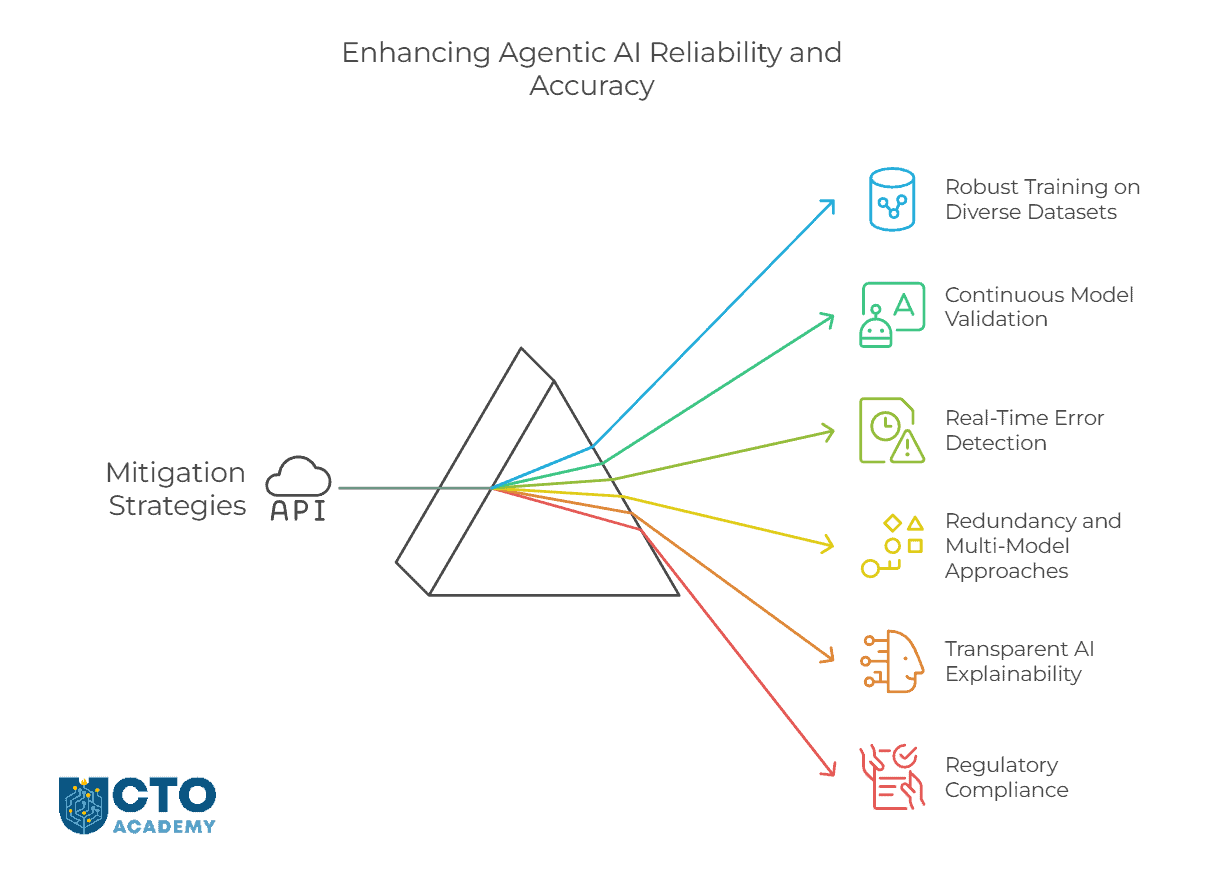
To improve reliability and accuracy, organisations should:
Train AI on high-quality unbiased datasets.
Conduct real-world testing and validation.
Implement real-time error detection and self-correction.
Use redundancy (multi-model AI systems) to cross-verify decisions.
Apply explainability techniques (XAI) to flag uncertain predictions.
Ensure regulatory compliance and third-party auditing.
Require human oversight in critical decision-making.
Conclusion
Agentic AI presents immense opportunities but also introduces critical risks such as:
Loss of control
Ethical dilemmas
Security threats
Lack of transparency
Over-reliance
Accuracy failures.
To mitigate these, technology leaders must prioritise human oversight, robust security measures and explainability while enforcing strict governance frameworks.
AI should be an assistive tool, not an autonomous decision-maker in high-risk domains. In other words, human expertise remains central.
Success in deploying agentic AI hinges on continuous validation, adversarial testing, regulatory alignment and adaptive learning models. Organisations that proactively address these challenges will drive trustworthy, resilient and high-impact AI adoption, positioning themselves as industry leaders in safe and scalable AI innovation.
Start-ups and scale-ups often prioritise quick decisions to maintain their competitive edge, which can lead to shortcuts in data analysis or overreliance on intuition. The impact is often immediate because hasty decisions based on incomplete or improperly analysed data can result in missed opportunities or strategic missteps.
This is particularly true when data is fragmented across silos. Teams simply cannot access or integrate information efficiently. This forces tech leaders to either wait for data consolidation (slowing down the process) or make quick decisions based on incomplete data, sacrificing rigour (accuracy).
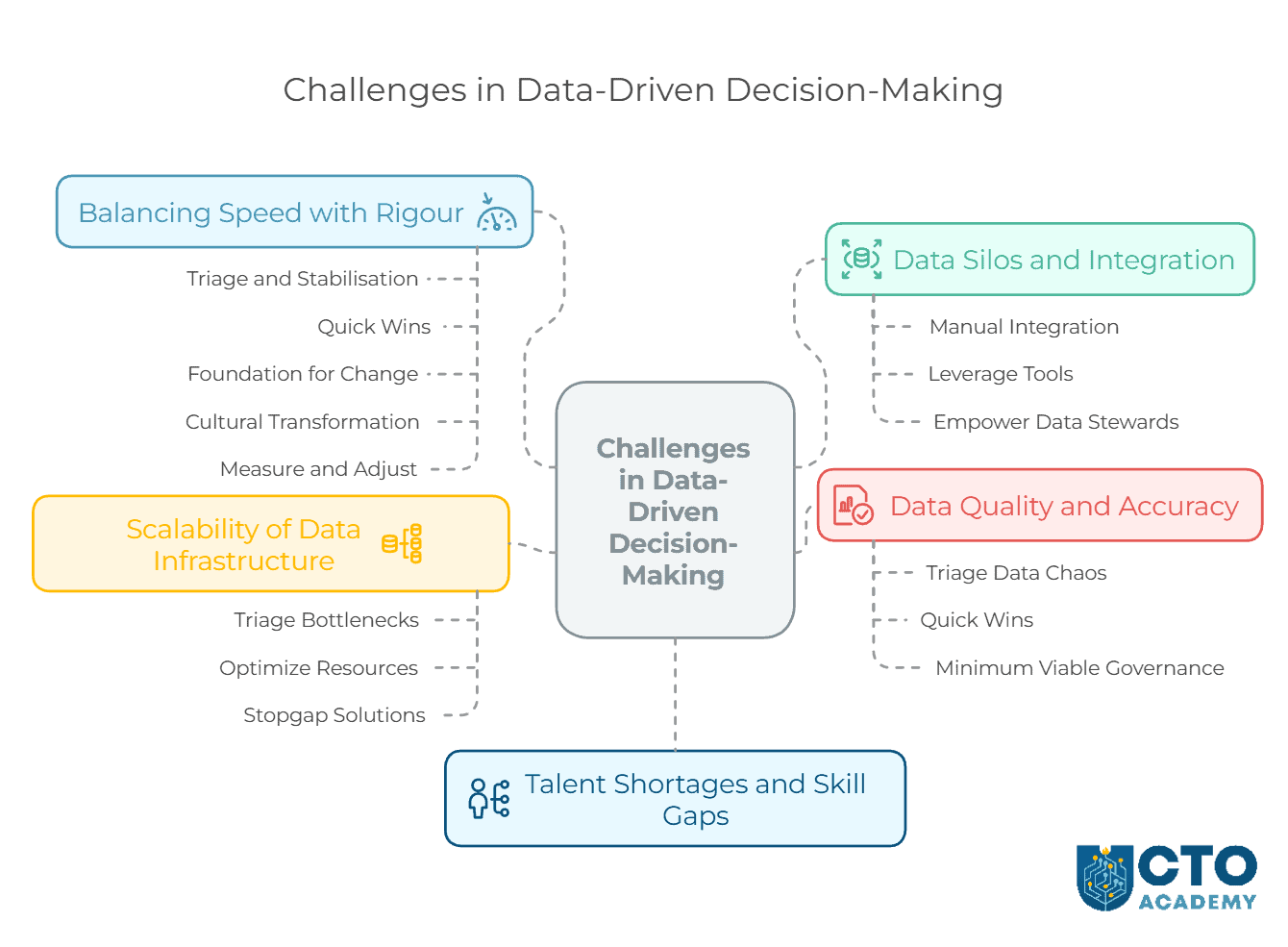
This article will address these two primary challenges and offer actionable solutions while solving the other three capital problems in data-driven decision-making. However, this is not our normal day at work. In this case, things just cannot be worse. We are operating in a high-pressure scenario where the company is on the brink of financial ruin and you, as a technology leader, inherited a chaotic environment with poor data processes. The goal is to quickly induce enough order to enable survival, even if perfection is impossible.
5 Biggest Challenges for Start-up and Scale-up Tech Leaders in Data-Driven Decision-Making
In any given scenario, the challenges are the same:
Data Silos and Integration
Data Quality and Accuracy
Scalability of Data Infrastructure
Talent Shortages and Skill Gaps
Balancing Speed with Rigour
But, in our situation, we can’t use the familiar approach and/or deploy common strategies. We need to step up our game.
1. Data Silos and Integration
Start-ups and scale-ups often adopt multiple tools and platforms quickly, leading to fragmented data spread across various systems (CRM, ERP, marketing tools, etc.). Integrating this data into a cohesive system is complex and resource-intensive. This is especially true if you fail to a) invest in data integration platforms, and/or b) develop a unified data architecture early on.
In all honesty, a tech leader’s hands are often tied either due to budgetary restraints or late arrival. Consequently, disconnected data sources hinder holistic insights and create inefficiencies in decision-making and you can’t exactly “correct” what’s been done wrong right from the start on short notice.
How to solve this problem?
When traditional mitigation strategies are not viable, you can still take alternative, resource-efficient steps. These approaches focus on leveraging existing resources, prioritising immediate needs and adopting creative low-cost solutions.
1.1. Manual Integration with Pragmatic Prioritisation
Identify the most critical data silos that impact decision-making and prioritise integrating those first. Use lightweight manual processes or scripting (eg, Python, Google Sheets) to consolidate data where automation tools are unavailable.
From that point onward, do the following:
Conduct a quick audit to map critical data flows and prioritise based on business impact.
Use basic automation tools like Zapier, Make (formerly Integromat) or built-in export/import features of existing platforms.
Focus on incremental improvements—address key bottlenecks rather than aiming for perfection.
The outcome of these measures should be partial but impactful data integration for essential use cases without significant resource investments.
1.2. Leverage Existing Tools and Free/Open-Source Options
Maximise the utility of existing platforms and adopt free or open-source tools for basic data integration. Your sequence of actions should be like this:
Explore native integrations provided by current software (eg, APIs, built-in connectors).
Encourage teams to utilise data exports, shared dashboards or reports from existing tools.
This should result in cost-effective integration with tools already in your tech stack.
1.3. Empower “Data Stewards” Within Teams
If you are in a larger organisation, identify key individuals within departments who can take ownership of their team’s data. These people should act as intermediaries to share and consolidate information.
Now, to make this process as smooth as possible, take the following steps:
Designate a “data steward” in each team to document, clean and standardise departmental data.
Create simple workflows or templates for data-sharing (eg, shared Excel sheets or cloud folders).
Facilitate regular meetings where data stewards align on metrics and share insights.
What you are looking to achieve with this is not only improved communication but also understanding of data across departments without requiring centralised systems. It is a longer walk around, no doubt, but on the bright side, it will create a data processing singularity in the long run.
1.4. Adopt a “Federated Data Governance” Model
At first glance, this solution seems like it might lead to a pinball effect, with you bouncing from one office to another in a desperate search for that final document. Be that as it may, if you allow teams to maintain control over their own data while introducing light governance structures, it will a) reduce silos, and b) result in shared standards and definitions. However, it won’t happen on its own so to achieve those results, follow this strategy:
Define a small set of core metrics or KPIs that all teams must report consistently.
Provide teams with guidelines for data structure, format and reporting (eg, a standard CSV template).
Finally, use simple collaboration tools (eg, Slack, Notion) for sharing updates and insights.
And there you have it – a fully decentralised yet coordinated approach to data management that minimises silos. Because sometimes, even the government’s bureaucracy turns out efficient.
1.5. Pilot Low-Cost Data Lake
If — and this is a big if — resources allow for at least minimal investment, pilot a low-cost, pay-as-you-go cloud data lake solution. You want a focused, incremental approach to centralisation without incurring large up-front costs.
Gradually migrate the most critical data into the data lake while leaving less critical silos untouched.
Later, during a fast-growth stage, when you get your hands on more resources, this can easily evolve into a full-stack cloud data storage and processing.
1.6. Create a Cross-Functional Data Task Force
As you can assume, this strategy perhaps better fits the onset of the fast-growth stage, but it could also be just what you need in your start-up. This is how it works:
First, you start by forming a small task force with representatives from key teams to collaborate on solving integration challenges (not a full data team).
Then, you task the team with regularly consolidating reports or insights and aligning metrics.
Finally, they share consolidated data via basic tools (eg, Google Drive, Notion, shared dashboards).
It is an agile team effort that minimises dependencies on expensive tools or specialists.
The core philosophy here is: start small, build incrementally.
In other words, when constrained by budget or timing, focus on solving the highest-impact problems first. Admit to yourself that perfect integration may not be possible, but incremental improvements can still provide meaningful value. By being a bit creative and by maximising existing resources, technology leaders can mitigate the impact of silos without requiring substantial investments.
2. Data Quality and Accuracy
Your most immediate challenge is the all too familiar consequence of rapid growth and that’s a lack of consistent data governance. As you know, this inevitably leads to poor data quality (inaccuracies, duplicates or incomplete data).
The impact can turn out devastating because low-quality data undermines the reliability of insights, leading to poor strategic decisions. Imagine a marketing team missing an entire segment of the target audience or misaligning the core message. Sooner than later, all fingers will point at you.
On a normal day, you would mitigate by:
Implementing data validation and cleansing processes.
Establishing data governance frameworks.
Regularly auditing and updating data sets to ensure accuracy.
But remember, this is not your normal day. More often than not, technology leaders inherit a chaotic environment with poor processes and must react instead of being proactive.
Here’s what you can do in such a situation:
2.1. Triage the Data Chaos
Your immediate priority is to identify the most critical areas where poor data quality immediately impacts the company’s survival. Take the following steps:
Conduct a rapid audit of key data pipelines and processes.
Focus on revenue-critical systems (eg, billing, sales forecasting, customer data).
Prioritise data that directly affect regulatory compliance, financial reporting or mission-critical KPIs.
In the end, you will understand where to focus efforts for maximum impact in the shortest time.
2.2. Deliver a Few Quick Wins to Build Credibility
In other words, identify and solve one or two highly visible data issues to demonstrate progress and build trust. Simply fix a problem that has frustrated key stakeholders (eg, cleaning up sales pipeline data or resolving overdue billing errors) and then publicise the success with tangible results (eg, “Resolved 300 duplicate records, improving invoice accuracy by 20%”).
And now you have improved stakeholder confidence and momentum for broader changes.
2.3. Implement a “Minimum Viable Governance”
Quickly enforce lightweight rules to address the most damaging data quality issues without overengineering. This is achieved by:
Defining non-negotiable standards for critical data fields (eg, customer IDs, transaction amounts, dates).
Creating simple validation scripts to flag obvious errors (eg, missing fields, incorrect formats).
Using tools already in place (eg, Excel, SQL, lightweight automation tools like Zapier) for basic cleaning and validation.
If you do everything right, you should end up with an immediate reduction in errors, enabling more reliable decision-making.
2.4. Mobilise a Data “SWAT Team”
This strategy is more appropriate for larger organisations, but it can be scaled down to fit the purpose of a start-up.
In essence, you assemble a cross-functional, small team with representatives from critical departments to act as a task force. To succeed, this is what you should do:
Identify power users or, as some call them, “data champions”, from key teams like finance, operations and marketing.
Assign clear roles: one focuses on cleaning sales data, another on financials, etc.
Empower them to fix data in real-time and escalate issues to you directly.
The outcome is rapid, team-based problem-solving that restores operational functionality.
2.5. Apply a “Spot-Fix and Lock” Strategy
In other words, fix the most critical data issues in high-priority areas and immediately lock processes to prevent further degradation.
Start by identifying high-impact errors (eg, duplicates in customer records, incorrect pricing). Once you identified the set(s), correct these errors manually or via scripts. Finally, implement basic process locks, such as requiring specific fields to be filled before records are saved or restricting edits to validated data.
You end up with stabilised data quality in key areas, reducing downstream chaos.
Once the immediate chaos is controlled, start laying the groundwork for systematic improvements and building a foundation for sustainable data management. For instance, create a roadmap for addressing root causes (eg, better governance, new necessary tools). But whatever you do, don’t forget to document lessons learned from the crisis to guide future processes.
The key principle here is: stabilise, not perfect.
Remember, your goal is to bring enough order to stabilise operations and decision-making, even by using imperfect solutions. Once the immediate crisis is averted, you can gradually transition to proactive long-term strategies.
3. Scalability of Data Infrastructure
Let’s see what we can do with infrastructure bottlenecks caused by over-relying on basic tools that now can’t handle the exponential growth of data as the organisation scales. Instead of smooth operations, we have slow analytics processes, delayed insights and increased costs because systems struggle to keep up.
Again, on a normal day, you would simply:
Adopt cloud-based, scalable data storage and processing solutions.
Use modular systems that can grow with the organisation.
Plan for scalability when designing data architectures.
But that simply isn’t the case. Your predecessors (if any), didn’t quite do the job right and now you have a serious problem – unscalable data in a fast-growing company.
When faced with such an infrastructure in a rapidly growing organisation without the resources to invest in modern solutions, you must focus on triage, optimisation and tactical solutions. The goal is to stabilise the infrastructure to support growth in the short term while preparing for future scalability once resources are available.
3.1. Triage the Infrastructure Bottlenecks
Your priority is identifying the most critical bottlenecks in the current infrastructure that directly impact operations or decision-making. That is, perform a rapid audit of the existing infrastructure to identify pain points (eg, slow query response times, system outages, capacity issues).
Once identified, prioritise fixing the systems that handle mission-critical data (eg, sales, billing, customer support).
This should give you a clearer understanding of where to focus limited resources for maximum impact.
3.2. Optimise Existing Resources
While you are already dealing with bottlenecks, activate the afterburner by squeezing the maximum performance out of the existing infrastructure with targeted optimisations.
For example:
Database Tuning:
Optimise query performance by indexing critical columns, rewriting inefficient queries and archiving old data.
Partition large tables if possible to improve performance.
Storage Management:
Compress data to reduce storage requirements.
Move cold or historical data to cheaper, offline storage (eg, local hard drives or NAS).
Batch Processing:
Shift non-urgent data processing tasks (eg, report generation) to off-peak hours.
If done correctly, you should see immediate performance improvements without requiring new infrastructure.
3.3. Implement Stopgap Solutions
The play here is to introduce temporary fixes to alleviate pressure while preparing for longer-term improvements.
Here’s what you can do to achieve this:
Use local servers or existing hardware more efficiently (eg, repurpose underutilised machines as temporary data nodes).
Set up lightweight, open-source tools for specific needs (eg, Apache Kafka for message queuing, PostgreSQL for database expansion).
Leverage basic automation tools to reduce manual intervention in data handling.
These solutions may appear trivial but keep in mind what we are trying to achieve here and under which circumstances. We ultimately want stabilised infrastructure to support ongoing growth, even if suboptimal.
3.4. Segment and Prioritise Data Loads
Data don’t need to be processed or stored at the same priority level. Therefore, segregate data workloads based on their importance and urgency. For example:
Categorise data into tiers (critical, operational, historical).
Allocate the best resources to the most critical data sets.
Limit real-time processing to essential data and defer non-critical processing.
The cumulative effect is reduced strain on the infrastructure without sacrificing business-critical operations.
3.5. Leverage Community and Open-Source Resources
Sometimes, you don’t have any other choice but to enter the dark ally of open-source tools and use them to address specific pain points in the data infrastructure.
Use open-source tools like MySQL, PostgreSQL or SQLite for additional database capacity and implement lightweight ETL solutions like Apache NiFi or Singer for data integration. Finally, make sure to monitor system health with, for example, Zabbix or Prometheus.
None of us prefer open-source solutions, but they are cost-effective and scalable enhancements. For instance, we are utilising Mautic as our central nervous system and a single source of truth. Our CTO, Jason Noble, spent a lot of sleepless nights getting that open-source beast to life and keeping it updated. However, it was worth it. We don’t spend thousands on monthly subscriptions and we alone own all data. Would it be the same if we had chosen HubSpot, for example, that’s highly questionable.
3.6. Build Manual Processes as Interim Solutions
When automation or scaling proves impractical for any number of reasons, use manual processes to handle critical data workflows.
You simply assign dedicated teams or individuals to manage data flows that the current infrastructure cannot handle (eg, manually consolidating reports or transferring data between systems). Just remember to use templates or scripts to streamline repetitive tasks.
It’s not exactly practical and can cause delays, but these short-term solutions keep the business running without overwhelming the infrastructure.
The key principle here is: survival first, perfection later.
In this critical phase, focus on stabilising the infrastructure and ensuring business continuity. While the current environment may remain suboptimal, these actions will buy you time to secure the resources and strategic alignment necessary for sustainable, long-term growth.
And remember, no matter the situation, begin laying the groundwork for scalable solutions even if resources are tight. Begin consolidating fragmented systems into a single source of truth wherever feasible. Also, document the current infrastructure and create a lightweight plan for migration to a scalable architecture once resources become available. And in that little spare time you get around lunch, try to identify low-cost, incremental investments that could ease scalability bottlenecks.
4. Talent Shortages and Skill Gaps
Start-ups often struggle to attract and retain skilled data professionals due to competition from larger organisations. That lack of expertise can result in underutilised data assets and suboptimal decision-making.
Commonly, a CTO would deploy these three strategies:
Upskilling existing team members in data literacy and analytics.
Partnering with external consultants or leveraging outsourcing for specialised needs.
Cultivating an attractive work culture to retain data talent.
Now imagine the scenario in which none of the proposed mitigation strategies works, at least not in the long run because the small team of only a few simply can’t find additional time to upskill in data literacy and analytics (they are software engineers). Partnering with external consultants or some extensive outsourcing is out of the question and the work atmosphere is so grim that it is impossible to create and cultivate an attractive work culture to retain data talent. But the paycheck on the other hand is so big that you don’t want to quit and search for something else. What can you do?
Here is the list of the most realistic strategies:
Identify the smallest set of tasks that deliver the most significant results and focus only on those.
Empower non-technical staff to handle basic data-related tasks with user-friendly tools.
Accept that the data infrastructure and processes won’t be perfect and focus on “good enough” solutions.
Create opportunities for your team to learn informally and in small increments, without requiring extensive upskilling efforts.
Collaborate with other departments to share responsibilities or gain access to additional skills.
Improve communication about current constraints and challenges to align expectations.
If possible, bring in limited short-term help from freelancers or contractors for specific tasks.
Implement changes that yield long-term benefits without requiring ongoing maintenance.
Even in a grim atmosphere, recognise and reward your team’s efforts to boost morale.
As you can see, the guiding principle here is: stabilise to survive. In other words, if you are in a highly stressful and negative environment with limited resources and a small overburdened team, just focus on stabilising the situation and delivering “good enough” results.
Therefore, prioritise ruthlessly, automate strategically and leverage creatively to ensure the team survives the current challenges while laying the groundwork for future improvements.
5. Balancing Speed with Rigour
As we said early on, start-ups and fast-growing organisations are often forced to make quick decisions to maintain their competitive edge. This leads to shortcuts in data analysis or overreliance on intuition.
Normally, a technology leader would implement these three strategies to balance speed with rigour:
Create streamlined yet robust processes for data validation and analysis.
Foster a balance between agility and thoroughness in decision-making.
Encourage cross-functional collaboration to validate insights before acting.
But what happens when data silos hinder speed and rigour while pressure for speed amplifies silos?
Let’s use case studies to better understand this causal relationship:
Scenario 1: A start-up rushes to launch a new product. Sales and marketing teams use different platforms to track leads and engagement. Decisions about the product’s target audience are made based on siloed data, leading to misaligned messaging and wasted resources.
Scenario 2: A scale-up prioritises speed in reporting but lacks a unified data warehouse. Analysts spend time manually consolidating data, delaying insights and increasing the risk of errors, which undermines rigour.
How to break this vicious cycle?
In ideal circumstances, organisations would employ the following strategies:
Adopt centralised data platforms or warehouses early on to enable seamless access across teams.
Encourage teams to adopt scalable systems even if they take longer to implement initially.
Establish cross-functional practices by facilitating data sharing and strategic alignment between teams.
Only, we are not that lucky. There are no warehouses, teams still work on legacy (read: rigid and fixed-capacity) systems and nobody shares anything. It even seems that teams pursue different strategic goals. That’s the situation we met after accepting the role.
What we need now is a phased, tactical approach that delivers quick wins while laying the groundwork for broader transformation. It is essentially a five-step strategy:
Step 1: Triage and Stabilisation
In this step, our priority is to identify critical interdependencies so we can get some clarity on immediate priorities to stabilise the situation.
To find out, we can conduct a rapid assessment of the most critical pain points. For example:
Which decisions are being delayed or compromised due to silos?
What strategic misalignments are most damaging to the company?
Then, we need to focus on cross-functional bottlenecks where silos directly affect speed and rigour. This requires the creation of a temporary “Data Task Force” or a small agile cross-functional group that will address critical silos by accessing and consolidating data needed for immediate priorities. The good practice here is to assign members from key teams (eg, product, finance, operations) to represent diverse perspectives.
Eventually, all these efforts should create a temporary workaround that will enable collaboration and quick fixes.
Step 2: Quick Wins to Build Momentum
Start by creating a “Minimum Viable Integration” to achieve basic data sharing without major resource investments. That is, use lightweight solutions to connect siloed systems, focus on critical data flows and automate repetitive processes.
Next, establish a “Single Source of Truth” for critical metrics to enable shared visibility into business performance, fostering alignment.
Finally, pilot cross-functional decision reviews for high-stakes decisions to create a foundation for a gradual cultural shift toward collaboration and shared accountability.
Step 3: Establishing a Foundation for Change
To reduce strategic misalignment and increase clarity, teams must unify under the same goal framework. To get there, team leads need to be aligned on well-defined company-wide strategic goals. These goals must then be broken into measurable objectives tied to specific team deliverables.
It’s only now that you can start prioritising tactical investments in scalability by implementing high-impact, low-cost upgrades to legacy systems (eg, replacing outdated software with lightweight cloud-based tools).
You can easily justify these investments by linking them to business outcomes like faster time-to-market or improved customer satisfaction. Just remember to start small to fit within resource constraints.
The outcome is gradual modernisation without overwhelming the organisation.
Step 4: Cultural and Process Transformation
You want to achieve three goals here:
Incentivise data sharing to reduce resistance to collaboration and improve data flow.
Simplify and streamline processes to improve operational efficiency without introducing unnecessary complexity.
Drive a mindset shift (lead by example).
Step 5: Measure and Adjust
What to track and measure?
Well, track key indicators such as decision turnaround times, collaboration frequency and strategic goal alignment. Use these metrics to gauge the effectiveness of your interventions. Just remember to regularly share progress updates with leadership and the broader team.
How to adapt for scaling?
Build on early successes to expand collaboration and data-sharing practices.
Gradually phase out legacy systems, reinvesting savings into more scalable solutions.
Adjust priorities based on the evolving needs of the organisation.
The result is sustained momentum and long-term scalability.
Conclusion
In challenging environments, maintaining data integrity for strategic planning requires a balance between stabilising immediate risks and building a scalable foundation for the future. Quick wins, collaboration and adaptability are essential to breaking the cycle of dysfunction and driving sustained organisational success.
The key takeaways:
Understand and prioritise immediate risks.
Establish quick, practical solutions.
Promote collaboration and alignment.
Balance speed with rigour.
Leverage existing resources creatively.
Drive cultural transformation.
Measure progress and adapt.
Through four weeks and sixteen lectures in Module 8 of our Digital MBA for Technology Leaders, the faculty of senior executives responsible for data management in their organisations, teach this and other subjects in much more detail, using years-long experience. You will learn how to adjust to an array of different circumstances to, ultimately, maintain data integrity even in worst-case scenarios.
Recently, we had Emily Castles, CTO at a scaling start-up, Boundless, joining us for her fourth CTO Shadowing session. She reflected on their journey over the past year and, by doing that, provided an exclusive look into the challenges of a scale-up Chief Technology Officer who has to recover from severe financial cuts and consequent team losses.
Rebuilding the Teams
A year before, the financial cuts at Boundless affected product and tech teams. The product team especially suffered and was reduced to virtually nothing. At that point, of the original eight team members (a full development team with a product manager), only she and one other developer remained.
Having finally recovered from a period of downsizing and uncertainty, Emily focused initially on rebuilding the teams.
Now, the common scenario in start-ups is that employees have to cover areas outside their imminent scope of work. Emily quickly realised that, due to the specific nature of their products, they also needed a dedicated customer support person to offload work from HR and Payroll. With that addition, things finally got moving again.
Measuring Success in a Changing Landscape
As the company scales, the CTO requires more concrete metrics to measure success. In Emily’s case, they’ve implemented a company scorecard to track key performance indicators (KPIs) and gain a clearer picture of the company’s health.
The key metrics they were monitoring at this stage were:
Velocity
Customer engagement
Customer incidents
Of course, it took a while before they got in a position to actually measure success. It is just one of the realities of being a CTO in a scaling start-up. Security, data protection and onboarding new (big) customers were priorities. So at that point, measures of success were qualitative.
However, after implementing a company scorecard, they ended up with 15 metrics, measuring success and accountability weekly with a 13-week testing period.
Her immediate challenge was to define product metrics. One of them was the velocity measure. In Emily’s experience, this was the best place to start even though it’s not the best tool for measuring productivity.
The second one was the service-specific customer engagement metric; in other words, it is custom-made for the type of services Boundless is offering, and it should resolve the issue they had in the past where they didn’t really know if people were using people or products to solve the problem. Its purpose is, therefore, to measure the number of operations happening on a customer level while interacting with the product.
The final metric, this time from a project perspective, was customer incidents.
Besides measuring CSAT and NPS, Emily required insight into operational mistakes (eg, mistakes in payroll, a signed contract that has to be undone and redefined, bugs, etc.). The purpose was to immediately identify glitches in the system and improve the product/service.
You never know whether the thing that you’re about to measure is going to be right until you go and do it. — Emily Castles, Boundless CTO
As a scale-up CTO, you must always acknowledge the challenges of maintaining a culture of honesty and transparency as the company grows and the SLT becomes further removed from day-to-day operations. The emphasis must therefore be on open communication and public feedback channels to ensure visibility into potential issues. In practice, this means that if there’s a security incident (eg, breach) or anything like that, there should never be any kind of admonishment. You don’t want people sweeping problems under the carpet, after all, do you?
Third-Party Integrations and Outsourcing
The immediate goal Emily is trying to achieve is eliminating the need to enter every information twice. Customers are putting a lot of data in their own systems, and then they have to put it into the Boundless systems as well. Granted, the company has various ways to pull data from one system to another but integrating with third-party HRIS systems seems like the best solution. So it has been a priority, but she’s struggled to identify the most critical problem to solve to decide which of the available solutions would be optimal.
Another thing she’s currently evaluating is whether to use a unified API or integrate directly with individual providers. After all, the company plans to grow and a unified API might impose certain limits.
Emily is also considering outsourcing some aspects of the project, but she wants to keep core development work in-house while allowing external developers to work on the edges of the project.
Operational Expenditures and Internal Tooling
While operational expenditures haven’t been a major focus due to the company’s funding stage and relatively low operating costs, as the CTO, she is increasingly looking for ways to streamline internal operations and reduce the need for additional headcount.
As a part of that effort, she’s exploring no-code/low-code platforms like Retool and Microsoft Power Platform to build custom tools for internal teams.
Quarterly Retrospectives and Looking Ahead
Emily found the quarterly retrospectives with colleagues to be a valuable exercise, providing a structured opportunity for reflection and feedback. They also appreciated the external perspective and different language used in these sessions compared to internal meetings.
Looking ahead, she is focused on continuing to scale the company’s operations and product development efforts while maintaining a strong culture of transparency and collaboration. She is also excited to explore new technologies and approaches to streamline internal workflows and improve efficiency.
In the original shadowing session with Emily Castles, we explored the challenges and considerations of a CTO in a scaling start-up. It detailed topics such as:
Rebuilding and managing a development team
Implementing metrics and scorecards to measure success
Integrating with third-party systems and potential outsourcing
Managing operational expenditures and exploring internal tooling solutions
The value of retrospectives and external feedback
As always during these sessions, attendees had the opportunity to ask questions and share knowledge and experience. So if you haven’t already, sign up for CTO Academy Membership to not only draw from the experience of seasoned technology leaders in different industries but to offer your own unique perspective.
Key Takeaways
Building and maintaining a strong team is crucial for success. Emily emphasised hiring and retaining skilled developers and a product manager to drive product development.
Metrics and transparency are essential for effective scaling. As the company grows, implementing clear metrics and maintaining open communication channels become increasingly important for monitoring progress and identifying potential issues.
Exploring new technologies and approaches can streamline operations. In Emily’s case, it involves investigating no-code/low-code platforms and other tools to improve internal workflows and efficiency.
Sometimes, community threads turn themselves into ready-made blog posts. This one, which deals with proven ways to manage a corporate website, definitely deserves a wider audience.
Feel free to comment and ask questions here, but your best option is to join the thread on our Slack #ask-the-community channel.
Back to our thread…
Ken, a Texas-based CTO asked the one question every tech leader is asking these days:
What is the current opinion on the best choice(s)/practice(s) for handling the corporate website?
Ken is looking for solutions for three immediate challenges:
What to implement?
Whom to engage to migrate content?
Whom to engage for small continuous ad-hoc updates?
Context:
“As tech leaders, we all dig in on managing and running our product development”, Ken explains, “But the corporate website generally gets short-shrift and runs off to the side.
Current security posture considerations have pushed me into changing that off-to-the-side mentality, as I have had global bank partners vulnerability scan the corp site, calling out failings, and seeking evidence of data protection (PII and GDPR, for example). This is all critically important (there was an SQL injection opening in the search), but the ease of the business and marketing managing the website content is critical as well.
We are in the middle of a rebranding effort, and it is the perfect time for me to completely change how the website is built, run and managed. Currently, it is a home-built LAMP stack run in AWS EC2 self-hosted, with an outsourced dev team that isn’t performing well for the cost.
The website is fairly straightforward, with blogs, press releases, case studies, search and SF/Pardot tracking for marketing, but not much else (no e-commerce, for instance).
In one of the MBA course lectures on Brand, it was Julian I believe who talked about your user support experience being a part of your brand. I’ve always viewed it as another component in your Product Offerings Portfolio and should be treated that way.
This is a SaaS site that needs to be branded for white-labelled customers, cohesively matching the general branding and tailored to the different needs of different personas who will use it.”
Along with Ken, Brian, Director of Digital Technology in Massachusetts, is also looking at WordPress to replace their current small off-the-shelf CMS for a large (and multiple-site) footprint on a self-hosted stack. More specifically, they are looking at the WP Engine and Kinsta to take hosting off their hands.
Brian and the rest of his team are aware that it will require some work to get multisite up and running and set permissions for individuals/groups to restrict access to certain sections of the site. That is the core of their current CMS. But they also think that it is one of the issues with WordPress.
Additional Questions:
In Ken’s opinion, WordPress has always been a strong choice, especially if you run it on something like WP Engine (he has friends who worked there a long time).
But he’s also wondering if modern low-code platforms like Webflow or Wix are the way to go. If so, should it be cloud-hosted (as intended) or should they take the effort and limitations of self-hosting (which can be done), use Webflow for building it, and then just export and host it on their own? Or is it some completely different way?
“While WordPress and low-code options are super user-friendly and quick to set up, I tend to lean towards Next.js for a few reasons.
Next.js is awesome for SEO, making sure your site gets the visibility it deserves, especially important during a rebrand.
Finding developers is easier and more budget-friendly than you might think.
You get top-notch performance and full control over your site. It’s like having the best of both worlds – flexibility and power under the hood.
Every platform has its perks, but if you’re looking for something that scales well and gives you more customisation, Next.js is definitely worth considering.”
Paul, CTO, Manchester
“Good question, Ken. We too have had the same questions fired over about our corporate site. When we refreshed our site, we used Webflow. However, that was mostly because the CEO wouldn’t commit any budget or resources to it, but that’s a story for another day.
The right solution will ultimately come down to the skill of the resource you have to maintain it.
I’m going to assume that this kind of site stays mostly the same except for news updates and a contact form.
If that’s the case, a static site with a headless CMS is worth a look.
You’ll negate any need for hosting aside from a CDN such as Cloudflare or Netlify. With zero admin panel or dynamic things happening, like in WordPress for example, it’s much less prone to security vulnerabilities (eg, Cloudflare Pages or Gatsby/Docusaurus.
Webflow is a good low-code tool that supports integration with Figma. There are, however, a couple of fundamentals regarding security (not supporting HSTS, for example).”
Tome, Head of Engineering, USA
“I think Webflow is pretty good for static pages and simple CMS needs. You do need someone who knows it well to utilise it; otherwise, it will likely turn into a mess.
I would look at hosted Ghost if you want more of a real CMS. It is a lot slicker than WordPress and has good out-of-the-box SEO support. Ghost is also easy to set up. The framework comes with a GitHub repo. It contains a base setup for creating themes which is, pretty much, straightforward.
WordPress is definitely capable; it just feels so cluttered and ancient to me personally.”
Ravi, CTO, Washington
“For corporate sites that do not change often, I would stick to WordPress.
(I have not used Webflow and others as much).
It’s simple enough and easy to find theme developers or builders for any changes. Contractors and even non-engineers can make a lot of content changes if not all.”
Jayson, Head of Cloud Platforms Transformation, North Carolina
“I have some direct/indirect experience with a few of these in question and here’s my take:
Wix – Great for cookie-cutter websites, easy to configure, has advanced things like a lead magnet, distro list, blogs, etc. On the other hand, it can be pricey depending on needs, and painful when doing custom things.
Webflow – Offers more control over the pages, you can do custom design, but the trade-off is the learning curve and also their responsive interfaces are a little quirky.
WordPress – I’ve only hosted my own. You can go to AWS Lightsail and install one in minutes. It is a pretty straightforward setup (no code unless you need to do something custom). It’s also great for advanced web features like e-commerce. For static pages, however, it may be overkill.
To summarise, if you are looking for a quick migration and don’t need a unique/custom-looking website, then Wix may be worth an eval.”
Byron, CTO, Cape Town
“I use Ghost for my personal site. But it’s not as simple to set up custom things because it’s a post or page only. Therefore, you have to do some creative queries for dynamic content (think blocks or custom post types in WP terms ).
I’m fond of Next.js and use it for a lot of projects. But if you want ease of use, no/low-code, Framer is also a great option. It has a Figma integration. We used it at my previous company for the marketing site.
Wix also has a powerful backend that allows you to write custom JS and run things like APIs etc. But if you don’t mind the effort, using Ghost as a backend (headless CMS) with their API and then putting a Next.js layer on top, it’s pretty powerful. And Next.js standalone builds make it quite lightweight.
For WordPress, I’ve used the Sage theme as a boilerplate/skeleton. It brings Laravel’s blade templating and has better integration with Composer, so you can bypass a lot of the plugin bloat with WP.
A note on the Ghost and Next.js docs. They are a bit dated and the Ghost content API package hasn’t been updated for a while, but the gist is there.”
“I had a chat with our Websites Delivery Manager and a Team Lead, and here are key takeaways from the discussion:
We would select Webflow or WordPress for simple websites if monthly hosting costs and development time are of utmost importance.
If there are other more critical non-functional requirements, we would propose Umbraco CMS. There are several reasons for that:
The corporate websites are mainly based on complex designs that follow current trends and best practices. These require flexibility to adapt to those designs.
Umbraco follows .Net releases (updates after each major release).
Being an open-source CMS, there is a strong community behind it.
It has built-in support for multi-website and multilingual content structures.
Compared to WordPress, it requires more time for site development, but the development team has full control over the code, and it is less plugin-dependent, providing high flexibility.
A built-in headless support allows the decoupling of backend and frontend implementations. In this case, there are no design limitations, allowing developers to follow the best practices, including SEO optimisation.
The back office is user-friendly, and content editors can easily update content. Content editors have full control and flexibility over site content and its structure.
It ticks the boxes of security and performance out of the box and can support thousands of website users.
It can be hosted on-premise, in Umbraco Cloud or any other cloud platform, such as Azure, AWS or GCP. Umbraco Cloud could be a bit pricey with a monthly subscription of 250+ euros, but in this case, we would revert to either on-premise hosting or deployment on a preferred cloud provider.
Of course, there are many other options above those mentioned. Our advice is to assess what are the non-functional requirements for the website (eg, security, performance, scalability, flexibility, extensibility, development time/cost, pricing, user-friendliness for content editors, etc.) and go with a solution that satisfies most of them.”
What does your experience say? What is the best choice and whom to engage for migration and day-to-day maintenance?