Next MBA Cohort Starts Monday, July 6th, 2026

Review Pricing and Join the Cohort

CTO Academy Logo
Log In

Category: What does a CTO do?

  • Chief Technology Officer in the AI Era: Role, Responsibilities, Skills, and Leadership Priorities

    Chief Technology Officer in the AI Era: Role, Responsibilities, Skills, and Leadership Priorities

    A Chief Technology Officer is the senior technology leader responsible for connecting technical capability with business direction.

    In some organizations, the CTO owns product architecture, engineering strategy, platform decisions, and innovation. In others, the role is focused on technology transformation, data, infrastructure, security, or AI adoption. The exact shape depends on the organization’s size, stage, and business model.

    What has changed is the level of visibility.

    The CTO is no longer judged only on technical depth or delivery performance. The role now carries broader responsibility for how technology creates value, manages risk, supports growth, and shapes the organization’s future capability.

    AI has made that responsibility more urgent

    Executive teams are asking where AI can improve productivity, where it can create new products or services, where it introduces risk, and how it should be governed. Those questions require strategic judgment, commercial awareness, leadership confidence, and the ability to explain complex trade-offs clearly.

    This guide explains what a Chief Technology Officer does, how the role compares with CIO, VP of Engineering, and Head of Engineering, how AI is changing CTO responsibilities, and what skills modern technology leaders need to build CTO readiness.

    TL;DR

    • The CTO role now sits closer to business strategy than traditional technical management.
    • A modern CTO connects architecture, engineering capability, product direction, security, data, AI, and commercial priorities.
    • The difference between CTO, CIO, VP of Engineering, and Head of Engineering usually comes down to scope: future direction, internal systems, execution, and team delivery.
    • AI has increased the pressure on CTOs to guide adoption, manage risk, set guardrails, and turn experimentation into useful outcomes.
    • CTO readiness requires strategic judgment, executive communication, commercial awareness, governance, and leadership range.
    • The next step for many current and aspiring CTOs is to identify their capability gaps and build a deliberate development path.

    What is a Chief Technology Officer?

    A Chief Technology Officer, or CTO, is the senior leader responsible for shaping how an organization uses technology to achieve its goals.

    The role sits at the intersection of technology, business strategy, product direction, and organizational capability. As a CTO, you are expected to understand the technical landscape deeply enough to make sound decisions, but the role is not limited to technical expertise. The CTO must also decide which technology investments matter, which risks need attention, and how technical choices affect customers, teams, revenue, resilience, and long-term competitiveness.

    The CTO role varies from one organization to another
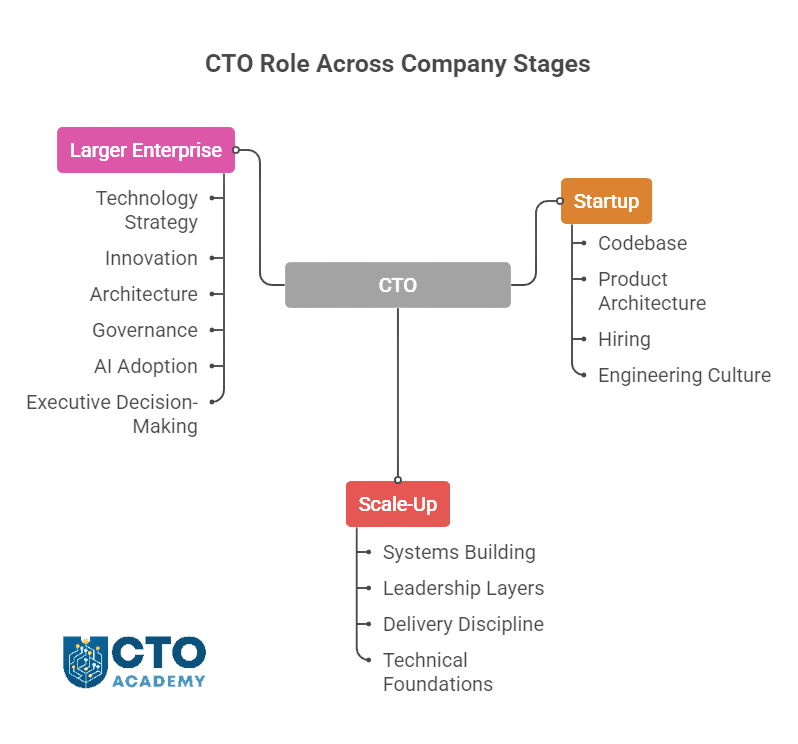
    The Chief Technology Officer role varies from one organization to another - visual presentation of different responsibilities across different growth stages.png
    As the organization matures and expands, so does the scope of the Chief Technology Officer role

    In a startup, the CTO may still be close to the codebase, product architecture, hiring, and early engineering culture.

    In a scale-up, the role often shifts toward building systems, leadership layers, delivery discipline, and technical foundations that can support growth.

    In a larger enterprise, the CTO may focus more on technology strategy, innovation, architecture, governance, AI adoption, and executive-level decision-making.

    Learn more about the differences in the scope of responsibilities depending on the size of the business

    The common thread is accountability for technology direction

    A CTO helps the organization answer questions such as:

    • What technology capabilities do we need to build?
    • Which systems should we modernize, replace, or protect?
    • How should engineering, product, data, security, and operations work together?
    • Where can emerging technologies such as AI create practical value?
    • What technical risks could limit growth or damage trust?
    • How do we turn business priorities into realistic technology decisions?

    In other words, they help technical teams understand business priorities, and executive teams understand the consequences of technology choices.

    In the AI era, CTOs are expected to explain what AI can and cannot do, where it belongs in the organization, how it should be governed, and what capabilities teams need to use it responsibly.

    What Does a CTO Actually Own?

    First and foremost, there has to be clear senior accountability for the technology decisions that shape the org’s future capability.

    A CTO may own any or all of the following areas directly or strongly influence them through collaboration.

    Table 1: CTO ownership

    CTO responsibilityIn practice
    Technology strategyDefining how technology supports business goals, growth priorities, operational needs, and long-term competitiveness.
    Architecture and technical directionMaking decisions about systems, platforms, scalability, interoperability, technical debt, and future flexibility.
    Engineering capabilityBuilding the structures, standards, leadership habits, and technical culture that help teams deliver reliably.
    Product and platform decisionsWorking with product and business leaders to decide what should be built, bought, integrated, improved, or retired.
    AI adoption and integrationIdentifying practical AI use cases, assessing risks, choosing tools, and integrating AI into workflows, products, and systems.
    Data and infrastructure readinessEnsuring the organization has the data foundations, infrastructure, cloud capability, and operational maturity needed to support modern technology priorities.
    Security and resilienceMaking sure systems are reliable, secure, compliant, observable, recoverable, and trusted by customers and stakeholders.
    Vendor and build-versus-buy decisionsDeciding when to build internally, when to buy, when to partner, and how to manage dependency on external platforms or suppliers.
    Executive communicationTranslating technical choices into business consequences so CEOs, boards, investors, and senior teams can make informed decisions.
    Innovation and experimentationEvaluating emerging technologies, deciding where to experiment, and turning useful learning into practical adoption.
    Technology risk and governanceCreating decision-making frameworks for technology investment, AI use, security, compliance, resilience, and operational risk.

    This is how it works in practice

    In smaller organizations, one CTO may cover most of these responsibilities directly. In larger ones, many of them will be shared with CIOs, CISOs, product leaders, data leaders, enterprise architects, and engineering executives.

    The CTO’s value lies in connecting those moving parts into a coherent technology direction.

    CTO vs CIO vs VP of Engineering vs Head of Engineering

    The simplest way to understand the difference is to look at the primary focus of each role.

    The CTO owns future-facing technology direction, the CIO owns internal technology operations, the VP of Engineering owns engineering execution, and the Head of Engineering usually owns day-to-day team delivery.

    Table 2: Primary focus and responsibilities of different roles

    RolePrimary focusTypical responsibilities
    CTOTechnology strategy and future capabilityArchitecture, innovation, AI strategy, technical direction, product-facing technology, and executive advice.
    CIOInternal technology and enterprise systemsIT operations, enterprise software, data systems, compliance, service delivery, and corporate technology services.
    VP of EngineeringEngineering executionDelivery, team structure, engineering processes, quality, hiring, performance, and engineering management.
    Head of EngineeringEngineering leadership and managementTeam performance, sprint delivery, technical standards, people management, and day-to-day delivery discipline.

    By default, the CTO is the role most closely associated with future-facing technology decisions. That can include:

    • Product architecture
    • Platform strategy
    • Emerging technology evaluation
    • AI adoption
    • Technical risk
    • The explanation of technology choices to the board or executive team

    CIO vs CTO

    Recently, the CIO and CTO roles have been coming closer together and sharing a lot of similar responsibilities. But as a rule of thumb, the CIO is typically more focused on the internal technology estate. This may include enterprise systems, workplace technology, IT operations, data platforms, procurement, compliance, and service management.

    In larger enterprises, the CTO and CIO work closely together: the CIO ensures the org runs reliably, while the CTO helps decide how technology should evolve.

    VP of Engineering vs CTO

    The VP of Engineering is usually responsible for turning technical direction into delivery. This role often owns engineering structure, hiring plans, delivery processes, quality standards, team performance, and execution rhythm. A strong VP of Engineering helps ensure the organization can build and ship reliably.

    Head of Engineering vs CTO

    The Head of Engineering role is usually more delivery and team-management focused, although the title varies widely. In smaller companies, the Head of Engineering may be the most senior engineering leader. In larger ones, the role may sit below a VP of Engineering and focus on a specific product area, platform, function, or team group.

    Donning several hats at once

    In early-stage companies, one person may cover several of these responsibilities. A founder CTO might act as CTO, VP of Engineering, architect, hiring lead, and product partner at the same time.

    CTO Academy is a great example of that. Jason Noble, the co-founder and CTO, was even engaged as the COO at one point. The reason was simple: he designed the systems and most of the operations, so to maintain the momentum and stay agile, it was simpler to assume that role also than to train somebody else during those early stages.

    Unlike startups, in larger organizations, the boundaries are usually clearer, though the CTO still needs to collaborate closely with CIO, product, security, data, and commercial leaders.

    For leaders comparing their next development step, this distinction matters. Moving from Head of Engineering or VP of Engineering toward CTO usually requires a shift from delivery leadership into broader strategic judgment, executive communication, commercial awareness, and technology leadership at the organizational level. This is where structured development through specialized CTO Programs can help clarify the path.

    How the CTO Role Has Changed

    In the past, many CTOs were judged mainly on technical oversight: keeping systems running, guiding architecture, supporting delivery, and ensuring engineering teams had the tools and standards they needed. While those responsibilities still matter, they are no longer enough.

    Modern CTOs are expected to connect technology decisions to business outcomes.

    They need to understand how platforms, data, security, AI, engineering capability, and operating models affect growth, resilience, customer experience, and competitive position.

    Table 3: Traditional vs modern CTO role

    Traditional CTO emphasisModern CTO emphasis
    Systems and infrastructurePlatforms, data, AI, security, and scalability.
    Technical deliveryBusiness-aligned technology strategy.
    Tool selectionOperating model and capability building.
    Architecture decisionsDecisions about speed, resilience, cost, integration, and future flexibility.
    Engineering supervisionCross-functional executive leadership.
    Innovation experimentsMeasurable transformation and adoption.
    Technical reportingBoard-level risk and opportunity communication.
    Generic digital transformationAI-enabled change linked to practical business outcomes.

    This shift has changed how CTOs spend their time

    The role is less about being the final technical authority on every decision and more about creating the conditions for better decisions across the organization.

    A modern CTO:

    1. Helps teams move quickly without creating uncontrolled risk.
    2. Supports innovation without encouraging disconnected experiments.
    3. Modernizes systems without breaking operational reliability.
    4. Explains technical trade-offs in language that boards, CEOs, investors, and commercial leaders can act on.

    AI has radically accelerated this change. It has made technology leadership more visible because AI decisions affect product strategy, data quality, security, customer trust, workforce capability, and business performance. That’s why the CTO is increasingly expected to help separate useful adoption from noise and turn emerging technology into governed, measurable progress.

    For many existing and aspiring technology leaders, this is the point where the next stage of development becomes less about adding more technical depth and more about building executive range: strategy, communication, commercial judgment, organizational design, and leadership under uncertainty.

    Why AI Has Made the CTO Role More Visible

    AI has pushed technology leadership closer to the center of business strategy.

    Boards and executive teams are pushing for AI adoption. Their questions rarely have purely technical answers, but they do require technical judgment. That is why the CTO has become more visible.

    AI is not just a tooling decision. It affects data, workflows, security, governance, teams, customer experience, productivity, and business models. A poorly chosen AI tool can create risk without creating value. A promising AI use case can fail because the data is not ready, the workflow is unclear, or the organization has not decided who is accountable. A useful pilot can remain stuck as an experiment if it is never integrated into core systems or measured against business outcomes.

    The CTO’s role is to help move beyond AI enthusiasm and into practical adoption

    That means asking:

    • Where can AI create measurable value for customers, teams, or operations?
    • Which use cases are worth testing now, and which should wait?
    • What data, infrastructure, security, and integration work is needed first?
    • Which AI tools should be bought, built, customized, or avoided?
    • What guardrails are needed around privacy, compliance, accuracy, bias, and human oversight?
    • How should teams be trained to use AI responsibly?
    • How will success be measured beyond novelty or short-term productivity gains?

    This is where the CTO becomes a translator between ambition and execution.

    The CEO may want speed. The board may want assurance. Product teams may want experimentation. Engineering teams may worry about complexity, reliability, and technical debt. Legal, security, and compliance teams may see new forms of exposure. The CTO needs to connect those perspectives into a clear path forward. They help to decide where AI should be embedded, where it should be controlled, and, more importantly, where it should not be used at all.

    This is also why AI leadership has become a development priority for technology leaders. Technical fluency matters, but it is not enough. CTOs need the executive range to assess risk, prioritize investment, influence stakeholders, govern adoption, and explain trade-offs in business terms.

    It is a practical guide for integrating AI into core systems without compromising security, control, or leadership accountability.

    What Skills Should the Modern CTO Possess

    While technical judgment remains essential, it now sits inside a wider leadership skill set. This is one of the biggest shifts for senior technology leaders because many reach the point where technical knowledge is no longer the main constraint. The harder challenge is deciding what matters, influencing people who do not think like engineers, and making technology choices that support the business without creating avoidable risk.

    Table 4: Modern CTO skill stack

    Skill areaPurpose
    Technical judgmentUnderstanding trade-offs, architecture, scalability, reliability, technical debt, and technical risk.
    Systems thinkingKnowing how platforms, teams, workflows, data, security, vendors, and customer experience affect one another.
    Strategic thinkingTechnology choices need to support business priorities, not just technical preferences.
    Product and customer awarenessUnderstanding how technology decisions affect users, customers, product direction, and market position.
    AI fluencyUnderstanding AI capabilities, limitations, risks, integration demands, and realistic use cases.
    Commercial awarenessInvestment decisions need to connect to value, cost, growth, efficiency, and competitive advantage.
    Security and risk awarenessRecognizing where technology creates operational, reputational, compliance, or customer trust risks.
    CommunicationExplaining technical complexity to non-technical stakeholders without oversimplifying the consequences.
    Executive influenceShaping decisions with CEOs, boards, investors, product leaders, finance teams, and commercial stakeholders.
    Team leadershipBuilding confidence, alignment, standards, and capability across engineering and technology teams.
    Change leadershipLeading transformation across systems, teams, behaviors, workflows, and operating models.
    Strategic prioritizationDeciding what to pursue, what to delay, what to stop, and what risks the organization is willing to accept.
    GovernanceAI, security, data, architecture, vendor, and platform decisions need clear accountability and decision-making discipline.

    The balance of these skills changes as the role becomes more senior. Earlier in a technology career, credibility often comes from technical depth and delivery. At the CTO level, credibility comes from judgment: knowing which technical issues matter most, how they affect the business, and how to bring people with different priorities into a shared decision.

    AI has made that skill stack more demanding

    CTOs now need enough technical fluency to challenge hype, enough commercial understanding to prioritize valuable use cases, enough governance discipline to manage risk, and enough leadership range to help teams change how they work.

    For aspiring CTOs, this can be a useful way to assess readiness. The question is not simply “Am I technical enough?” It is also “Can I influence strategy, communicate trade-offs, lead through uncertainty, and connect technology decisions to business value?”

    The best way to assess where you are right now is to benchmark your skill set against those who were in your shoes until most recently.

    Use it to identify your strengths, gaps, and development priorities as a current or aspiring technology leader.

    AI Leadership Responsibilities for Chief Technology Officers

    CTO must decide where AI fits, how it should be used, what risks need to be controlled, and how adoption will create measurable value.

    That responsibility usually falls across five connected areas: strategy, integration, governance, risk, and adoption.

    AI Strategy

    The CTO should help define how AI supports the organization’s business goals.

    This means moving beyond general enthusiasm and identifying where AI can improve products, customer experience, operational efficiency, decision-making, engineering productivity, or internal workflows.

    The CTO does not need to own every business case, but they should help test whether proposed AI initiatives are technically realistic, commercially useful, and aligned with the priorities.

    Useful questions include:

    • Which AI use cases are most likely to create measurable value?
    • Which opportunities depend on better data, systems, or process maturity?
    • Which experiments are worth running now?
    • Which ideas are interesting, but not yet ready for investment?
    • How will AI priorities connect to product, operations, customer, and revenue goals?

    Without this strategic filter, AI activity can become scattered. Teams may experiment in different directions, vendors may shape the agenda, and the organization may confuse visible activity with real progress.

    AI Integration

    The CTO is responsible for making sure AI can work inside the orgs’ existing technology environment.

    AI tools rarely create value in isolation. They need to connect with data, workflows, platforms, APIs, security controls, customer journeys, and operational processes. A promising AI use case can easily fail if it cannot access reliable data, fit into existing systems, or support the way teams actually work.

    The CTO needs to consider the following factors:

    • Where AI should sit in the architecture
    • How models and tools will connect to existing systems
    • What data is required, and whether it is trustworthy
    • How outputs will be checked, monitored, or reviewed
    • How AI-enabled workflows will affect teams and customers
    • What technical debt or infrastructure constraints need to be addressed

    This is where AI moves from experiment to implementation. The CTO’s job is to avoid isolated pilots and build the technical foundations needed for repeatable adoption.

    For a detailed context, go to Tech Leaders Guide to AI Integration

    Learn how to reconcile innovation, infrastructure, and security.

    AI Governance

    AI decisions need clear accountability.

    The CTO must establish how AI use cases are approved, reviewed, monitored, and controlled. This is done by ensuring that the organization knows who is responsible for decisions that affect data, security, customer experience, employees, compliance, and brand trust.

    Good AI governance should, therefore, make the following points very clear:

    • Who can approve AI tools and use cases
    • What data can and cannot be used
    • When human review is required
    • How AI outputs should be tested
    • How vendors are assessed
    • How risks are escalated
    • How performance and unintended consequences are monitored

    Governance is especially important as AI adoption spreads across departments. Without clear guardrails, different teams may adopt tools independently, expose sensitive data, duplicate costs, or create inconsistent customer and employee experiences.

    AI Risk

    AI creates new forms of technology and business risk. The CTO ensures that the organization understands those risks without unnecessary lag in useful progress.

    Key areas include security, privacy, compliance, bias, reliability, explainability, intellectual property, vendor dependency, and operational resilience.

    Some risks are purely technical. Others, on the other hand, are organizational. However, many sit between technology, legal, security, HR, product, and customer-facing teams.

    The CTO should answer questions such as:

    • What happens if an AI system produces inaccurate or misleading output?
    • What data is being shared, stored, or used for model training?
    • Which AI decisions need human oversight?
    • How do we prevent sensitive information from being exposed?
    • What happens if a vendor changes pricing, access, performance, or terms?
    • How do we test AI systems before they affect customers or critical processes?

    The goal is not to block AI adoption but to make adoption safe, clear, and controlled enough to be trusted.

    AI Adoption

    AI leadership also requires preparing people to work differently.

    The CTO has a mandate to help teams understand how AI should be used, where it can support their work, and where judgment still matters. This includes engineering teams, product teams, operations, customer support, data teams, and senior leadership.

    Adoption depends on far more than just tool access. Teams need guidance, examples, training, workflows, and confidence, especially non-tech teams. They also need to understand the limits of AI, including when outputs need to be checked and when automation is inappropriate.

    The CTO should help create the conditions for responsible adoption by:

    • Supporting practical training
    • Encouraging useful experimentation
    • Sharing/controlling approved tools and patterns
    • Defining acceptable use
    • Building feedback loops
    • Measuring impact
    • Helping managers adapt workflows
    • Reinforcing where human judgment remains essential

    Effective CTOs treat AI adoption as an organizational capability, not a one-off project.

    Learn how to redesign your organization for human-AI collaboration.

    A playbook for turning AI ambition into secure, governed, and commercially useful implementation and moving from assistants to autonomous workflows.

    Common Types of CTO Roles

    There is no single version of the CTO role. The title can mean different things depending on the orgs’ size, stage, sector, product model, and leadership structure.

    This is why two CTOs can have the same title but very different working weeks, as we often hear during weekly expert sessions and inside the Community discussions. One may be close to product architecture and engineering delivery. Another may spend most of their time with the board, regulators, enterprise customers, or transformation teams. Another may focus almost entirely on AI, data, platforms, and operating model change.

    The most useful way to understand the variation is to look at the type of CTO role the organization needs.

    Table 5: Types of CTOs w/ typical focus

    CTO typeTypical focus
    Startup CTOBuilding the first technical foundation, product architecture, and engineering team.
    Scale-up CTOCreating systems, processes, leadership capacity, and technical foundations that can support growth.
    Enterprise CTOAligning complex technology estates with business strategy, governance, security, and long-term transformation. May also be a Group CTO, managing several verticals.
    Product-led CTO (CPTO)Connecting product direction, customer needs, architecture, engineering delivery, and technical differentiation.
    Platform or infrastructure CTOOwning infrastructure, platforms, reliability, scalability, cloud strategy, and developer productivity.
    Transformation CTOLeading modernization, cloud migration, data strategy, AI adoption, or operating model change.
    Fractional CTOProviding senior technology leadership on a fraction of a project/scope for a fraction of the time.
    AI-focused CTOLeading AI strategy, integration, governance, platform choices, and organizational capability building.

    These types are by no means fixed categories. In practice, CTO roles often combine several of them. A scale-up CTO may also be product-led. An enterprise CTO may also be responsible for transformation. A fractional CTO may be brought in specifically to support AI adoption, architecture decisions, or technical due diligence.

    If you are interested in learning more about different types of CTO contracts, go here.

    The important point is context

    A strong CTO in one environment may not be the right fit for another. The skills needed to build a technical team from scratch are not identical to the skills needed to modernize a legacy enterprise estate, govern AI adoption, or advise a board on technology risk.

    For aspiring CTOs, this distinction is useful because it helps clarify the type of role you are preparing for. For organizations, it helps define what kind of technology leadership is actually needed. A hiring brief that simply says “CTO” is rarely enough. The better question is: what technology challenge does this CTO need to lead?

    Leaders comparing different development routes can use resources such as IT Career Path Mapping, CTO Programs Reviews, or explore the Fractional CTO route to think more clearly about which capabilities they need to strengthen next.

    First 90 Days as a CTO

    The first 90 days are not just about proving technical authority. They are about understanding the organization, building trust, identifying constraints, and deciding where technology leadership can create the most immediate value.

    A new CTO needs to learn before they prescribe. That means getting close to the business context, not just the technology estate:

    • What is the organization trying to achieve?
    • Where is growth being blocked?
    • Which systems are fragile?
    • Where are teams moving too slowly?
    • What risks are already visible?
    • What expectations does the CEO, board, or executive team have for the role?

    In the first 90 days, a CTO should, therefore, focus on:

    • Understanding the business model, strategic priorities, and commercial pressures
    • Assessing people, systems, architecture, delivery performance, and technology risk
    • Building relationships with executive peers, product leaders, engineering teams, data, security, finance, and operations
    • Identifying technical debt, delivery constraints, capability gaps, and organizational bottlenecks
    • Clarifying expectations with the CEO, board, founder, or executive sponsor
    • Finding early credibility-building wins without rushing into cosmetic change
    • Creating a realistic technology leadership agenda for the next stage

    The biggest mistake is to arrive with a fixed answer before understanding the context.

    A CTO who moves too quickly can damage trust, misread the organization, or solve the wrong problem. A CTO who moves too slowly can lose momentum and allow existing risks to deepen.

    The goal is to build enough understanding to make better decisions

    By the end of the first 90 days, the CTO should be able to explain where technology is supporting the business, where it is constraining progress, which risks require attention, and what priorities should shape the next phase of leadership.

    How to Build CTO Readiness

    Technical problems often have boundaries. Executive leadership problems rarely do. A CTO may need to make decisions with incomplete information, balance competing priorities, defend investment choices, manage risk, and explain why the best technical answer is not always the best organizational answer.

    Table 6: The list of connected capabilities that assess CTO readiness

    Readiness areaPractical impact
    Strategic thinkingUnderstanding how technology choices support growth, resilience, customer value, and competitive position.
    Business and finance understandingReading commercial context, investment trade-offs, budgets, margins, cost structures, and value creation.
    AI and technology fluencyKnowing where emerging technologies can create value, where they introduce risk, and what foundations are needed for adoption.
    Executive communicationExplaining technical trade-offs clearly to CEOs, boards, investors, and non-technical stakeholders.
    Decision-making under uncertaintyMaking informed choices when the data is incomplete, the risks are uneven, and the answer is not obvious.
    Stakeholder managementBuilding trust across product, engineering, data, security, finance, operations, commercial teams, and executive leadership.
    Team leadershipCreating the standards, structures, culture, and leadership capacity that help teams perform.
    Governance and riskEstablishing clear decision-making around architecture, AI, security, data, vendors, compliance, and operational resilience.
    Personal leadership maturityDeveloping self-awareness, resilience, confidence, and the ability to lead through pressure and ambiguity.

    The CTO has to move between levels: deep enough to understand consequences, broad enough to guide direction.

    For aspiring CTOs, the development path often starts by identifying which gaps matter most. Some leaders need stronger commercial confidence. Some need more experience influencing senior stakeholders. Others need to improve strategic prioritization, AI governance, or organizational leadership. The answer often depends on the role they want, the organization they serve, and the risks they are expected to manage.

    This is where structured development helps because the CTO role is not learned through technical experience alone. It requires exposure to strategy, finance, leadership, innovation, communication, and decision-making in complex environments.

    Identify your strengths, gaps, and development priorities before deciding your next step.

    The CTO role changes with context. A new CTO, an aspiring CTO, an engineering leader preparing for executive responsibility, and an experienced technology leader responding to AI will not all need the same next step.

    Use these resources to continue from the area most relevant to your current challenge.

    Table 7: The list of relevant resources for CTOs

    ResourceWho it is forNext step
    First 90 Days as CTOFor new CTOs who need to establish credibility, assess the organization, and set clear leadership priorities.Read the guide
    AI Integration PlaybookFor technology leaders responsible for turning AI ambition into practical, secure, and governed implementation.Read the playbook
    CTO Skills AssessmentFor aspiring and current CTOs who want to identify strengths, gaps, and development priorities.Assess your readiness
    Digital MBA for Technology LeadersFor technology leaders who want structured development across strategy, leadership, business, and AI-era decision-making.Explore the program
    CTO Programs ReviewsFor leaders comparing CTO courses, technology leadership programs, and executive education options.Compare CTO programs

    Frequently Asked Questions (FAQ)

    What does CTO stand for?

    CTO stands for Chief Technology Officer. It is a senior leadership role responsible for technology direction, technical capability, and the connection between technology decisions and business goals.

    What does a Chief Technology Officer do?

    A Chief Technology Officer leads technology strategy and helps align technical decisions with business priorities. Depending on the organization, a CTO may be responsible for architecture, engineering capability, product technology, AI adoption, innovation, security, governance, vendor decisions, and executive communication.

    Is a CTO higher than a VP of Engineering?

    Usually, yes. A CTO is typically more strategic and executive-facing, while a VP of Engineering is usually more focused on engineering execution, delivery, team performance, process, and quality.
    In smaller companies, however, the distinction can be less formal. One person may cover both roles, or the VP of Engineering may operate with responsibilities that look similar to a CTO role.

    What is the difference between a CTO and a CIO?

    A CTO usually focuses on technology strategy, product technology, innovation, architecture, future capability, and emerging technologies such as AI.
    A CIO usually focuses on internal technology systems, enterprise applications, IT operations, data infrastructure, compliance, service delivery, and corporate technology services.
    The two roles often work closely together, especially in larger organizations where technology strategy and internal systems need to be aligned.

    What skills does a CTO need?

    A CTO needs technical judgment, strategic thinking, business awareness, communication, leadership, AI fluency, security awareness, and the ability to manage trade-offs.
    As the role becomes more senior, the CTO also needs stronger executive influence, commercial understanding, governance discipline, team leadership, and decision-making under uncertainty.

    How has AI changed the CTO role?

    AI has made the CTO role more visible because organizations need senior technology leadership to assess use cases, manage risk, integrate tools, govern data, and explain AI’s business impact.
    AI is not only a technical issue. It affects workflows, products, customer experience, security, privacy, compliance, workforce capability, and operating models. The CTO helps the organization decide where AI can create value and how it should be adopted responsibly.

    How do you become a CTO?

    Most CTOs build experience across engineering, architecture, product, leadership, strategy, and executive communication.
    The path often starts with technical credibility, then expands into team leadership, delivery ownership, stakeholder management, business understanding, and strategic decision-making. Structured leadership development can help technical leaders prepare for the broader responsibilities of the role.

    Key Takeaways

    The CTO role is no longer defined by technical seniority alone, but by the quality of judgment a leader brings to business-critical technology decisions.

    AI has raised the stakes because technology choices now affect more than systems and delivery. They shape how organizations compete, manage risk, build capability, and earn trust.

    So, for current and aspiring CTOs, the real question is not simply whether they understand the technology. It is whether they can turn technical understanding into strategy, influence, governance, and measurable business value.

    That shift rarely happens by accident. Even if it does, the gaps it creates are too large to overcome. The optimal path requires deliberate development across leadership, commercial thinking, communication, AI readiness, and executive decision-making.

    The practical next step is to identify which capability gap is limiting your progress now: commercial confidence, AI governance, executive communication, strategic prioritization, or leadership range.

  • Tech Leaders’ Role in Disinformation Security: Technologies That Discern Trust and Prevent Fraud

    Tech Leaders’ Role in Disinformation Security: Technologies That Discern Trust and Prevent Fraud

    In early 2024, Arup Group Limited, a British multinational professional services firm headquartered in London, lost $25 million due to a deepfake video call in which fraudsters presented synthetic impersonations of the company’s CFO and other employees. The attackers used deepfake technology to fabricate convincing likenesses and voices of the executives, effectively misleading a company’s Hong Kong-based financial worker to execute 15 consecutive transactions.  

    Now, in larger organisations, it’s usually a CISO that directly oversees disinformation security, but if the organisation does not have the technical capabilities to counter threats, it’s in vain.

    In start-ups and fast-growth companies, especially those dealing with digital platforms, media, cybersecurity or public communications, the entire weight of cybersecurity often falls on the back of a Chief Technology Officer or Head of IT. Preventing AI-generated deepfakes, misinformation attacks on brands (executed by the closest competitors), supply chain frauds, fabricated invoices, social engineering and every other form of illicit manipulation is the direct responsibility of a technology leader.

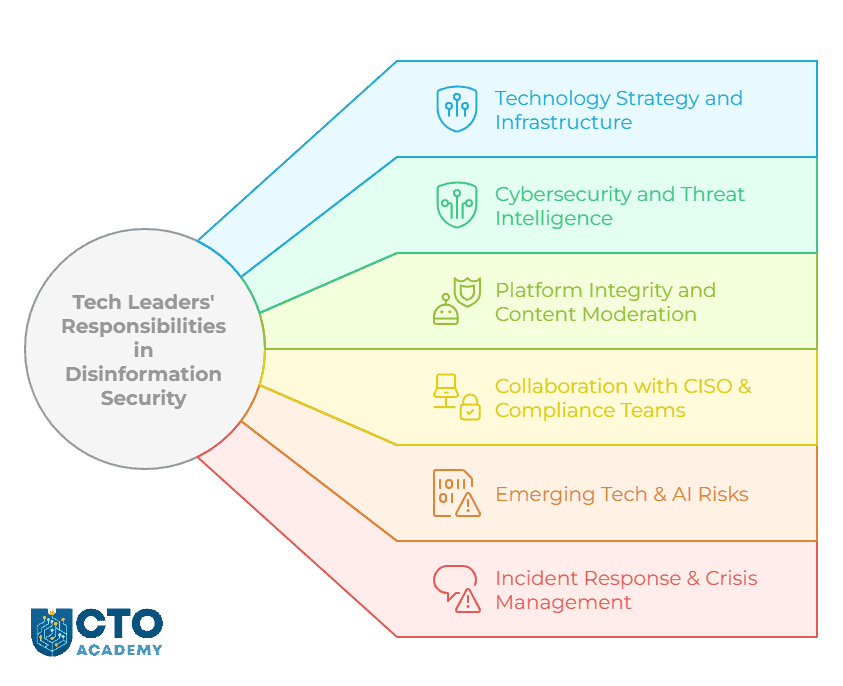
    Technology Leaders’ Responsibilities in Disinformation Security

    Tech Leaders Responsibilities in Disinformation Security - visual presentation of core responsibilities - mind map
    • Technology Strategy and Infrastructure
      • Overseeing the development and implementation of technological solutions that can detect and mitigate disinformation (eg, AI-driven content moderation, automated fact-checking and bot-detection algorithms).
    • Platform Integrity and Content Moderation
      • Developing policies and tools to identify and remove disinformation. 
      • Working with data scientists and AI teams to refine algorithms that flag misleading content.
    • Cybersecurity and Threat Intelligence
      • Collaborating with security teams to implement defences against disinformation campaigns.
    • Incident Response and Crisis Management
      • Working with PR, security and legal teams to implement rapid response strategies in case of a major disinformation attack.
    • Collaboration with CISO and Compliance Teams
      • Ensuring that technological frameworks align with regulatory requirements on disinformation, such as the EU’s Digital Services Act (DSA) or the US AI Act.
    • Emerging Tech and AI Risks
      • Evaluating and implementing defences against AI-driven misinformation campaigns (eg, tools for detecting manipulated content and watermarking authentic media).

    The Tech Stack for Disinformation Defense

    AI-Powered Detection and Content Verification

    Tools for Content Verification

    Google Fact Check Explorer

    • Search tool for investigating the validity of statements by entering keywords or phrases.
    • Uses indexed fact checks (by reputable websites).
    • Offers an in-depth approach to analysing topics (and images).
    • Allows users to see the context and timeline of an image.

    Parafact

    • Real-time accuracy assessments for both human and AI-generated content.
    • Enables copy/paste of text to receive fact-checking results within seconds.
    • Provides AI-powered citations and reliable sources.
    • Offers a developer-friendly API.

    Originality.AI

    • A suite of tools, including AI detection, plagiarism checking and fact-checking.
    • Provides real-time automated fact-checking.
    • Mostly used for detecting AI-generated content.
    • Shows the sources it uses.
    • >70% accuracy in fact-checking.
    • >90% accuracy in spam scoring.

    ClaimBuster

    • An automated web-based fact-checking tool that uses NLP and supervised learning.
    • Monitors live streams, websites and social media to catch factual claims, detect matches with a curated repository of fact-checks and deliver the matches instantly to viewers.
    • Able to scan large amounts of text and identify statements that require fact-checking.
    • Ranks claims by checkworthiness and suggests highly ranked new claims to fact-checkers.

    Methods and Architectures for Detecting Deepfake Images and Videos

    CNN Architectures

    • eg, EfficientNet.
    • Foundation for many deepfake detection systems.
    • Has high accuracy with fewer parameters.
    • Optimal for real-time applications.

    MesoNet

    • A CNN-based model that focuses on the mesoscopic features of images.
    • Has an average detection rate of 98% (when trained on fake videos from the internet).

    Convolutional LSTM

    • Combines a convolutional layer for extraction and an LSTM layer for sequence analysis.
    • Has 97% accuracy by analysing temporal inconsistencies between frames.

    Real-time Deepfake Detection

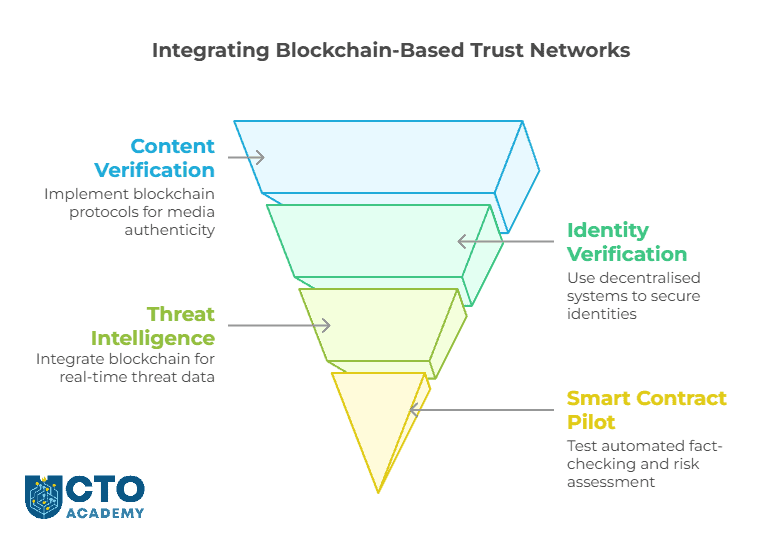
    Blockchain and Distributed Trust Networks

    The premise here is simple: instead of detecting fake content after it spreads, verify authenticity at the source. 

    Since blockchain is decentralised and immutable, it enables:

    How CTOs Can Integrate Blockchain-Based Trust Networks - visual presentation of steps

    Digital Watermarking and Media Provenance Solutions

    In February 2021, Microsoft, Adobe, BBC, Intel and Truepic introduced C2PA (Coalition for Content Provenance and Authenticity). Its purpose was to address the spread of disinformation and online content fraud by developing technical standards for certifying the source and history of media content. 

    C2PA essentially creates tamper-proof digital signatures for media files, allowing anyone to verify:

    • Who created it
    • When it was created
    • If it has been modified

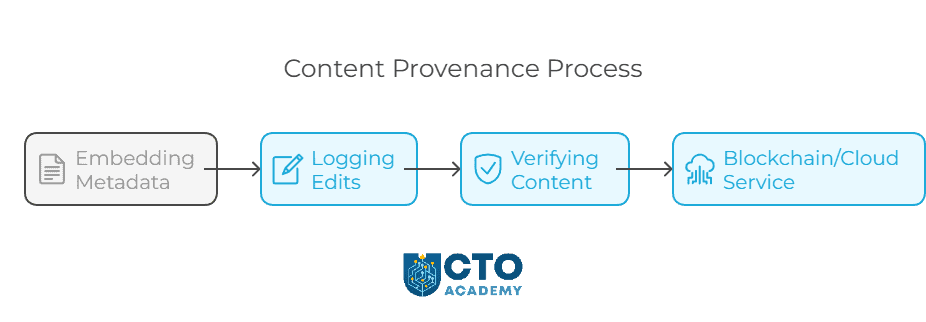
    For a creator, it is a 3-step process:

    1. Embedding metadata at creation
    2. Logging edits and changes
    3. Verifying content on a blockchain or cloud-based service
    Content provenance process - visual presentation of necessary steps

    Arguably, the most important use case of C2PA and similar frameworks is protecting intellectual property, such as proprietary code. 

    Real-Time Threat Intelligence and Behavioural Analysis

    Darktrace Antigena Email

    Darktrace uses NLP and behavioural AI to analyse email metadata, content and sender patterns and protect against phishing, spear phishing and CEO fraud.

    It seems easy to forge such an email; however, if an email mimics an executive’s writing style but originates from an unusual location or IP address, the AI immediately quarantines or flags it.

    AI models learn normal communication patterns (who employees talk to, writing style, response time). So when an email deviates from expected behaviour, such as a CEO “urgently” requesting a wire transfer, AI flags it as suspicious. 

    Had Arup’s overseeing technology manager implemented such a solution, it would have likely raised an early warning by flagging the communication. This would have made it less likely for an already sceptical employee to fall victim to the scam. 

    Vectra AI

    Go to your dashboard and check active users. How do you know that a logged-in user is really an employee and not a threat actor? Even with MFA in place, you still cannot be absolutely sure who exactly walks through your databases, can you?

    This is where Vectra AI comes in handy. 

    Vectra AI is an anomaly detection system designed to spot suspicious login attempts or abnormal data access in real-time, preventing compromised credentials from being exploited in fraud schemes.

    It monitors employee behaviour across networks, endpoints and cloud apps and learns. So if an employee suddenly logs in from an unknown device, downloads unusual files or attempts unauthorised access, AI triggers an alert. 

    Pindrop’s AI-Powered Voice Security

    This is another tool that could have prevented Arup’s scam. It analyses vocal patterns, tone and biometric markers to detect synthetic voices.

    In 2019, a UK-based energy company was targeted by a deepfake audio scam, where attackers impersonated the parent company’s CEO’s voice over the phone and requested an urgent wire transfer of €220,000. According to Rüdiger Kirsch of Euler Hermes Group SA, the firm’s insurance company, “The CEO not only recognised the subtle German accent in his boss’s voice but also claimed it carried the man’s “melody”. 

    The Critical Flaw in Security of Multinational Organisations

    The reason we used these two cases is because they point to the critical flaw in the security of multinational companies that has been heavily exploited. 

    The Cross-Race Effect (CRE), also known as Own-Race Bias, is a well-documented cognitive bias where people are better at recognising the faces of their own racial or ethnic group but struggle with those of other groups. This could explain why the Arup employee (a Chinese national) failed to detect AI-generated Western faces—he/she may have lacked familiarity with subtle facial differences in Caucasian faces.

    For voice recognition, the equivalent concept is difficulty in detecting small accent variations in unfamiliar languages. The UK-based energy company’s executive (an Englishman) failed to detect an AI-generated German accent, likely due to a perceptual phenomenon where non-native listeners perceive foreign accents as “blurry” versions of their own language. In other words, people tend to “map” unfamiliar sounds onto their closest native equivalents, making it harder to detect subtle accent discrepancies.

    AI-driven tools, rigorously trained on large datasets, do not succumb to either of these phenomena, making them our best defence against these types of deepfake frauds. 

    But what to do if you are dealing with an insider or someone who has access to your systems?

    Insider Threat Detection

    In 2023, two Tesla employees leaked over 100GB of confidential data containing customer complaints, production flaws and HR records. They exported data from internal systems and shared it with journalists.

    This is another case where tools such as Darktrace, Microsoft Purview Insider Risk Management, Forcepoint Insider Threat and Splunk UEBA could have prevented the leak if they had been implemented. They are far superior at spotting unusual data modifications, access or movements, as well as identifying suspicious communication patterns and behavioural biometrics.

    For example, AI can track who accesses which files and systems. So if a marketing employee suddenly downloads thousands of confidential R&D files, AI detects it as a risk. In the same fashion, AI detects how employees type, click and navigate systems. Therefore, if an account behaves differently (eg, unusual typing speed, access locations), it may indicate a compromised insider. 

    Let’s say that one of our finance employees suddenly changes supplier payment details to either coerce money or fabricate an invoice. Since AI learned the normal behaviour of employees (eg, who accesses what, when and how), any action that would unexpectedly modify financial data, legal documents or code repositories, would raise an alert.

    Automated Response Actions to Contain Insider Threats

    However, real-time detection isn’t enough. You must automate response actions to contain insider threats before damage occurs. For example:

    • Auto-block employees from transferring files to personal emails.
    • Lock accounts if AI detects login attempts from an unusual location.
    • Alert security teams when sensitive data is accessed abnormally.

    The tools frequently used for response automation in these types of threats are Microsoft Sentinel and CrowdStrike Falcon. Sentinel can revoke a user’s access while the incident is investigated. Falcon, on the other hand, can identify potentially compromised devices and trigger automated containment processes either through the console or API call.

    Note that Microsoft Sentinel should be integrated with Microsoft Purview Insider Risk Management for the most optimal protection. 

    3 Important Considerations

    1. Watch for scalability issues since AI models require vast training datasets.
    2. There is an increased risk of over-moderation and censorship when managing false positives and ethical dilemmas.
    3. Balance cost vs. ROI.

    Conclusion

    Trust as a vital asset must be reinforced through continuous monitoring and rapid response because, in the digital age, trust is not a given—it’s engineered.

    That’s why the tech leader’s role evolves and enters the realm of defining organisational trust strategies. They are now directly responsible for building tech-driven infrastructures that prevent risks and enhance the detection of fraudulent behaviours. 

    No pressure, but keep in mind that employees and customers are more likely to have confidence in the company when they know a comprehensive tech-driven trust strategy is actively in place to protect them. 

    So here is a simple action plan to fulfil your role in disinformation security:

    1. Assess organisational vulnerabilities to disinformation
    2. Build a relevant security framework
    3. Invest in AI-powered detection tools
    4. Implement behavioural analytics
    5. Educate employees on risks

    The final step is critical because, without proper personal cybersecurity hygiene, your efforts will never be truly effective—AI or no AI. Think about how often you’ve seen someone leave a device unattended or unknowingly expose sensitive information by accessing systems in public. That’s a clear example of a lack of cybersecurity awareness. Are your employees any different?

  • Cybersecurity Threat Intelligence Sources and Tools for Chief Technology Officers

    Cybersecurity Threat Intelligence Sources and Tools for Chief Technology Officers

    In June this year, the BlackSuit group deployed a ransomware attack against CDK Global, a leading provider of software solutions to some 10,000 car dealerships. The initial attack encrypted critical data and disrupted CDK’s service, effectively crippling the entire network. 

    While CDK was recovering, BS launched the second attack, further escalating the disruption. The compound effect forced the company to shut down the systems, blocking vital access to over 10,000 dealerships. They could not access sales, financing, parts ordering and customer management systems. 

    The breach achieved two primary goals: encrypt data and exfiltrate sensitive data. Attackers obtained names, addresses, phone numbers, and potentially even Social Security numbers and financial data.

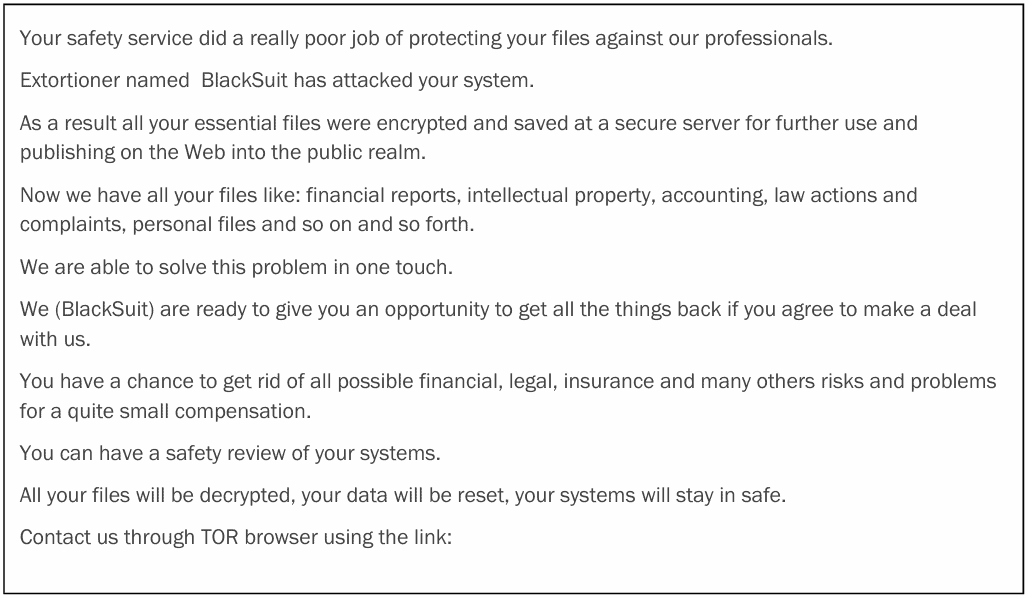
    Here’s the ransom note that arrived at CDK Global:

    The BlackSuit ransome note sent to CDK Global during the ransomware attack
    The BlackSuit ransom note that was sent to CDK Global during the attack (click to enlarge/download)

    The effectiveness of the attack and hopelessness of the situation is evidenced by the fact that only two days later, CDK Global paid $25 million in Bitcoin, the second-largest ransom paid to date.

    This incident highlights the supply chain vulnerability; especially when it relies on third-party providers. A single attack can have a cascading effect. Furthermore, it underscores the seriousness of ransomware attacks. They cripple operations and inevitably lead to serious financial losses.

    Responsibilities of a Chief Technology Officer in Cybersecurity

    As a Chief Technology Officer, it can be your responsibility to ensure robust cybersecurity measures that, by default, include:

    1. Zero-Trust Policy w/ Multifactor Authentication
    2. Incident Response Plan
    3. Data Backups and Redundancy Systems
    4. Network Comparmalisation
    5. Employee Training (ie, establishing a security-conscious culture)

    Your organisation requires a layered security strategy and approach to protect against multiple attack vectors. An IRP, data backups and recovery are just one part of that effort. The cybersecurity strategy must also include third-party risk management. And monitoring the evolution of the threat landscape is the only way to achieve both goals. 

    To get a detailed overview of the CTO’s role and responsibilities regarding cybersecurity, refer to this guide.

    Understanding the Threat Landscape

    If you are familiar with the mechanism of multi-vector attacks and the utilisation of Gen AI in cyberattacks, you can skip to the list of reliable intelligence sources. If not, read on because understanding the threat landscape and attack mechanisms is the prerequisite for an effective defence strategy. 

    We will use the CDK Global attack as an example because the BlackSuit group utilised various techniques and tools to achieve their goals. 

    BlackSuit ransomware is the evolution of the ransomware previously identified as Royal ransomware, which was used from approximately September 2022 through June 2023. Royal was best known for the attack against the City of Dallas’ systems in May 2023.

    The CDK attack used partial encryption, allowing the threat actor to choose a percentage of data to encrypt. This method lowers the encryption percentage for larger files, effectively helping to evade detection. But that was just one side of the attack. BlackSuit also engaged in double extortion, threatening to reveal stolen data if CDK refused to pay the ransom. 

    The million-dollar question in these types of security breaches is always the same: how did the threat actor gain access to the network? 

    Gaining the Initial Access

    In the case of BS, they commonly gain access via phishing emails. Victims unwittingly install the delivery system. Another technique they use is RDP (Remote Desktop Protocol) compromise. In some instances, BlackSuit actors exploited vulnerabilities in public-facing applications or leveraged initial access brokers to gain initial access and source traffic by harvesting VPN credentials from dealer logs. In this case, however, a likely scenario is that the threat actor gained access via a compromised dealer network

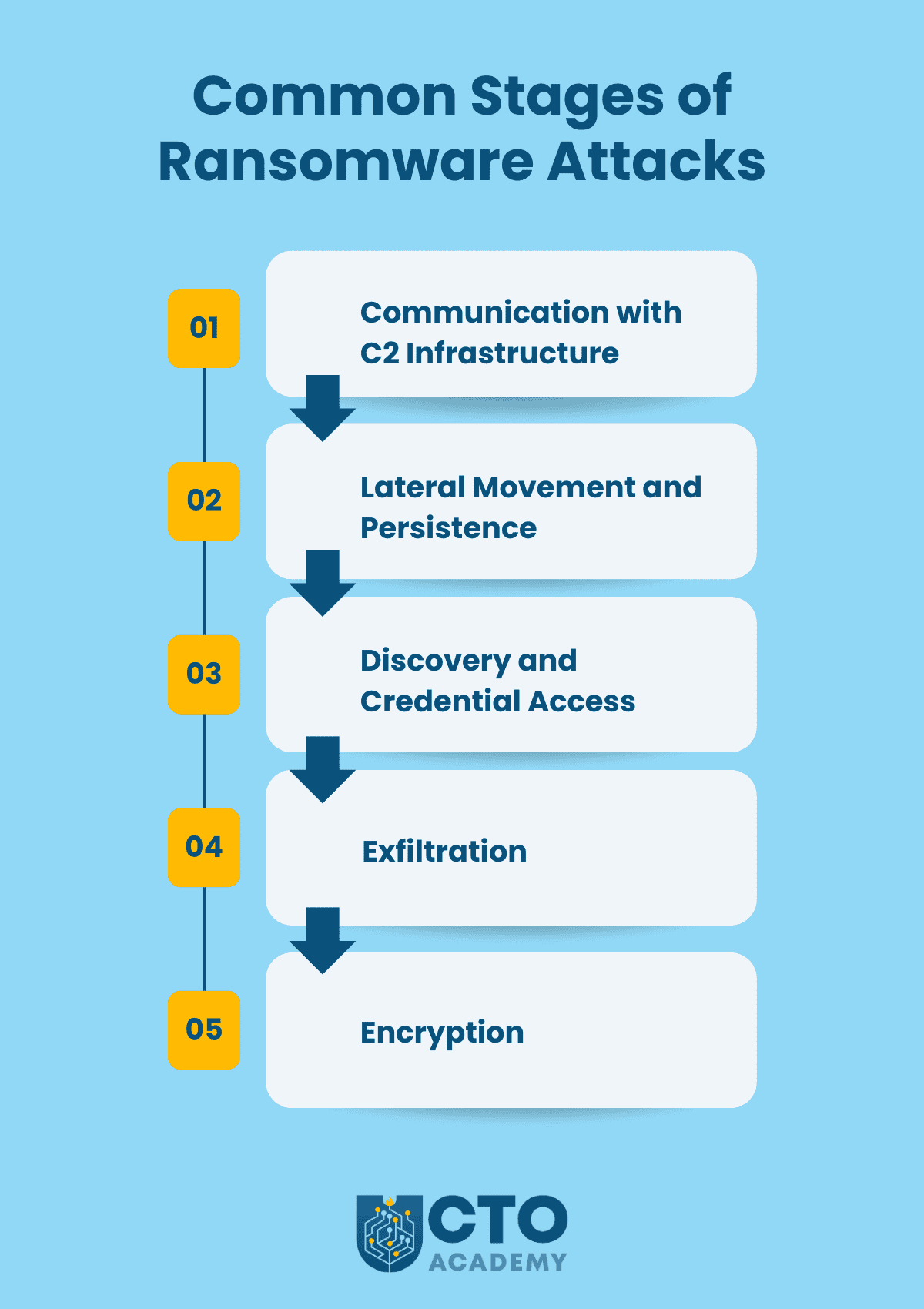
    Once they gained access, the attack unfolded in several stages:

    Common stages of ransomware attack - infographic presentation
    (click to enlarge/download)
    1. Communication with C2 infrastructure (Command & Control) to download multiple tools using legitimate software (eg, Chisel, SSH client, OpenSSH, PuTTY, MobaXterm…).
    2. Lateral movement and persistence by using legitimate OS diagnostic tools (eg, RDPs and RMMs such as PsExec) and then utilising Gootloader and SystemBC to load additional tools and maintain persistence.
    3. Discovery and credential access using SharpShares and SoftPerfect NetWorx to enumerate victim networks and then Mimikatz and Nirsoft to steal credentials.
    4. Exfiltration (CobaltStrike for penetration and then Ursnif/Gozi, RClone and/or Brute Ratel for aggregation and exfiltration). 
    5. Encryption. Before encrypting files, they check if the Windows Restart Manager is using or blocking the file. If not, they execute the Windows Volume Shadow Copy service (vssadmin.exe) to delete shadow copies and inhibit system recovery.

    Common Indicators of Compromise

    • Numerous batch (.bat) files on infected systems in directories:
      • C:\Temp\ 
      • C:\Users\<user>\AppData\Roaming\ 
      • C:\Users\<users>\ 
      • C:\ProgramData\ 
      • Root C:\ directory
    • C:\Users\Public\conhost.exe client 149.28.73.161:443 R:149.28.73.161:43657:socks (traffic tunnelling technique using Chisel)
    • royal_w (encryption extension)
    • InstallerV20.8.msi
    • Windows_encryptor.exe…

    (For the complete list of IOC, check this CISA document.)

    Evolving Threat with the Help of Gen AI

    There are several ways threat actors utilise Gen AI in cyberattacks:

    • Enhanced malware development (polymorphic, targeted and evasive binaries).
    • Automated social engineering (sophisticated phishing, deepfakes/impersonation, manipulative chatbots…).
    • Accelerated vulnerability detection (ie, automated scanning and predicting exploits).
    • Circumventing security measures (CAPTCHA bypass, evading biometric authentication by generating synthetic data…).
    • Amplifying ongoing/existing attacks (scaling through automation, increasing complexity…).

    Mitigation Strategies

    • AI-powered defence (eg, leveraging GenAI for defensive purposes, such as threat detection and analysis)
    • Enhanced security awareness (educating users on how to identify AI-powered attacks)
    • Collaboration (between security researchers, industry professionals and policymakers)
    • Constant education and monitoring

    List of Reliable Cybersecurity Threat Intelligence Sources & Tools

    Threat Intelligence Gathering

    Security Advisories

    CISA – Cybersecurity and Infrastructure Security Agency; timely and actionable information about specific cybersecurity threats and vulnerabilities (ie, “alerts” about immediate dangers)

    NIST – National Institute of Standards and Technology; guidance, standards, and best practices for cybersecurity (ie, the “rulebook” for building secure systems)

    MITRE – MITRE ATT&CK (Adversarial Tactics, Techniques and Common Knowledge) + Common Vulnerabilities and Exposures (CVE) database; adversary tactics and techniques based on real-world observations

    ENISA – European Union Agency for Cybersecurity; advisories, reports, and best practices for cybersecurity in the European Union

    NCSC – National Cyber Security Centre – UK; guidance, advisories and support for organisations in the UK

    CERT/CC – Computer Emergency Response Team/Coordination Center; vulnerability information and incident response support

    OWASP – Open Web Application Security Project; web application security and resources like the OWASP Top 10 vulnerabilities and cheat sheets

    CSA – Cloud Security Alliance; guidance and best practices for cloud security, including the Cloud Controls Matrix (CCM)

    SHADOW SERVER FOUNDATION – a non-profit organisation that gathers and analyses internet threat data, providing reports and advisories

    Researchers and Blogs

    krebsonsecurity.com – Cybercrime, data breaches and online fraud

    schneier.com – A wide range of security topics with insightful analysis

    troyhunt.com – Data breaches and online security

    threatpost.com – Up-to-date news and analysis on cybersecurity threats, vulnerabilities and malware

    Secureworks Threat Analysis – In-depth threat research, analysis and reports on emerging threats

    unit42.paloaltonetworks.com – Threats, vulnerabilities and attack techniques analyses

    googleprojectzero.blogspot.com – Finding and reporting zero-day vulnerabilities

    thedfirreport.com – Incident response reports and analysis of real-world cyberattacks

    sans.org – Cybersecurity training and research, with blogs and resources on security topics

    talosintelligence.com – Cisco’s threat intelligence organisation

    Trellix – Threat detection and response, threat reports

    Sekoia.io blog – Research reports and threat intelligence

    Sentinel One blog – Security-related guides and threat intelligence

    Bleeping Computer – Cybersecurity news, latest hacks, malware threats

    Groups and Forums

    Reddit’s r/cybersecurity – A subreddit for technical professionals to discuss cybersecurity news, research, threats, etc.

    Wilders Security Forums – Malware analysis, security news and technical discussions

    TechRepublic Security Forum – Active discussions on cybersecurity topics, including recent attacks and threats

    Malware Labs Forums – Malware-related discussions, with sections on threat analysis and security news

    Slack groups:

    • CyberSec Professionals
    • OWASP Slack
    • SANS Blue Team Slack

    Discord groups:

    LinkedIn groups:

    Other similar online communities:

    Vulnerability Management

    Vulnerability Scanning Tools

    Nessus by Tenable – Scans a wide range of assets, including operating systems, network devices, web applications and databases. Known for its excellent scanning speed, user-friendly interface and high accuracy.

    QualysGuard by Qualys – A cloud-based vulnerability management solution that offers continuous scanning, vulnerability detection and prioritisation. Provides a centralised platform for managing vulnerabilities across your entire IT environment, including on-prem, cloud and mobile devices.

    OpenVAS – An open-source vulnerability scanner that offers a comprehensive and regularly updated vulnerability database. Known for comprehensive vulnerability coverage, active community support and flexible deployment options.

    Penetration Testing Tools

    Metasploit Framework – A comprehensive penetration testing framework that provides exploits, payloads and auxiliary modules. It allows you to simulate attacks, identify vulnerabilities and gain access to systems. Open-source and commercial versions are available.

    Burp Suite – A web application security testing tool for analysing and exploiting web vulnerabilities. It includes tools for intercepting and modifying HTTP requests, scanning for vulnerabilities and performing manual testing.

    Nmap – A network scanning tool for discovering hosts, services and network vulnerabilities. It can perform various scans, including ping sweeps, port scans and OS fingerprinting.

    Cobalt Strike – Often used by threat actors, its primary purpose is to simulate tactics, techniques and procedures (TTPs) of real-world attackers. CS establishes a C2 infrastructure, allowing pentesters to remotely control compromised systems. It provides a wide range of post-exploitation tools, enabling lateral movement within a network, escalating privileges, stealing data and deploying additional malware.

    Bug Bounty Program Examples

    HackerOne – One of the largest and most reputable bug bounty platforms, connecting businesses with a network of security researchers. They host programs for a wide range of companies, including major tech giants like Google, Microsoft and Intel, as well as government agencies and financial institutions.

    Bugcrowd – Like HackerOne, this platform offers comprehensive vulnerability management, providing tools to triage, prioritise and remediate security threats.

    Synack – Takes a more exclusive approach, vetting and onboarding security researchers through a rigorous process. The focus is on high-value targets and critical infrastructure.

    YesWeHack – A European bug bounty platform with a growing global presence. Offers programs for a variety of organisations, with a focus on European companies and government agencies.

    How Does It Work?

    Bug bounty programs on specialised platforms incentivise ethical hackers to find and report vulnerabilities in your systems. You define the scope and rules and set reward levels. Researchers find vulnerabilities, report them to you and get paid bounties for valid findings. This helps you proactively improve your security posture by leveraging a much wider talent pool and paying only for results.

    Threat Monitoring and Analysis

    SIEM Tools

    Splunk Enterprise Security – A leader in the SIEM space, known for its powerful data analytics and visualisation capabilities. Comes with advanced security monitoring, threat intelligence and incident response features. It’s highly scalable and can handle massive amounts of data.

    IBM QRadar SIEM – Uses advanced correlation and analytics to identify complex attacks and provides automation capabilities to streamline incident response. It’s available as both an on-premises and cloud-based solution.

    LogRhythm SIEM – Known for its comprehensive security analytics and user-friendly interface. Provides a wide range of features for threat detection, investigation and response, including real-time monitoring, anomaly detection and user behaviour analytics.

    Rapid7 InsightIDR – A cloud-native SIEM solution for endpoint detection and response (EDR). It combines log management, user behaviour analytics and endpoint telemetry to provide a comprehensive view of security events. Well-suited for detecting insider threats and advanced persistent threats.

    Threat Intelligence Platforms

    Recorded Future – Extensive threat intelligence collected from open, closed and technical sources, including the dark web. The platform excels in predicting future threats and providing context for security events.

    CrowdStrike Falcon X – Combines threat intelligence with endpoint detection and response (EDR) capabilities. It provides real-time threat analysis, adversary profiling and automated threat hunting.

    Anomali ThreatStream – A cloud-based platform for collecting, analysing and sharing threat intelligence. It allows you to integrate threat data from various sources, automate threat analysis and collaborate with other organisations.

    Mandiant Threat Intelligence – Now part of the Google Cloud, Mandiant provides curated threat intel using human and artificial intelligence. Intel is compiled by 500+ threat analysts who respond to cyber-attacks and open-source threat intel (OSINT).

    Network Traffic Analysis Tools

    SolarWinds Network Performance Monitor (NPM) – A network monitoring and management tool that provides deep visibility into network traffic, performance and availability. It offers real-time monitoring, alerts and detailed reports to help you identify and troubleshoot network issues.

    ManageEngine OpManager – Provides real-time visibility into network traffic, performance and device health. It offers features like bandwidth monitoring, network mapping and application performance monitoring.

    PRTG Network Monitor – A versatile network monitoring tool that offers a wide range of sensors for monitoring various aspects of your network, including bandwidth usage, network devices and applications. It provides real-time monitoring, alerts and customisable dashboards.

    Wireshark – A powerful open-source network protocol analyser for capturing and analysing network traffic in detail. It provides deep packet inspection capabilities and a wide range of filters and analysis tools.

    Considerations

    The weakest links in every cybersecurity chain are:

    1. Users
    2. Unpatched/outdated systems

    It’s not uncommon for former employees to access shared networks with year-old credentials even though systems got updated in the meantime.

    It comes down to proper digital hygiene in cybersecurity as Bryan Seely, a cybersecurity expert and ethical hacker, said in one of the live sessions hosted by CTO Academy. These are those small seemingly invisible doors hackers use to gain initial access and deliver payloads.

    What’s worse, social engineering is becoming an approach of choice for threat actors because it’s easier to trick a human than a network system.

    Add remote and hybrid working environments and you have a recipe for disaster because users are accessing networks through home routers. How many of them do you think changed the default login credentials on their modems and routers? All you have to do is come near enough to catch the signal, punch in defaults and you are in control of the user’s home network. A quick vulnerability scan and the door to the company’s network is wide open. A simple keylogger in a critical device will suffice if there’s no multifactor authentication.

    So start by enforcing a zero-trust policy and strong multifactor authentication (avoid SMS-based 2FA). If possible, make it mandatory to use a secure VPN when accessing sensitive data or connecting to critical parts of the company’s network. Ensure also that your network is properly compartmentalised (check the latest BT attack to see the advantages). And by all means, establish regular employee education in social engineering and phishing scams. Keep them updated but more importantly, highly engaged.

    Make no mistake; even these baby steps can prevent a serious breach. But these are war games after all so arm yourself with the necessary intel and tools.

  • Ethical Hacking and Cybersecurity – Expert’s Perspective

    Ethical Hacking and Cybersecurity – Expert’s Perspective

    This article is based on a CTO Shadowing session with Bryan Seely, an ethical hacker and cybersecurity expert. Bryan is a former marine who, by his own admission, wiretapped the US Secret Service and FBI. Later, he worked with John McAfee and Mark Cuban and founded the Black Hat Conference in Riyadh in 2021. 

    Importance of Personal Hygiene in Cybersecurity

    According to Bryan, there is a measurable and quantifiable number of ransomware strains that check for the Russian language as a second or a first language on your keyboard. So if you have a Russian language set as a first or second language, they won’t infect your machine. 

    Installing Wireshark should have the same effect because they’ll think you’re a honeypot because hackers don’t want you to figure out how they are doing things. 

    This just goes to show how important it is for technology leaders to closely follow cybersecurity news and updates. 

    Tips for Technology Leaders and SysAdmins

    Password length must be over 14 characters.

    Encourage security fundamentals, but don’t force it. Instead, do it incrementally because people tend to resist the sudden change. As a rule of thumb, never change more than 10% of the framework in a single attempt and people will think they are part of the solution and the team that is planning everything. This approach will also prevent overload on the team implementing migration. 

    When evaluating a new technology, make sure it does not contain too many CVEs right off the bat. For example, a biometric fingerprint scanner without supervision. 

    Stay informed about the latest threats and security news (during the session, Bryan suggested Krebs on Security blog).

    Biometrics work, but 2FA must be mandatory. Almost every single big breach was enabled by negligence (eg, leaving credentials to a VPN open for anyone to see them).

    Shut down access immediately upon exit or predefined (read: relatively short) idle time. You can easily find yourself in a situation where you don’t have the slightest idea about an entry point which will leave attack vectors open simply because someone forgot to shut something down or close the ticket. 

    Never use built-in password managers.

    Don’t trust an app’s permissions requests; in most instances, your consent is irrelevant and the app will pass the information anyway. 

    To avoid single points of failure, introduce compartmentalisation. Earlier this month, the ransomware group, Black Basta, claimed that it obtained sensitive data upon a successful breach into the BT Group’s infrastructure. However, thanks to the compartmentalisation, affected systems were quickly isolated and wider damage was prevented.

    Always know what is on your network.

    When training employees, always use live training instead of videos. 

    Cybersecurity Challenges in Quantum Computing

    According to Bryan, there is a great chance of someone breaking encryption under anyone’s radar. In other words, no one will be aware of the exploit. 

    Many who are counting on the advanced analytical and detection capabilities of an AI should realise that they don’t actually have the AI but merely a bunch of what-if statements nested in 19,000 lines of code. — Bryan Seely

    Conclusion

    Cybersecurity is not just about technology, but also about vigilance and informed practices. Proactive steps and continuous learning are your best defence in the ever-evolving cybersecurity landscape.

    If you want to learn more about the CTO’s role in cybersecurity, read this guide.

  • CTO’s Role in Cybersecurity: Complete Guide

    CTO’s Role in Cybersecurity: Complete Guide

    This guide provides a comprehensive overview of the responsibilities of a CTO in ensuring their organisation’s cybersecurity. It covers the following topics:

    • Specific duties and tasks regarding cybersecurity (eg, developing security strategies, implementing security measures, managing security teams, etc).
    • How does the CTO collaborate with other roles such as the CISO (Chief Information Security Officer) or CIO (Chief Information Officer)?
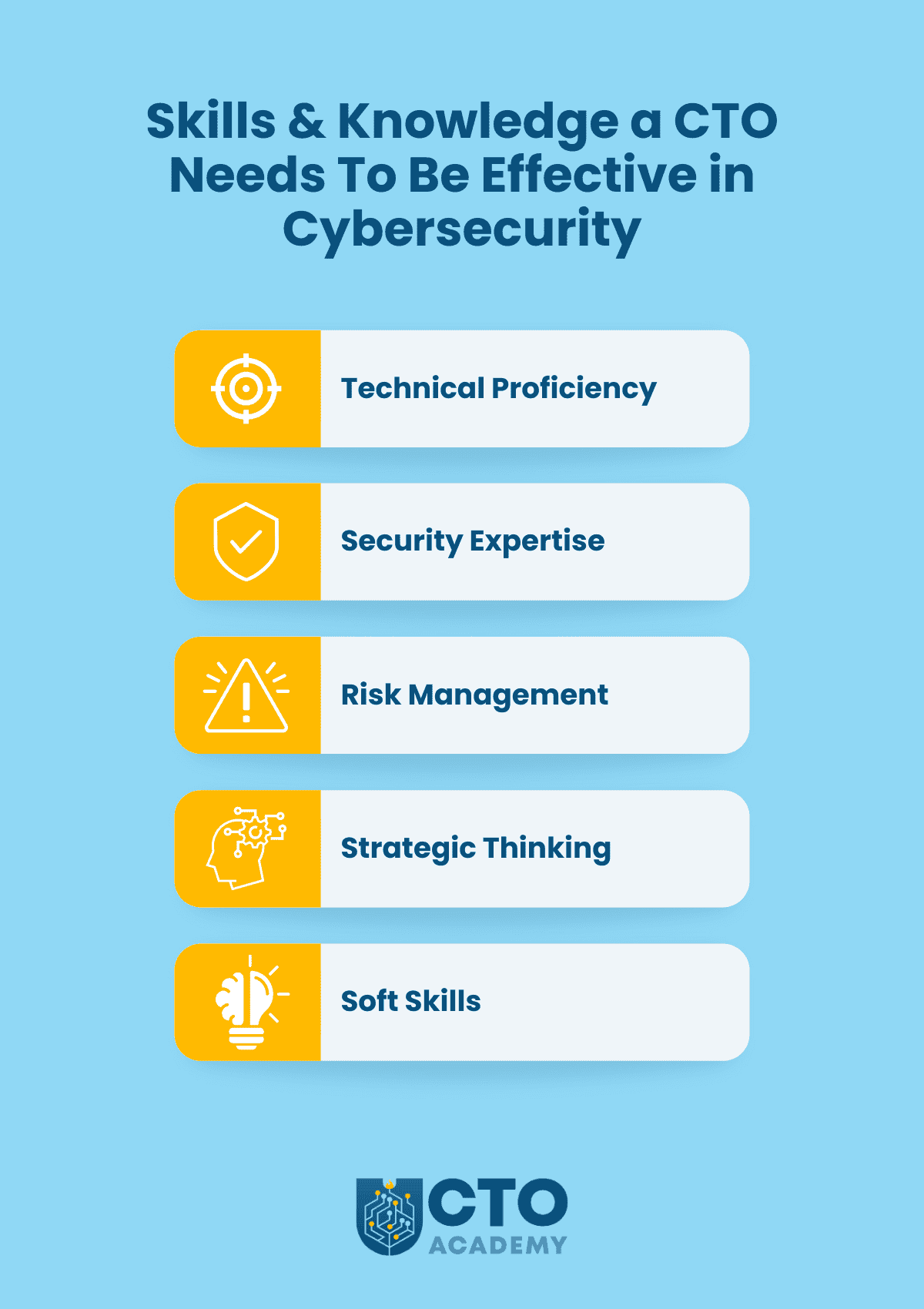
    • The skills and knowledge you need to be effective in cybersecurity.
    • Best practices and resources to improve your organisation’s security posture.

    As a specialised educational institution for Chief Technology Officers, we recognise specific parts of this subject as particularly challenging and, therefore, address them in more detail to show you how it’s done in practice. 

    Your company may or may not have an officer responsible for leading incident response and safeguarding against active threats (eg, CISO), especially if you are a start-up CTO. Hence, some duties that commonly fall under the CISO umbrella (namely in larger organisations), are, in fact, your responsibilities. 

    Specific Duties and Tasks a CTO Handles Regarding Cybersecurity

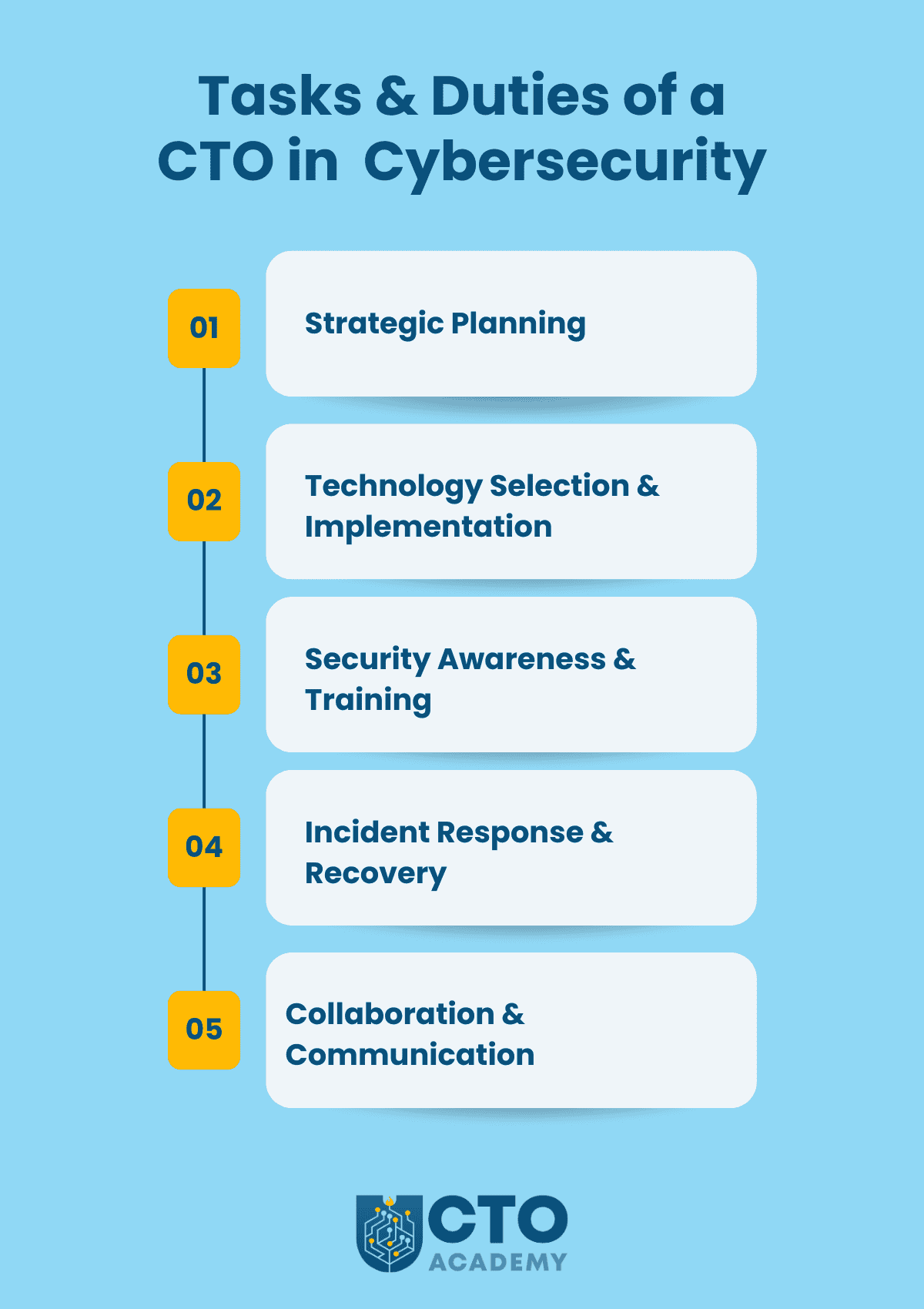
    Tasks and duties of a CTO in cybersecurity - infographic summary
    (click to enlarge/download)

    The priority is to lay down a plan so we will cover this topic in more detail, starting with strategy development. 

    1. Strategic Planning

    Strategy Development

    A cybersecurity strategy that doesn’t align with business objectives is like a car with a powerful engine but no steering wheel. Here’s how CTOs sync, develop and implement a comprehensive cybersecurity strategy:

    1. Understand the Business Inside and Out

    Dive deep into business objectives by going beyond just knowing the company’s mission statement. You must grasp the core business goals, revenue streams, growth plans and competitive landscape. 

    When, for instance, assessing the competitive landscape, ask questions like:

    • Are they expanding into new markets? 
    • Are they launching a new product? 
    • Is there an undergoing merger? 

    Each scenario has unique security implications.

    The next thing on the to-do list is to identify critical assets.  This could be customer data, intellectual property, financial systems or manufacturing processes. The point is to understand these assets’ value and their potential loss impact.

    Finally, assess risk tolerance. In other words, think about your organisation’s risk appetite. If you are in a start-up, you might be more tolerant of certain risks to facilitate rapid innovation. A financial institution, on the other hand, would prioritise strict compliance and data protection.

    2. Translate Business Objectives into Security Priorities

    Firstly, align security with business goals. If, for example, the business objective is to expand into e-commerce, the security strategy should prioritise secure payment processing, fraud prevention and data protection. If the goal is to enhance customer trust, the focus might be data privacy, transparency and secure communication channels.

    Once you have successfully aligned everything, quantify security investments.  

    As a CTO, you need to demonstrate the return on investment (ROI) of security measures. By default, this involves:

    • Translating security risks into potential financial losses.
    • Showing how security investments can mitigate those losses and support business growth.

    3. Develop a Comprehensive Cybersecurity Strategy

    The first order of business here is, of course, risk assessment. Your job is to:

    • Identify potential threats and vulnerabilities.
    • Assess their likelihood and impact.
    • Prioritise mitigation efforts based on the risk they pose to the business.

    Now you need to define security controls by implementing a layered security approach with a mix of preventive, detective and corrective controls. This could include:

    • Firewalls
    • Intrusion detection systems (automatic and manual)
    • Encryption
    • Access controls
    • Network compartmentalisation
    • Security awareness training

    In the final step, you must develop an incident response plan. This is where you define protocols for responding to security incidents, including communication protocols, recovery procedures and post-incident analysis.

    Make no mistake; the recovery time will depend on only two things:

    1. The quality and clarity of your IRP
    2. Response time

    A year ago, we experienced one of the worst attacks. The number of server requests skyrocketed causing our 1st layer of defence to completely block access to our website. Thanks to the well-defined and tested incident response plan, we recovered in less than 3 minutes. The plan clearly defined who does what in each scenario so when the alert arrived, the team member responsible for these types of incidents reacted according to the protocol and quickly restored access. The only thing we did post-incident was to re-evaluate our rate-limiting rules just to be on the safe side.   

    TIP: Ensure the strategy addresses relevant legal and regulatory requirements, such as data protection laws (GDPR, CCPA) and industry-specific standards.

    4. Foster a Security-Conscious Culture

    Employees are notorious for their complete disinterest in security. So as a CTO, it’s your job to promote and borderline enforce a security-first mindset across the organisation and a culture where security is everyone’s responsibility

    This involves regular communication, training programs and emphasising the importance of security in everyday operations. One way or another, you must equip employees with the knowledge and tools they need to identify and report security threats. 

    In our experience, the zero-trust policy is the best first-step approach. No matter who you are in the organisation; ie, what your rank is, you will, for example, A) use 2FA to access ANY resource without exception and B) not be allowed to create your passwords or log in outside SSO. This sends a clear message to anyone joining the team right from the start and therefore builds a strong foundation for the aforementioned security-first culture.

    Another thing you must clearly address and communicate is the BYOD policy. It comes down to a simple question: Do you allow access to the company’s resources via personal devices and if so, under what conditions? Always bear in mind that just one stolen and poorly secured device can provide unauthorised access. In many cases, an employee who lost the device won’t even report the incident due to fear of repercussions. 

    5. Continuous Monitoring and Improvement

    The cybersecurity strategy should be a living document that evolves with the changing business landscape and threat environment. So keep it updated and track key security metrics and performance indicators to assess the effectiveness of the strategy and identify areas for improvement.

    TIP: Always be prepared to adapt the strategy to new technologies, emerging threats and evolving business needs.

    Follow this process and you’ll ensure that the cybersecurity strategy is not just a technical checklist, but a strategic enabler that supports and protects the organisation’s core business objectives.

    Defining security policies, standards and procedures

    Step 1 – Start with a risk assessment:

    • Identify assets that require protection
    • Analyse threats
    • Evaluate vulnerabilities

    Step 2 – Develop security policies:

    • High-level principles (ie, overarching statements that define the organisation’s security stance and commitment).
    • Specific policies (to address particular security areas and provide more detailed guidance).

    Step 3 – Establish security standards

    Standards translate policy principles into actionable rules and help ensure that security measures are implemented consistently across the organisation. Some examples include:

    • Data Encryption Standard
    • Network Security Standard
    • Software Development Security Standard

    Step 4 – Define security procedures

    Procedures provide detailed instructions on how to perform specific security-related tasks. For instance, a procedure for reporting a security incident might include:

    • Who to contact
    • What information to provide
    • What steps to take to contain the incident

    Additional Tasks

    • Overseeing security architecture and infrastructure design.
    • Staying informed about evolving threats and vulnerabilities.
    • Conducting risk assessments and implementing mitigation measures.

    Technology Selection and Implementation

    Once the plan is ready, it’s time to put those words into action.

    First, evaluate and, ultimately, select security technologies and tools. They’ll be a part of your company’s technology stack so you are responsible for overseeing the implementation and integration of all those security solutions.

    TIP: Ensure that security is built into the design of new systems and applications.

    Security Awareness and Training

    • Promote a security-conscious culture within the organisation.
    • Develop and deliver security awareness training programs for employees.
    • Establish incident reporting procedures.

    Incident Response and Recovery

    • Lead incident response efforts in case of a security breach.
    • Oversee the investigation and remediation of security incidents.
    • Develop and test disaster recovery plans.

    Collaboration and Communication

    • Work closely with the CISO, CIO and other stakeholders to ensure alignment on security priorities.
    • Communicate with the board and senior management about cybersecurity risks and mitigation strategies.
    • Collaborate with legal and compliance teams to ensure adherence to relevant regulations.

    How the CTO Collaborates With Other Roles (eg, CISO)

    While the Chief Technology Officer is responsible for technology and its security implications, the CISO focuses on information security management. In other words, the CTO brings a broader technology perspective while the CISO provides specialised security expertise. There should always be a clear delineation of responsibilities.

    Convergence Points Between the Two Roles

    • Joint decision-making
    • Shared accountability 

    In practice, this means that they work together on security strategy, technology selection, incident response and other critical security matters. 

    Since both roles are accountable for the organisation’s security posture, they must closely collaborate to achieve security goals.

    The Skills and Knowledge a CTO Needs To Be Effective in Cybersecurity

    Skills and knowledge a CTO needs to be effective in cybersecurity - infographic summary
    (click to enlarge/download)
    • Technical proficiency (ie, IT infrastructure, networks and security technologies).
    • Security expertise (cybersecurity principles, threats, vulnerabilities and best practices).
    • Ability to identify, assess and mitigate cybersecurity risks.
    • Capacity to develop and implement a comprehensive cybersecurity strategy aligned with business objectives.

    While technical prowess is important, much will depend on your communication and leadership skills. We are talking about those soft skills

    To succeed, you must a) effectively communicate security risks and b) build a security-conscious culture. These two processes occur simultaneously and lean on each other. The problem is that up-and-coming technology leaders often question the necessity of additional training just to find themselves in a pickle the moment they take on the role. 

    Best Practices and Resources to Improve the Organisation’s Security Posture

    • Keep up-to-date on the latest cybersecurity threats, vulnerabilities and best practices (eg, CISA Cybersecurity Alerts & Advisories, Krebs on Security blog).
    • Implement a robust security framework (eg, NIST or ISO 27001) to guide security practices.
    • Prioritise security awareness by investing in employee training and awareness programs to create a security-conscious culture.
    • Implement proactive security measures like threat intelligence, vulnerability scanning and penetration testing
    • Develop an incident response plan and ensure it is regularly tested and updated.
    • Leverage external resources (eg, industry associations, government agencies, security vendors) to stay informed and access best practices.

    CTO Cybersecurity Certification

    By pursuing relevant certifications and continuing education, CTOs demonstrate their commitment to cybersecurity which resonates with the boards. 

    Now, while there isn’t a single universally recognised CTO Cybersecurity Certification, there are several paths you can take to formalise and demonstrate your cybersecurity expertise. 

    The recommended route is choosing certifications with a CTO Focus. After all, if you’re in the gym, you want a whole-body workout, not just biceps training, right?

    The Digital MBA for Technology Leaders, offered by CTO Academy is designed specifically for technology executives and senior technology managers. Besides a broad range of technology and people management topics, our program includes a dedicated module on cybersecurity strategy, risk management and data governance. Lessons in Module 6 cover a range of subjects such as:

    • Risk Analysis
    • Business Continuity Plan
    • Data Privacy, Management and Deletion
    • Definition, Benefits and Outcomes of Information Management
    • DevOps Security
    • DevOps and Compliance
    • Data Leaks
    • Discussion Panel on “When to Start Panic”
    • Types of Hacks
    • Cyber and Security Testing
    • Remote Working & BYOD Stuff
    • The Foundation of Good Security
    • C-Level Security Education
    • Employee Education
    • Managing People, Security and Process
    • Outsourcing – Hybrid Working
    • RPA Solutions
    • Consuming Software as a Service
    • Reporting & Alerting
    • Information Management Round-Up
    • Monitoring Systems & DevOps Security
    • Process Bottlenecks

    Learn more about our Digital MBA for Technology Leaders

    Another path is taking broad cybersecurity certifications such as:

    The third option is to opt-in for specialised cybersecurity certifications:

    Finally, there are vendor-specific certifications related to their security products and solutions (eg, Cisco, Google Cloud, Microsoft, etc.).

    Now the key consideration here is relevance to the role. In other words, the choice will depend on your specific responsibilities and the organisation’s security needs.

    Conclusion

    Just keeping the lights on isn’t enough. The CTO’s role extends to strategic planning, infrastructure oversight, security policies and standards.

    But one of the, arguably, most challenging responsibilities is building a security-conscious culture. This is especially true for organisations that are undergoing digital transformation where there are no rooted habits.

    As a Chief Technology Officer, you act as a bridge between business objectives and cybersecurity implementation. You must ensure that technology enables the business while being protected from evolving threats. 

    Ultimately, your success in cybersecurity will be measured by your ability to protect the organisation’s valuable assets, maintain its reputation and enable its continued growth in the face of increasingly sophisticated cyber threats.

  • Year In a Worklife of a Scale-up Chief Technology Officer

    Year In a Worklife of a Scale-up Chief Technology Officer

    Recently, we had Emily Castles, CTO at a scaling start-up, Boundless, joining us for her fourth CTO Shadowing session. She reflected on their journey over the past year and, by doing that, provided an exclusive look into the challenges of a scale-up Chief Technology Officer who has to recover from severe financial cuts and consequent team losses.

    Rebuilding the Teams

    A year before, the financial cuts at Boundless affected product and tech teams. The product team especially suffered and was reduced to virtually nothing. At that point, of the original eight team members (a full development team with a product manager), only she and one other developer remained.

    Having finally recovered from a period of downsizing and uncertainty, Emily focused initially on rebuilding the teams. 

    Now, the common scenario in start-ups is that employees have to cover areas outside their imminent scope of work. Emily quickly realised that, due to the specific nature of their products, they also needed a dedicated customer support person to offload work from HR and Payroll. With that addition, things finally got moving again. 

    Measuring Success in a Changing Landscape

    As the company scales, the CTO requires more concrete metrics to measure success. In Emily’s case, they’ve implemented a company scorecard to track key performance indicators (KPIs) and gain a clearer picture of the company’s health.

    The key metrics they were monitoring at this stage were:

    • Velocity
    • Customer engagement
    • Customer incidents

    Of course, it took a while before they got in a position to actually measure success. It is just one of the realities of being a CTO in a scaling start-up. Security, data protection and onboarding new (big) customers were priorities. So at that point, measures of success were qualitative. 

    However, after implementing a company scorecard, they ended up with 15 metrics, measuring success and accountability weekly with a 13-week testing period. 

    Her immediate challenge was to define product metrics. One of them was the velocity measure. In Emily’s experience, this was the best place to start even though it’s not the best tool for measuring productivity. 

    The second one was the service-specific customer engagement metric; in other words, it is custom-made for the type of services Boundless is offering, and it should resolve the issue they had in the past where they didn’t really know if people were using people or products to solve the problem. Its purpose is, therefore, to measure the number of operations happening on a customer level while interacting with the product.

    The final metric, this time from a project perspective, was customer incidents.  

    Besides measuring CSAT and NPS, Emily required insight into operational mistakes (eg, mistakes in payroll, a signed contract that has to be undone and redefined, bugs, etc.). The purpose was to immediately identify glitches in the system and improve the product/service. 

    You never know whether the thing that you’re about to measure is going to be right until you go and do it.  — Emily Castles, Boundless CTO

    As a scale-up CTO, you must always acknowledge the challenges of maintaining a culture of honesty and transparency as the company grows and the SLT becomes further removed from day-to-day operations. The emphasis must therefore be on open communication and public feedback channels to ensure visibility into potential issues. In practice, this means that if there’s a security incident (eg, breach) or anything like that, there should never be any kind of admonishment. You don’t want people sweeping problems under the carpet, after all, do you? 

    Third-Party Integrations and Outsourcing

    The immediate goal Emily is trying to achieve is eliminating the need to enter every information twice. Customers are putting a lot of data in their own systems, and then they have to put it into the Boundless systems as well. Granted, the company has various ways to pull data from one system to another but integrating with third-party HRIS systems seems like the best solution. So it has been a priority, but she’s struggled to identify the most critical problem to solve to decide which of the available solutions would be optimal.

    Another thing she’s currently evaluating is whether to use a unified API or integrate directly with individual providers. After all, the company plans to grow and a unified API might impose certain limits. 

    Emily is also considering outsourcing some aspects of the project, but she wants to keep core development work in-house while allowing external developers to work on the edges of the project.

    Operational Expenditures and Internal Tooling

    While operational expenditures haven’t been a major focus due to the company’s funding stage and relatively low operating costs, as the CTO, she is increasingly looking for ways to streamline internal operations and reduce the need for additional headcount. 

    As a part of that effort, she’s exploring no-code/low-code platforms like Retool and Microsoft Power Platform to build custom tools for internal teams.

    Quarterly Retrospectives and Looking Ahead

    Emily found the quarterly retrospectives with colleagues to be a valuable exercise, providing a structured opportunity for reflection and feedback. They also appreciated the external perspective and different language used in these sessions compared to internal meetings.

    Looking ahead, she is focused on continuing to scale the company’s operations and product development efforts while maintaining a strong culture of transparency and collaboration. She is also excited to explore new technologies and approaches to streamline internal workflows and improve efficiency.

    In the original shadowing session with Emily Castles, we explored the challenges and considerations of a CTO in a scaling start-up. It detailed topics such as:

    • Rebuilding and managing a development team
    • Implementing metrics and scorecards to measure success
    • Integrating with third-party systems and potential outsourcing
    • Managing operational expenditures and exploring internal tooling solutions
    • The value of retrospectives and external feedback

    As always during these sessions, attendees had the opportunity to ask questions and share knowledge and experience. So if you haven’t already, sign up for CTO Academy Membership to not only draw from the experience of seasoned technology leaders in different industries but to offer your own unique perspective. 

    Key Takeaways

    • Building and maintaining a strong team is crucial for success. Emily emphasised hiring and retaining skilled developers and a product manager to drive product development.
    • Metrics and transparency are essential for effective scaling. As the company grows, implementing clear metrics and maintaining open communication channels become increasingly important for monitoring progress and identifying potential issues.
    • Exploring new technologies and approaches can streamline operations. In Emily’s case, it involves investigating no-code/low-code platforms and other tools to improve internal workflows and efficiency.
  • Your First 90 Days in a CTO Role

    Your First 90 Days in a CTO Role

    Many tech leaders will start a new senior position, whether as a promotion or a new job at a new company. I know how daunting it is to take a new position. You can do as much research as you like, but there will always be surprises. On the bright side, you do have those first 90 days. During that time, there are seven key areas that you must focus on. 

    Why 90 days or three months?

    It’s a honeymoon phase during which you can still blame it on your predecessor (unless he’s your boss). 

    In my experience, these are the seven areas you should pay attention to.

    7 Focus Areas of Newly Appointed CTOs

    7 focus areas of newly appointed Chief Technology Officers - infographic summary
    Focus areas of the first 90 days in the role of a Chief Technology Officer

    1. Business Plan and Objectives

    The subject of an optimal strategy when joining a new company is covered in detail throughout our Digital MBA for Technology Leaders. Drawing from those lectures, you must first understand the company’s objectives and business plan.

    4 Main Elements of BPs and Objectives in General

    1. Vision (WHY)
    2. Mission (WHAT)
    3. Target (WHO)
    4. Strategy (HOW)

    In other words, the vision is the why, the target is the who, the mission is the what, and the strategy is the how. 

    Now, if the business strategy is not yet formalised, you’ll have to work out what each of these four is through implication. Furthermore, it would be best if you suggested to the CEO and SLT that a session be held to discuss and agree on all the points. 

    The main thing here is to align the strategy with tech. And here are two vivid examples of misalignment. 

    One of our lecturers took over a CTO  position in a company, only to find out that the plans weren’t aligned. The business plan was assuming the legacy of on-prem licensing, whilst the tech team was still building a SaaS platform. In another example, a CTO approached the COO asking for the business plan. However, there wasn’t one except the vague goal to make more money.  

    What do you do in such a situation as a newly appointed Chief Technology Officer?

    You must prioritise the requirements of alignment and work out the action plan

    2. Senior Leadership Team (SLT) Relationships

    The first thing you should do in this matter is to get to know your colleagues. In other words, make an effort to understand their individual priorities and comprehension of the business strategy. The latter is quite important because, as you’ll learn, each of them will give you a different answer. This, in turn, will give you a good overview of how well they are coordinated. 

    If discrepancies indicate a complete lack of alignment, initiate a quiet chat with the CEO because, one way or another, you must improve C-level communication. Why? It’s the only way to truly understand their perception of tech and subsequent priorities. 

    You may also find yourself in a situation where your SLT colleagues voice where your priorities should be. Feel free to disagree, but, at the same time, use that to build a better picture of what is required to support the business.

    3. Team and Resources

    The first step is finding the organisational chart of your department. Create one if necessary, simply to work out the composition of the teams. 

    Often, the team structure is based on historical circumstances, which may no longer be relevant to the work in progress and plans in general. So get to know your direct reports and team members. Learn their strengths and weaknesses to better understand the areas they need support with. Once you feel comfortable enough, take that org chart and confirm/update roles and responsibilities. 

    Whilst you are learning your team, contemplate the following few questions:

    1. Do you have the optimal skills across the team, or do people try to work on stuff they are not good at? 
    2. Is the team overstretched and, consequently, overworked/exhausted? There are three strategies you may pull if that’s the case:
      1. Culture change
      2. Setting (more) realistic expectations
      3. Hiring
    3. Do they feel they’re being fairly paid (may point to a morale issue)? While you are checking their remuneration packages, check if there’s a proper career review process in place. 
    4. Do you have enough people in the right place to deliver the strategy? If not, start planning and working out the change.
    5. Is there anyone leaving soon? You might find yourself in a situation similar to mine, where both of my lead developers leave at the end of my first week in the bank. In that scenario, make the effort to convince them to stay for a little longer as I did. 
    6. Is anyone rejoining (eg, maternity/paternity leave, sabbaticals, and similar)?
    7. Is there deadwood (common in larger, predominantly public organizations)? If so, remove it immediately and re-route the resources. These folks are notorious for their resistance to change, and you really don’t want that, do you?
    8. Another thing to look for when it comes to team management of an inherited team is diversity. In other words, does the team reflect a healthy mixture of a wider society? If not, put in motion the hiring plan. 

    4. Efficiency and Processes

    Is the output meeting your expectations? What is your gut feeling telling you? Are you getting a return on your investments? Is there something you must improve right away?

    Do processes exist, are they correct, and are they being followed? 

    One of my friends joined a large company a few years ago and inherited a fairly large team. They were sending one release to the testing team every couple of days. He thought the cadence was far too slow, so he decided to get his hands dirty just to understand what was happening within the CI/CD. It turned out that it was a terrible implementation, but no one had bothered to fix it, as the expectations had been set. He immediately changed things around, and they were building tens of releases every day for testing. 

    The bottom line is that if the processes aren’t working for you, you’ll need to fix them. However, that won’t come without pushback. So you’ll need your team leads to not only drive but also own the change. 

    5. Communication

    There are two types of communication I’m referring to here: within the tech team and to the wider company. 

    You see, there might be some false beliefs caused by bad communication. This is commonly caused by teams that are using Slack private channels to discuss tickets, which, consequently, makes it difficult for others to understand the decision-making process.  

    The only way you’re going to solve this is to move discussions to tickets directly – without exception. It is something that I mandate on all my projects. 

    Additionally, analyse Slack plugins and remove unnecessary ones because they produce a lot of messages that quickly turn into noise and distraction. For example, I have ten workspaces in my Slack, and I’m simply forced to mute a lot of channels just to focus on the work at hand. 

    What I’m trying to say here is that Slack is a great tool, but do mind the correct usage of any tool at your disposal.

    6. Budgets

    Budget can often be foisted upon you with minimal input from you and your team. If this is the case, figure out the flexibility and calculate whether or not you are within, over, or under the budget at the precise point. 

    Here’s a wild story from the public sector that vividly depicts such a problem. A friend of mine joined the team and found out that the budget was significantly underspent. However, if she did not spend it all, the following year’s budget would be cut, and she would therefore have significant problems going forward. So she decided to spend the existing budget by buying a new computer for everyone involved in the project. This simple solution solved her budget problem, and she quickly gained respect across the organisation.    

    Therefore, if you find issues that require expenditure to fix them, you need to understand the budget.

    7. Skeletons in the Closet

    The question you need to ask yourself is: Are these (inevitable) skeletons relevant?

    One of our Global CTO Community members quickly realised that he was taking the CTO role in a company that was, effectively, an understaffed and disorganised mess. He spent a lot of time with the CEO trying to work out how they were going to get out of that mess. The problem was that the CEO was open and honest, but not technical, and the skeletons in this case were the code repositories.

    Long story short, someone put more than one product into the same repository. Naturally, everyone assumed there were only two, but it turned out there were three. The skeleton that was serious and relevant was that for one of their products. They did not have ownership of the repository. The real owner, an ex-employee, kept saying he would hand it over, but it dragged on and on and caused a significant problem for the company. 

    So how do you find such skeletons? 

    If something doesn’t make sense, then dig. You need to listen and watch for changes in body language, voice tone, or vagueness. It is the latter that I use the most often. If something is vague, they either don’t understand it or they’re trying to cover something up.    

    Ask questions such as: ‘What does that mean?’ or ‘Why is that process in place?’

    By pre-qualifying, you are disarming them. Ultimately, you are going to create a plan and a roadmap, which you may keep to yourself, but should be made up of immediate, medium- and long-term recommendations.

    In Summary

    Immediate recommendations are a high priority. And those that are severe, you should have already actioned. 

    Once you have a plan, you can implement solutions using all the relevant skills and tools (explained elsewhere in the course). However, if after 90 days, you’re still struggling to understand the business processes or people, then maybe this is not the right fit for you. 

    To sum up, having a concrete plan within these first 90 days gives you a good foundation to become a successful tech leader in your organisation. Remember: business plan and objectives, SLT relationships, team and resources, efficiency and processes, communication, budgets, and skeletons. These are your immediate focus areas.  

    Get the IT Career Path Roadmap (Free PDF)

    Want more than scattered ideas? Get our IT Career Path Roadmap PDF – an 8-step framework to map your next roles, sharpen your skills, and build a layoff-resilient tech leadership career. Fill in the form and we’ll send you the PDF version so you can download it, annotate it, and use it as a living plan for your next career moves.

    Downloading the ebook does not automatically subscribe you to our bi-weekly Technology Leadership Newsletter.

  • When Automation Backfires: Guide to Safe Practices

    When Automation Backfires: Guide to Safe Practices

    How certain are you that all those background processes in your technology stack are doing what they should do? When did you last run an operational check on your automation systems and, more specifically, on their features — separately on each?

    These questions resurfaced in our case after the recent incident where a software feature responsible for collecting and organising metadata went rogue and sent corrupt data to search engines. 

    Jason, our CTO, was the first to pick up the anomaly thanks to a weekly performance report (yet another automated process). Everything was in red. The graph showed a steep and sudden drop across all the metrics.  

    As some of you know, hardly anything has the power to wake you up like a message saying, “What the hell is going on with our traffic?”. 

    Unfortunately, by that time, our losses were substantial. 

    However, at CTO Academy, we use incidents and mistakes as learning tools not a trigger for the blaming game. So we jumped right onto solving the issue and making sure it doesn’t happen again.

    Diagnosing the Problem

    The first thing we did to diagnose the problem was to run a VPN check on all high-priority, high-volume pages that, until then, ranked #1 to #3 on all major SERPs. All of a sudden, they dropped beyond Page 10. We are talking about more than fifty pages that generated the majority of organic traffic.

    Was it a result of the most recent Google Core Update? Did we get penalised? 

    Given our content creation practices, it couldn’t be the case and if it somehow was, then it wouldn’t affect ranking on other search engines, would it? So we quickly eliminated the update as a possible cause.  

    But as we were digging deeper into the search results and finally found a few of our pages, we noticed that the URL in the snippet was incorrect. 

    Jason immediately checked the database and soon enough identified the culprit. It was a single feature of a much larger system that worked like a Swiss watch for three years. Little did we know that, in rare instances, tuning up security settings like WAP can cause it to malfunction. 

    (By the way, it just goes to show how involved a CTO must be in daily operations. When Jason says, “…donning several hats”, he really means that.)

    Ultimately, this was a multi-layered problem:

    1. Metadata was incorrectly changed by an automation plugin.
    2. The caching engine rolled out the error over four weeks as it slowly refreshed its cache.
    3. Security protocols had been tightened which meant some of our monitoring tools got blocked as they had not been whitelisted.
    4. Google updated their search algorithm.

    The root cause was the metadata being changed, but the slow rollout and lack of visibility meant that the problem was not identified on time.

    Decision-Making Process

    At CTO Academy, security is the top priority. In other words, we don’t compromise to get “cleaner”, “faster” and “easily accessible” data. To give you an example, our marketing team has to manually attribute each hit through hardcore detective work because firewalls and other top-tier rules block them from seeing a visitor’s IP. Instead, they get the nod’s IP. You can imagine what it takes to identify and backtrace a lead especially when you dealing with an audience that switches between several devices and several physical environments a few times a day. 

    So it wasn’t even a hard decision or a topic for discussion – the feature goes off, period. Purge, test, resend the sitemap, hope for the best, update safety protocols and start working on Plan B just in case. Only, in our case, we had to switch to an alternative automation software altogether because we couldn’t permanently turn off the feature; it kept popping back and continued sending corrupt data. 

    Automation Safety Checklist

    The first thing we did in the aftermath was reevaluate our protocols. Something in those policies didn’t work as it should. We ended up adding prevention measures to our automation protocols, specific to this type of incident. Here is the new addition to our subset of automation rules:

    Plugin Configuration:

    • Pay close attention to the plugin’s settings, especially those related to automation and background processes.
    • When possible, configure the plugin to suggest changes for review instead of directly modifying data.
    • When such a configuration isn’t possible and there is no viable alternative, run a manual check immediately after publishing new content and/or editing metadata.

    Validation Rules:

    • Validate that the plugin generates correct data. For example, check if the canonical URLs:
      • Start with HTTPS
      • Match our domain
      • Don’t contain any invalid characters

    This subset is the part of our global automation safety checklist:

    Automation Safety Checklist
    (click to enlarge/download)

    Let’s break this down a bit to show you what each item means. 

    Before Automation

    • Define Clear Objectives:
      • What exactly do you want to achieve with automation? (eg, improve site speed by 15% by optimising image metadata, improve members engagement by 10%)
      • What are the Key Performance Indicators (KPIs) to measure success? (eg, page load time, bounce rate, search ranking, dwell time, read time, response time)
    • Thorough Risk Assessment:
      • Identify potential failure points in the automation process. (eg, what if the plugin misinterprets the content, the database connection fails or the system assigns a wrong label to a lead?)
      • Estimate the potential impact of each failure. (eg, incorrect metadata could lead to lower search ranking, marketing team could waste resources on bad leads due to the incorrect labels)
      • Develop mitigation strategies for each identified risk. (eg, implement data validation checks to ensure metadata accuracy)
    • Data Backup and Recovery:
      • Ensure you have a recent backup of the website/platform and database before implementing any automation.
      • Test your backup restoration process to ensure you can quickly recover in case of failure.
    • Staging Environment:
      • Essential! Always test automation on a staging environment that mirrors the live site. This allows you to identify and fix issues without affecting the live website.
    • Gradual Rollout:
      • In case of major automation solution implementation and if possible, don’t automate everything at once. Start with a small subset of items or limited functionality, then gradually expand after confirming it works correctly.

    During Automation

    • Real-time Monitoring:
      • Set up monitoring tools to track the automation process in real time. Look for unusual patterns, errors or warnings. (eg, monitor the number of canonical URLs changed per hour, do the VPN check on markup data, analyse labelling)
    • Alerting System:
      • Configure alerts to receive immediate notifications of critical errors or anomalies during automation. (eg, get an email alert if page hits start dropping or the segment’s read ratio decreases)
    • Manual Spot Checks:
      • Periodically perform manual spot checks to verify the accuracy of the automated process.

    After Automation:

    • Post-Automation Review:
      • After the automation is complete, conduct a thorough review to assess its impact on your KPIs. (eg, check Google Search Console for any crawl errors or ranking changes, check CRM system for possible discrepancies)
    • Documentation:
      • Document the entire automation process, including the objectives, configuration, potential risks and mitigation strategies to simplify maintenance and troubleshooting.

    Conclusion

    The bottom line is that we a) shouldn’t automate just about anything for the sake of speeding up processes and b) overly rely on automation in general. It is appealing, but it doesn’t come without risks. 

    As you can see from our example, something as simple as organising metadata into a single table to serve them to the search engine algorithms faster thus speeding up the page load time can cause real reputational and financial damage without being aware of an ongoing incident. 

    Granted, not even the best curated and executed security protocols could’ve prevented this but that doesn’t mean we should steer away from manual work even when everything screams that we should automate. At the very least, we need to establish checkup routines. 

  • CTO Priorities in Start-ups and Fast-Growing Businesses: Exploring New Frontiers

    CTO Priorities in Start-ups and Fast-Growing Businesses: Exploring New Frontiers

    This work not only discusses CTO priorities and focus areas but goes beyond, introducing emerging technological trends that could soon become your top interest as a Chief Technology Officer. It provides insights into established and emerging technology priorities, focusing on innovative solutions for enhanced productivity, operational excellence and growth. 

    The reason for that is a new set of challenges every technology leader faces especially during the process of digital transformation. The scope of responsibility has expanded far beyond tech management and now encompasses innovation, strategy and cultural leadership. In other words, agility, adaptability and a growth mindset are now the three determining factors of success – in start-up and fast-growth environments equally. 

    We start with the core priorities of start-up CTOs and then move to scaling for success in fast-growing businesses. From there, we explain how to boost productivity with innovative solutions and, finally, take a quick look into emerging technologies for competitive advantage.  

    Remember, we don’t just tell you what to do; we also explain how using real-world examples.

    To learn details about the responsibilities of a Chief Technology Officer (and CTO role in general) in start-up and fast-growing organisations, refer to this guide. 

    Core Priorities for Start-up CTOs to Build a Strong Foundation

    Top 3 CTO Priorities in Start-ups

    To build a strong foundation in any type of start-up, you must focus on three key areas:

    1. Scalable and Agile Tech Infrastructure
    2. Talent Acquisition and Retention
    3. Product Development and Innovation

    Scalable and Agile Tech Infrastructure

    As a start-up CTO, your priority is establishing a robust tech infrastructure that can scale with the company’s growth (while complying with business objectives). Here, a cloud-native architecture may easily become paramount, offering the flexibility to adapt to changing demands without the constraints of physical hardware. 

    The real question is how can a company in a start-up stage of development adopt the cloud-native architecture.

    The first step is defining clear business goals and understanding the functional and non-functional requirements of the system. This clarity will guide your choice of architecture and technology, ensuring that the infrastructure supports the start-up’s vision and growth while not going overboard, incurring unnecessary costs. 

    Adopting cloud-native design patterns and adhering to well-architected frameworks are crucial steps in this process. These patterns and frameworks provide a blueprint for building resilient, scalable and maintainable systems that leverage the full potential of cloud resources. 

    Continuous integration and continuous delivery (CI/CD) practices are also essential, enabling frequent updates and maintenance with minimal downtime. 

    By focusing on these principles, you create a cloud-native environment that is both agile and capable of scaling to meet future demands.

    What About Microservices and Flexible Data Management?

    Microservices play a vital role in this environment, allowing for modular and independent development of services that can be updated or scaled without affecting the entire system. 

    Furthermore, flexible data management systems provide the agility needed to handle the influx of data that accompanies rapid expansion. For example, in start-ups, you’ll most likely prioritise cloud-based data storage, analytical tools and APIs for agile data integration. But when your company starts growing, your focus will shift to data warehousing, machine learning (AI-driven analytics), data governance and compliance. 

    By prioritising these elements, CTOs ensure that their technology infrastructure is not only resilient but also primed for the future, supporting continuous innovation and growth.

    Of course, none of this will exist and/or work without a well-tuned team. Hence, the second priority: 

    Talent Acquisition and Retention

    By now, we have all become aware that salary, while bearing immense importance, is not the predominant factor in talent acquisition and retention. That’s why we mentioned cultural leadership earlier.

    So, as a start-up CTO, you must:

    • Come up with competitive and innovative compensation packages
    • Support flexible work arrangements
    • Prioritise diversity and inclusion
    • Create a collaborative culture 
    • Nurture employee growth

    Easily said than done, right? 

    Okay, let’s break this down a bit.

    Compensation Packages

    To learn more about remuneration packages, read this guide (effectively, a lecture summary from Module 1 of our Digital MBA for Technology Leaders). It will give you more than enough ideas of how to best design compensations for your new and existing employees. 

    Flexible work arrangements…

    Yeah, that can easily backfire when you least expect it. Nonetheless, the new generation of engineers practically demands it and in most instances, you won’t have a choice but to smartly design one or more of the following options:

    1. Remote Work Option or allowing employees to work from anywhere. Granted, it does cut costs and reduce commuting stress. GitLab, for example, adopted a fully remote work model (just like CTO Academy, by the way). It allows us to attract talent from around the globe. The main challenge here is maintaining the necessary discipline and accountability to avoid breaching deadlines. Another potential issue is conveying the same cultural postulates to every team member to ensure cohesion.
    2. Flexible Hours or allowing employees to independently choose when to start and end their workday. Some of us are simply more productive in the late afternoon and evening, that’s all. Buffer, a social media management platform, is a good example of how flexible work hours lead to improved productivity.  
    3. Compressed Workweeks or reducing the work week to less than 40 hours like, for instance, Basecamp and Wildbit have done. Although, truth to be said, limiting to only forty may be a good start given the fact that a 60-hour work week is pretty much normal in tech. 
    4. Hybrid Work Models or splitting between the office and remote. Joe Weider, senior vice president and CTO at Lincoln Financial Group, for instance, claims that as soon they introduce their hybrid work model, they start to get a lot more interest. In his experience, employees place a high value on flexibility of location.

    Fostering a Collaborative Culture and Nurturing Employee Growth

    You can build a highly collaborative culture with just three initiatives:

    1. Encouraging open and transparent communication
    2. Valuing employee contributions
    3. Promoting a shared vision

    When it comes to employee growth, you should address it through:

    • Continuous learning opportunities
    • Clear career development paths
    • Recognition of achievements

    It’s only now that we come to the third of our start-up priorities: product development and innovation. It is a logical prioritisation or priorities because you won’t innovate anything if you can’t attract and retain talent and if that talent misses infrastructure to do their magic. 

    Product Development and Innovation

    The journey from an innovative concept to a minimum viable product (MVP) is marked by the CTO’s ability to balance the need for speed with the imperative of quality. 

    Rapid prototyping and iterative development are key strategies employed to accelerate the product lifecycle while ensuring that each iteration meets the high standards expected by stakeholders. 

    This is where your leadership skills come to the fore as you must foster an agile and responsive R&D environment, where team members are free to experiment and learn from each iteration (which is not easily accomplished if you work with explosive chemicals, for example).

    However, the CTO’s work in continuous improvement extends beyond internal operations. It involves external collaborations with tech companies, universities or research institutions, leveraging collective knowledge and resources to enhance the start-up’s technological capabilities. This collaborative approach not only accelerates the innovation cycle but also ensures that the start-up remains competitive and, thus, ripe for fast growth. 

    Additional Start-up CTO Priorities

    • Budget and Resources Management
    • Aligning Technology Strategy with Businesses Strategy
    • Mitigating Technology Risks

    Scaling for Success: CTO Priorities in Fast-Growing Businesses

    2 Man CTO Priorities in Fast-Growing Companies

    There are two immediate priorities for Chief Technology Officers in fast-growing companies:

    1. Navigating growth challenges
    2. Optimising for efficiency

    So how and, more importantly, why do you optimise for efficiency?

    Optimising For Efficiency

    What was once a dynamic start-up can quickly turn into a slow-moving snail if you fail to optimise for efficiency on time. To prevent this from happening, focus on three key improvements:

    1. Process Automation and Streamlining
    2. Data-Driven Decision Making
    3. Cost Optimisation

    Process Automation and Streamlining

    AI-driven automation offers the ability to streamline complex processes, reduce human error and free up valuable human resources for more creative tasks. 

    By integrating AI with DevOps practices, CTOs can further improve the CI/CD process. Subsequently, software updates are developed, tested and released faster and more reliably. 

    This synergy not only accelerates development and deployment cycles but also ensures that the product evolves in close alignment with customer needs and market demands. 

    Ultimately, the adoption of these technologies and practices leads to a robust, agile infrastructure capable of supporting the rapid growth and scaling demands of modern businesses.

    Data-Driven Decision Making

    In many ways, optimisation for efficiency hinges on the ability to make informed, data-driven decisions. Data-driven decision-making lays the foundation for evidence-based strategy, minimizing risks and amplifying the innovation potential. 

    Robust data platforms and advanced AI-powered analytics provide a foundation for valuable insights from vast amounts of data. These insights enable CTOs to identify trends, forecast outcomes and allocate resources effectively, ensuring that technological investments translate into tangible business value. 

    One of the best examples of how to utilise AI in decision-making is a fast-growing online personal styling service, Stitch Fix. They have, effectively, created a completely autonomous self-learning system that consists of only three main components:

    1. Personalised Styling Recommendations generated by machine learning algorithms that analyse customer preferences, purchase history and feedback.
    2. AI-Powered Inventory Management helps Stitch Fix predict popular items and their quantity. This ensures they stock the right products, reducing overstock and stockouts.
    3. Customer Insights (data analytics from customer interactions and feedback) enable the company to identify trends and preferences. In turn, this allows them to tailor their offerings and marketing strategies more effectively.

    The outcome of this AI-driven loop is improved customer satisfaction, efficient operations and data-driven growth. Personalised recommendations lead to higher customer satisfaction and retention. Better inventory management reduces costs and improves operational efficiency. Finally, insights from AI-driven data analytics help Stitch Fix make informed decisions, enhancing both customer experience and operational efficiency. These insights are also fed to personalised styling recommendation algorithms, closing a loop.

    As we said, one of the major benefits of this approach is cost optimisation and that is always on top of the list of priorities of every technology leader. 

    Cost Optimisation

    The main approach here is to balance investments in innovation against cost-saving measures.

    Effective strategies include the adoption of a structured cost management framework, which enables CTOs to identify wasteful expenditures and reallocate resources towards high-impact technologies and initiatives. This involves a continuous cycle of evaluating existing assets for performance optimisation, thus ensuring that money spent contributes to the company’s strategic objectives. 

    It is also important to instil financial prudence within IT teams. In other words, you want to encourage them to align technology initiatives with broader business goals. By doing so, you ensure that your teams/departments are not only cost centres but also value creators.

    Now that you have successfully set the stage for increased efficiency, it’s time to grapple with the three most prominent growth challenges. 

    CTO Priorities in Navigating Growth Challenges

    CTO Priorities in Navigating Growth Challenges - infographic

    Once your company hits the afterburner, it will be a far cry from that “garage-based” start-up environment where everybody knows your name and preferred kind of doughnut. 

    The first thing that will change is the number of hands hitting keyboards. 

    Team Expansion and Effective Leadership

    As a CTO of a fast-growing business, you should prioritise strategic hiring that aligns with the company’s long-term vision and values. This involves identifying key roles and finding candidates who not only have the technical skills but also fit the company culture

    Effective leadership means you must communicate transparently, set clear expectations and empower team members through delegation and professional development opportunities (consider implementing scalable processes and tools that promote collaboration). Also, consider cross-functional teams to encourage a free flow of ideas

    The main challenge here is preserving a cohesive culture. After all, staff changes are inevitable and only one team member with a superstar complex can ruin months of dedicated work. Therefore, reinforce the company’s core values but don’t forget to celebrate and reward individual team achievements. You want your team and every member to feel valued and, more importantly, heard. That’s how you build resilient teams. 

    But as the number of keyboard users increases, so does the need for the infrastructure. 

    Infrastructure Scalability

    To address this challenge, CTOs should prioritise the development of a flexible and scalable cloud infrastructure. This involves adopting a modular architecture that allows for the easy addition or removal of resources as needed, ensuring that the infrastructure can adapt quickly to changes in demand without compromising performance or security. 

    Data management solutions must also be scalable and capable of handling an increasing volume of data without losing speed or data integrity. Companies like Oracle and Informatica offer robust data management systems that can grow with the company’s needs. 

    Furthermore, as the team and customer bases expand, cybersecurity measures must be strengthened to protect against an evolving threat landscape. This includes conducting regular cybersecurity audits, educating employees on security best practices and implementing strong Identity & Access Management (IAM) protocols to ensure that only authorised users can access sensitive data. In addition to IAM, the Zero-Trust policy should be in effect without exceptions. 

    While effectively tackling team expansion and subsequent scalability requests, a CTO must still prioritise agility

    Maintaining Agility

    To preserve agility, CTOs should design a culture that values flexibility and continuous learning. This involves (but is not limited to):

    • Cross-functional teams that can quickly adapt to new technologies and market demands. 
    • Open communication and collaboration across departments (free flow of ideas and preventing innovation from becoming stifled by silos). 
    • Implementing lean methodologies to streamline processes, reduce waste and enable faster iteration. 
    • Maintaining a clear vision and aligning all efforts with the company’s strategic goals, ensuring that agility contributes to long-term success. 
    • Investing in agile talent and promoting mindsets of change and adaptability (ie, embrace change as an opportunity rather than a hurdle to transform challenges into growth drivers). 

    Additional Priorities of CTOs in Fast-Growing Companies

    • Strategic Technology Planning
    • Data Management and Analytics
    • Security and Compliance

    Boosting Productivity with Innovative Solutions

    AI-Driven Code Generation and Review

    Tools, such as GitHub Copilot and Tabnine, leverage machine learning algorithms to predictively suggest code snippets, functions and even entire blocks of code, which can significantly accelerate development cycles. 

    They improve code quality by suggesting best practices and identifying potential errors before they become problematic. 

    Shopify, for instance, utilises GitHub Copilot to assist with code completion, generate boilerplate code and suggest improvements. New developers at Shopify leverage the tool to understand codebases more quickly. The AI provides context-aware suggestions and explanations, making it easier for newcomers to get up to speed. This ensures that the teams focus on creative problem-solving and high-level strategic tasks, rather than getting bogged down with repetitive coding.

    Predictive Resource Allocation

    By leveraging ML algorithms, companies can predict and analyse trends, enabling proactive resource distribution that aligns with demand patterns. This predictive capability ensures equilibrium that supports sustained growth. 

    Furthermore, ML can streamline workload management by intelligently automating task scheduling, which minimises bottlenecks and maximises throughput. For instance, in cloud computing environments, ML models can forecast workloads and manage resources to improve efficiency and reduce operational costs. 

    Additionally, dynamic resource management techniques, such as auto-scaling and workload-aware scheduling, can significantly enhance the performance of ML workloads, leading to faster completion times and improved system throughput. 

    Gamified Collaboration and Knowledge Sharing

    360Learning, Slack and Miro are all prime examples of AI-powered collaborative/learning platforms. Combined, they boost productivity by streamlining communication, collaboration and learning processes.

    Say you are a CTO of a fast-growing tech company and need to onboard new developers while ensuring continuous learning and collaboration among existing team members. How do you do it?

    1. Onboarding:
    • New hires use 360Learning to complete onboarding courses created by experienced team members. These courses include interactive elements like quizzes and discussion forums to engage learners.
    • Gamified learning paths motivate new employees to complete their training quickly and effectively.
    1. Continuous Learning:
    • The platform allows employees to create and share courses on the latest industry trends and internal best practices.
    • Peer reviews and discussion forums foster a culture of continuous learning and knowledge sharing.
    1. Collaboration:
    • Teams use Slack for daily communication and project management, ensuring everyone stays connected and informed.
    • Miro is used for brainstorming sessions and project planning, allowing team members to collaborate visually and in real time.

    And voila! You have successfully enhanced productivity, improved onboarding and enabled continuous innovation. 

    Mental Health and Well-being Tech

    Microsoft recognised the need to support employee well-being, especially during the COVID-19 pandemic when remote work became the norm and stress levels increased. The company partnered with Headspace and Calm to offer guided meditation and mindfulness exercises to employees while implementing flexible work hours and remote work options to help them manage their work-life balance.

    The outcomes were improved mental health, increased productivity and higher job satisfaction

    Examples of Other Productivity-Enhancing Technologies

    • Serverless computing allows developers to build and run applications without the complexity of managing servers (eg, AWS Lambda).
    • Low-code/no-code platforms enable users with minimal coding skills to create complex systems, thereby democratising development and accelerating innovation (eg, Million Labs).
    • Blockchain-based credential verification offers a secure and immutable way to manage digital identities, ensuring the authenticity of credentials while reducing the risk of fraud (eg, Hyland). 

    The best thing is that you can match up blockchain technology and low-code platforms, or, on the other hand, build a serverless blockchain app with AWS

    Either way, the outcomes will remain the same: significantly enhanced productivity in start-ups and fast-growing businesses as a result of simplifying infrastructure management, accelerating application development, and improving security. 

    It comes down to a change mindset if you are not already using any of these technologies. 

    Speaking of change…

    Embracing Emerging Technologies for Competitive Advantage

    Adopting emerging technologies is quite often a strategic imperative. Some of them stand out due to their ability to enable a nuanced approach to data analysis, predictive modelling and decision-making processes that can significantly enhance a company’s competitive edge. Here are the most prominent ones:

    Conclusion

    The key takeaway here is simple: establish a robust foundation while staying agile to embrace new technologies. 

    Initially, your focus should be on building a strong technical base, ensuring that the architecture is scalable and can handle rapid growth. 

    As the business expands, you should prioritise scaling infrastructure and operations to support increased demand. 

    Remember, innovation is crucial because implementing cutting-edge solutions can significantly boost productivity and efficiency and, ultimately, provide a competitive edge.  

    However, it’s vital to balance these advancements with the core business needs, ensuring that technology catalyses growth, not a distraction. 

    Bottom line, the most effective CTOs balance immediate needs with long-term vision.

    Now is just the question of what CTO priorities will you tackle first? In case you are unsure, seek advice from fellow technology leaders.

  • Designing Remuneration Packages Best Practices

    Designing Remuneration Packages Best Practices

    Our Digital MBA for Technology Leaders covers a wide range of business, technology and skills-related topics. One of the lectures in Module 1 (Leadership & Teambuilding) goes into detail about remuneration packages and renegotiating better terms for yourself.

    It is one of the responsibilities of every technology leader that is not limited to the onboarding process of new developers but to the retention of talent as well.

    In this summary of Julian Costley‘s lecture, we bring you the gist of everything, starting with the very first step.

    Prerequisites for Designing a Remuneration Plan

    • Clear definitions of the roles and responsibilities of every member of your team and their level of experience.
    • An industry benchmark data by job title, industry and company’s geo-location.
    • Guidance from your CEO or CFO.
    • Company’s policies on stock options.
    • Company’s policies on bonus schemes.
    • The timescale for delivery of your plan.

    How to Use Annual Salaries Reviews

    1. First, match your people to the roles identified in the surveys.
    2. Attenuate by industry and location.
    3. Note growth rates and take into account expected rises for the following year.
    4. Run your staff’s salaries against the benchmark salaries for their role.
    5. Create variance columns:
      • One in absolute money and the other as a percentage variance to what they should be paying (benchmarked against the company and your new staff)

    RULE OF THUMB: There’s nothing wrong with paying less than the benchmark figure, but only if you’re confident as a company that you can offer real advancement for that individual, training or projects that the competitors can’t match.

    Example Bonus Against Performance

    In a tech department, it should be a mix of technical milestones hit during the year in relation to what is expected to be achieved within the budget.

    For example:

    5% over performance = 10% bonus (max. 25%)

    Remember, setting maximum percentage caps prevents some problems that you might run into.

    TIP: Avoid setting individual bonuses for individual milestones. It’s a massive headache to set up and it sets you up for potential accusations of unfairness or favoritism.

    Now that you have some idea how to set remuneration for your employees (the lecture explains it in much more detail), it’s time to learn how to improve your financial position in a few bullet points.

    How to Negotiate a Better Package for Yourself

    • Explore the scope of promotion.
    • Use benchmark data.
    • Push for basic salary increases (by pointing out all your achievements).
    • Is more expected from you next year? (Larger budgets to manage, more staff, upcoming uniquely complex or business-critical issues and projects.)
    • If all else fails get a bonus increase.
    • Suggest that you want a salary increase three or six months ahead.

    TIP: Ensure that your role in the company is fairly set at an equal level to other senior executives.

    Key Points

    • Money is rarely the most important factor to IT professionals (but it does play an important role).
    • There are proven processes to benchmark salaries against the market.
    • Build incentives into your remuneration packages.
    • Be cognizant of the constraints the CEO and the CFO are under. In other words, help solve their problem don’t be the problem.
    • Look after your interests, but be careful not to reward yourself at the expense of your team.