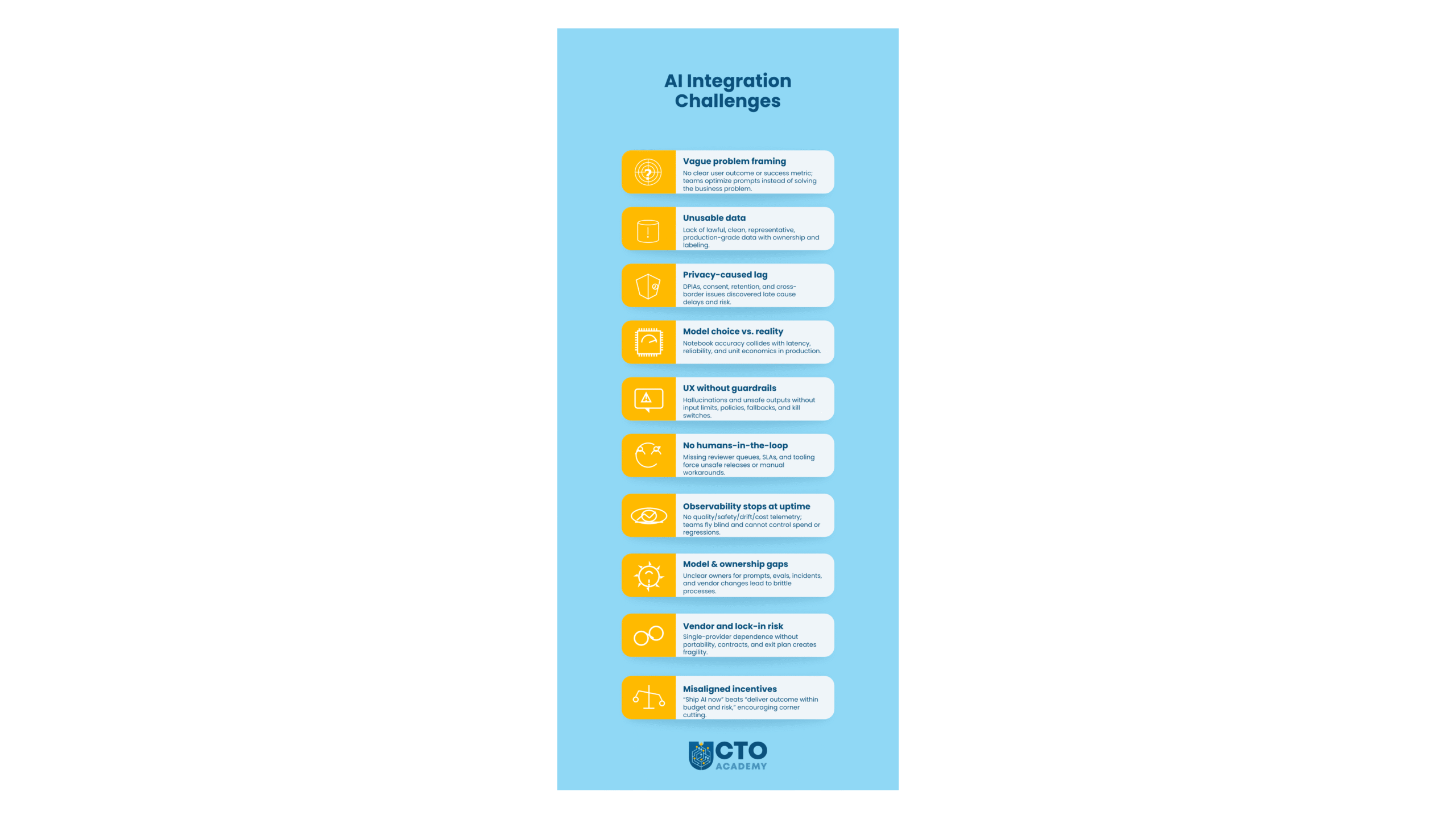
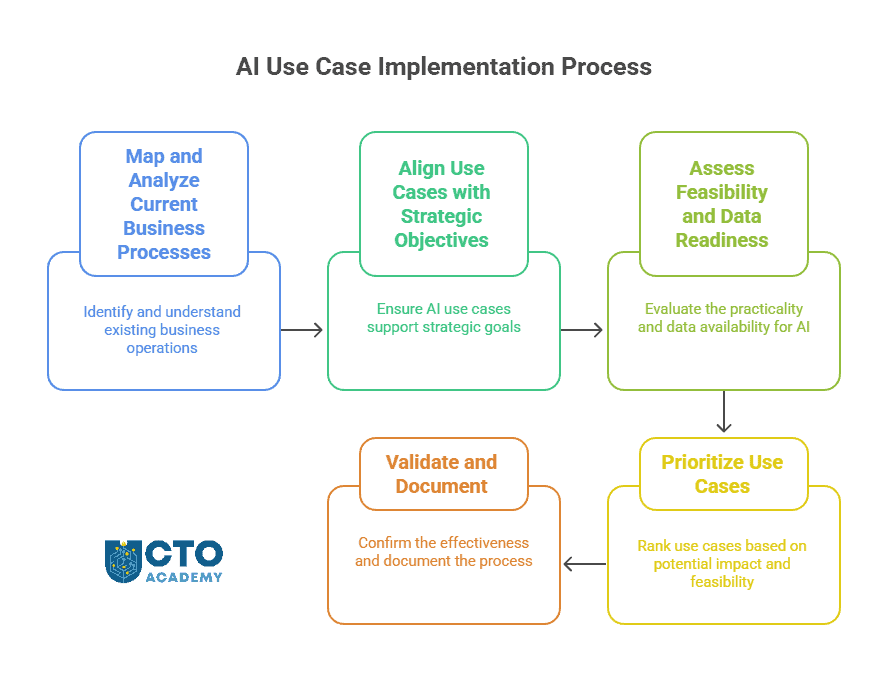
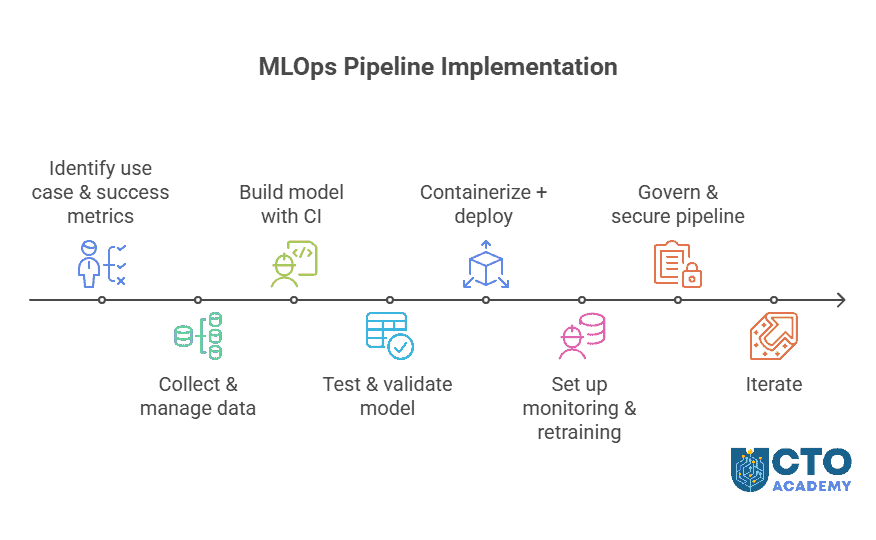
Senior technology leaders are under constant pressure to “do something with AI.” Boards want productivity gains. Vendors promise autonomous agents. Engineering teams are experimenting with coding copilots, browser agents, code-review bots, test-generation tools, and multi-agent orchestration systems.
The sales narrative is dangerously simple: connect a powerful model to tools, give it a goal, let one agent write the work and another review it, and watch delivery accelerate.
The evidence, however, is not that simple.
Generative AI is useful. It can accelerate parts of software development, writing, research, analysis, testing, documentation, and support. In bounded environments, it can perform well. But it remains far from reliable autonomous end-to-end execution.
TL;DR
No independent evidence verifies that any GenAI model can execute complex tasks end-to-end with 100% accuracy and no human oversight.
AI performs best in bounded workflows with clear inputs, explicit context, and external validation.
Benchmark results show a sharp gap between constrained coding tasks and realistic autonomous web workflows.
AI-assisted coding does not always save time; in mature codebases, it can slow experienced developers down.
More AI-generated output can increase review burden, especially for senior engineers.
Agentic review is not the same as independent verification; “AI checking AI” can create confident failure.
Leaders should start with documentation, task decomposition, and success criteria before prompting.
Treat AI as a high-leverage assistant inside a governed workflow, not as an autonomous operator.
Table of Contents
Download the AI Integration Playbook
AI integration is now a leadership challenge as much as a technical one.
It is not enough to run a few experiments, buy another AI tool, or ask teams to “find use cases.” Technology leaders need a way to decide what belongs in production, what needs stronger controls, what creates business value, and what introduces unnecessary risk.
The AI Integration Playbook for Technology Leaders gives you that structure.
If you are still working through the bigger question of how AI fits into your technology strategy, the related guide “Tech Leaders Guide to AI Integration” explains the full strategic context: infrastructure readiness, secure environments, business-aligned use cases, governance, compliance, cost control, and responsible innovation. This Playbook goes beyond that strategic explanation, straight into phased execution.
The Uncomfortable Reality
Here’s the harsh reality beyond marketing claims and hype: there is no single independent source that can verify that any model can execute any task end-to-end with 100% accuracy without human oversight or intervention. It simply does not exist.
(Our own usage that spans from deep research, intelligence, and analytics to software development, repos, and agent orchestration confirms that we cannot rely on AI end-to-end, even for the simplest of tasks.)
And the methodology of our research was simple: disregard any source that is in any way affiliated with anyone inside the sales chain of any model (from publisher to vendors to media/testing/benchmarking platforms funded by organizations directly or indirectly connected to companies behind Gen AI models). Turns out, the majority of “sources” and “independent benchmarks” are not independent at all, and that’s something you have to keep in mind when you are evaluating a model for possible inclusion in your stack, regardless of the use case. It should be the second step, right after defining a problem statement.
The Practical Conclusion
AI should be treated as an assistant inside a highly governed workflow, not as an accountable operator.
This distinction matters because many failed AI implementations begin with the wrong operating model. Teams treat the system as if it were a junior employee who can infer intent, understand organizational context, recover from ambiguity, and verify its own output.
In reality, even strong models behave more like powerful but inconsistent interfaces. They can produce useful work when the task is split into small chunks, well-bounded, the context is explicit, and the quality criteria are external to the model itself. In contrast, they become much less reliable when asked to run a messy process from start to finish.
That is a strong result, but it is not 100%, and, more importantly, it is achieved in a favorable environment: bounded coding tasks with files, tests, and pass/fail feedback. Consider this: What if in that remaining 15.1% that fail, you have guardrails, security, legal, privacy, and/or finances?
Even the top result still fails 27 out of 225 tasks.
Now compare that with WebArena, a benchmark designed to evaluate autonomous browser agents on realistic web tasks. WebArena includes self-hosted websites across domains such as e-commerce, forums, collaborative software development, content management, maps, calculators, scratchpads, and knowledge resources. The agent must navigate interfaces, interpret state, plan multiple steps, use tools, recover from mistakes, and decide when the task is complete.
In WebArena’s original results, the best GPT-4-based agent achieved only 14.41% end-to-end task success, while human performance reached 78.24%. Among the top five non-human configurations in the published results, the median score is 8.75%. If you’ve been a GPT-4 user who has now switched to 5.5, you know that the difference in performance between the older and new model is not significant.
The Contrast Is the Main Point
On a constrained coding task with executable feedback, models can appear highly capable. On realistic web workflows that require long-horizon action, contextual judgment, and error recovery, performance collapses. In other words, the gap between 84.9% and 8.75% is the gap between bounded assistance and operational autonomy.
The same pattern appears in coding productivity research
The assumption that AI-assisted coding is always faster is not supported by independent evidence. In a 2025 randomized controlled trial, METR studied 16 experienced open-source developers completing 246 tasks in mature repositories they knew well. Developers expected AI tools to reduce completion time by 24%. After using them, they believed the tools had saved about 20%. The measured result, however, went in the opposite direction: AI-assisted developers took 19% longer. The slowdown came from prompting, waiting, reviewing, and correcting output.
AI-assisted coding often helps less-experienced developers produce more code faster, especially in controlled or unfamiliar tasks. However, it may not help experienced developers move faster in complex repositories they already understand. In some settings, it can significantly slow them down.
AI can increase output volume before it increases verification capacity. If junior or peripheral contributors generate more code, and senior engineers must review more of it, the bottleneck does not disappear. It moves upstream into architecture, specification, integration, and review. The team may feel faster while becoming more fragile.
Former GitHub senior engineer Zen van Riel has warned about exactly this failure mode. In his video “I Quit My GitHub Job Because AI Breaks Software,” van Riel argues that companies are beginning to replace parts of the software development lifecycle with AI agents, including code review, testing, deployment decisions, and architecture. He acknowledges the productivity boost, but warns that unchecked agentic coding creates a mathematical certainty of bugs because developers cannot manually verify the growing volume of generated code. His central objection is not to AI assistance; it is to substituting autonomous systems for human oversight and then trusting AI to monitor other AI.
That warning aligns with what the benchmark and productivity evidence suggest. The problem is not that AI always writes bad code. The problem is that AI can produce more output than teams can understand, test, review, and maintain. Once that happens, the organization is no longer accelerating engineering. It is accumulating unverified complexity.
Axel Molist, CEO of Wu and leader of a 20-person software development team, describes the same shift from a management perspective. In “What 6 Months of AI Coding Did to My Dev Team,” Molist argues that AI has moved the primary workload from writing code to supervising and architecting systems. As tools generate code faster, the bottleneck moves upstream into precise technical specifications, documentation, architectural judgment, and institutional knowledge. Senior engineers become traffic controllers for machine-generated output, while junior developers may see immediate productivity gains without fully understanding the systems they are changing.
The Strategic Point Vendor Narratives Avoid
AI does not remove the need for engineering discipline. It just moves the engineering discipline earlier in the process.
Before AI, weak specifications often caused confusion during implementation. With AI, weak specifications cause plausible code to appear quickly. That makes the failure more dangerous because the system does not stop and say, “Hey, your requirements are incomplete.” It just fills in the gaps, predicting the next word or symbol. In other words, it invents assumptions and generates structure. It may even pass narrow tests while violating product intent, security expectations, architectural constraints, or operational realities.
Agent orchestration can make this worse
Things can go south really fast if leaders mistake orchestration for independent verification.
A second model reviewing the first model is still the same class of system: probabilistic, context-sensitive, and vulnerable to similar blind spots.
Granted, multi-agent review may improve coverage in some workflows, but it is not equivalent to independent validation. If the same missing context, bad assumption, or weak specification is present across agents, the review layer can simply produce a more confident failure.
This is why “AI reviewing AI” should not be the foundation of quality assurance. It can be one layer, but not the final authority.
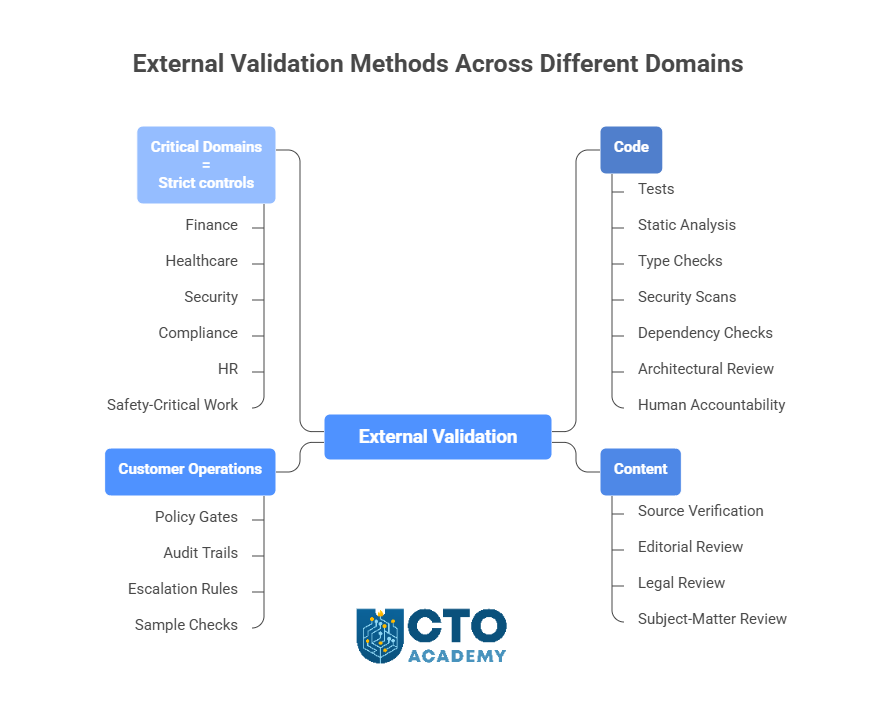
Different domains require different verification methodologies.
For code, external validation means tests, static analysis, type checks, security scans, dependency checks, architectural review, and human accountability.
For content, it means source verification, editorial review, legal review, or subject-matter review.
For customer operations, it means policy gates, audit trails, escalation rules, and sample checks.
For finance, healthcare, security, compliance, HR, or safety-critical work, it means strict controls designed around the consequences of failure.
The right operating model is therefore not “autonomous AI employee.” It is “high-leverage assistant embedded in a governed workflow.”
That model changes the implementation plan.
The Correct Implementation Sequence
Step 1: Document before prompting
What is the exact task?
What inputs are allowed?
Which sources are authoritative and trusted?
What assumptions are forbidden?
What edge cases matter?
What does a correct output look like?
What must the system do when information is missing?
What evidence must be attached?
What decisions require immediate escalation?
A prompt without this surrounding documentation is not a process. It is an improvisation request.
Step 2: Decompose work into bounded tasks
AI is strongest when asked to assist with defined pieces of work. For example:
Summarize this document.
Propose tests for this function.
Draft a migration plan using these constraints.
Extract these fields from this contract.
Compare these two policies.
Generate a first-pass implementation for this ticket.
Identify contradictions in this requirements document.
It is weaker when asked to “handle the process” without a precise operating frame.
Step 3: Measure delivery rather than output
Lines of code, number of commits, number of generated test cases, or number of tickets touched are weak measures. Leaders should instead measure:
Time to accepted pull request
Review cycles
Rework rate
Defect leakage
Incident rate
Senior-review load
Maintainability
The percentage of AI-generated work that is accepted without substantial modification.
Step 4: Protect senior engineers from becoming the hidden bottleneck
If AI increases code volume by 30%, but senior engineers spend 40% more time reviewing fragile output, the organization has not improved productivity. It has redistributed the cost.
Engineering leaders need explicit capacity planning for review, architectural governance, and documentation maintenance.
Step 5: Preserve institutional knowledge
As Molist argues, specifications increasingly become the product. If the AI can generate code quickly, then the durable asset is not the first draft of the implementation. It is the clarity of the system design, constraints, domain model, naming conventions, failure modes, operational rules, and business logic. Teams that fail to document these will become strangers to their own software.
He provided a vivid example. The company’s server crashed, returning the 503 error. An on-call junior developer used a proprietary AI to diagnose the problem and seek advice. The model read the documentation and suggested a reboot. The technician rebooted the instance, but it crashed again. So he again prompted the model. Repeated reading of the same documentation – as models commonly do — returned the same advice: reboot. He ended up rebooting the server 6 times, and it crashed every time. Until a senior developer checked the logs and immediately spotted the problem. As you can guess, some long-forgotten cron job hidden in one of the backend systems filled up the memory, causing the overload. The problem was that nobody remembered to include that specific cron job in the documentation, so the AI was completely unaware of it – just like the junior developer.
Conclusion
Generative AI will continue to improve. Agentic systems will become more capable. Some bounded tasks will probably reach very high reliability. But the evidence today does not support the claim that AI can execute complex end-to-end work with perfect accuracy and no human intervention.
The strongest results appear in constrained environments with clear feedback. The weakest results appear in realistic workflows with ambiguity, long-horizon planning, and high integration cost.
For senior technology leaders, the practical takeaways are clear:
Deploy AI aggressively where the workflow is bounded, observable, and externally verifiable.
Be cautious where the task requires judgment, tacit knowledge, compliance, safety, or accountability.
Do not let vendor claims replace internal measurement.
Do not let agentic review replace independent validation.
Most importantly, start with documentation, not with prompts.
Contrary to bombastic claims, AI is not even remotely ready to be trusted as an autonomous operator – at any level. But it is well-equipped to be used as an assistant by teams disciplined enough to tell it exactly what good work looks like. From the CTO’s perspective, this means focusing on team leadership first and only then on technology management.
A Chief Technology Officer is the senior technology leader responsible for connecting technical capability with business direction.
In some organizations, the CTO owns product architecture, engineering strategy, platform decisions, and innovation. In others, the role is focused on technology transformation, data, infrastructure, security, or AI adoption. The exact shape depends on the organization’s size, stage, and business model.
What has changed is the level of visibility.
The CTO is no longer judged only on technical depth or delivery performance. The role now carries broader responsibility for how technology creates value, manages risk, supports growth, and shapes the organization’s future capability.
AI has made that responsibility more urgent
Executive teams are asking where AI can improve productivity, where it can create new products or services, where it introduces risk, and how it should be governed. Those questions require strategic judgment, commercial awareness, leadership confidence, and the ability to explain complex trade-offs clearly.
This guide explains what a Chief Technology Officer does, how the role compares with CIO, VP of Engineering, and Head of Engineering, how AI is changing CTO responsibilities, and what skills modern technology leaders need to build CTO readiness.
TL;DR
The CTO role now sits closer to business strategy than traditional technical management.
A modern CTO connects architecture, engineering capability, product direction, security, data, AI, and commercial priorities.
The difference between CTO, CIO, VP of Engineering, and Head of Engineering usually comes down to scope: future direction, internal systems, execution, and team delivery.
AI has increased the pressure on CTOs to guide adoption, manage risk, set guardrails, and turn experimentation into useful outcomes.
The next step for many current and aspiring CTOs is to identify their capability gaps and build a deliberate development path.
Table of Contents
What is a Chief Technology Officer?
A Chief Technology Officer, or CTO, is the senior leader responsible for shaping how an organization uses technology to achieve its goals.
The role sits at the intersection of technology, business strategy, product direction, and organizational capability. As a CTO, you are expected to understand the technical landscape deeply enough to make sound decisions, but the role is not limited to technical expertise. The CTO must also decide which technology investments matter, which risks need attention, and how technical choices affect customers, teams, revenue, resilience, and long-term competitiveness.
The CTO role varies from one organization to another
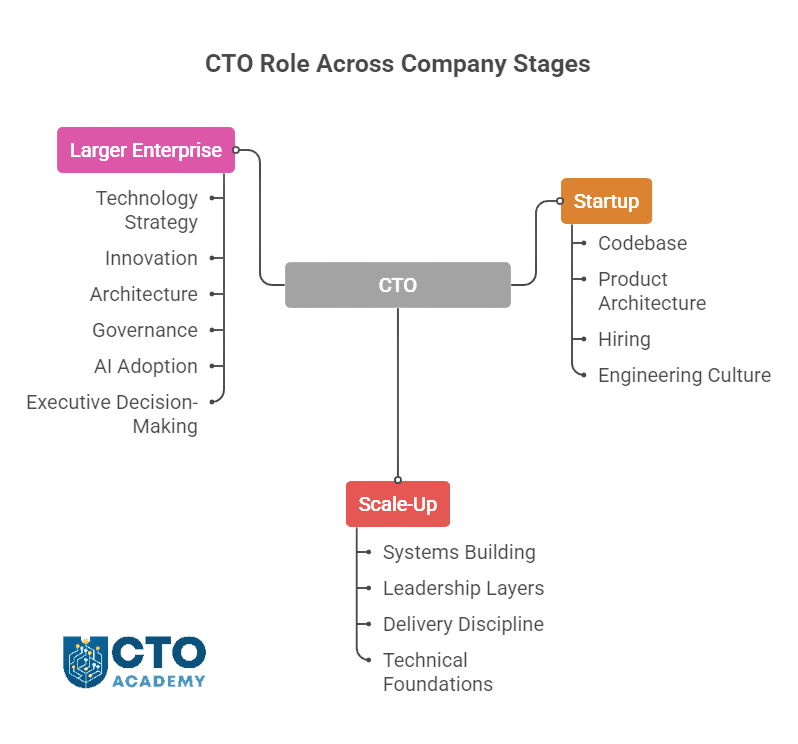
As the organization matures and expands, so does the scope of the Chief Technology Officer role
In a startup, the CTO may still be close to the codebase, product architecture, hiring, and early engineering culture.
In a scale-up, the role often shifts toward building systems, leadership layers, delivery discipline, and technical foundations that can support growth.
In a larger enterprise, the CTO may focus more on technology strategy, innovation, architecture, governance, AI adoption, and executive-level decision-making.
The common thread is accountability for technology direction
A CTO helps the organization answer questions such as:
What technology capabilities do we need to build?
Which systems should we modernize, replace, or protect?
How should engineering, product, data, security, and operations work together?
Where can emerging technologies such as AI create practical value?
What technical risks could limit growth or damage trust?
How do we turn business priorities into realistic technology decisions?
In other words, they help technical teams understand business priorities, and executive teams understand the consequences of technology choices.
In the AI era, CTOs are expected to explain what AI can and cannot do, where it belongs in the organization, how it should be governed, and what capabilities teams need to use it responsibly.
What Does a CTO Actually Own?
First and foremost, there has to be clear senior accountability for the technology decisions that shape the org’s future capability.
A CTO may own any or all of the following areas directly or strongly influence them through collaboration.
Table 1: CTO ownership
CTO responsibility
In practice
Technology strategy
Defining how technology supports business goals, growth priorities, operational needs, and long-term competitiveness.
Architecture and technical direction
Making decisions about systems, platforms, scalability, interoperability, technical debt, and future flexibility.
Engineering capability
Building the structures, standards, leadership habits, and technical culture that help teams deliver reliably.
Product and platform decisions
Working with product and business leaders to decide what should be built, bought, integrated, improved, or retired.
AI adoption and integration
Identifying practical AI use cases, assessing risks, choosing tools, and integrating AI into workflows, products, and systems.
Data and infrastructure readiness
Ensuring the organization has the data foundations, infrastructure, cloud capability, and operational maturity needed to support modern technology priorities.
Security and resilience
Making sure systems are reliable, secure, compliant, observable, recoverable, and trusted by customers and stakeholders.
Vendor and build-versus-buy decisions
Deciding when to build internally, when to buy, when to partner, and how to manage dependency on external platforms or suppliers.
Executive communication
Translating technical choices into business consequences so CEOs, boards, investors, and senior teams can make informed decisions.
Innovation and experimentation
Evaluating emerging technologies, deciding where to experiment, and turning useful learning into practical adoption.
Technology risk and governance
Creating decision-making frameworks for technology investment, AI use, security, compliance, resilience, and operational risk.
In smaller organizations, one CTO may cover most of these responsibilities directly. In larger ones, many of them will be shared with CIOs, CISOs, product leaders, data leaders, enterprise architects, and engineering executives.
The CTO’s value lies in connecting those moving parts into a coherent technology direction.
CTO vs CIO vs VP of Engineering vs Head of Engineering
The simplest way to understand the difference is to look at the primary focus of each role.
The CTO owns future-facing technology direction, the CIO owns internal technology operations, the VP of Engineering owns engineering execution, and the Head of Engineering usually owns day-to-day team delivery.
Table 2: Primary focus and responsibilities of different roles
Role
Primary focus
Typical responsibilities
CTO
Technology strategy and future capability
Architecture, innovation, AI strategy, technical direction, product-facing technology, and executive advice.
CIO
Internal technology and enterprise systems
IT operations, enterprise software, data systems, compliance, service delivery, and corporate technology services.
VP of Engineering
Engineering execution
Delivery, team structure, engineering processes, quality, hiring, performance, and engineering management.
Head of Engineering
Engineering leadership and management
Team performance, sprint delivery, technical standards, people management, and day-to-day delivery discipline.
By default, the CTO is the role most closely associated with future-facing technology decisions. That can include:
Product architecture
Platform strategy
Emerging technology evaluation
AI adoption
Technical risk
The explanation of technology choices to the board or executive team
CIO vs CTO
Recently, the CIO and CTO roles have been coming closer together and sharing a lot of similar responsibilities. But as a rule of thumb, the CIO is typically more focused on the internal technology estate. This may include enterprise systems, workplace technology, IT operations, data platforms, procurement, compliance, and service management.
In larger enterprises, the CTO and CIO work closely together: the CIO ensures the org runs reliably, while the CTO helps decide how technology should evolve.
VP of Engineering vs CTO
The VP of Engineering is usually responsible for turning technical direction into delivery. This role often owns engineering structure, hiring plans, delivery processes, quality standards, team performance, and execution rhythm. A strong VP of Engineering helps ensure the organization can build and ship reliably.
Head of Engineering vs CTO
The Head of Engineering role is usually more delivery and team-management focused, although the title varies widely. In smaller companies, the Head of Engineering may be the most senior engineering leader. In larger ones, the role may sit below a VP of Engineering and focus on a specific product area, platform, function, or team group.
Donning several hats at once
In early-stage companies, one person may cover several of these responsibilities. A founder CTO might act as CTO, VP of Engineering, architect, hiring lead, and product partner at the same time.
CTO Academy is a great example of that. Jason Noble, the co-founder and CTO, was even engaged as the COO at one point. The reason was simple: he designed the systems and most of the operations, so to maintain the momentum and stay agile, it was simpler to assume that role also than to train somebody else during those early stages.
Unlike startups, in larger organizations, the boundaries are usually clearer, though the CTO still needs to collaborate closely with CIO, product, security, data, and commercial leaders.
In the past, many CTOs were judged mainly on technical oversight: keeping systems running, guiding architecture, supporting delivery, and ensuring engineering teams had the tools and standards they needed. While those responsibilities still matter, they are no longer enough.
Modern CTOs are expected to connect technology decisions to business outcomes.
They need to understand how platforms, data, security, AI, engineering capability, and operating models affect growth, resilience, customer experience, and competitive position.
Table 3: Traditional vs modern CTO role
Traditional CTO emphasis
Modern CTO emphasis
Systems and infrastructure
Platforms, data, AI, security, and scalability.
Technical delivery
Business-aligned technology strategy.
Tool selection
Operating model and capability building.
Architecture decisions
Decisions about speed, resilience, cost, integration, and future flexibility.
Engineering supervision
Cross-functional executive leadership.
Innovation experiments
Measurable transformation and adoption.
Technical reporting
Board-level risk and opportunity communication.
Generic digital transformation
AI-enabled change linked to practical business outcomes.
This shift has changed how CTOs spend their time
The role is less about being the final technical authority on every decision and more about creating the conditions for better decisions across the organization.
A modern CTO:
Helps teams move quickly without creating uncontrolled risk.
Supports innovation without encouraging disconnected experiments.
Modernizes systems without breaking operational reliability.
Explains technical trade-offs in language that boards, CEOs, investors, and commercial leaders can act on.
AI has radically accelerated this change. It has made technology leadership more visible because AI decisions affect product strategy, data quality, security, customer trust, workforce capability, and business performance. That’s why the CTO is increasingly expected to help separate useful adoption from noise and turn emerging technology into governed, measurable progress.
For many existing and aspiring technology leaders, this is the point where the next stage of development becomes less about adding more technical depth and more about building executive range: strategy, communication, commercial judgment, organizational design, and leadership under uncertainty.
Why AI Has Made the CTO Role More Visible
AI has pushed technology leadership closer to the center of business strategy.
Boards and executive teams are pushing for AI adoption. Their questions rarely have purely technical answers, but they do require technical judgment. That is why the CTO has become more visible.
AI is not just a tooling decision. It affects data, workflows, security, governance, teams, customer experience, productivity, and business models. A poorly chosen AI tool can create risk without creating value. A promising AI use case can fail because the data is not ready, the workflow is unclear, or the organization has not decided who is accountable. A useful pilot can remain stuck as an experiment if it is never integrated into core systems or measured against business outcomes.
The CTO’s role is to help move beyond AI enthusiasm and into practical adoption
That means asking:
Where can AI create measurable value for customers, teams, or operations?
Which use cases are worth testing now, and which should wait?
What data, infrastructure, security, and integration work is needed first?
Which AI tools should be bought, built, customized, or avoided?
What guardrails are needed around privacy, compliance, accuracy, bias, and human oversight?
How should teams be trained to use AI responsibly?
How will success be measured beyond novelty or short-term productivity gains?
This is where the CTO becomes a translator between ambition and execution.
The CEO may want speed. The board may want assurance. Product teams may want experimentation. Engineering teams may worry about complexity, reliability, and technical debt. Legal, security, and compliance teams may see new forms of exposure. The CTO needs to connect those perspectives into a clear path forward. They help to decide where AI should be embedded, where it should be controlled, and, more importantly, where it should not be used at all.
This is also why AI leadership has become a development priority for technology leaders. Technical fluency matters, but it is not enough. CTOs need the executive range to assess risk, prioritize investment, influence stakeholders, govern adoption, and explain trade-offs in business terms.
It is a practical guide for integrating AI into core systems without compromising security, control, or leadership accountability.
What Skills Should the Modern CTO Possess
While technical judgment remains essential, it now sits inside a wider leadership skill set. This is one of the biggest shifts for senior technology leaders because many reach the point where technical knowledge is no longer the main constraint. The harder challenge is deciding what matters, influencing people who do not think like engineers, and making technology choices that support the business without creating avoidable risk.
Table 4: Modern CTO skill stack
Skill area
Purpose
Technical judgment
Understanding trade-offs, architecture, scalability, reliability, technical debt, and technical risk.
Systems thinking
Knowing how platforms, teams, workflows, data, security, vendors, and customer experience affect one another.
Strategic thinking
Technology choices need to support business priorities, not just technical preferences.
Product and customer awareness
Understanding how technology decisions affect users, customers, product direction, and market position.
Understanding AI capabilities, limitations, risks, integration demands, and realistic use cases.
Commercial awareness
Investment decisions need to connect to value, cost, growth, efficiency, and competitive advantage.
Security and risk awareness
Recognizing where technology creates operational, reputational, compliance, or customer trust risks.
Communication
Explaining technical complexity to non-technical stakeholders without oversimplifying the consequences.
Executive influence
Shaping decisions with CEOs, boards, investors, product leaders, finance teams, and commercial stakeholders.
Team leadership
Building confidence, alignment, standards, and capability across engineering and technology teams.
Change leadership
Leading transformation across systems, teams, behaviors, workflows, and operating models.
Strategic prioritization
Deciding what to pursue, what to delay, what to stop, and what risks the organization is willing to accept.
Governance
AI, security, data, architecture, vendor, and platform decisions need clear accountability and decision-making discipline.
The balance of these skills changes as the role becomes more senior. Earlier in a technology career, credibility often comes from technical depth and delivery. At the CTO level, credibility comes from judgment: knowing which technical issues matter most, how they affect the business, and how to bring people with different priorities into a shared decision.
AI has made that skill stack more demanding
CTOs now need enough technical fluency to challenge hype, enough commercial understanding to prioritize valuable use cases, enough governance discipline to manage risk, and enough leadership range to help teams change how they work.
For aspiring CTOs, this can be a useful way to assess readiness. The question is not simply “Am I technical enough?” It is also “Can I influence strategy, communicate trade-offs, lead through uncertainty, and connect technology decisions to business value?”
The best way to assess where you are right now is to benchmark your skill set against those who were in your shoes until most recently.
Use it to identify your strengths, gaps, and development priorities as a current or aspiring technology leader.
AI Leadership Responsibilities for Chief Technology Officers
CTO must decide where AI fits, how it should be used, what risks need to be controlled, and how adoption will create measurable value.
That responsibility usually falls across five connected areas: strategy, integration, governance, risk, and adoption.
AI Strategy
The CTO should help define how AI supports the organization’s business goals.
This means moving beyond general enthusiasm and identifying where AI can improve products, customer experience, operational efficiency, decision-making, engineering productivity, or internal workflows.
The CTO does not need to own every business case, but they should help test whether proposed AI initiatives are technically realistic, commercially useful, and aligned with the priorities.
Useful questions include:
Which AI use cases are most likely to create measurable value?
Which opportunities depend on better data, systems, or process maturity?
Which experiments are worth running now?
Which ideas are interesting, but not yet ready for investment?
How will AI priorities connect to product, operations, customer, and revenue goals?
Without this strategic filter, AI activity can become scattered. Teams may experiment in different directions, vendors may shape the agenda, and the organization may confuse visible activity with real progress.
AI Integration
The CTO is responsible for making sure AI can work inside the orgs’ existing technology environment.
AI tools rarely create value in isolation. They need to connect with data, workflows, platforms, APIs, security controls, customer journeys, and operational processes. A promising AI use case can easily fail if it cannot access reliable data, fit into existing systems, or support the way teams actually work.
The CTO needs to consider the following factors:
Where AI should sit in the architecture
How models and tools will connect to existing systems
What data is required, and whether it is trustworthy
How outputs will be checked, monitored, or reviewed
How AI-enabled workflows will affect teams and customers
What technical debt or infrastructure constraints need to be addressed
This is where AI moves from experiment to implementation. The CTO’s job is to avoid isolated pilots and build the technical foundations needed for repeatable adoption.
Good AI governance should, therefore, make the following points very clear:
Who can approve AI tools and use cases
What data can and cannot be used
When human review is required
How AI outputs should be tested
How vendors are assessed
How risks are escalated
How performance and unintended consequences are monitored
Governance is especially important as AI adoption spreads across departments. Without clear guardrails, different teams may adopt tools independently, expose sensitive data, duplicate costs, or create inconsistent customer and employee experiences.
AI Risk
AI creates new forms of technology and business risk. The CTO ensures that the organization understands those risks without unnecessary lag in useful progress.
Key areas include security, privacy, compliance, bias, reliability, explainability, intellectual property, vendor dependency, and operational resilience.
Some risks are purely technical. Others, on the other hand, are organizational. However, many sit between technology, legal, security, HR, product, and customer-facing teams.
The CTO should answer questions such as:
What happens if an AI system produces inaccurate or misleading output?
What data is being shared, stored, or used for model training?
Which AI decisions need human oversight?
How do we prevent sensitive information from being exposed?
What happens if a vendor changes pricing, access, performance, or terms?
How do we test AI systems before they affect customers or critical processes?
The goal is not to block AI adoption but to make adoption safe, clear, and controlled enough to be trusted.
AI Adoption
AI leadership also requires preparing people to work differently.
The CTO has a mandate to help teams understand how AI should be used, where it can support their work, and where judgment still matters. This includes engineering teams, product teams, operations, customer support, data teams, and senior leadership.
Adoption depends on far more than just tool access. Teams need guidance, examples, training, workflows, and confidence, especially non-tech teams. They also need to understand the limits of AI, including when outputs need to be checked and when automation is inappropriate.
The CTO should help create the conditions for responsible adoption by:
Supporting practical training
Encouraging useful experimentation
Sharing/controlling approved tools and patterns
Defining acceptable use
Building feedback loops
Measuring impact
Helping managers adapt workflows
Reinforcing where human judgment remains essential
Effective CTOs treat AI adoption as an organizational capability, not a one-off project.
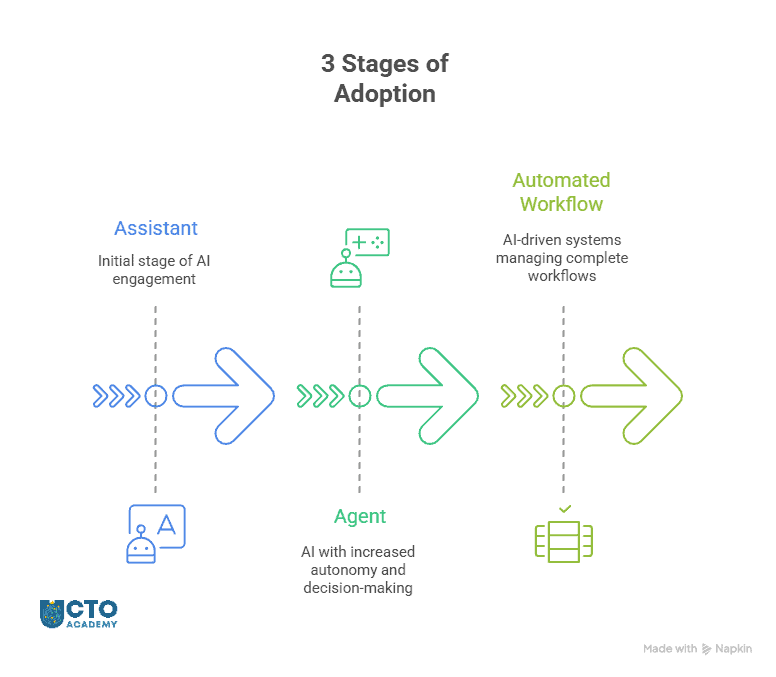
A playbook for turning AI ambition into secure, governed, and commercially useful implementation and moving from assistants to autonomous workflows.
Common Types of CTO Roles
There is no single version of the CTO role. The title can mean different things depending on the orgs’ size, stage, sector, product model, and leadership structure.
This is why two CTOs can have the same title but very different working weeks, as we often hear during weekly expert sessions and inside the Community discussions. One may be close to product architecture and engineering delivery. Another may spend most of their time with the board, regulators, enterprise customers, or transformation teams. Another may focus almost entirely on AI, data, platforms, and operating model change.
The most useful way to understand the variation is to look at the type of CTO role the organization needs.
Creating systems, processes, leadership capacity, and technical foundations that can support growth.
Enterprise CTO
Aligning complex technology estates with business strategy, governance, security, and long-term transformation. May also be a Group CTO, managing several verticals.
Providing senior technology leadership on a fraction of a project/scope for a fraction of the time.
AI-focused CTO
Leading AI strategy, integration, governance, platform choices, and organizational capability building.
These types are by no means fixed categories. In practice, CTO roles often combine several of them. A scale-up CTO may also be product-led. An enterprise CTO may also be responsible for transformation. A fractional CTO may be brought in specifically to support AI adoption, architecture decisions, or technical due diligence.
If you are interested in learning more about different types of CTO contracts, go here.
The important point is context
A strong CTO in one environment may not be the right fit for another. The skills needed to build a technical team from scratch are not identical to the skills needed to modernize a legacy enterprise estate, govern AI adoption, or advise a board on technology risk.
For aspiring CTOs, this distinction is useful because it helps clarify the type of role you are preparing for. For organizations, it helps define what kind of technology leadership is actually needed. A hiring brief that simply says “CTO” is rarely enough. The better question is: what technology challenge does this CTO need to lead?
The first 90 days are not just about proving technical authority. They are about understanding the organization, building trust, identifying constraints, and deciding where technology leadership can create the most immediate value.
A new CTO needs to learn before they prescribe. That means getting close to the business context, not just the technology estate:
What is the organization trying to achieve?
Where is growth being blocked?
Which systems are fragile?
Where are teams moving too slowly?
What risks are already visible?
What expectations does the CEO, board, or executive team have for the role?
In the first 90 days, a CTO should, therefore, focus on:
Understanding the business model, strategic priorities, and commercial pressures
Assessing people, systems, architecture, delivery performance, and technology risk
Building relationships with executive peers, product leaders, engineering teams, data, security, finance, and operations
Identifying technical debt, delivery constraints, capability gaps, and organizational bottlenecks
Clarifying expectations with the CEO, board, founder, or executive sponsor
Finding early credibility-building wins without rushing into cosmetic change
Creating a realistic technology leadership agenda for the next stage
The biggest mistake is to arrive with a fixed answer before understanding the context.
A CTO who moves too quickly can damage trust, misread the organization, or solve the wrong problem. A CTO who moves too slowly can lose momentum and allow existing risks to deepen.
The goal is to build enough understanding to make better decisions
By the end of the first 90 days, the CTO should be able to explain where technology is supporting the business, where it is constraining progress, which risks require attention, and what priorities should shape the next phase of leadership.
Technical problems often have boundaries. Executive leadership problems rarely do. A CTO may need to make decisions with incomplete information, balance competing priorities, defend investment choices, manage risk, and explain why the best technical answer is not always the best organizational answer.
Table 6: The list of connected capabilities that assess CTO readiness
Readiness area
Practical impact
Strategic thinking
Understanding how technology choices support growth, resilience, customer value, and competitive position.
Business and finance understanding
Reading commercial context, investment trade-offs, budgets, margins, cost structures, and value creation.
AI and technology fluency
Knowing where emerging technologies can create value, where they introduce risk, and what foundations are needed for adoption.
Executive communication
Explaining technical trade-offs clearly to CEOs, boards, investors, and non-technical stakeholders.
Decision-making under uncertainty
Making informed choices when the data is incomplete, the risks are uneven, and the answer is not obvious.
Stakeholder management
Building trust across product, engineering, data, security, finance, operations, commercial teams, and executive leadership.
Team leadership
Creating the standards, structures, culture, and leadership capacity that help teams perform.
Governance and risk
Establishing clear decision-making around architecture, AI, security, data, vendors, compliance, and operational resilience.
Personal leadership maturity
Developing self-awareness, resilience, confidence, and the ability to lead through pressure and ambiguity.
The CTO has to move between levels: deep enough to understand consequences, broad enough to guide direction.
For aspiring CTOs, the development path often starts by identifying which gaps matter most. Some leaders need stronger commercial confidence. Some need more experience influencing senior stakeholders. Others need to improve strategic prioritization, AI governance, or organizational leadership. The answer often depends on the role they want, the organization they serve, and the risks they are expected to manage.
This is where structured development helps because the CTO role is not learned through technical experience alone. It requires exposure to strategy, finance, leadership, innovation, communication, and decision-making in complex environments.
Identify your strengths, gaps, and development priorities before deciding your next step.
Related Resources for Current and Aspiring CTOs
The CTO role changes with context. A new CTO, an aspiring CTO, an engineering leader preparing for executive responsibility, and an experienced technology leader responding to AI will not all need the same next step.
Use these resources to continue from the area most relevant to your current challenge.
Table 7: The list of relevant resources for CTOs
Resource
Who it is for
Next step
First 90 Days as CTO
For new CTOs who need to establish credibility, assess the organization, and set clear leadership priorities.
CTO stands for Chief Technology Officer. It is a senior leadership role responsible for technology direction, technical capability, and the connection between technology decisions and business goals.
What does a Chief Technology Officer do?
A Chief Technology Officer leads technology strategy and helps align technical decisions with business priorities. Depending on the organization, a CTO may be responsible for architecture, engineering capability, product technology, AI adoption, innovation, security, governance, vendor decisions, and executive communication.
Is a CTO higher than a VP of Engineering?
Usually, yes. A CTO is typically more strategic and executive-facing, while a VP of Engineering is usually more focused on engineering execution, delivery, team performance, process, and quality. In smaller companies, however, the distinction can be less formal. One person may cover both roles, or the VP of Engineering may operate with responsibilities that look similar to a CTO role.
What is the difference between a CTO and a CIO?
A CTO usually focuses on technology strategy, product technology, innovation, architecture, future capability, and emerging technologies such as AI. A CIO usually focuses on internal technology systems, enterprise applications, IT operations, data infrastructure, compliance, service delivery, and corporate technology services. The two roles often work closely together, especially in larger organizations where technology strategy and internal systems need to be aligned.
What skills does a CTO need?
A CTO needs technical judgment, strategic thinking, business awareness, communication, leadership, AI fluency, security awareness, and the ability to manage trade-offs. As the role becomes more senior, the CTO also needs stronger executive influence, commercial understanding, governance discipline, team leadership, and decision-making under uncertainty.
How has AI changed the CTO role?
AI has made the CTO role more visible because organizations need senior technology leadership to assess use cases, manage risk, integrate tools, govern data, and explain AI’s business impact. AI is not only a technical issue. It affects workflows, products, customer experience, security, privacy, compliance, workforce capability, and operating models. The CTO helps the organization decide where AI can create value and how it should be adopted responsibly.
How do you become a CTO?
Most CTOs build experience across engineering, architecture, product, leadership, strategy, and executive communication. The path often starts with technical credibility, then expands into team leadership, delivery ownership, stakeholder management, business understanding, and strategic decision-making. Structured leadership development can help technical leaders prepare for the broader responsibilities of the role.
Key Takeaways
The CTO role is no longer defined by technical seniority alone, but by the quality of judgment a leader brings to business-critical technology decisions.
AI has raised the stakes because technology choices now affect more than systems and delivery. They shape how organizations compete, manage risk, build capability, and earn trust.
So, for current and aspiring CTOs, the real question is not simply whether they understand the technology. It is whether they can turn technical understanding into strategy, influence, governance, and measurable business value.
That shift rarely happens by accident. Even if it does, the gaps it creates are too large to overcome. The optimal path requires deliberate development across leadership, commercial thinking, communication, AI readiness, and executive decision-making.
FACT: Most AI projects fail before the first prompt.
In a recent Expert Session hosted by CTO Academy, Umbar Shakir, a Partner and EMEA Lead for AI at Gartner Consulting, made a point that stuck with us: The number one reason AI initiatives fail is the problem statement. Not the model, prompt, vendor, or the team’s enthusiasm. It is the problem statement.
That may sound oversimplified, but it explains a lot.
In practice, AI initiatives begin with a rush toward action:
“We need an AI assistant.”
“We should automate this process.”
“Can we use ChatGPT for customer support?”
“Let’s build an internal copilot.”
“Can we add AI to the product?”
These are not bad ideas. However, they are not problem statements. They are just proposed solutions looking for a problem.
And once that happens, everything downstream becomes weaker: the prompt, the model choice, the data requirement, the workflow design, the success metric, the vendor brief, the governance model.
In other words, a weak problem statement is often the first failure. Everything after that inherits the weakness.
This guide surfaces hidden dangers, shows what not to do, and provides a simple, high-impact AI (business) problem statement template.
TL;DR
AI initiatives often fail before the model, prompt, or vendor is chosen because the problem statement is too vague.
“We need an AI assistant” or “we should automate this” are not problem statements. They are proposed solutions looking for a problem.
Before approving an AI pilot, leaders should define who has the problem, what friction exists today, why it matters, what better looks like, how success will be measured, and what constraints the solution must respect.
A strong AI problem statement turns vague ambition into a testable business initiative.
Without this clarity, teams risk building impressive demos with little operational value.
With it, leaders can assess whether AI is appropriate, whether the data exists, which risks matter, and whether the initiative warrants investment.
Table of Contents
AI Makes It Dangerously Easy to Move Faster Than We Should
You can open a tool, write a prompt, generate an output, build a prototype, and show something impressive in a meeting before anyone has properly defined what is being solved.
While that speed feels productive, in leadership terms, it can create false momentum.
The team may be moving quickly, but toward an unclear outcome. The pilot may look impressive, but solve a marginal problem. The prompt may be clever, but built on a vague assumption. The tool may work, but not fit the workflow where value is actually created.
This is why the first leadership discipline is not prompt engineering.
“What problem are we solving, for whom, and what changes if we solve it well?”
Or, as Umbar elegantly put it:
To what end?
For what benefit?
At what cost?
Bad AI Problem Statements Examples
Here are a few examples that look reasonable at first glance:
“We need to use AI to improve productivity.”
“We want an AI tool to help our support team.”
“We should automate reporting.”
“We need a chatbot for internal knowledge.”
“We want to use AI to reduce manual work.”
Each of these may point toward a real opportunity, but, at the same time, none of them is clear enough to guide an AI initiative.
Why?
Because they do not:
Identify the specific user.
Describe the current friction.
Explain the business cost.
Define what better looks like.
Create a measurable test of success.
And if the problem is that vague, the team is forced to guess. That is when AI work becomes theatre: demos, dashboards, prompts, prototypes, and workshops with little to no operational value.
The Most Optimal Method to Define the Problem
Use this simple structure before you approve an AI pilot, brief a vendor, or ask a team to start prompting.
The AI Problem Statement Template
For [specific user/team], the problem is [specific friction], caused by [current constraint, workflow breakdown, or decision bottleneck], resulting in [measurable cost, delay, risk, or missed opportunity].
A successful AI-enabled solution would [desired outcome], measured by [success metric], within [data, workflow, compliance, security, or customer constraints].
That’s it.
Simple enough to use in a meeting.
Specific enough to expose weak thinking.
Practical enough to guide the next decision.
Example: Weak vs Strong
Weak:
“We need an AI tool to help customer success teams work faster.”
This sounds useful, but it doesn’t tell us:
Which customer success teams?
What work is slow?
Why is it slow?
How much time is being lost?
What would improvement look like?
Where would the AI output be used?
What risks or constraints matter?
Now compare that with this example.
Strong:
“For enterprise customer success managers managing more than 40 active accounts, the problem is that renewal preparation requires manually reviewing CRM notes, support tickets, call transcripts, and product usage reports. This creates several hours of preparation work each week and increases the risk of missing important customer signals before renewal conversations.
A successful AI-enabled solution would generate a reliable renewal briefing in under five minutes, measured by reduced preparation time, manager trust in the summary, and improved renewal meeting quality, within existing CRM, privacy, and customer data constraints.”
Now the team has something tangible to work with. They can:
Ask whether the data exists.
Decide whether AI is appropriate.
Test the output.
Define acceptable risk.
Compare this against other use cases.
Decide whether the initiative deserves funding.
The AI work now has a real shape.
5 Questions Every AI Problem Statement Must Answer
1. Who exactly has the problem?
Avoid “the business,” “the team,” or “users” here. Be specific:
Are they enterprise account managers?
Finance analysts closing month-end?
Engineers triaging incidents?
Support agents handling technical tickets?
Product managers synthesizing customer feedback?
Security analysts reviewing alerts?
Remember, AI initiatives become much clearer when the user is named precisely.
2. What is the current friction?
Describe the work as it happens today:
What is manual?
What is repetitive?
What is slow?
What is error-prone?
What requires judgment?
What depends on scattered information?
What creates a delay between decision and action?
This step stops teams from applying AI to a vague sense of inefficiency since it doesn’t describe the usual suspects: the dream state, the tool you want, or the current reality.
3. What is the cost of the problem?
If there is no cost, there is no priority. However, cost does not always mean direct financial loss. It may be:
Time lost
Customer delay
Decision latency
Operational risk
Compliance exposure
Rework
Poor quality
Missed revenue
Employee frustration
Leadership blind spots
The point is to make the pain visible.
4. What would better look like?
Do not define success as “we launched AI,” because that is activity, not value. Instead, define the improved state. For example:
“Reduce renewal preparation from 3 hours to 15 minutes.”
“Classify incoming support tickets with 90% sampled accuracy before routing.”
“Give managers a weekly risk summary they trust enough to use in planning.”
“Reduce manual report preparation by half without increasing errors.”
“Identify high-risk incidents faster while keeping a human approval step for escalation.”
This is where an AI idea becomes a testable business initiative.
5. What constraints must the solution respect?
A usable problem statement should name the constraints early. For example:
Customer data must remain inside approved systems.
Outputs must be explainable to a manager.
A human must approve high-risk actions.
The solution must work inside the existing CRM.
The cost per completed task must stay below a defined threshold.
The system must not use sensitive data in prompts.
The output must be auditable.
Remember: Constraints do not slow the initiative down. They stop the team from discovering obvious blockers too late.
Download the AI Integration Playbook for Tech Leaders
A phase-based blueprint for integrating AI into core systems without compromising security, governance, or control.
Let’s reiterate. The next time someone says, “Can we use AI for this?”, do not start with the prompt. Start with this:
“For [specific user/team], the problem is [specific friction], caused by [current constraint or workflow breakdown], resulting in [measurable cost, delay, risk, or missed opportunity].
A successful AI-enabled solution would [desired outcome], measured by [success metric], within [data, workflow, compliance, security, or customer constraints].”
Rule of Thumb: If the team cannot complete this, they are not ready to build.
They may still be ready to explore, research, or investigate, though. But they are not ready to choose a model, approve a vendor, design a workflow, or judge whether a prompt is good.
Because a prompt is only good in relation to a problem.
A Leadership Rule of Thumb
Before funding or approving an AI initiative, ask for a one-page problem statement.
This should not be mistaken for a slide deck, a demo, a list of tools, or a claim that “AI can do this.”
The one page should tell you (in this precise order):
Who has the problem
What is broken or slow today
Why it matters
What better looks like
How success will be measured
What constraints must be respected
If that one page is clear, the AI conversation becomes much more useful. If it is not clear, the team is probably about to automate ambiguity. And, as you know, ambiguity scales badly.
To Sum Up
AI can accelerate work. But it also accelerates weak thinking. And this is the result:
The sequence of consequences when AI initiatives are forced without a proper use case definition and problem statement.
A vagueproblem becomes a vagueprompt.
A vague prompt produces a vagueoutput.
A vague output creates vagueconfidence.
And vague confidence is expensive.
Bottom line, the organizations that get value from AI will not be the ones that simply move fastest. They will be the ones that define the problem clearly enough for speed to matter.
Frequently Asked Questions (FAQ)
What is an AI problem statement?
An AI problem statement is a clear description of the business problem an AI initiative is meant to solve. It should define who has the problem, what friction they experience today, why that friction matters, what improvement would look like, and how success will be measured. Without this clarity, teams risk starting with a tool or prompt instead of a real business need.
How is an AI use case different from an AI idea?
An AI idea often sounds like “we need a chatbot” or “we should automate reporting.” An AI use case is more specific. It connects a defined user, workflow, pain point, desired outcome, success metric, and set of constraints. The difference matters because AI ideas can generate activity, while well-defined use cases create something the business can test, fund, and improve.
What should a strong AI problem statement include?
A strong AI problem statement should name the specific user or team, describe the current friction, explain the cause of that friction, identify the measurable cost or risk, define the desired outcome, state the success metric, and name any data, workflow, security, privacy, compliance, or customer constraints.
Why should leaders define the problem before choosing a model, vendor, or prompt?
Because the model, prompt, vendor brief, data requirement, workflow design, governance model, and success metric all depend on the problem being solved. If the problem is vague, every downstream decision becomes weaker. A clear problem statement gives the AI work a real shape before time and budget are committed.
How do you know whether an AI problem statement is too vague?
It is probably too vague if it uses broad phrases like “improve productivity,” “help the team,” “reduce manual work,” or “use AI for customer support” without explaining who is affected, what work is slow or broken, what the cost is, what better looks like, or how success will be measured. If the team cannot complete the problem statement clearly, they may be ready to explore, but they are not ready to build.
What makes an AI use case worth pursuing?
A use case becomes worth pursuing when the problem is specific, painful enough to matter, measurable, and constrained enough to test safely. Leaders should be able to see who benefits, what business value is created, whether the right data exists, what risks must be managed, and whether the expected improvement justifies investment.
How should teams prioritize multiple AI use cases?
Start by separating promising ideas from use cases that are actually ready for investment. A strong use case should have a clear business problem, measurable value, workflow fit, data readiness, manageable risk, named ownership, and a realistic path to production. If several ideas are competing for attention, use these criteria to decide what should scale, what should pause, and what needs redesign before more budget goes in. For a practical framework, read our guide to building an AI operating model.
How do you decide whether AI is actually the right solution?
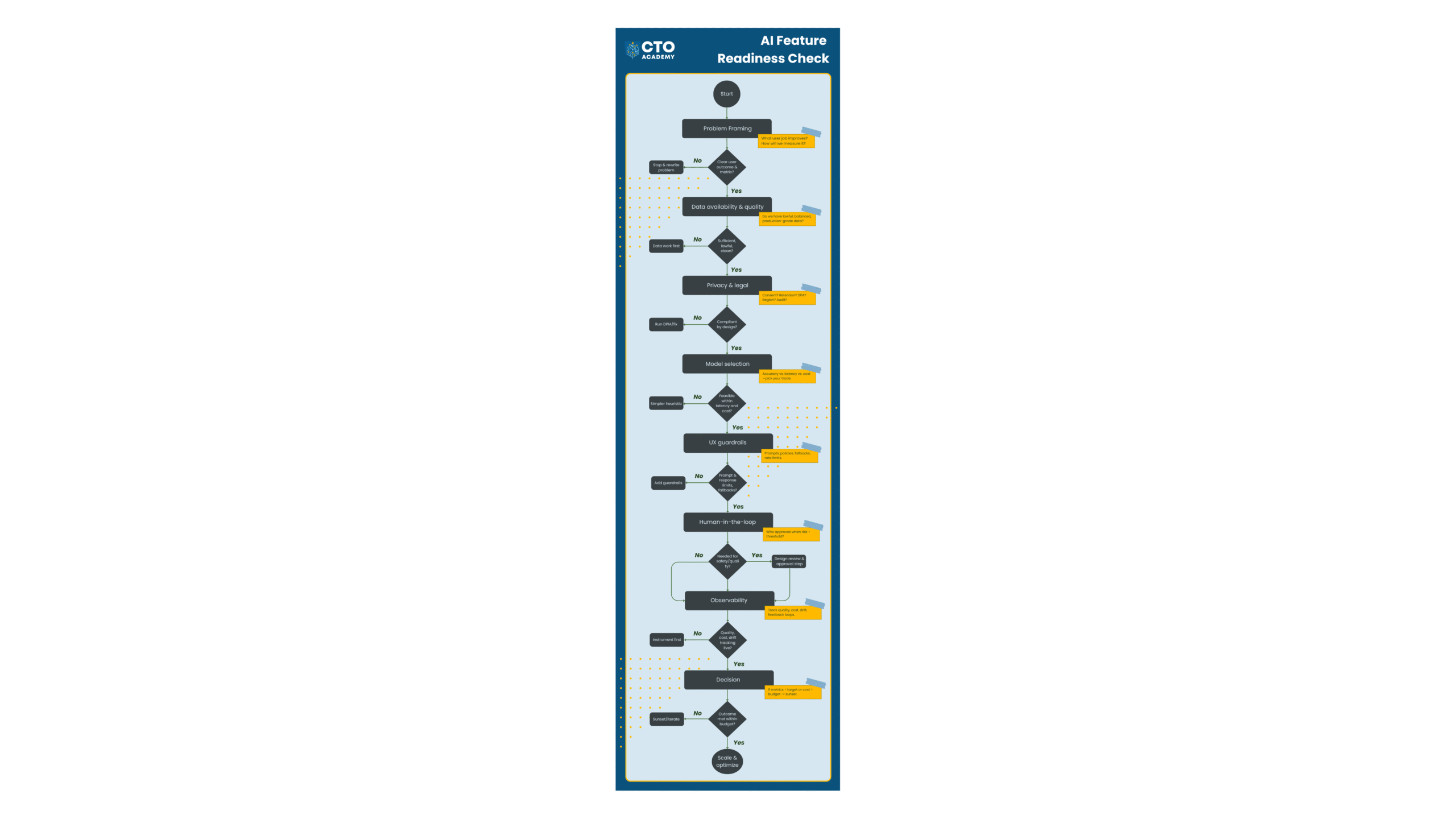
AI should not be the default answer. Before building, ask what user behavior needs to change, what metric should improve, and what you would ship if AI were not available. If a simpler rule, workflow change, automation, or reporting improvement can solve the problem, start there. AI becomes worth considering when the problem is specific, measurable, data-supported, and difficult to solve well with simpler approaches. For a deeper decision check, read our AI feature readiness guide.
What data readiness questions should be asked before approving an AI use case?
Ask whether the required data exists, who owns it, whether it is accessible, whether it is lawful to use, whether it is fresh enough, and whether teams can trust it inside the workflow. Data that is technically available but poorly governed, hard to access, or disconnected from production reality can weaken even a well-framed AI use case. For a broader roadmap on trusted, accessible data for AI, read our guide to data democratization.
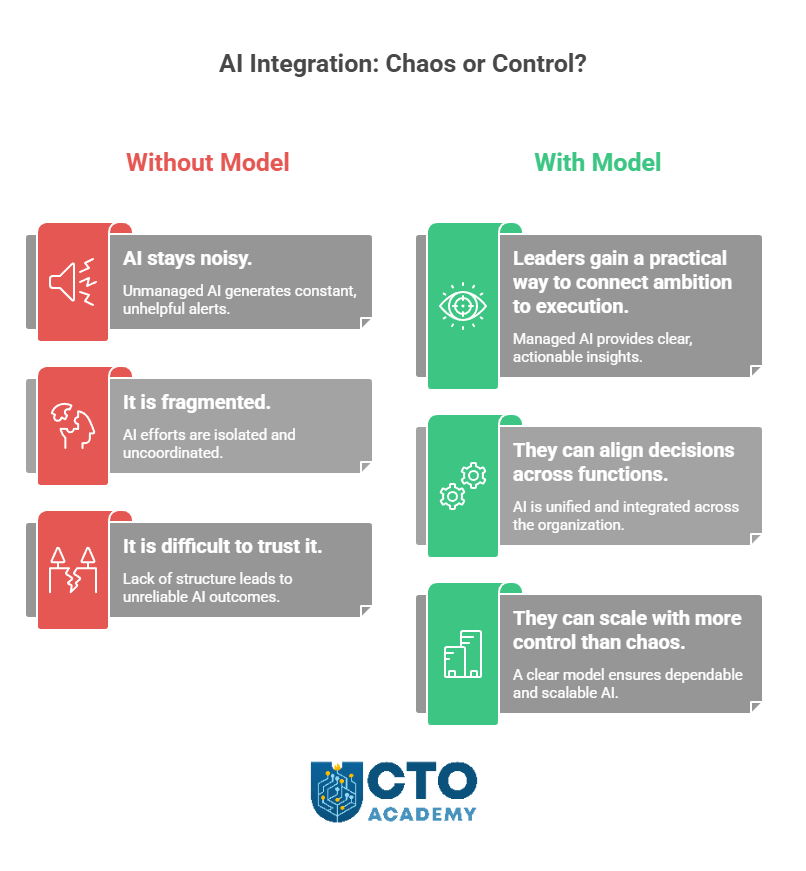
The reality is that AI is everywhere in the board narrative, but often nowhere in the operating model. The result? Programs look busy, roadmaps look ambitious, and reporting looks active, yet accountability remains thin. Nobody is fully sure which use cases should scale, who owns the decision, or what “production-ready” means. In fact, orgs don’t really know how to run it inside the business in a way that is governed, useful, and repeatable.
So, the real bottleneck is operating practice because leaders failed to implement an AI operating model in time or at all.
Situation in the org with vs without an AI operating model
What follows is a practical framework for getting that control back. This guide will help you separate signal from noise, identify why so many AI efforts stall between pilot and production, and put a more usable structure around decisions, ownership, risk, and delivery. Rather than offering another high-level strategy view, it will give you a field-ready operating model with roadmaps you can use to assess what should scale, what should pause, and what needs redesign before more investment goes in.
TL;DR
AI is not failing because of a lack of ambition. It is failing because many organizations still lack a usable operating model.
The real gap is between pilot activity and accountable production: teams experiment, but ownership, decision rights, and scale criteria remain unclear.
A strong AI operating model defines six essentials: ownership, readiness, governance, rollout, monitoring, and executive review.
This helps leaders decide what should scale, what should pause, and what needs redesign before more time and budget are committed.
The goal is simple: turn AI from scattered experimentation into governed, useful, repeatable delivery.
This is where many teams get stuck: they treat pilot activity and production readiness as if they were only a few steps apart. In practice, they are operating under different standards entirely, as Table 1 below clearly shows.
Table 1: Pilot vs production-what changes when AI becomes accountable
Area
Pilot mode
Production mode
Primary goal
Explore potential and test whether the use case is worth pursuing
Deliver reliable value in a live business environment
Ownership
Interest is shared across teams, but accountability is often still loose
A named business owner and delivery owner are clearly accountable
Success criteria
Early signals, directional feedback, and rough promise
Defined outcomes, measurable KPIs, and agreed thresholds for success
Decision-making
Informal, fast-moving, and often dependent on sponsor enthusiasm
Structured, documented, and tied to clear decision rights
Risk review
Partial, delayed, or handled in parallel with experimentation
Built into the operating path before broader rollout
Security and compliance
Considered when concerns become visible
Addressed as a standard requirement before scale
Workflow integration
Tested in limited or artificial conditions
Proven inside real workflows, systems, and user behavior
User adoption
Interest is assumed or lightly tested
Adoption, training, support, and behavior change are actively managed
Weaker leadership credibility due to slower execution (i.e., teams become busy maintaining optionality instead of making decisions).
Rising confusion about where value is actually being created (i.e., executives hear progress updates, but still cannot see which use cases deserve investment, which should stop, and who owns the final call).
If there are parallel pilots alive, attention consumption is rising while confidence is falling.
Pilot theater is not just a tooling problem. It is a leadership problem.
Download the AI Integration Blueprint
Move beyond pilots and integrate Gen AI into core systems, without losing control of cost, security, or compliance. Get the practical roadmap tech leaders use to modernize infrastructure, prioritize the right use cases, and set governance that scales.
It is, effectively, the translation layer between ambition (pilot) and accountable delivery (production). In other words, an operating model turns broad goals into repeatable operating practice by defining three things:
Table 2: Six components of the AI operating model and questions they answer
Component
Core question it answers
Best practice
Ownership and decision rights
Who owns the decision?
Assign a named business owner, a named delivery owner, and a clear escalation path for every use case.
Readiness and use-case selection
What is ready to move forward?
Define the problem, measurable value, workflow fit, data availability, manageable risk, and a shared definition of production-ready.
Governance and risk controls
What must be reviewed and controlled?
Build risk into the operating path early, with clear review points, evidence requirements, and escalation rules.
Delivery and rollout sequencing
How does work move into production?
Use a staged rollout path: test in a bounded setting, validate value, confirm controls, integrate into workflow, and scale deliberately.
Incident response and monitoring
How do we manage issues after launch?
Monitor performance, exceptions, and misuse actively, with clear response ownership and rollback authority.
Executive communication and review cadence
How does leadership stay informed and accountable?
Run regular portfolio reviews covering progress, risk, readiness, ownership, and the decisions leadership must make next.
Taken together, these six components form a usable operating model because they answer all six questions leaders keep running into. That is what turns AI from scattered experimentation into accountable delivery.
A product team wants to move a promising AI feature forward because early testing looks strong and executive interest is high. Security pushes back because the controls, data boundaries, or review steps are still unclear. Engineering is already partway into implementation. Data is being asked for support. The meetings multiply, but the decision does not get better.
So here, we have a perfect storm:
Unclear ownership (across product, engineering, data, and security)
Pilots without scaling criteria
Risk review arrives too late
No shared definition of acceptable value or acceptable risk
Executive pressure without operating clarity
This is all avoidable if we implement an AI operating model in time.
Helps teams decide whether a promising use case is actually ready for controlled rollout.
Prevents teams from scaling enthusiasm ahead of evidence by forcing a practical review of workflow fit, data quality, risk exposure, ownership, and measurable value.
Used after initial interest is established, but before a pilot is allowed to expand.
Here is an exemplary AI readiness scorecard you can use right now.
Table 4: AI readiness scorecard (example)
Assessment area
What to check
Key question
Score (1–5)
Red flags if weak
Problem clarity
The business problem is specific, understood, and worth solving
Is the use case tied to a real operational or commercial problem?
Vague objective, novelty-led use case, no clear pain point
Strategic relevance
The use case supports a current business priority
Does this initiative clearly connect to a strategic goal or measurable priority?
Interesting idea, but weak executive relevance
Value case
Expected value is defined in practical terms
Can the team describe the expected gain in cost, speed, quality, revenue, or risk reduction?
Benefits are assumed, not quantified
Success criteria
Clear outcomes and KPIs are agreed upon upfront
Do we know how success will be measured during the pilot and after rollout?
No baseline, no agreed KPIs, no threshold for scale
Ownership
Accountability is explicit across business and delivery
Is there a named business owner and a named delivery owner?
Shared interest but no final owner
Decision rights
Approval and escalation paths are defined
Do we know who can approve, pause, escalate, or stop the initiative?
Too many stakeholders, no final call
User workflow fit
The use case fits real work, not just a technical demo
Will this improve an existing workflow that people actually use?
Impressive output, weak day-to-day adoption case
User adoption readiness
Change, training, and team adoption have been considered
Are users likely to trust, adopt, and use the solution consistently?
No training plan, unclear user behavior impact
Data readiness
The required data is available, accessible, and usable
Do we have the right data quality, structure, permissions, and lineage?
Poor data quality, access gaps, unclear provenance
Technical feasibility
Integration and engineering complexity are understood
Can this be implemented within the current architecture and tooling?
Demo works in isolation, but not in the production stack
Security readiness
Security review requirements are known and manageable
Have data handling, access control, and exposure risks been assessed?
Sensitive data risk, unresolved access concerns
Privacy and legal readiness
Privacy, regulatory, and contractual implications are understood
Are there any privacy, compliance, IP, or legal blockers?
Legal review not started, unclear data rights
Model risk
Reliability, explainability, and failure modes are understood
Do we understand accuracy limits, hallucination risk, and edge cases?
Model behavior not tested in realistic conditions
Operational controls
Monitoring, incident handling, and rollback plans exist
If this fails, drifts, or causes harm, do we know what happens next?
No monitoring owner, no rollback path
Vendor readiness
Third-party tools have been properly assessed
If a vendor is involved, have security, commercial, and support checks been completed?
Vendor selected on demo strength alone
Delivery capacity
The team has the people and time to execute
Do we have sufficient product, engineering, data, and governance capacity?
Pilot approved without delivery bandwidth
Production readiness
The team has defined what “ready to scale” means
Are the technical, operational, and control thresholds for rollout explicit?
Pilot continues with no scale gate
Executive visibility
Leadership can review progress and unblock decisions
Is this use case visible in the right governance and reporting cadence?
Work is active but not decision-visible
Suggested scoring guide
Score
Meaning
1
Not in place
2
Major gaps
3
Partially ready
4
Mostly ready
5
Ready with confidence
Table 5: Suggested interpretation of the scorecard
Total readiness result
Meaning
Recommended action
75–90
Strong readiness
Proceed to controlled rollout
55–74
Moderate readiness
Proceed only with targeted gap closure
35–54
Weak readiness
Keep in pilot or redesign
Below 35
Low readiness
Do not scale
Optional decision rule
You can also add a simple gate beneath the table:
No use case should scale if Ownership, Success criteria, Security readiness, Privacy and legal readiness, or Production readiness scores below 3.
Any category scored 1 requires explicit review before more investment is approved.
A concise label for the box could be: “Ready to scale, or only ready to discuss?”
A good AI update should help leadership review progress, risk, resourcing, and the decisions required to move forward.
The aim is not to show everything that is happening, but to show what matters most at the decision level.
Table 8: Suggested executive update structure
Update area
What leadership needs to see
Why it matters
What good looks like
Portfolio summary
A concise view of active AI initiatives by stage: exploration, pilot, controlled rollout, scale
Gives executives a clean picture of where effort is concentrated
A simple portfolio view with clear stage definitions and no inflated reporting
Business value
What each priority initiative is expected to improve in cost, speed, quality, revenue, or risk reduction
Keeps the conversation tied to business outcomes rather than technical motion
Value stated clearly, with baseline and target where possible
Progress since last review
What has moved forward, what has stalled, and what has changed materially
Helps leaders track momentum without getting lost in detail
A short narrative focused on movement, not task lists
Risk position
The most material active risks across privacy, security, legal, adoption, vendor, and delivery
Makes risk part of the operating conversation, not a separate escalation later
Top risks summarized with ownership, mitigation status, and escalation threshold
Decisions required
The approvals, tradeoffs, or interventions needed from leadership now
Prevents updates from becoming passive status meetings
Specific decisions clearly framed with options and implications
Resourcing and capacity
Where delivery capacity, funding, or specialist support is constraining progress
Shows whether the portfolio is realistically supported
Clear view of bottlenecks, not vague references to bandwidth
Readiness to scale
Which initiatives are ready to move forward, which should remain in pilot, and which should stop
Brings discipline to go/no-go visibility
Readiness assessed against explicit criteria, not enthusiasm
Cross-functional alignment
Whether product, engineering, data, security, legal, and procurement are aligned
Exposes where friction is structural, not personal
Alignment issues stated plainly, with the owner and next action
Incidents or exceptions
Any major failures, policy breaches, quality issues, or unexpected operational problems
Reinforces that oversight includes live accountability, not just pipeline optimism
Clear summary of issue, response, impact, and corrective action
Next-period priorities
The few actions or outcomes leadership should expect before the next review
Keeps the operating rhythm focused and forward-looking
Three to five priorities, each tied to an owner and a timeline
Example executive editorial update format
You can also present the update in a simple editorial structure like this:
1. Current portfolio view 12 active initiatives: 4 in exploration, 5 in pilot, 2 in controlled rollout, 1 at scaled deployment.
2. What is progressing Two customer-support use cases moved from pilot to controlled rollout after meeting readiness criteria on workflow fit, quality threshold, and security review.
3. What is blocked One internal knowledge assistant remains in pilot due to unresolved data-access controls and unclear ownership of rollback decisions.
4. Top risks The highest current risks are vendor dependency in one workflow, weak adoption in another, and late legal review on a third externally facing use case.
5. Decisions required from leadership Approve additional delivery capacity for the two rollout candidates. Decide whether to pause the internal knowledge assistant until security ownership is clarified. Confirm risk appetite for external-facing generative use cases this quarter.
6. What happens next Before the next review, the team will complete one vendor assessment, close two open control actions, and return with a go/no-go recommendation on three pilot-stage initiatives.
Cadence
For most organizations, this works best as a monthly executive review and a quarterly board-level summary, with the board version simplified to focus on portfolio value, top risks, resourcing pressure, and major decisions ahead.
AI vendors are quite skilled at showing what a tool can do in ideal conditions. The real question is whether the product fits your environment, controls, workflows, and commercial reality.
The following checklist (Table 9) gives leadership a more disciplined way to assess the situation before committing.
Table 9: Vendor evaluation checklist (example)
Evaluation area
What leaders should test
Why it matters
What good looks like
Use-case fit
Does the product solve a defined business problem better than existing options?
A polished tool still creates noise if the use case is weak
Clear fit to a priority workflow, with an identifiable business outcome
Workflow integration
Can the tool work inside the systems, processes, and user behavior that already exist?
Many AI tools look strong in demo conditions but fail inside real operations
Proven compatibility with current workflows, systems, and team practices
Data handling
What data does the vendor access, store, retain, or use for model improvement?
Weak data controls can create privacy, security, and contractual risk
Clear data boundaries, retention policy, and customer control over sensitive data
Security posture
Are security controls, certifications, access models, and testing standards credible?
AI procurement often moves faster than control review
Transparent security documentation, strong access controls, and review readiness
Privacy and compliance
Can the product support your legal, regulatory, and policy obligations?
A tool can be technically useful and still commercially unusable
Clear compliance position, relevant certifications, and no unresolved policy conflicts
Model reliability
Are outputs consistent, explainable enough, and fit for the intended level of decision support?
Weak reliability erodes trust and creates operational risk
Tested performance in realistic scenarios, with known limitations stated clearly
Human oversight
Can users review, challenge, or override outputs where needed?
High-risk workflows need judgment, not blind automation
Clear review points, user visibility, and override capability
Implementation effort
How much integration, configuration, change work, and support effort is actually required?
Underestimated implementation cost is one of the fastest ways to kill value
Realistic implementation scope, named dependencies, and credible support plan
Vendor maturity
Is the vendor operationally stable enough to support long-term use?
A fast-moving market increases continuity risk
Evidence of customer support quality, roadmap clarity, and organizational stability
Commercial model
Do pricing, usage assumptions, and contract terms hold up under scale?
AI tools can look affordable until usage expands
Transparent pricing, sensible scale economics, and no hidden commercial traps
Interoperability and lock-in
Can you switch, extract data, or reduce dependency if priorities change?
Strong early performance can still create long-term lock-in
Open standards where possible, export paths, and clear exit terms
Monitoring and support
What happens after go-live if performance drops, incidents occur, or needs change?
Procurement should include the operating reality, not just the purchase moment
Defined support model, service expectations, escalation path, and change process
You can also frame the checklist as a short set of practical questions (Table 10).
Table 10: Set of evaluation questions
Question
What it helps prevent
Does this solve a real priority problem?
Buying for novelty rather than business value
Will it work in our actual workflow?
Demo success with no operational fit
Are the data and security controls acceptable?
Late-stage control objections and rework
Do we understand the legal and compliance position?
Procurement moving ahead of governance
Can users trust and challenge the outputs?
Over-reliance on weak or opaque outputs
What will implementation really require?
Hidden delivery cost and integration drag
Are the commercial terms still workable at scale?
Cost surprise after adoption grows
How easily could we exit or replace this vendor?
Lock-in without leverage
Best practice and cadence
Use this checklist before vendor selection is finalized, and revisit it before rollout if the scope of the use case changes. In practice, it works best when product, engineering, security, procurement, and legal all review it together rather than in sequence. That makes tradeoffs visible earlier and reduces the chance of late-stage resistance.
What must be true before this use case moves further into the business?
The job of a rollout governance model is simple: define the checkpoints, decision rights, and control expectations that sit between early promise and scaled use.
In practice, this is what stops a pilot from becoming “live by drift.”
Table 11: Rollout governance model (example)
Rollout stage
What the business is trying to prove
What must be true to move forward
Primary decision owners
What does this stage prevent
Exploration
The use case is relevant enough to investigate
The problem is clear, business value is plausible, and ownership is assigned
Business sponsor/Product lead
Time spent on novelty with no strategic case
Pilot
The use case can work in a bounded environment
Success criteria are defined, users are identified, risk review has started, delivery scope is realistic
Product/Delivery/Risk stakeholders
Pilots launched with no discipline or measurable outcome
Controlled rollout
The use case can operate safely in a live but limited setting
Workflow fit is proven, controls are in place, monitoring is active, rollback path exists
Product/Engineering/ Security/Legal as needed
Scaling something that works only in test conditions
Scale decision
The use case is ready for broader deployment
Value is evidenced, risk is acceptable, support model is ready, and executive visibility is in place
Executive sponsor/Leadership review
Moving to scale on momentum rather than evidence
Ongoing operation
The use case remains useful, safe, and governable over time
Performance is monitored, incidents are owned, review cadence is active, and changes are controlled
Operations/Product/Executive oversight
Treating launch as the end of governance
But there is a more practical version leaders can use in a workshop or steering meeting (Table 12).
Table 12: Rollout governance checklist
Checkpoint area
Key question
Why it matters
Ready/Not ready
Problem definition
Is the use case tied to a clear business problem worth solving?
Prevents rollout built on vague promise
Ownership
Is there a named business owner and delivery owner?
Prevents shared interest from being mistaken for accountability
Success criteria
Have we defined what success looks like in the pilot and at rollout?
Prevents decisions based on activity rather than evidence
Workflow fit
Has the solution been tested in the real workflow it is meant to improve?
Prevents strong demos with weak operational fit
Security review
Have security requirements been reviewed and addressed at the right stage?
Prevents late-stage objections and avoidable rework
Privacy and legal review
Have privacy, legal, and compliance questions been resolved?
Prevents rollout ahead of governance
Data readiness
Is the data usable, accessible, and governed appropriately?
Prevents scaling on weak inputs or unclear data rights
Reliability threshold
Has the solution met an agreed quality or accuracy threshold?
Prevents rollout on inconsistent performance
Human oversight
Is there clarity on where human review or override is required?
Prevents over-automation in sensitive workflows
Monitoring
Are performance, misuse, and exceptions being tracked?
Prevents unmanaged drift after launch
Incident response
Is there a clear owner and response path if something goes wrong?
Prevents confusion during failure or escalation
Rollback readiness
Can the organization pause, limit, or reverse deployment if needed?
Prevents fragile launches with no exit path
Support model
Are training, adoption, and operational support in place?
Prevents rollout that teams cannot sustain
Executive visibility
Is this use case visible in the right review cadence with clear go/no-go ownership?
Prevents scale decisions from happening by inertia
In practical terms, this 90-day window starts when leadership begins using the model in the real business: decision rights are clearer, pilot selection is more disciplined, cross-functional review is active, and executive reporting follows a repeatable cadence.
The portfolio is smaller, more deliberate, and easier to explain. Low-value experiments are easier to stop, and new ideas are screened against clearer readiness criteria before they absorb more time or budget.
Clearer ownership
There is less ambiguity across product, engineering, data, and security. Teams can name the business owner, the delivery owner, the review path, and the final decision-maker.
Faster go/no-go decisions
Decisions move with less circular debate because the criteria are clearer. Stronger use cases progress with fewer delays, while weaker pilots are paused earlier and with less friction.
Stronger board-level narrative
Executive updates become easier to govern because progress, risk, resourcing pressure, and decisions required are visible in the same conversation. That matters because boards are being asked to oversee AI more actively, even while many organizations are still building the structures to support that oversight.
The first 90 days are about creating control. The roadmap below (Table 14) shows how that work typically unfolds from the moment leadership begins putting an AI operating model in place, through the first year of embedding it more consistently across the business.
Table 14: A 12-month roadmap
Timeframe
What is happening at this stage
What good looks like in practice
0–30 days
Leadership begins putting the model in place
Current pilots are visible, ownership starts to become clearer, key risk gaps are identified, and the first decision forums are established
30–90 days
The first working version of the model goes live
Use-case selection criteria are in use, risk review is active, reporting cadence begins, and go/no-go checkpoints start shaping decisions
3–6 months
The model starts becoming the default way of operating
AI work is approved, reviewed, and challenged through a clearer structure rather than through ad hoc discussions or executive pressure
6–12 months
The model becomes more embedded across the portfolio
Templates are refined, governance becomes more consistent, and AI decisions are linked more clearly to budgeting, resourcing, and executive oversight
An AI operating model is the structure that helps an organization move from scattered experimentation to repeatable delivery. It clarifies who owns decisions, how work is governed, what controls must be in place, and how AI use cases move from pilot to scale.
Why do so many AI initiatives stall after the pilot stage?
Most organizations are still struggling to turn AI activity into a scaled business impact. The usual blockers are unclear ownership, weak governance, poor workflow integration, and an inability to connect experiments to measurable value.
Who should own AI in the business?
AI should not belong to a single function. Effective ownership usually combines business leadership, product and delivery teams, data and engineering, and risk functions such as security, legal, and compliance. What matters most is clear decision rights and named accountability.
How do we decide which AI use cases are worth scaling?
The strongest candidates solve a real business problem, fit an actual workflow, have usable data, meet control requirements, and show a credible path to measurable value. In other words, leaders should scale use cases based on readiness and business relevance, not novelty or executive excitement.
What kind of governance is needed to scale AI responsibly?
Organizations need practical governance, not performative. That usually means clear review points, defined risk thresholds, cross-functional oversight, and operating rules that support speed with control rather than slowing everything down by default.
What risks should be reviewed before rollout?
The most common risks include privacy, security, legal exposure, model reliability, bias, third-party dependency, and weak post-launch monitoring. These should be reviewed early, not after a use case is already gathering momentum.
How should leaders measure AI success?
AI success should be tied to business outcomes such as cost reduction, speed, quality, revenue impact, or risk reduction. Leaders also need evidence that the solution works reliably in live workflows, not just in a demo or isolated pilot.
What should boards and executives review regularly?
Boards and executive teams should focus on portfolio visibility, business value, risk exposure, readiness to scale, resourcing pressure, and the decisions that management needs to make next. Oversight works best when AI is treated as an operating and governance issue, not just an innovation update.
The teams that win with AI will not be the ones that try the most.
Selective scaling beats broad experimentation because it creates value rather than just visibility. It does so by relying on attention, decision quality, delivery capacity, and trust.
At the same time, leadership credibility depends on operating discipline. To put it bluntly, leaders must be able to explain what is being pursued, who owns it, how risk is being managed, and why a use case deserves to move forward. It is the ownership, readiness, governance, and executive accountability that make momentum usable.
The organizations that pull ahead will be the ones that know where AI belongs, what is ready to scale, and what should stop before more time and budget are consumed. That is the strongest case for building the model before expanding the portfolio.
In late 2021, Zillow shut down “Zillow Offers,” its algorithm-driven home-flipping arm, after the company admitted it could no longer trust its pricing model to predict near-term home values. The fallout was brutal: more than half a billion dollars in losses, plans to offload roughly 7,000 homes, and layoffs affecting about a quarter of the workforce. Executives cited a lack of confidence in the algorithm’s ability to anticipate market movements at the required speed, validating warnings researchers had raised about the operational risks of iBuying models.
But the truth is, Zillow didn’t fail because “AI doesn’t work.” It failed because a complex feature (algorithmic pricing, rapid acquisitions, and renovation logistics) outpaced the organization’s readiness across data quality, operational capacity, risk controls, and decision-making guardrails. In other words, the capability was deployed before the system—encompassing people, processes, data, and oversight—was ready to support it.
This article offers a practical “AI Feature Readiness Check” so technology leaders can avoid Zillow-style surprises. We’ll frame the challenge, expand the flowchart into a concrete checklist, and provide takeaway actions you can use in your next roadmap review.
TL;DR
AI is a capability, not a feature. Treat it as a cross-functional system—data, compliance, UX, operations, and economics—not just a model pick.
Start with a falsifiable outcome. If you can’t state the user behavior change and the metric target, you’re not ready to build.
Gate your work through eight checks: problem framing → data fitness → privacy/legal → model selection against SLOs → UX guardrails → human-in-the-loop → observability (quality/safety/drift/cost) → decision: scale, iterate, or sunset.
Choose the simplest thing that works. Prefer heuristics or smaller models if they meet accuracy, latency, and cost envelopes.
Design for trust. Add input/output policies, safe fallbacks, and a kill switch before any broad rollout.
Instrument economics. Track cost per successful outcome alongside quality; treat cost regressions like incidents.
Action plan (2 weeks): one-pager problem statement → 50–100 real samples → lightweight DPIA & DPAs → model bake-off vs. SLOs → guardrails + HITL + dashboards → limited alpha → evidence-based go/iterate/sunset.
Download the AI Integration Blueprint
Move beyond pilots and integrate Gen AI into core systems, without losing control of cost, security, or compliance. Get the practical roadmap tech leaders use to modernize infrastructure, prioritize the right use cases, and set governance that scales.
Most “let’s add AI” conversations start with excitement and end with rework. Contrary to what some believe, the root problem isn’t the model but the organizational readiness gap. You see, integrating an AI capability touches every layer of the system: data, compliance, user experience, operations, finance, and change management. Miss one, and the whole feature under-delivers or creates new risks.
The list of challenges is long, as the following infographic clearly shows:
AI Integration Challenges (click to expand/download)
10 Most Common Challenges
Ch. 1: Vague problem framing that leads to unfalsifiable success
Teams jump to “add GPT so users can X” without a crisp outcome and metric. If you can’t name the user’s job-to-be-done and the measurable lift (e.g., reduce resolution time by 20%), you’ll optimize prompts instead of solving a business problem. This makes trade-offs impossible and invites scope creep.
Ch. 2: Data that’s available, but not usable
AI needs lawful, representative, production-grade data. Common gaps include:
Unclear ownership
Missing consent/retention tags
PII mingled with logs
Offline training data that doesn’t match production distributions.
Even when data exists, labeling quality and freshness often aren’t good enough for reliable outcomes.
Ch. 3: Compliance and privacy lag the prototype
As a rule of thumb, early demos completely skip DPIAs, cross-border transfers, vendor DPAs, and retention policies. And once legal steps in, teams discover that model inputs include sensitive categories or that outputs can’t be audited.
The usual quick fix?
Retro-fitting.
Well, it might sound like a good idea, but such an action causes delays with compliance, launch, and, worse, creates trust issues with customers.
Ch. 4: Model choice collides with reality
A model that’s accurate in a notebook may be too slow, costly, or brittle under real traffic. Leaders must therefore balance accuracy vs. latency vs. cost vs. operational complexity (fine-tuning, eval suites, red-teaming). Without explicit thresholds, you get endless bake-offs and no decision.
Ch. 5: UX without guardrails
AI shifts failure modes from “doesn’t load” to “confidently wrong.” Without guardrails—input limits, policy enforcement, refusal behaviors, safe fallbacks, and kill switches—hallucinations become support tickets, and users lose trust fast.
Ch. 6: Humans-in-the-loop are an afterthought
Many AI actions, particularly on the agentic service level, require human review at defined risk thresholds (e.g., credit impact, legal messaging, bulk changes). If you don’t design queues, SLAs, and reviewer tooling, the feature either ships unsafe or stalls behind manual workarounds.
Ch. 7: Observability that stops at uptime
Traditional monitoring isn’t enough. You need quality (task-specific evals), safety (policy violations), drift (data/model changes), and unit economics (cost per successful outcome). Without this process, teams keep shipping tweaks with no learning loop or cost control.
Ch. 8: Operating model and ownership gaps
Who owns prompts, evals, model upgrades, incident response, and vendor changes?
Platform vs. product responsibilities are often unclear, leading to “shadow AI” and brittle knowledge silos. Without documented owners and runbooks, incidents take longer and regressions repeat.
Ch. 9: Vendor and lock-in risk
Relying on a single model/provider without portability (contracts, abstractions, test suites) makes cost spikes or policy changes existential. Leaders need an exit plan that includes compatible APIs, data export options, and budget scenarios.
Ch. 10: Misaligned incentives and messaging
Executives want momentum, but teams need guardrails.
If success is framed as “launch AI this quarter,” teams cut corners. If, on the other hand, success is a “measurable outcome within budget and risk,” teams can say “not yet” with evidence.
The bottom line is that AI features fail when organizations treat them as isolated model choices instead of cross-functional capabilities. The readiness check exists to collapse this complexity into a sequenced, testable path to value.
Treat each gate as a yes/no test. If a gate fails, do the smallest piece of work that unlocks the next decision—not another unbounded prototype.
Here’s the visual flowchart of the process:
AI Feature Readiness Check flowchart (click to expand/download)
Key Takeaways
AI is a capability, not a feature. Don’t treat it as just another model choice. Instead, treat it as a cross-functional system spanning data, compliance, UX, ops, and economics.
Start with an outcome you can falsify. If you can’t name the user behavior change and the metric target (e.g., “≥20% improvement in X by date Y”), you’re not ready.
Data fitness beats data abundance. Ensure that data is lawful, representative, production-grade, data—owned, refreshed, and properly labeled. That matters more than volume.
Design compliance from day one. DPIA/consent/retention and vendor DPAs must be part of the blueprint, not a retrofit.
Pick the simplest model that meets SLOs. Evaluate accuracy, latency, and cost per successful outcome; avoid “notebook winners” that fail in prod.
Make failure safe for users. Guardrails (input filtering, output policies, fallbacks, kill switch) are product requirements, not nice-to-haves.
Humans in the right loop. Define review thresholds, queues, SLAs, and feedback capture so HITL improves the system rather than blocking it.
Observe what matters. Instrument quality, safety, drift, and unit economics; be able to trace “what the model did” for any request.
Decide with evidence, not sunk cost. Scale if outcomes + economics hold; iterate with a bounded plan if close; sunset if they don’t.
Ship in gates, not big bangs. Use the eight-step readiness flow as a repeatable, stop-anytime decision process for every AI idea.
Action Steps
If you’ve read this far, you already know why “just add AI” fails. The win comes from turning the readiness flow into muscle memory. Here’s a tight, actionable 2-week plan you can start today:
Day 1–2: Pick one candidate use case
Choose a single, high-signal workflow (support, onboarding, analytics insight, etc.). Write a one-page problem statement:
Persona
Desired behavior change
Baseline
Target (e.g., “reduce median resolution time 14h → 9h in 60 days”)
The non-AI alternative
Day 3–4: Validate data fitness.
Map sources, owners, consent/retention, and freshness. Pull a 50–100 sample that reflects reality (edge cases included). If you can’t, your first deliverable is a data remediation task, not a prototype.
Day 5: Compliance first, not last.
Spin up a lightweight DPIA (or equivalent), confirm vendor DPAs, and document what data will not leave your boundary. If this is fuzzy, pause.
Run a small bake-off (heuristic vs. small/medium LLM) with task-specific evals. Track accuracy, p95 latency, and cost per successful outcome.
Week 2: Design for trust.
Add UX guardrails (input/output policies, safe fallbacks, a kill switch) and a minimal HITL queue with clear SLAs.
Stand up observability for quality, safety, drift, and unit economics.
Ship to a limited alpha.
Friday of Week 2: Decide with evidence.
Review the alpha report: Did we hit the target within cost/latency envelopes?
Scale with a traffic ramp plan, or
Iterate with a ≤2-sprint fix, or
Sunset and move to the next use case.
Transform this into an AI feature deployment policy. Create a standing “AI Readiness” gate in your product lifecycle. Every new AI idea enters through the same eight checks. Because, in the long run, it’s the habit that delivers value, not the hype.
FAQ – Frequently Asked Questions
How do I know if an AI approach is better than a simple heuristic or rules?
Run a quick bake-off on realistic samples. Compare task success, p95 latency, and cost per successful outcome. If a heuristic hits the target metric within your SLOs (and is cheaper/more stable), choose it. AI should earn its keep.
How much data do we actually need to start?
Enough to cover real distribution + edge cases for a small alpha (often 50–500 labeled examples per task is plenty to decide). If you can’t assemble a lawful, representative sample quickly, your first milestone is data remediation, not modeling.
What’s the minimum viable compliance for prototypes?
Document purpose & legal basis, run a lightweight DPIA if there’s any sensitive data, and ensure a DPA with vendors before sending data. Enforce data minimization (redact/avoid PII) and keep an audit trail of what leaves your boundary.
How do we measure “quality” beyond accuracy?
Use a small eval suite tied to user outcomes: pass/fail on critical cases, semantic match or win-rate for subjective tasks, and safety metrics (policy violations/refusal correctness). Track these alongside latency and unit economics in one dashboard.
How do we keep costs from exploding as usage grows?
Set a cost-per-success ceiling and enforce it with per-request caps, caching, RAG (retrieve before generate), and a model tiering strategy (cheap default, expensive fallback). Review cost drivers weekly; treat regressions like incidents.
When should humans be in the loop, and how do we avoid bottlenecks?
Insert review at defined risk thresholds (financial impact, legal/comms exposure, bulk actions). Give reviewers proper tools (queues, diffs, canned feedback) and SLAs. Crucially, capture reviewer decisions to improve prompts/retrieval/models so the loop shrinks over time.
Most organizations stall on AI not because they lack tools, but because their org design gets in the way, rendering human-AI collaboration inefficient. They pilot copilots, open sandboxes, celebrate demos, but then, progress flattens. Why? Work is split into silos: product in one lane, data in another, ops and risk somewhere else. However, AI value rarely lives inside a single lane; it appears across them.
The fix is structural. High-performing teams organize around outcomes, not functions. They build cross-functional workstreams where agents and people co-own results: agents handle repeatable tasks; humans focus on judgment, exceptions, and trust.
Leaders who’ve made the shift describe the turning point plainly:
“We didn’t need more AI features. We needed someone accountable for an AI-powered outcome.”
“If the cost of being wrong is higher than being slow, we keep humans in the loop. If not, we scale.”
This playbook demonstrates how to transition from assistants to agents to automated workflows, with clear guardrails, roles, and KPIs that transform experiments into durable ROI. It draws from a CTO Academy’s Expert Q&A session with Karina Mendonça (CTO & Technology Strategist).
TL;DR
Your AI stalls aren’t tooling gaps; they’re org design gaps.
Organize around outcomes, not functions: small cross-functional pods where agents + humans co-own results.
Adopt in stages: assistant → agent → automated workflow, with clear exit criteria between each.
Size the human–AI oversight ratio to the cost of being wrong; lower review as confidence stabilizes.
Build guardrails into the flow (data policy, approvals, audit, rollback) so governance accelerates, not blocks.
Run a 90-day plan per use case (shadow → limited live → scale) and fund only what moves a single KPI.
Download the AI Integration Blueprint
Move beyond pilots and integrate Gen AI into core systems, without losing control of cost, security, or compliance. Get the practical roadmap tech leaders use to modernize infrastructure, prioritize the right use cases, and set governance that scales.
AI struggles in organizations that are built around functions rather than results.
In a function-first model, product, data, operations, and risk each optimize for their own backlog. AI value, however, shows up across those boundaries. In other words, it is at the intersection of data, workflows, and decisions. So when no one owns the end-to-end outcome, pilots stay trapped in prototypes and “assistant” demos, which, consequently, causes plateaus.
What’s going wrong (function-first):
The first issue is fragmented ownership. Each team solves a slice; no one is accountable for the outcome (e.g., time-to-refund, days-sales-outstanding, first-contact resolution).
The second one is long handoffs, or the situation where ideas and data move through queues, but latency and context are lost.
Then, there is this common practice of using the AI as a patch, not a redesign. Teams simply “drop a copilot” into one step (e.g., drafting replies) but leave the overall workflow, handoffs, and ownership unchanged. You get a small local speed-up, not an end-to-end improvement, so the business KPI barely moves.
And for the final nail in the coffin, unclear guardrails slow everything. Because data rules, approval paths, and escalation points aren’t defined up front, any cross-functional AI step triggers ad-hoc reviews and “wait for legal/security” loops. Work stalls not because AI is risky, but because responsibilities and rules are vague.
How to fix it (outcome-first pods):
Establish a cross-functional workstream where a small pod (product, domain lead, data/ML, operations, risk) owns a measurable outcome.
Split the lanes into agentic and human. As implied in the introduction, AI agents should handle repeatable tasks while humans handle judgment, exceptions, and trust.
Set up clear interfaces with predefined inputs/outputs, decision rights, and escalation paths.
Use live metrics with dashboards tracking the outcome KPIs, not just activity metrics.
The outcome:
Siloed backlogs transform into a shared outcome roadmap
Tool trials make room for process redesign and agent insertion points
Ad hoc approvals turn into codified guardrails and checkpoints
Vanity metrics become business KPIs (cycle time, CSAT, cash, risk)
Action steps:
Pick one outcome (e.g., “reduce ticket resolution time by 40%”).
Form a pod with a single accountable owner.
Map the process by marking (separately):
Agentable steps
Human judgment steps.
Define guardrails (data use, escalation, rollback) and a baseline KPI to beat.
Most teams try to jump straight from demos to full automation and then simply stall. A safer, faster path is to sequence capability in three stages. Each stage expands what AI is allowed to do, while you tighten guardrails, observability, and KPIs.
Stage 1 – AI as Assistant
AI is here only to help a human complete a task faster—drafts, summaries, suggested actions—but never acts on its own.
Examples:
Drafting customer replies or internal updates
Summarizing tickets, incidents, or contracts
Retrieving relevant knowledge (RAG) to support decisions
Supervision:
Humans review every suggestion before sending or applying
Shadow mode comparisons: “What would AI suggest vs. what did we do?”
Success metrics (examples):
Time-to-first-draft ↓ 50–80%
Average handle time ↓ 20–40%
Knowledge search success rate ↑ (measured via click-through/use)
Build a small, realistic evaluation set (happy path + edge cases)
Stage 2 – AI as Agent (digital colleague)
In the second stage, AI takes bounded actions inside a system (create a ticket, route a case, file a draft PR), with clear rules and rollback. Humans approve the tricky bits or review samples.
Examples:
Auto-triage and routing (tickets, leads, exceptions)
Structured updates (CRM hygiene, status changes, tagging)
Suggested refunds/credits up to a safe limit, with approval on exceptions
Supervision:
Confidence thresholds decide “auto-apply” vs. “send for review”
Fine-grained permissions, audit trails, and observability
Policy checks (PII handling, financial controls) baked into flows
Error budgets and rollback procedures
Stage 3 – Automated Workflow
Multiple agents orchestrated across systems to complete a full process (e.g., verify → decide → execute → notify), with humans supervising only high-risk or novel cases.
Examples:
Payment or collections workflows with bounded amounts and clear rules
Business continuity plans and periodic red-team tests
Quick Overview of Changes
Stage
Typical candidates
Primary success metric
Risk level
Production-ready presets
Assistant
Drafts, summaries, retrieval
Time saved per task
Low
Logging, eval set, redlines
Agent
Triage, routing, small-bounds actions
Cycle-time & manual touches
Medium
Permissions, audit, error budgets
Automated workflow
Multi-step orchestration
End-to-end KPI (SLA/CSAT/DSO)
Higher
Full eval harness, anomaly detection, BCP
Success Criteria
The point is to move up the stage only after the following conditions are satisfied:
Assistant suggestions meet/exceed the agreed quality bar on your eval set
Redlines, data policy, and audit logging are in place and verified
Error rate is within the error budget for two consecutive sprints
You can trace an output to inputs, prompts, versions, and approvals
The KPI tied to this stage (e.g., cycle time, FCR, DSO) has moved materially
Basically, we are talking about these five conditions:
Precision
Safety
Stability
Observability
Business proof
When these hold at one stage, move to the next with a limited-scope rollout (single market, segment, or product line) before broadening.
Done-for-You Design Pattern
As you scale, start in the shadow mode, letting the assistant or agent run silently for a sprint so you can compare its choices to human decisions without risk.
Slowly introduce confidence thresholds in the next step so low-confidence cases route to humans while high-confidence actions apply automatically.
At the same time, place guardrails at the edge—where harm could occur—by enforcing policy checks before money moves or sensitive data crosses boundaries.
Remember: Keep every action rollback-ready with a reversible path and clear ownership. Even after the successful implementation, continue sample reviews on a rotating schedule to catch drift, novel edge cases, and process regressions early.
Action Steps (checklist)
Pick one assistant use case and define a baseline KPI (time saved, handle time).
Build a 10-20 item eval set with real edge cases. Make sure to agree on the quality bar.
Add logging + redlines. Run this in shadow mode for a sprint.
If the bar is met, promote to Agent with confidence thresholds and a killswitch.
Review results with a lightweight AI council and decide whether to scale or pause.
The question now is, how to find the right oversight balance?
The Optimal Human–AI Oversight Ratio
The right amount of human review isn’t a universal number. Instead, it’s a function of risk, impact, and novelty. In other words, too little oversight underuses AI or adds to tail risk. Too much, on the other hand, creates bottlenecks and wipes out the gains. Leaders should, therefore, size review to the cost of being wrong vs. the cost of being slow, and adjust as confidence improves.
Start with a simple rule: if an action can materially affect money, customers, compliance, or reputation, increase human involvement at that step. For lower-impact or well-understood tasks, reduce reviews as metrics stabilize.
Quick Sizing Sequence
When in doubt, use this sequence:
Map the workflow and tag each step by risk/impact.
Assign the minimum review that would make a skeptic comfortable.
Run in shadow mode, then tighten thresholds until KPIs move without breaching the error budget.
Reassess monthly; lower review where precision holds, raise where novelty or drift appears.
New Roles and Upskilling Best Practices
Human–AI collaboration changes who does the work and how it’s owned. The important thing to understand here is that you don’t create a new empire of “AI people,” but extend existing roles. Plus, you want to add a few targeted responsibilities so outcomes have clear owners.
The goal is simple: every AI-powered workflow has someone accountable for value, someone accountable for safety, and enough hands-on capability in the team to iterate without waiting on a central queue. This implies that you must consolidate existing roles.
Ensures data classification, retention, and approvals are applied in the flow
Runs periodic audits and incident reviews
That said, we must also consider upskilling the non-technical staff because, whether we like it or not, they are pretty much involved in processes.
Baseline AI Literacy for Non-technical Staff
The best practice is to distribute a 4-module playbook:
How agents work (tasks, tools, confidence, and escalation)
Data & privacy in practice (what can/can’t be used; examples from your workflows)
Prompt patterns + policy redlines (from intent via instruction to safe output)
Quality & feedback (how to log issues, propose improvements, and read dashboards)
The Next Steps
Nominate one AI Product Owner per priority workflow.
Schedule the four literacy modules (≤60 minutes each) for the full pod.
Create the capability matrix and fill gaps with targeted upskilling or fractional support.
Tie role expectations to KPI movement (not activity), reviewed biweekly.
Governance Without Friction
The purpose of AI governance is not to put the red tape everywhere but to introduce certain guardrails.
In other words, governance should accelerate delivery, not block it. Therefore, treat it like a product: minimum viable controls, clear owners, and fast paths to “yes.”
Additional action steps:
Publish simple rules that anyone can follow (what data can be used, where it can go, who approves exceptions, and how incidents are handled)
Create a lightweight AI Council (security, legal, data, product) that meets weekly to unblock pilots and review metrics, not to re-litigate principles.
Design controls where harm could occur:
Place policy checks at the edge (i.e., before money moves, contracts are sent, or sensitive data crosses boundaries)
Bake guardrails into the workflow (permissions, rate limits, thresholds, logging) so teams don’t have to remember them.
Default to transparency: every automated action should be traceable (inputs, prompts, versions, approvals) and reversible.
Copy-paste checklist (use per use case):
Purpose & KPI defined (what business metric must move)
Data policy applied (classification, retention, redaction)
Human-in-the-loop points + escalation thresholds
Evaluation suite (accuracy, bias, robustness, drift)
Fallbacks & killswitch (who owns rollback, how to invoke)
Remember to keep the paperwork light: one-page briefs per workflow, monthly audits, and incident postmortems that improve the rules. When the rules are simple, visible, and embedded, adoption speeds up and risk stays controlled.
How to Avoid AI Solutionism
Start from pain, not possibility. That’s the POC that earns budget.
Igor K, CM, CTO Academy
The fastest way to waste time with AI is to start from capability (“we have a copilot”) instead of pain (“tickets linger 3 days; DSO is 58; onboarding slips two weeks”).
AI solutionism, the term derived from Morozov’s critique of the instinct to treat complex social or organizational problems as solvable by tech alone, is the reflex to start with a shiny capability (“let’s add a copilot!”) instead of a concrete operational problem and an end-to-end redesign. In practice, it’s having a support team deploy an email-drafting bot while leaving the real bottlenecks: slow routing, unclear refund thresholds, and legal approvals. Drafts do get faster, but tickets still wait in queues, so first-response time and CSAT don’t budge.
From a leadership perspective, AI solutionism signals missing ownership and weak framing: no single KPI to move, no guardrails, no rollback plan, and no one accountable for the outcome. The antidote is disciplined problem selection (start from the pain), explicit success metrics, a redesigned workflow that separates “agentable” steps from human judgment, and a time-boxed POC with error budgets and go/kill criteria. Tools must follow structure, not the other way around.
So begin by mining your backlog and metrics for choke points: long cycle times, handoffs, rework, compliance blocks, or cash trapped in process. Then redesign the workflow, don’t just drop AI into an old step. When you change the flow, ownership, and guardrails together, the KPI moves.
Anchor every experiment to a single business metric and a time-boxed plan. If the metric won’t budge in 30–45 days, change the design or kill it quickly.
POC design template (copy/paste):
Problem & KPI: What hurts, and which number must move? (e.g., Cut first-response time from 18h → 4h.)
New workflow (short): Steps, systems touched, agentable vs. human gates, and rollbacks.
Guardrails: Data scope, approval thresholds, confidence floor, logging/observability.
30–45 day plan: Shadow week → limited live → review against baseline; go/hold/kill.
What to measure (pick 1–2 max):
Cycle time/time to resolution
First-contact resolution or deflection rate
Working capital metrics (DSO/DPO)
Cost-per-transaction or manual touches per item
CSAT/NPS for affected journeys
Action steps:
Choose one pain point with clear, frequent volume and bounded risk.
Write the one-page POC using the template; agree on the KPI and error budget.
Run shadow mode for a sprint, then move to limited live with a killswitch.
Review in the AI Council (scale only if the KPI improves and guardrails hold).
Field-Tested Use Cases
Below are four proven workflows that deliver fast, measurable wins. Each pairs an agentable core with clear human checkpoints so risk stays controlled.
Use Case #1: Customer Triage & Routing (web/e-commerce/B2B support)
What it does: Classifies inbound messages, extracts intent and metadata (order ID, priority, sentiment), and routes to the right queue or macro; proposes actions like replacements or refunds within safe limits.
Where to start: A single channel (email or chat) with well-defined categories and macros.
What to track: First-response time, deflection rate, % auto-routed correctly, CSAT on assisted tickets.
Make it production-ready: Confidence thresholds for auto-route vs. human review; refund limits; audit log of each decision; weekly spot-checks.
Use Case #2: Payment Collections Automation (Order-to-Cash)
What it does: Sequences reminders, updates contact details, proposes payment plans, marks disputes, and closes the loop when remittance lands.
Where to start: One region or customer segment with consistent invoice terms.
Make it production-ready: Amount thresholds for human approval, integration with ERP for source-of-truth, and rollbacks for incorrect dunning.
Use Case #3: Insight Synthesis for CX/Marketing
What it does: Clusters feedback from tickets, reviews, and surveys; drafts weekly briefs with top themes, examples, and suggested experiments.
Where to start: One data source (e.g., support tickets) and a single product area.
Track: Time-to-insight, adoption of recommended experiments, downstream CSAT/NPS shifts.
Make it production-ready: Redaction of PII, reproducible prompts/tools, and a sign-off step by a product/cx lead before distribution.
Use Case #4: Knowledge-base Assistant for Operations
What it does: Answers “how do I…?” queries using approved SOPs; proposes next actions (forms, checklists), and pre-fills fields from context.
Where to start: A tightly scoped SOP set (onboarding, refunds, RMA) with up-to-date docs.
Track: Handle time, answer accuracy (sampled), % of cases resolved without escalation.
Make it production-ready: Document freshness checks, fallbacks to human SME on low confidence, and telemetry to flag missing/contradictory SOPs.
Final implementation tip: Ship one use case per pod, run a shadow week, then limited live with a killswitch. Expand the scope only when the KPI moves and your guardrails hold.
Budgeting the Real Costs: Compute, Production-hardening, and Mistakes
AI rarely blows the budget on model calls alone. The hidden costs live in production-hardening and error handling. Therefore, plan for three buckets:
Variable compute and vendor fees
Engineering the “last mile”
The cost of being wrong
1) Variable compute & vendor fees
Expect usage to spike as adoption grows (more prompts, larger contexts, higher concurrency). Deploy these preventive actions:
Right-size models, cap context windows, and cache aggressively
Most of the spend lands here: integrations, eval harnesses, observability, permissions, audit trails, and rollbacks. Treat these as non-negotiable; they turn a demo into a durable service. So, budget time and money for test data, edge-case generation, and periodic red-team exercises.
3) The cost of being wrong
Model mistakes become operational costs: refunds, rework, compliance fixes, and reputational clean-up. Make this explicit with error budgets and approval thresholds—and stage rollouts (shadow → limited live → scale) to cap exposure.
If the cost of being wrong exceeds the cost of being slow, add humans to the loop.
Financial Hygiene Tips
Track cost per unit of value (e.g., € per resolved ticket; € per € collected) rather than per token.
Instrument per-workflow cost so pods see their own economics.
Reserve a small “learning tax” line item for drift, retraining, and policy updates.
Review monthly with finance and risk; pause scope where spend rises but KPIs don’t.
A 90-day window is enough to prove value, harden guardrails, and decide whether to scale. Treat this like any other product rollout: write a one-pager, fix ownership, and commit to a single KPI per workflow.
Days 0–30: Frame, baseline, and shadow
Outcome: a clear problem statement, baseline metrics, and a no-risk trial.
Pick one workflow with frequent volume and bounded risk (e.g., ticket triage or invoice reminders).
Write a one-pager: purpose, KPI target, “agentable” steps vs. human gates, data scope, approval thresholds, rollback.
Build a 10–20 item eval set with real edge cases; agree on the quality bar.
Turn on shadow mode: the assistant/agent runs silently; compare its outputs to human decisions for a sprint.
Stand up observability & audit (logs, prompts, versions, actions, owners) before enabling any actions.
Days 31–60: Limited live with tight guardrails
Outcome: controlled production impact with reversible actions.
Enable bounded actions (e.g., auto-routing; refunds ≤ €X), using confidence thresholds to decide auto-apply vs. human review.
Maintain sample reviews (10–20%), plus automatic escalation on low confidence or policy triggers.
Enforce killswitch & rollback procedures; publish who can pause and how.
Track the single KPI weekly (e.g., cycle time, FCR, DSO) alongside error budget and cost per unit of value.
Hold a weekly AI Council to unblock issues quickly (data access, policy clarifications, tool limits).
Days 61–90: Scale or kill
Outcome: a decision based on evidence, not anecdotes.
If the KPI moves materially and you’re inside the error budget, expand to a second segment (new region, channel, or product line).
If not, stop or redesign: revisit the workflow, guardrails, or candidate use case.
Where scaling: tighten evaluation harnesses (accuracy, fairness, robustness), add anomaly detection, and schedule monthly audits.
Document the playbook (setup, thresholds, metrics, rollback) so the next pod can copy it without re-learning.
Insight synthesis: Weekly brief time ↓ from 6h → 1h, adoption of recommended experiments ≥ 50%.
Quick Checklist
One KPI that matters, with a documented baseline
Confidence thresholds, review gates, and error budget defined
Shadow → limited live → scale stages, each with exit criteria
Observability, audit, and rollback in place before actions
Owner named for value, and owner named for safety
Weekly AI Council decisions recorded; monthly audit & drift review
End each 90-day cycle with a one-page results summary: baseline vs. current, cost per unit of value, incidents/learners, and a go/hold/kill decision. Then either templatize for the next pod or archive and move on.
Durable AI impact isn’t a tooling story but an org design story. Teams that win reorganize around outcomes, stage adoption from assistants → agents → automated workflows, and embed guardrails, roles, and KPIs so progress compounds safely.
The path is practical: pick a high-friction workflow, run a time-boxed POC, size the human–AI oversight ratio to the cost of being wrong, and scale only when the metric moves. The playbook is repeatable and yours to run.
Do we need a separate “AI team,” or should we embed AI into existing teams?
Embed. Create small, cross-functional pods that own a single outcome (e.g., DSO, first-response time). Give each pod two explicit owners: one for value (KPI) and one for safety (guardrails). Use a lightweight central “AI Council” only to set policy, unblock access, and review metrics.
How do we pick the first AI use case?
Start from pain + volume + bounded risk. Choose a workflow with frequent cases and a clear KPI (cycle time, CSAT, DSO). Avoid rare, high-stakes tasks for the first win. Write a one-pager (purpose, KPI, agentable vs. human gates, guardrails, rollback) before you touch tools.
What does “human–AI oversight ratio” actually look like in practice?
Use confidence thresholds and quality gates. Auto-apply above the bar; route below to humans. Add spot checks (10–20%) and a killswitch. Increase review where the cost of being wrong is high (money moves, legal exposure); decrease it as precision stabilizes.
We tried copilots and saw little impact. What likely went wrong?
Classic AI solutionism: you patched a step without redesigning the flow or ownership. Fix by mapping the end-to-end process, inserting agents where they remove handoffs, defining guardrails, and tying the change to one KPI. Run shadow → limited live → scale with clear exit criteria.
How do we budget for AI beyond model costs?
Expect most cost in production-hardening: integrations, eval sets, observability, permissions/audit, and rollback paths. Track cost per unit of value (e.g., € per resolved ticket) and keep a small “learning tax” for drift, re-work, and policy updates.
What skills do non-technical staff need?
A short baseline: (1) how agents work (tasks, tools, escalation), (2) practical data/privacy rules, (3) prompt patterns + policy redlines, and (4) quality & feedback (how to log issues, read dashboards, and request rollbacks). Upskill domain ICs into workflow engineers who can design, monitor, and iterate safely.
Data democratization enables data to be accessible and understandable to everyone within an organization. However, despite years of investment in data lakes, analytics tools, and isolated AI pilots, most enterprises still struggle to turn information into everyday advantage. High-quality data and advanced models remain firmly locked behind specialist teams, creating bottlenecks that slow decision-making and leave frontline employees flying blind in a market where speed is a matter of survival.
This issue can be solved through a pragmatic four‑part roadmap:
First, a modern, governed data foundation ensures every approved user can discover, trust, and safely manipulate the information they need.
Second, targeted upskilling programs build confidence and capability across functions while keeping experts in the loop for oversight.
Third, self‑service analytics and low‑code/no‑code platforms place powerful tools directly in the hands of business creators, removing the queue for scarce development resources.
Finally, leadership must embed a culture in which data questions are rewarded, and experimentation is the norm.
Data democratization means making trusted data (and governed AI workbenches) accessible and usable for everyone who can turn insight into action, not just specialist teams.
Most enterprises are still stuck with data/AI bottlenecks: siloed data, specialist queues, and “pilot purgatory,” even after big investments in lakes, dashboards, and AI PoCs.
The article’s core recommendation is a pragmatic roadmap that sequences change so speed doesn’t outrun safety:
Build a modern, secure data foundation
Upskill the workforce
Roll out self-service analytics + low-code/no-code AI
Reinforce with a leadership-led, data-driven culture
Start with diagnostics: establish an evidence-based baseline (friction points, bottlenecks, symptoms like spreadsheet sprawl and shadow tools) so everyone agrees what must change.
Architecture choices (lakehouse/mesh/fabric) matter less than outcomes: discoverability, lineage, quality, access controls, and privacy-by-design that enable broad use without violating policy.
Self-service isn’t “free-for-all.” The goal is freedom within guardrails: inheritance of masking, lineage, and ethical checks for everything built by business users.
The roadmap includes KPIs to prove traction (adoption, turnaround time, backlog reduction, models promoted to prod, governance violations, and business impact deltas).
External pressure is rising: faster competitive cycles + higher compliance expectations, including the EU AI Act phasing in from 2025, make governed democratization urgent.
Download the AI Integration Blueprint
Move beyond pilots and integrate Gen AI into core systems, without losing control of cost, security, or compliance. Get the practical roadmap tech leaders use to modernize infrastructure, prioritize the right use cases, and set governance that scales.
1. Introduction: The Data Democratization Imperative
Over the past decade, organizations have poured millions into data lakes, dashboards, and AI proofs-of-concept, yet insight remains scarce at the edge. Data is trapped in functional silos, access mediated by overstretched specialists, and experimentation queues stretch for weeks.
RAND and Gartner estimate that 80 % of AI projects fail and only 30 % progress beyond pilot, all symptoms of poor data quality, limited reach, and fragile ownership models. Meanwhile, oceans of raw information—customer behavior, supply-chain signals, machine telemetry—lie dormant. Consequently, product teams are deprived of the resources they require for rapid iteration. This leaves executives to steer with partial visibility.
Bottom line, data has become an abundant but inaccessible raw material, forced into scarcity by organizational architecture rather than physics.
In this new order, waiting days for a central data team to run a query can mean missed market windows and strategic blind spots.
The antidote for all of this is true data democratization. In other words, driving initiatives directly from the CTO Office that open trusted data sets and governed AI workbenches to everyone who can turn insight into impact.
Think of it this way: What do you get when you converge secure infrastructure, self-service platforms, upskilled talent, and a curiosity-driven culture?
You end up with three outcomes:
Organizations unlock latent intelligence.
Experimentation accelerates.
Reduced risk—without losing oversight.
The reality is that data democratization is no longer a side project; it is the operating system for the enterprise in the Gen AI era. It enables cross-functional teams—from finance analysts building forecasting bots to marketers refining campaigns on the fly—to solve problems at the speed of thought and innovate responsibly.
2. Assessing the Starting Point
2.1 Current-State Diagnostics
Before any roadmap can gain traction, technology leaders need a cold-eyed view of what is already in place—and what is missing. A structured diagnostic should cover three critical areas:
List every model (traditional ML, advanced forecasting, generative) in production or pilot.
Note: purpose, training data, last retrain date, performance drift, owner, and downstream dependencies.
Pay special attention to “shadow models” developed by power users outside the core data team because these often drive critical decisions yet escape governance.
Access-Control Heat-Map – Visualise who can touch which datasets and models:
Map role-based permissions to actual usage logs to expose gaps where critical data is technically available but practically unreachable
Note choke points where a single specialist or ticket queue gates progress.
Mapping Stakeholder Pain
Essentially, there are two “pains”:
Business Functions
IT and Data Teams
Commercial, operations, and product teams complain of week-long request queues, resorting to spreadsheet extracts and gut-feel decisions. They see analytics as a black box that delivers late or not at all, undermining trust and blunting agility.
Meanwhile, centralized data engineers and data scientists face an endless backlog of ad-hoc tickets, constant context-switching, and escalating compliance risk. They spend more time policing access and firefighting pipeline issues than innovating.
The Goal of Diagnostics
The diagnostic’s goal is not to assign blame but to create a single, evidence-based baseline that both sides recognize. When framed this way, data democratization ceases to be a lofty ideal and becomes a pragmatic response to clearly documented friction. It sets the stage for the strategic roadmap that follows.
2.2 Typical Symptoms of Limited Data Democratization
In the absence of governed, self-service analytics, employees build their own “islands” of insight: rogue SaaS tools, local BI apps, and—still the perennial favorite—Excel sheets passed around by email.
Take a moment and reflect on your organization’s practices. Does it fall into the group of 90% that still use spreadsheets? If so, you need to step up and drive the change.
The “Priesthood” of Data Scientists
Expertise becomes a bottleneck when access to models and deployment pipelines is restricted to a small, over-extended elite.
Individually, these symptoms sap speed. But together, they signal a systemic barrier to value realization. Recognizing them early provides the incentive—and the evidence—to pursue enterprise-wide democratization of data.
3. Strategic Roadmap to Enterprise‑Wide Data & AI
NOTE: Each step includes objectives, success criteria, and quick‑win tips.
3.1 Build a Robust, Secure Data Foundation
A scalable, governed data layer is the foundation of every other democratization effort. Whether you adopt a lakehouse, data mesh, or data fabric pattern, the goal is the same: expose high-quality, trusted data to every authorized user without sacrificing security or compliance.
A unified governance plane—catalog, lineage, access controls, and privacy tooling—binds the architecture together so that insight moves freely while risk stays contained.
Establishing such a foundation transforms data from a guarded commodity into a shared utility, setting the stage for self-service analytics, low-code AI, and, ultimately, enterprise-wide innovation.
Objectives:
Unify dispersed data sources under a single logical architecture to eliminate silos.
Guarantee trust through end-to-end lineage, automated quality checks, and policy-as-code guardrails.
Reduce friction for downstream consumers by providing discoverable datasets with business-friendly metadata.
Embed privacy by design (e.g., differential privacy, dynamic masking) to meet GDPR, CCPA, and forthcoming EU AI Act requirements.
Success Criteria Table:
KPI
Target
Why It Matters
Catalog coverage
≥ 90% of critical tables & objects
Ensures users can actually find data.
Time to onboard a new dataset
< 1 day
Measures the agility of the ingestion pipeline.
Certified-data adoption
≥ 70% of analytical queries hit governed sources
Indicates trust and reduced shadow copies.
Policy-violation rate
< 1% of access requests flagged
Validates controls without throttling innovation.
Quick-Win Tips:
Run a two-week “data census.” Do this by leveraging automated scanners (e.g., OpenMetadata, Collibra FastScan) and stakeholder interviews to baseline your asset inventory.
Stand up a lightweight lakehouse pilot. Use Delta Lake or Apache Iceberg on top of existing object storage to prove schema evolution and ACID guarantees without a full rebuild.
Implement role- and attribute-based access controls (RBAC/ABAC) early on. Start with broad read privileges and tighten only where regulation demands. Such an approach reverses the default-deny bottleneck.
Adopt lineage-first pipelines. Choose an orchestration (e.g., Dagster, DataOps.live) that records column-level lineage automatically to cut audit prep time later.
Surface “golden” datasets via a data mart or semantic layer. Remember: Even a small curated slice (finance KPIs, customer 360) builds credibility and wins sponsorship for a broader rollout.
3.2 Establish Clear Data & AI Governance
To avoid regulatory fines, brand reputation damage, and stalled adoption, technology leaders must add robust governance to their modern architecture. This practice translates abstract principles (i.e., ethics, privacy, and compliance) into enforceable policies and, more importantly, clear accountability. If done well, it accelerates access by giving stakeholders confidence that the right guardrails are always in place.
Objectives
Codify a policy framework covering data classification, access tiers (public/restricted/confidential), and model-risk levels (minimal, limited, high).
Embed ethical guardrails into the model lifecycle (i.e., bias detection, explainability thresholds, and human-in-the-loop review).
Achieve continuous compliance with GDPR, CCPA, and the EU AI Act through automated monitoring and audit-ready evidence trails.
Define an operating model that balances scale and ownership; for example, federated stewardship for domain expertise, backed by a central governance council for standards and arbitration.
Success Criteria Table
KPI
Target
Why It Matters
Written policies mapped to data/model tiers
100% of critical assets
Eliminates ambiguity; speeds approvals
Time to approve a new data-access request
< 4 hours
Signals frictionless yet controlled access
Models with automated bias & drift tests
≥ 90% in production
Demonstrates ethical compliance at scale
Audit issues flagged in the last review
0 material findings
Validates controls and reduces regulatory risk
Quick-Win Tips
Publish a one-page “AI Bill of Rights” which is, essentially, a summary of principles (fairness, accountability, transparency) in plain language. Link each to a concrete control. Always keep in mind that non-technical staff will read such documents, so you need to adapt your language style (i.e., minimize technical jargon, practice “ELI5” approach when deemed necessary).
Adopt policy-as-code tools (e.g., OPA, Apache Ranger) so that access rules live in version-controlled repositories. This will simplify change management.
Stand up a lightweight central council—five to seven cross-functional leaders who meet bi-weekly to rubber-stamp standards, resolve conflicts, and track compliance KPIs.
Pilot federated stewardship. Assign data product owners in two high-impact domains (e.g., marketing, supply chain) to prove that local experts can manage schemas and quality without central bottlenecks.
Automate DPIAs and model cards. Embed privacy-impact assessments and model-documentation templates into CI/CD pipelines; artefacts are generated each time a model is retrained.
All of this might sound as too much to handle, perhaps even unnecessary, or even as a break on innovation. It is not. Clear governance is a traffic system that lets every team move quickly and safely on the same road. It’s a map that eliminates wrong turns.
3.3 Enable Self-Service Analytics & Low-Code/No-Code AI
Self-service tooling turns every knowledge worker into a potential “citizen data scientist.” The “plumbing” hides in modern BI (Business Intelligence), AutoML, and low-code/no-code platforms. Business experts can ask questions, build models, and embed insights without idling in an IT queue. Bottom line, this “plumbing” accelerates adoption.
However, to capitalize on these advances, tech leaders must design a clear enablement playbook.
Objectives
Provide intuitive, governed self-service BI for descriptive and diagnostic questions.
Offer AutoML and prompt-engineering sandboxes so non-specialists can build predictive or generative models safely. This implies organizing workshops from time to time.
Expose analytics-as-a-service via REST/GraphQL or embedded components so product teams can infuse data/AI into customer-facing workflows.
Ensure all self-service activity inherits enterprise governance (data masking, lineage, ethical AI checks). In other words, ensure everything runs by the book.
Success Criteria Table
KPI
Target (first 12 months)
Why It Matters
Active self-service users / total potential users
≥ 50%
Signals broad reach beyond specialist teams
Average analytics request turnaround
< 1 hour (was days)
Measures friction removed from the decision flow
Citizen-built models promoted to prod
≥ 10 per quarter
Proves AutoML is creating deployable value
Time to embed a new insight/API into a product
< 2 sprint cycles
Confirms platform openness for dev teams
Governance violations from self-service actions
Zero critical
Demonstrates “freedom within guardrails”
Quick-Win Tips
Start with leading BI units. That is, identify two business units hungry for faster insight (commonly, these are Sales Ops and Supply Chain). Give them sandbox licences for Tableau/Power BI and pre-curated data marts. Make sure to publicise early wins to build pull.
Deploy an AutoML “model factory.” Use cloud offerings (DataRobot, Vertex AI, H2O Driverless) with templated pipelines that auto-log lineage and push approved models to a managed Feature Store.
Spin up a prompt-engineering lab. A gated environment with synthetic or masked data lets marketers and product managers experiment with LLM prompts without risking PII leakage.
Package insights as components. Provide React/Angular widgets or a low-latency API gateway so product squads can drop charts, predictions, and GenAI features straight into customer experiences.
Gamify adoption. Quarterly “data-thon” events where cross-functional teams prototype an analytic or AI idea in 48 hours drive grassroots momentum and surface talent.
Remember, it is vital to lower the technical barrier and keep governance invisible but firm. Soon, your organization will convert pent-up curiosity into a continuous stream of data-driven micro-innovations that compound over time.
3.4 Upskill and Empower the Workforce
A world-class platform is useless if people can’t—or won’t—use it.
Building enterprise-wide skill and confidence requires a structured, incentivised program that moves employees up the data literacy ladder and turns early enthusiasts into full-blown citizen data scientists.
Hence, the
Objectives
Raise baseline literacy so every employee can read a dashboard and ask the next question (Awareness → Proficiency → Fluency).
Build a citizen-data-scientist community through internal workshops, Q&A sessions, mentoring circles, and, ideally, certified learning paths.
Embed data behaviors in performance management, tying at least one OKR per team to a measurable, data-driven outcome.
Maintain the learning doctrine with peer teaching, hackathons, and “office hours” that keep skills in line with tools evolution.
Launch a 90-minute “Data 101” crash course. Focus on reading charts, basic SQL/Python snippets, and privacy hygiene. Make sure to record it and mandate completion for new hires.
Create a three-tier badge system. Bronze = Awareness, Silver = Proficiency, Gold = Fluency. Publish a public leaderboard in Slack/Teams to spark friendly rivalry.
Pair novices with “data buddies.” Peer learning scales faster than formal classes, so assign one proficient user to mentor three newcomers for a quarter.
Host a quarterly Data-Thon. Cross-functional teams solve a real business problem using self-service tools. Winners demo their solution at the next all-hands.
Bake literacy into OKRs. Example: “Cut forecast variance from ±8 % to ±3 % using self-built predictive dashboards.” Tie bonuses or recognition to achieving these metrics.
Offer just-in-time micro-learning. Integrate five-minute lessons in the BI tool sidebar so users level up exactly when a concept becomes relevant.
Reward reuse, not reinvention. Give “Open Source Inside” shout-outs when employees reuse a sanctioned notebook, prompt template, or feature store rather than building from scratch.
The bottom line is that you want to treat skills as a product, with a clear roadmap, success metrics, and recurring releases. By doing so, you convert curiosity into competence and create an internal talent engine that scales with your data and AI ambitions.
Sample Data-Driven OKRs
The following examples illustrate how objectives link directly to measurable, time-bound outcomes that track both adoption (behavior change) and tangible business impact.
#
Objective
Key Results
1
Accelerate decision-making through self-service analytics
1. Cut average request-to-insight time from 3 days to under 4 hours. 2. Reach 50% active adoption of the BI self-service portal across commercial and product teams. 3. Shrink the central data team ticket backlog by 70% without increasing headcount.
2
Improve forecast accuracy with citizen-built ML models
1. Train and promote ≥ 3 AutoML models—built outside the data-science team—into production for demand, churn, and pricing forecasts. 2. Reduce quarterly demand-forecast variance from ±8% to ±3%. 3. Attribute ≥ €2 million in incremental margin to forecast accuracy gains by year-end.
3
Embed a data-literate culture enterprise-wide
1. Elevate 70% of employees to Awareness and 25% to Proficiency on the Data Literacy Ladder via internal academy courses. 2. Certify 5% of staff as “Citizen Data Scientists” and assign them to mentor at least two peers each. 3. Ensure 100% of business-unit OKRs include a measurable data or AI metric (e.g., “Increase campaign ROI by 10% using segmentation dashboards”).
3.5 Embed a Data-Driven Culture
Even the best tools and governance crumble if the culture rewards intuition over evidence.
Embedding a data-driven mindset starts with a clear executive narrative, reinforced by visible rituals and reinforced again by the way success is celebrated.
(It may sound like something adults shouldn’t waste time on, but failing to celebrate, you’ll effectively work against the built-in human programming and, consequently, impede progress.)
Objectives
Signal from the top. Craft a compelling storyline (e.g, why data matters to strategy, customers, and careers). Have senior leaders repeat it in every forum.
Institutionalize data rituals. In other words, make metrics a living heartbeat through weekly KPI stand-ups and “fail-fast” experiment demos that normalise learning from evidence.
Celebrate insights, not just outputs, by recognizing teams that surface a counter-intuitive truth or retire an under-performing feature as loudly as those that ship code.
Close the feedback loop (i.e., track how often data is referenced in decisions and reward behaviors that move the needle).
Success Criteria Table
KPI
Target
Why It Matters
Executive comms referencing data stories
Mentioned in 100% of quarterly meetings
Keeps the narrative front-of-mind
Weekly KPI stand-up attendance (directors+)
≥ 90% average participation
Demonstrates leadership commitment
Experiment showcases per quarter
≥ 6 cross-functional demos
Normalises evidence-based iteration
“Insight of the Month” awards issued
12 per year
Shifts recognition from activity to learning
Employee survey: “We use data to make decisions.”
+15 pp improvement YoY
Measures cultural adoption at scale
Quick-Win Tips
Launch a “Why This Metric Matters” video series. Have the CFO, CPO, and COO each record a two-minute clip unpacking a critical KPI and how it guides their decisions.
Schedule 15-minute Friday KPI stand-ups. Each function shares one metric trend and one action taken; limit slides to a single chart.
Run monthly Fail-Fest sessions. Teams present fast experiments that didn’t pan out, and what the data revealed—reward candour with coffee vouchers or internal shout-outs.
Introduce the “Insight of the Month” badge. Highlight a team whose analysis changed policy, unlocked savings, or uncovered a new revenue stream; feature them on the intranet front page.
Embed data prompts in retrospectives. Add a standing agenda item: “What evidence supported this decision?”—turn every retro into a mini-lesson in applied analytics.
When leadership tells consistent data stories, teams practice data rituals, and insights earn the loudest applause, a culture of evidence takes root, ensuring the technology and talent investments made earlier translate into sustained competitive advantage.
Weekly KPI Stand-up Example: A 15-minute Sample Agenda & Script
Approach:
Data is the first slide, not an appendix.
Every insight must translate into a concrete next step.
Time
Owner
Activity
Example Content
00:00 – 00:02
CTO (host)
Kick-off & narrative refresh
“Our primary goal is 15% QoQ ARR growth. Today we’ll see where the data says we stand and what we’ll adjust.”
00:02 – 00:07
Product Lead
Primary Goal & Adoption Metrics
• Active users (DAU/MAU): 82k → 85k (+3.6%) vs. target 4%. • Feature-usage depth: Avg. 4.9 actions/user (flat). Action: launch in-app tooltip A/B test by Wed.
00:07 – 00:10
Ops Lead
Reliability & Cost Metrics
• App latency (P95): 430 ms → 380 ms (-12%) after cache patch. • Cloud spend/DAU: €0.048 (-6% WoW). Action: shift image-processing to cheaper tier; ETA next sprint.
00:10 – 00:12
Data Science Rep
AI Model Health
• Churn-prediction AUC: 0.82 → 0.79 (drift detected). Action: retrain with the July cohort; deliver by Friday.
00:12 – 00:14
Marketing Lead
Growth Funnel
• Trial-to-paid conversion: 10.8% → 11.5% (+0.7 pp). Action: double down on in-app nudges shown to convert 18% better.
00:14 – 00:15
CTO
Round-robin: blockers & asks
30-second shout-outs, escalate cross-team help, confirm next meeting.
How It Works
One slide per function: a single chart (screenshot from self-service BI) plus two-line commentary.
Traffic-light colours: green ≤ on-track, amber = watch, red = off-track; keeps discussion focused.
Data visible to everyone: links point to the same governed dashboards employees can explore after the call.
Action-oriented: every metric update ends with a named owner + deadline; progress checked the following week.
Time-boxed: host keeps a countdown timer in view—discussion spills into separate follow-ups if needed.
4. Overcoming Common Barriers
Barrier
Manifestation
Mitigation Strategy
Cultural Resistance
“Not my job” mindset
Change‑management playbooks, storytelling
Skill Gaps
Analytics requests queue
Micro‑learning, peer labs
Risk & Compliance Concerns
Access locked down
Role‑based controls, sandboxing
Legacy Tech Debt
Data silos, brittle ETL
Incremental migrations, abstraction layers
ROI Uncertainty
Budget pushback
Leading & lagging KPI stack
5. Case Studies (Lessons Learned)
Case Study 1: Leading Middle-East Retailer
Context & Challenge
A multi-brand department-store group operating 30+ outlets across the GCC had fragmented product, inventory, and customer data locked in separate ERP, e-commerce, and loyalty systems. Marketing teams could not create consistent cross-channel recommendations, and campaign ROIs were flat-lining.
Consolidate SKU, pricing, and transactional data into a real-time lakehouse.
Expose a unified product-catalogue API to web, mobile, and in-store apps.
Deliver role-based dashboards for marketing, store ops, and merchandising.
Impact
15% increase in upsell/cross-sell conversions within two quarters.
40% jump in actionable customer insights and 35 % higher campaign effectiveness.
25% boost in customer-satisfaction scores thanks to personalised offers.
Takeaways
Executive sponsorship plus an integration-first mindset turned messy, siloed data into a revenue engine, demonstrating how a pragmatic “mesh-lite” architecture can pay off quickly.
Case Study 2: Global Industrial Manufacturer
Context & Challenge
A multinational logistics-equipment maker was losing millions to unplanned crane and conveyor failures. Reactive maintenance and paper logs led to frequent shipping delays and inflated repair budgets.
Citizen-friendly monitoring dashboards (Power BI) let plant managers experiment with thresholds without writing code. It proves that self-service plus solid data pipelines accelerate value capture.
Case Study 3: Commercial Bank, Southeast Asia
Context & Challenge
A universal bank’s lending growth was stalled by legacy, rules-based scorecards that took six months to refresh and lacked explainability for regulators.
<1 week model build–deploy cycle (-92% time reduction).
8% increase in approval rates and 14% drop in loss rates within three months.
Single-click export of model documentation for supervisory review.
Takeaways
Low-code/no-code AI can compress both development and compliance effort, providing “regulator-ready” transparency while freeing scarce data-science capacity for higher-value work.
Cross-Case Learning for Technology Leaders
Item
Evidence
Lesson for CTOs
Executive sponsorship
Retail CEO funded unified data layer; manufacturer’s COO championed IoT rollout; bank’s CRO owned AI roadmap
Top-down mandate clears budget and removes policy gridlock.
Iterative rollout
Pilot store APIs, single production line, one lending product = quick wins
Start small, prove ROI, scale in sprints.
Trust & governance metrics
Data lineage dashboard (retail), model-drift alarms (bank), MTTD/MTTR KPIs (manufacturer)
Measuring quality and risk builds organisational confidence to democratise further.
Key Takeaway
These real-world examples show that when infrastructure, people, and culture align, AI and data democratization move from slideware to P&L impact in months, not years.
6. Measuring Success: KPIs & Leading Indicators
It’s always the same question: Is it working?
We put together a compact scoreboard that you, as a technology leader, can use to track momentum, surface early warning signs, and, ultimately, prove commercial impact.
1. Adoption of Self-Service Tooling
Measure the percentage of employees who run at least one query, build a dashboard, or deploy a low-code model each month.
Rising adoption shows that barriers are falling and bottlenecks are shifting away from the central data team. Target ≥ 50% active usage in the first year, segmented by function, so you can spot lagging departments.
2. Data Literacy Progression
Track how many staff move up the Awareness → Proficiency → Fluency ladder you defined in Section 3.4.
A simple completion metric (“70% of employees passed the Bronze course; 25% reached Silver; 5% earned Gold certification”) gives executives a clear view of cultural change and helps HR align future up-skilling budgets.
3. Speed Metrics
Two cycle-time indicators reveal whether democratization is translating into agility:
Time-to-Insight (i.e., elapsed hours from a question being asked to a validated answer appearing in a dashboard).
Model-to-Production (i.e., days from first notebook to a monitored model in a live environment).
Leading organisations cut these times by 70-90%. If there’s anything still measured in weeks, it indicates residual friction.
4. Business Value Deltas
Connect usage to money saved or earned. Pick the dimension most relevant to each initiative:
Revenue Uplift – incremental sales from cross-sell models, personalised offers, or faster product iteration.
Cost Avoidance – savings from predictive maintenance, automated forecasting, or reduced manual reporting.
Risk Mitigation – basis-point drops in credit losses, compliance-breach reductions, or lower audit findings.
Tie every major democratization project to at least one of these bottom-line deltas and review them quarterly alongside adoption and speed metrics.
When adoption climbs, cycle times shrink, and financial deltas turn material, you have proof that data and AI are accessible and used enterprise-wide.
These capabilities, however, will sit inside a tightening regulatory frame. The EU AI Act begins phasing in from 2 February 2025 (prohibitions and literacy duties)and layers on stricter obligations for GPAI models, governance, and penalties by August 2025, with high-risk system rules completing in 2026–2027. For organizations seeking a global benchmark, the new ISO/IEC 42001:2023 standard offers a management-system blueprint for responsible AI operations and continuous improvement.
In practice, the winning playbook is composable. Semantic layers and APIs that let chat-style analytics, task-specific copilots, and compliance controls plug neatly together.
Therefore, enterprises that build for modularity today will spend less time refactoring tomorrow.
Conclusion
The path to enterprise-wide value follows a clear arc:
Lay a modern, governed data foundation.
Codify policies and ethical guardrails.
Unlock self-service analytics and low-code/no-code AI.
Upskill the workforce.
Reinforce everything with executive-led, data-first rituals.
Together, these steps turn isolated assets into a shared engine for insight and invention.
The game is on, and the clock is ticking. Gen AI is compressing product cycles to weeks, customers expect real-time personalisation, and the EU AI Act will soon make transparency non-negotiable. What was once a competitive edge is fast becoming the minimum ante to stay in the game.
Therefore, start small but start now. In other words, choose one business problem, stand up a governed sandbox, and empower a cross-functional team to solve it with self-service tools. Measure the gains, harden the guardrails, then replicate.
And remember, pilot-to-platform scaling, when firmly anchored in governance, ensures that a) speed never outruns safety, and b) data democratization delivers lasting, measurable returns.
Further Reading & Resources
CTO Academy, “Digital MBA for Technology Leaders“ – Dedicated modules cover Information Management, Data, and AI Analytics. Lectures delivered by active CIOs, Heads of Data, and other senior executives for immediate applicability and practical understanding.
It’s shifting data from a guarded, specialist-controlled asset to a shared enterprise utility, where approved users can find, trust, and use data (and AI tools) safely, quickly, and repeatably.
Why do data lakes and dashboards often fail to deliver everyday advantage?
Because the technology exists, but the operating model doesn’t: data remains siloed, access is mediated by scarce experts, and experimentation gets stuck in queues, so frontline teams can’t iterate at market speed.
What are the telltale signs we haven’t democratized data?
Common symptoms include shadow AI/IT, “spreadsheet sprawl,” conflicting versions of the truth, long request turnaround times, and models that rarely reach production. All of this creates a vicious cycle of centralized control and low trust.
Does democratization mean giving everyone access to everything?
No. The article argues for broad access to trusted datasets for authorized users with strong governance (catalog, lineage, access controls, privacy tooling) so insight flows while risk stays contained.
What comes first: tools, training, or governance?
First, run current-state diagnostics to create a shared baseline; then build a robust, governed data foundation so self-service and upskilling actually work without creating chaos.
What’s included in a “robust, secure data foundation”?
A unified layer that eliminates silos and increases trust: data discoverability + business metadata, lineage, automated quality checks, policy-as-code guardrails, and privacy-by-design (e.g., masking) to satisfy regulatory and internal requirements.
How do self-service analytics and low-code/no-code AI fit in?
They turn knowledge workers into “citizen” builders by hiding plumbing behind modern BI/AutoML/LCNC, while ensuring all activity inherits governance controls (masking, lineage, ethical checks) so experimentation scales safely.
How do we prevent “citizen data science” from creating new risks?
Bake guardrails into the platform: role-based access, monitored sandboxes, standardized pipelines, and governance inheritance; then measure violations (target: zero critical) as part of your success scorecard.
What should we measure to prove democratization is working?
Track a mix of adoption, speed, and production outcomes (e.g., active self-service users, request turnaround time, number of citizen-built models promoted to prod, time to embed insights into products) and tie major initiatives to bottom-line deltas reviewed quarterly.
What’s the fastest way to start without boiling the ocean?
The article’s recommendation: pick one business problem, stand up a governed sandbox, empower a cross-functional team with self-service tools, measure gains, harden guardrails, then replicate—moving from pilot to platform deliberately.
AI integration is now a business imperative that puts technology leaders under immense pressure because we are not talking about a few AI-powered secondary systems. The request is to fully integrate Gen AI into the ecosystem.
However, this push for AI adoption brings significant challenges:
Existing IT infrastructures often lack the flexibility and scalability to support AI workloads
There are heightened risks related to data security, regulatory compliance, and ethical use of AI.
The complexity grows as leaders must define clear use cases, ensure secure deployment (often requiring private or sovereign cloud solutions), and balance innovation with the need for robust governance and cost control.
This advanced guide provides a strategic and technical roadmap to complex AI integration, covering everything from infrastructure and security to use cases and governance. In other words, it is a comprehensive resource for building an AI-ready enterprise that balances innovation with resilience.
TL;DR
Why this matters: Integrating generative AI is now a top-line business mandate, not a side project, but most enterprises lack the elastic, secure infrastructure and governance to do it safely and cost-effectively.
Five pressing hurdles: (1) modernising compute, storage, and networking; (2) securing data in trusted/sovereign clouds; (3) choosing use-cases that serve real business goals; (4) putting transparent, cross-functional AI governance in place; (5) funding rapid innovation while controlling spend and risk.
Infrastructure playbook: Audit current capacity → upgrade to GPU-centric hybrid clusters, tiered storage, and 100 GbE networks → automate with Kubernetes/Kubeflow and continuous cost-/utilisation monitoring. Done well, this cuts infrastructure cost by 35-40 % and doubles or triples model iteration speed.
Secure & compliant by design: Encrypt everything, run sensitive workloads in confidential-computing enclaves, enforce zero-trust RBAC and micro-segmentation, and adopt sovereign-cloud options to keep data residency regulators happy.
Operate responsibly: Align AI projects with strategic objectives via a scored use-case matrix, govern them with recognised frameworks (e.g., NIST AI RMF), embed FinOps and continuous risk assessment, and foster a “responsible innovation” culture that balances speed with accountability.
Download the AI Integration Blueprint
Move beyond pilots and integrate Gen AI into core systems, without losing control of cost, security, or compliance. Get the practical roadmap tech leaders use to modernize infrastructure, prioritize the right use cases, and set governance that scales.
Technology leaders face five immediate challenges:
Assessing and upgrading infrastructure for AI workloads.
Building secure, compliant, and scalable environments (e.g., trusted or sovereign cloud).
Defining business-aligned AI use cases and governance frameworks.
Addressing ethical, privacy, and regulatory considerations.
Balancing rapid innovation with cost and risk management.
1. Assessment and Upgrade
To architect an AI-ready enterprise, you must adopt a structured approach to infrastructure assessment and modernization. Below is a strategic framework compiled from industry best practices and real-world implementation insights.
The key here is treating compliance and scalability as interconnected pillars rather than isolated initiatives.
2.1. Optimal Architecture of Sovereign/Trusted Clouds
Core Requirements:
Data residency
Provider selection
Modular design
Ensure all data (including metadata) remains within jurisdictional boundaries to comply with GDPR, CCPA, or industry-specific mandates (e.g., HIPAA for healthcare).
When choosing cloud providers, focus on those offering sovereign cloud solutions (e.g., AWS Sovereign Cloud, Microsoft Azure Sovereign, or regional providers like OVHcloud).
Finally, decouple compute, storage, and networking to enable independent scaling of components (e.g., elastic GPU clusters + fixed on-prem storage):
COMPUTE:
Hybrid clusters (on-prem + burst to sovereign cloud)
KEY BENEFIT: compliance + cost optimization
STORAGE:
Tiered encrypted storage with local redundancy zones
KEY BENEFIT: Low latency + regulatory adherence
NETWORKING:
Private WAN links to sovereign cloud endpoints
KEY BENEFIT: Reduced exposure to public internet risks2. Security Hardening
2.2. Implementation Steps
STEP 1: Data Protection
Encryption: Apply AES-256 encryption for data at rest and TLS 1.3 or later for in-transit data, with keys managed via Hardware Security Modules (HSMs).
Confidential Computing: Use secure enclaves (e.g., Intel SGX, AWS Nitro) to process sensitive data in isolated environments.
STEP 2: Access Controls
Zero-Trust Model: Enforce strict RBAC (Role-Based Access Control) with MFA for AI pipelines and model repositories.
Microsegmentation: Isolate AI workloads from general IT traffic to limit lateral movement during breaches.
STEP 3: Threat Monitoring
Deploy AI-specific SIEM tools to detect anomalies in training data or model behavior.
Conduct red-team exercises simulating adversarial attacks on AI systems.
2.3. Compliance Frameworks
Regulatory Alignment:
Map AI workflows to compliance standards (e.g., ISO 27001 for security, NIST AI Risk Management Framework).
Implement automated audit trails for data lineage and model decision-making processes.
Sovereign Cloud Best Practices:
Partner with local legal teams to validate data sovereignty requirements.
Conduct quarterly DPIA (Data Protection Impact Assessments) for high-risk AI use cases.
STEP 1: Map and Analyze Current Business Processes
Begin by thoroughly mapping out your organization’s key processes to identify pain points, inefficiencies, or opportunities for innovation.
Engage with stakeholders across departments (IT, operations, marketing, HR, etc.) to gather diverse perspectives on where AI could add value.
STEP 2: Align Use Cases with Strategic Objectives
Ensure every potential AI use case directly supports strategic business goals, such as cost reduction, customer satisfaction, or new revenue streams.
Avoid following industry hype; instead, focus on how AI can solve real business challenges unique to your organization.
STEP 3: Assess Feasibility and Data Readiness
Evaluate the technical feasibility of each use case, considering available data quality and quantity, technical expertise, and integration complexity.
Prioritize use cases where high-quality, relevant data exists, as data is critical to AI success.
STEP 4: Prioritize Use Cases
Use a scoring matrix to rank use cases based on business impact, implementation complexity, strategic alignment, data readiness, and resource availability.
Start with “quick win” projects—low-complexity, high-impact use cases—to demonstrate early value and build momentum.
STEP 5: Validate and Document
Clearly define and document each use case: its purpose, expected outcomes, required data, and ethical/legal considerations.
Ensure documentation is accessible for transparency and future audits.
5. Balancing Rapid AI Innovation with Cost and Risk Management
When building an AI-ready enterprise, you aim for two outcomes:
It must be innovative.
It has to be resilient.
The most effective approach combines financial discipline, robust governance, and a culture of continuous optimization.
5.1. The Four Strategies Framework
S1: Establish Cross-Functional Oversight
Form an Operations Oversight Group (OOG) by bringing together stakeholders from IT, finance, security, and business units. The group’s task is to oversee AI investments, monitor spending, and align projects with business goals.
But this won’t work if you fail to define performance and cost milestones for each AI initiative. After all, as a tech leader, you want to ensure projects deliver value and stay within budget.
S2: Implement FinOps and Cost Management Practices
Integrate financial operations (FinOps) into AI project management to provide transparency, optimize resource allocation, and control cloud costs.
Leverage cloud-native tools (e.g., Azure Cost Management, AWS Cost Explorer) to predict expenses, set budgets, and monitor trends in real time.
Optimize resource utilization through regular reviews and optimization of compute, storage, and network usage. Ensure that outdated models are decommissioned. Also, when automating scaling, make sure it matches workload demands.
Measure visible and latent outcomes. In other words, track not only direct ROI but also intangible benefits like brand recognition and process efficiency. This will help you to either justify AI investments or retire initiatives.
S3: Embed Risk Management into Innovation
Here, we are talking about four good practices:
Continuous risk assessment
Governance
Scenario planning
Stress testing
Let’s briefly touch on each of these initiatives.
What goes into risk assessment besides real-time identification, assessment, and mitigation?
You must also include security threats, compliance gaps, and something that many neglect, technical debt.
With governance, things are a bit different than with your legacy tech stack. When integrating AI into systems across the domain, you need to include model explainability and ethical AI use. This implies regular audits for bias, privacy, and regulatory compliance.
Now, where to start with all of this?
It’s where scenario planning and stress testing come into play. You want to simulate adverse events (e.g., data breaches, model failures) to test resilience and refine response strategies. In the beginning, simulations provide foundations for Risk Assessment and Governance policies. As you move along the line, they are used to make necessary corrections, deliver improvements, and enable smoother pivoting.
S4: Build and Maintain a Culture of Responsible Innovation
What is “Responsible Innovation” from the perspective of a technology leader?
For a CTO, responsible innovation means driving AI initiatives only when every stage—strategy, data sourcing, model design, deployment, and continuous monitoring—can undoubtedly:
Advance business
Enhance customer value
Uphold trust
It blends experimentation with governance:
Cross-functional ethical, security, compliance, and sustainability guardrails.
Transparent metrics and explainability.
Diverse human oversight.
Rapid feedback loops to correct drift or harm.
In essence, it is innovation that is auditable, accountable, and aligned (AAA) with both organisational goals and the broader public good.
How to accomplish the Triple A?
Encourage experimentation, but with guardrails. In other words, allow teams to innovate rapidly within defined risk and cost boundaries. The good practice is to use “innovation sandboxes” for safe(r) experimentation.
Build a continuous training culture by investing in ongoing education for staff on cost optimization, risk management, and responsible AI practices.
Enforce transparent communication. You want teams to share cost, risk, and performance metrics. It will drive accountability and enable informed decision-making.
5.2. Key Takeaways
Balance is achieved through transparency, collaboration, and continuous optimization.
Align AI initiatives with business strategy and risk appetite.
Use FinOps and governance frameworks to ensure innovation is both cost-effective and secure.
Measure success holistically, considering both financial and strategic outcomes.
Your main responsibility is to ensure AI serves as a sustainable driver of growth rather than a source of unchecked cost or risk.
AI is no longer optional. Generative AI must be woven into core products and workflows, which forces tech leaders to rethink infrastructure, security, and governance from the ground up.
Expect five immediate hurdles:
Modernising compute, storage, and networking
Building secure, compliant (often sovereign-cloud) environments
Selecting use cases that advance clear business goals
Establishing cross-functional AI governance
Controlling spend and risk while still innovating fast
Modernise early to win later. Organisations that shift to GPU-centric hybrid clusters, tiered storage, and 100 GbE networks typically cut AI infrastructure costs by 35-40 % and speed model iteration 2-3×.
Secure & compliant by design. Encrypt data at rest/in transit, run sensitive workloads in confidential-computing enclaves, enforce zero-trust RBAC and micro-segmentation, and keep sensitive data inside sovereign-cloud boundaries to satisfy residency rules.
Governance is the safety net. Anchor programmes to recognised frameworks (e.g., NIST AI RMF) and embed policies for bias detection, explainability, and continuous oversight so AI remains transparent, fair, and accountable.
Balance innovation with FinOps discipline. Integrate FinOps into every AI project to track real-time costs, optimise resource use, and measure both ROI and intangible benefits—preventing AI from becoming a runaway expense or risk.
Operationalizing machine learning is no longer optional because AI initiatives have moved beyond prototypes. Tech leaders must, therefore, ensure scalability, maintainability, and compliance. This article provides a clear MLOps pipeline for production-level machine learning.
First, here’s a visual presentation of the process:
Download the AI Integration Blueprint
Move beyond pilots and integrate Gen AI into core systems, without losing control of cost, security, or compliance. Get the practical roadmap tech leaders use to modernize infrastructure, prioritize the right use cases, and set governance that scales.
As systems become increasingly decoupled, APIs are both the connective tissue and a growing attack surface. Designing secure API gateways is critical for tech leaders seeking to maintain performance without sacrificing control.
Here’s a handy flowchart so you can visualize the process first:
1. Audit Integration Needs
Start by inventorying APIs by function, sensitivity, and exposure (internal, partner, public).
Determine SLA and performance expectations for each class.
2. Define Security Requirements
Set your baseline: TLS enforcement, OAuth2 or JWT for authentication, and granular RBAC for authorization. Align these controls with your data classification.
3. Select Gateway Architecture
Choose between cloud-native (e.g., AWS API Gateway), open-source (e.g., Kong, Tyk), or self-hosted platforms.
Prioritize extensibility and vendor lock-in avoidance.
4. Implement Access Controls
Configure API keys, usage quotas, IP whitelisting, and client-specific rate limiting.
Enable multi-tenant support if needed for partner APIs.
5. Monitor, Log, and Alert
Integrate observability tools (e.g., Datadog, Prometheus) for metrics and logging.
TIP: Make sure to implement automated alerts for unusual behavior or security violations.
6. Connect to Services Securely
Ensure least privilege access when routing requests to backend services.
Use service meshes or encrypted tunnels to maintain confidentiality.
7. Conduct Security Reviews and Testing
Apply static analysis, fuzz testing, and penetration testing regularly.
Address findings before production releases.
8. Iterate and Automate
Integrate gateway configurations into your CI/CD pipelines.
Track policy changes and security incidents in a shared dashboard.
With a secure API gateway design, technology leaders can enable innovation without exposing the organization to unnecessary risk. Remember, the gateway is not just a router — it’s a governance guardrail.