Sometimes, community threads turn themselves into ready-made blog posts. This one, which deals with proven ways to manage a corporate website, definitely deserves a wider audience.
Feel free to comment and ask questions here, but your best option is to join the thread on our Slack #ask-the-community channel.
Back to our thread…
Ken, a Texas-based CTO asked the one question every tech leader is asking these days:
What is the current opinion on the best choice(s)/practice(s) for handling the corporate website?
Ken is looking for solutions for three immediate challenges:
What to implement?
Whom to engage to migrate content?
Whom to engage for small continuous ad-hoc updates?
Context:
“As tech leaders, we all dig in on managing and running our product development”, Ken explains, “But the corporate website generally gets short-shrift and runs off to the side.
Current security posture considerations have pushed me into changing that off-to-the-side mentality, as I have had global bank partners vulnerability scan the corp site, calling out failings, and seeking evidence of data protection (PII and GDPR, for example). This is all critically important (there was an SQL injection opening in the search), but the ease of the business and marketing managing the website content is critical as well.
We are in the middle of a rebranding effort, and it is the perfect time for me to completely change how the website is built, run and managed. Currently, it is a home-built LAMP stack run in AWS EC2 self-hosted, with an outsourced dev team that isn’t performing well for the cost.
The website is fairly straightforward, with blogs, press releases, case studies, search and SF/Pardot tracking for marketing, but not much else (no e-commerce, for instance).
In one of the MBA course lectures on Brand, it was Julian I believe who talked about your user support experience being a part of your brand. I’ve always viewed it as another component in your Product Offerings Portfolio and should be treated that way.
This is a SaaS site that needs to be branded for white-labelled customers, cohesively matching the general branding and tailored to the different needs of different personas who will use it.”
Along with Ken, Brian, Director of Digital Technology in Massachusetts, is also looking at WordPress to replace their current small off-the-shelf CMS for a large (and multiple-site) footprint on a self-hosted stack. More specifically, they are looking at the WP Engine and Kinsta to take hosting off their hands.
Brian and the rest of his team are aware that it will require some work to get multisite up and running and set permissions for individuals/groups to restrict access to certain sections of the site. That is the core of their current CMS. But they also think that it is one of the issues with WordPress.
Additional Questions:
In Ken’s opinion, WordPress has always been a strong choice, especially if you run it on something like WP Engine (he has friends who worked there a long time).
But he’s also wondering if modern low-code platforms like Webflow or Wix are the way to go. If so, should it be cloud-hosted (as intended) or should they take the effort and limitations of self-hosting (which can be done), use Webflow for building it, and then just export and host it on their own? Or is it some completely different way?
“While WordPress and low-code options are super user-friendly and quick to set up, I tend to lean towards Next.js for a few reasons.
Next.js is awesome for SEO, making sure your site gets the visibility it deserves, especially important during a rebrand.
Finding developers is easier and more budget-friendly than you might think.
You get top-notch performance and full control over your site. It’s like having the best of both worlds – flexibility and power under the hood.
Every platform has its perks, but if you’re looking for something that scales well and gives you more customisation, Next.js is definitely worth considering.”
Paul, CTO, Manchester
“Good question, Ken. We too have had the same questions fired over about our corporate site. When we refreshed our site, we used Webflow. However, that was mostly because the CEO wouldn’t commit any budget or resources to it, but that’s a story for another day.
The right solution will ultimately come down to the skill of the resource you have to maintain it.
I’m going to assume that this kind of site stays mostly the same except for news updates and a contact form.
If that’s the case, a static site with a headless CMS is worth a look.
You’ll negate any need for hosting aside from a CDN such as Cloudflare or Netlify. With zero admin panel or dynamic things happening, like in WordPress for example, it’s much less prone to security vulnerabilities (eg, Cloudflare Pages or Gatsby/Docusaurus.
Webflow is a good low-code tool that supports integration with Figma. There are, however, a couple of fundamentals regarding security (not supporting HSTS, for example).”
Tome, Head of Engineering, USA
“I think Webflow is pretty good for static pages and simple CMS needs. You do need someone who knows it well to utilise it; otherwise, it will likely turn into a mess.
I would look at hosted Ghost if you want more of a real CMS. It is a lot slicker than WordPress and has good out-of-the-box SEO support. Ghost is also easy to set up. The framework comes with a GitHub repo. It contains a base setup for creating themes which is, pretty much, straightforward.
WordPress is definitely capable; it just feels so cluttered and ancient to me personally.”
Ravi, CTO, Washington
“For corporate sites that do not change often, I would stick to WordPress.
(I have not used Webflow and others as much).
It’s simple enough and easy to find theme developers or builders for any changes. Contractors and even non-engineers can make a lot of content changes if not all.”
Jayson, Head of Cloud Platforms Transformation, North Carolina
“I have some direct/indirect experience with a few of these in question and here’s my take:
Wix – Great for cookie-cutter websites, easy to configure, has advanced things like a lead magnet, distro list, blogs, etc. On the other hand, it can be pricey depending on needs, and painful when doing custom things.
Webflow – Offers more control over the pages, you can do custom design, but the trade-off is the learning curve and also their responsive interfaces are a little quirky.
WordPress – I’ve only hosted my own. You can go to AWS Lightsail and install one in minutes. It is a pretty straightforward setup (no code unless you need to do something custom). It’s also great for advanced web features like e-commerce. For static pages, however, it may be overkill.
To summarise, if you are looking for a quick migration and don’t need a unique/custom-looking website, then Wix may be worth an eval.”
Byron, CTO, Cape Town
“I use Ghost for my personal site. But it’s not as simple to set up custom things because it’s a post or page only. Therefore, you have to do some creative queries for dynamic content (think blocks or custom post types in WP terms ).
I’m fond of Next.js and use it for a lot of projects. But if you want ease of use, no/low-code, Framer is also a great option. It has a Figma integration. We used it at my previous company for the marketing site.
Wix also has a powerful backend that allows you to write custom JS and run things like APIs etc. But if you don’t mind the effort, using Ghost as a backend (headless CMS) with their API and then putting a Next.js layer on top, it’s pretty powerful. And Next.js standalone builds make it quite lightweight.
For WordPress, I’ve used the Sage theme as a boilerplate/skeleton. It brings Laravel’s blade templating and has better integration with Composer, so you can bypass a lot of the plugin bloat with WP.
A note on the Ghost and Next.js docs. They are a bit dated and the Ghost content API package hasn’t been updated for a while, but the gist is there.”
“I had a chat with our Websites Delivery Manager and a Team Lead, and here are key takeaways from the discussion:
We would select Webflow or WordPress for simple websites if monthly hosting costs and development time are of utmost importance.
If there are other more critical non-functional requirements, we would propose Umbraco CMS. There are several reasons for that:
The corporate websites are mainly based on complex designs that follow current trends and best practices. These require flexibility to adapt to those designs.
Umbraco follows .Net releases (updates after each major release).
Being an open-source CMS, there is a strong community behind it.
It has built-in support for multi-website and multilingual content structures.
Compared to WordPress, it requires more time for site development, but the development team has full control over the code, and it is less plugin-dependent, providing high flexibility.
A built-in headless support allows the decoupling of backend and frontend implementations. In this case, there are no design limitations, allowing developers to follow the best practices, including SEO optimisation.
The back office is user-friendly, and content editors can easily update content. Content editors have full control and flexibility over site content and its structure.
It ticks the boxes of security and performance out of the box and can support thousands of website users.
It can be hosted on-premise, in Umbraco Cloud or any other cloud platform, such as Azure, AWS or GCP. Umbraco Cloud could be a bit pricey with a monthly subscription of 250+ euros, but in this case, we would revert to either on-premise hosting or deployment on a preferred cloud provider.
Of course, there are many other options above those mentioned. Our advice is to assess what are the non-functional requirements for the website (eg, security, performance, scalability, flexibility, extensibility, development time/cost, pricing, user-friendliness for content editors, etc.) and go with a solution that satisfies most of them.”
What does your experience say? What is the best choice and whom to engage for migration and day-to-day maintenance?
An IT Manager (a.k.a Information Technology Manager) oversees and manages IT operations, systems, and infrastructure. Additionally, they serve as a connection between technology strategies and the broader goals of the organisation.
As such, they a) ensure the efficient, secure operation of IT resources and b) nurture the overarching objectives of the business.
TL;DR
An IT Manager (Information Technology Manager) keeps the organisation’s technology running reliably, securely, and cost-effectively—while translating leadership strategy into execution across operations, projects, people, and vendors. v2-IT Manager-Role_Responsibili…
In practice, the role spans seven core areas: planning & alignment, team leadership, budgeting, project delivery, IT operations/ITSM (incl. SLAs), security & risk (incl. DR), and vendor/stakeholder management. v2-IT Manager-Role_Responsibili…
High-performing IT Managers run IT like a service and track outcomes using metrics such as uptime, MTTR/MTTA, SLA compliance, change success rate, patch/vulnerability SLAs, CSAT, and cost per user/ticket. v2-IT Manager-Role_Responsibili…
Salary varies by market and scope. In the US, this article cites $101K–$157K (median total ~$125,550). In the UK, it cites ~£42,500 average so far (with some London listings at £55,000+).
[Last updated: February 25, 2026 — Expanded the article with an at-a-glance role snapshot, a detailed responsibilities matrix (including KPIs and common tools/processes), and a dedicated IT Manager KPI framework to clarify how success is measured in real organisations. It now also contains refreshed salary framing by including both US and UK reference points and ensures the FAQ reflects the updated structure.]
Table of Contents
Common Types of IT Managers
Infrastructure Manager
Operations Manager
Security Manager
Project Manager
Application Development Manager
Service Manager
Depending on the organisation’s size, industry and specific requirements, it’s common to have a mix of these roles or even additional positions to meet the technology needs.
Get the IT Career Path Roadmap (Free PDF)
Want more than scattered ideas? Get our IT Career Path Roadmap PDF – an 8-step framework to map your next roles, sharpen your skills, and build a layoff-resilient tech leadership career. Fill in the form and we’ll send you the PDF version so you can download it, annotate it, and use it as a living plan for your next career moves.
IT Manager (IT Management): Quick Definition & Role Snapshot
An IT Manager leads the day-to-day delivery of technology services for a company. The role blends hands-on operational ownership (reliability, support, security, and delivery) with planning and prioritisation (roadmaps, budgets, vendors) to ensure IT enables business outcomes—not bottlenecks them.
What an IT Manager typically owns
IT operations and support (service desk, incident response, SLAs)
Infrastructure and core systems reliability (network, devices, cloud/on-prem)
Security hygiene and risk management (patching, access control, DR readiness)
Accountability: uptime, service quality, security posture, and delivery timelines
What this role is not (in most companies)
Not primarily a hands-on SysAdmin role (though smaller companies may combine both)
Not an executive strategy role like a CTO/CIO (IT Managers execute and operationalise strategy)
If you’re hiring for this role
Look for someone who can translate business needs into a practical roadmap, run reliable operations, manage risk, and lead people, without losing the ability to dive into technical decisions when needed.
The Key Responsibilities of an IT Manager
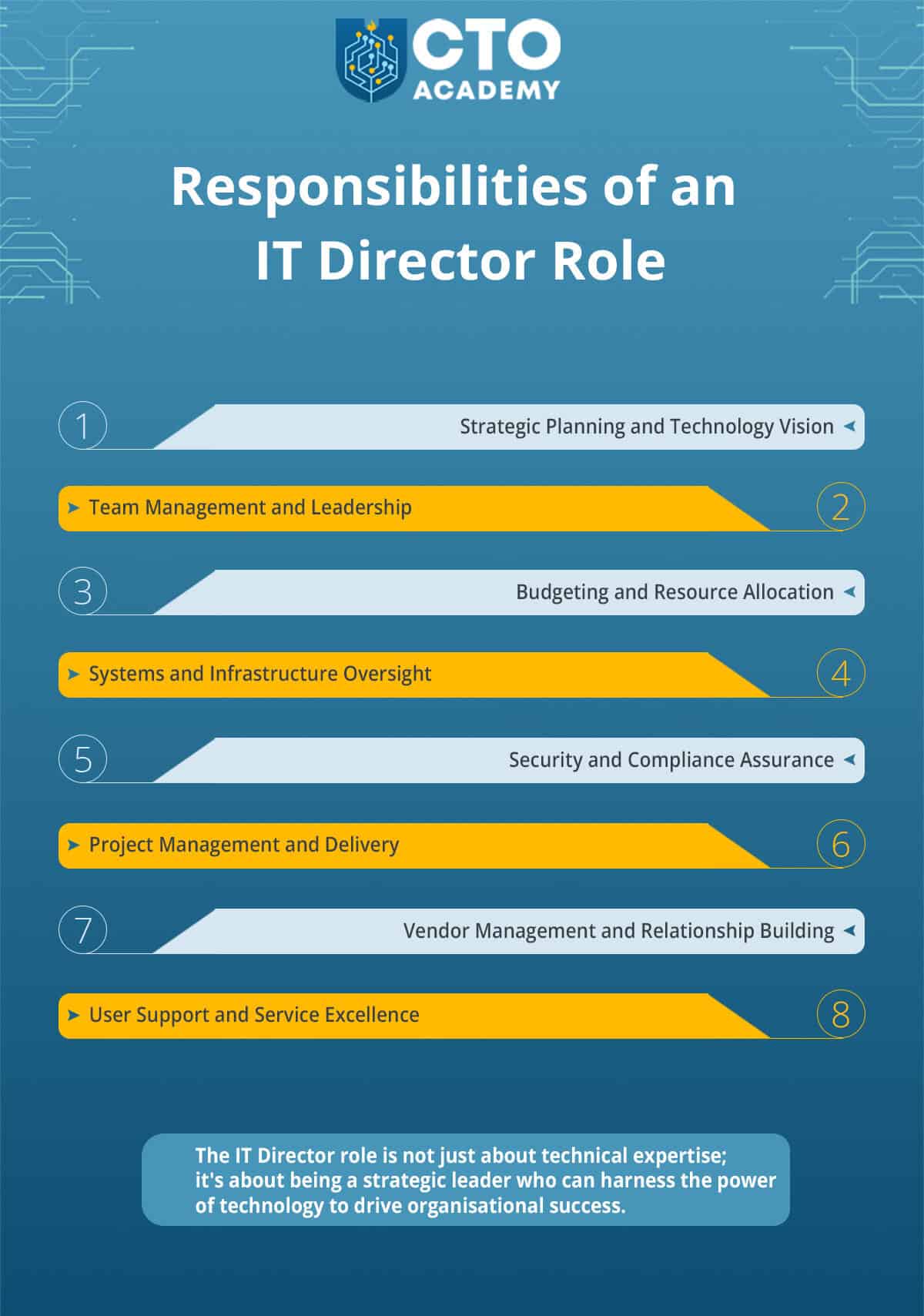
The IT Manager typically holds a mid-level managerial position and is responsible for the day-to-day management of the IT department.
Their role is more operational and tactical than that of a Chief Technology Officer, for example. IT Managers directly oversee IT operations. They are involved in day-to-day project management and team leadership while ensuring the reliability and security of IT systems.
They work closely with their teams to implement the strategies and decisions set forth by the CTO and senior management. Therefore, IT Managers are responsible for executing the plans and projects that align with the broader technology strategy.
The IT Manager also plays a critical role in optimising the use of resources. It’s their job to ensure that they are allocated effectively so that they can meet the organisation’s technology goals.
(Depending on the size and structure of an organisation, all of these responsibilities may fall under the CTO umbrella (eg, a start-up company). But as we scale up, we can have a CTO directly overseeing several IT Managers (eg, a cluster of subsidiaries or different IT departments) or a Group CTO overseeing a number of CTOs that oversee several IT Managers.)
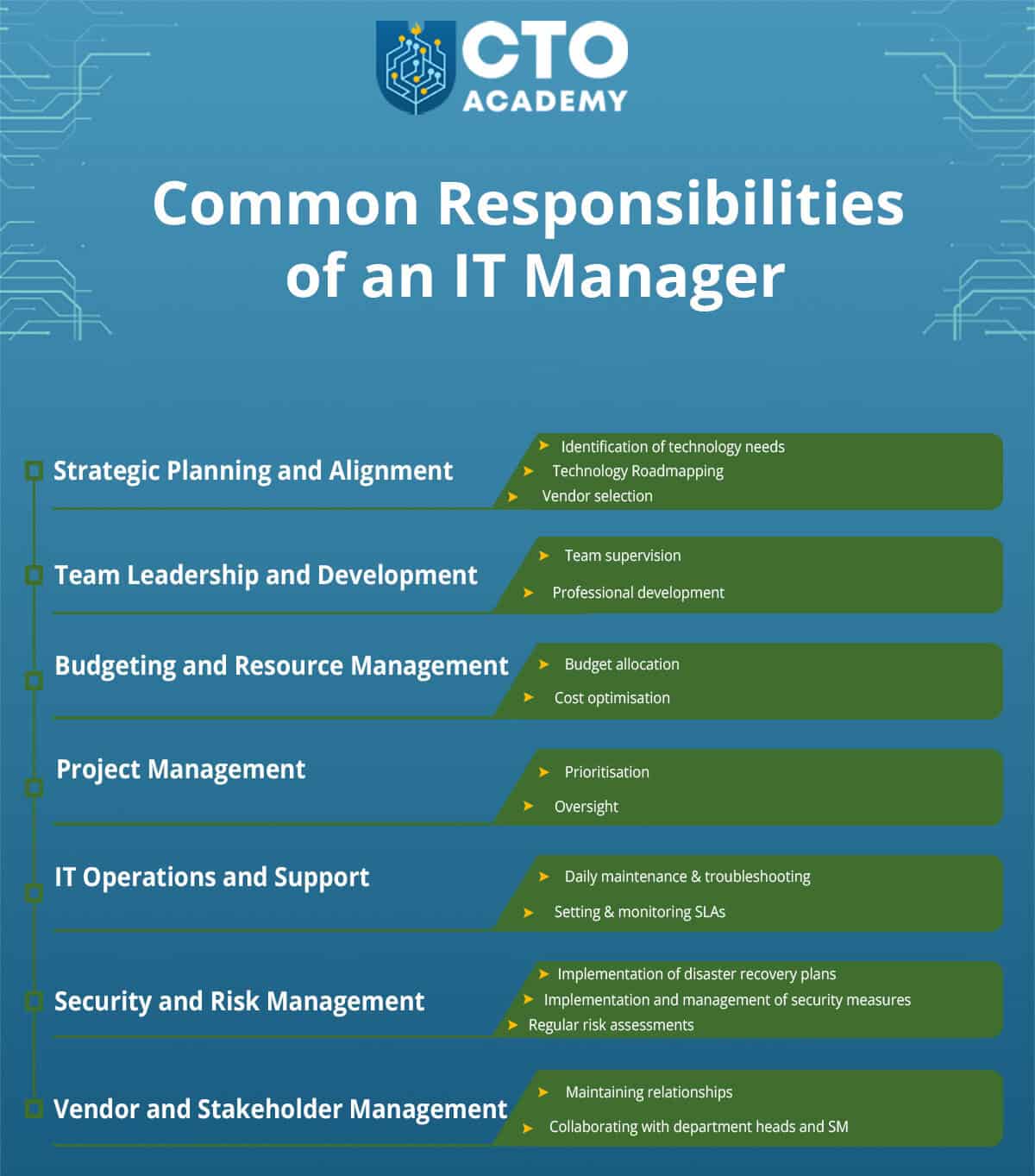
The Overview of Common Responsibilities of an IT Manager with Breakdown
Common responsibilities of the IT Manager
TABLE 1: IT Manager responsibilities matrix
Responsibility area
What it includes (examples)
“What good looks like” (KPIs)
Common tools / processes
Strategic planning & alignment
Translate business goals into an IT roadmap; assess gaps; choose solutions; define priorities and timelines
Roadmap delivered on time; reduced tech debt; stakeholder satisfaction; measurable business impact
QBRs, SLA reviews, escalation paths, contract and compliance checks
Tip:
In smaller companies, one IT Manager may own all areas; in larger organisations, responsibilities often split across specialised IT managers (e.g., Infrastructure, Operations, Security, Applications, Service Delivery).
IT Manager KPIs (How success is measured and “what good looks like”)
While the day-to-day can feel reactive, high-performing IT Managers run IT like a service: measurable, predictable, and continuously improving. These are the most common metrics used to evaluate performance:
Reliability & incident response
Uptime/availability for critical systems (email, identity, network, core apps)
Mean Time to Acknowledge (MTTA) and Mean Time to Restore (MTTR)
Incident volume and repeat-incident rate (problem management effectiveness)
On-call health (after-hours load, escalation frequency)
Service delivery & support quality
SLA compliance (response and resolution times by ticket priority)
Ticket backlog and average age of open tickets
First-contact resolution rate and escalation rate
User satisfaction (CSAT) and qualitative feedback trends
Change & project delivery
Change success rate (and change failure rate)
Deployment/rollout completion vs plan (milestones hit, scope controlled)
Time-to-deliver for common requests (e.g., onboarding, access changes)
Adoption and outcomes for major launches (usage, training completion, reduced manual work)
Security & risk management
Patch compliance and vulnerability remediation within SLA
Phishing simulation results/security training completion
Backup/restore success and disaster recovery test results
Cost control & vendor performance
Budget variance and spend predictability (licenses, cloud, contracts)
Cost per user / per device / per ticket (trend over time)
Vendor SLA adherence and escalation outcomes
License utilisation and waste reduction (unused seats, overlapping tools)
Rule of thumb:
A strong IT Manager improves stability, speed, and security at the same time—while keeping costs predictable and stakeholders informed.
Let’s now break down responsibilities and explain them in more detail.
1. Strategic Planning and Alignment
Identification of technology needs
Collaborating with department heads.
Participating in discussions to understand the specific requirements of different departments.
Technology roadmapping
Creating a technology roadmap that outlines the strategic direction for IT initiatives (short-term and long-term goals, technology investments and project timelines that align with the organisation’s growth plans).
Vendor selection
Evaluating vendors, hardware and software options, taking into account factors like cost, compatibility and support.
Making recommendations to senior management based on these evaluations.
2. Team Leadership and Development
Team supervision
Assigning tasks, setting priorities and overseeing daily operations.
Ensuring that team members have the tools and resources needed to perform their tasks effectively.
Professional development
Investing in the professional growth of their team members by identifying training opportunities, certifications and skill-building activities.
Encouraging team members to stay up-to-date with industry trends.
3. Budgeting and Resource Management
Budget allocation
Managing the IT budget and allocating resources for various projects and operational needs.
Balancing the allocation of funds to support current operations, ongoing maintenance and strategic initiatives.
Cost optimisation
Evaluating costs and seeking opportunities to optimise spending (ongoing task!).
Renegotiating vendor contracts, identifying areas for cost savings and ensuring that IT expenses align with the budget.
4. Project Management
Prioritisation
Ensuring the alignment with the organisation’s goals and available resources.
Oversight
Managing the full project lifecycle
Defining scopes
Creating project plans
Allocating resources
Regular monitoring of progress
Budget tracking
Communication with stakeholders
5. IT Operations and Support
Daily maintenance and troubleshooting of IT systems.
Setting and monitoring Service Level Agreements (SLAs) for IT support to ensure timely response and issue resolution and maintain high service availability.
6. Security and Risk Management
Implementing and managing security measures to protect the organisation’s IT systems and data (eg. establishing security policies, ensuring firewall and antivirus protection, monitoring for potential threats…)
Performing regular risk assessments and implementing disaster recovery plans.
7. Vendor and Stakeholder Management
Maintaining relationships with technology vendors and service providers (includes negotiating contracts, reviewing performance, making recommendations for vendor selection or changes etc.).
Collaborating with department heads and senior management and gathering feedback.
As we can see, a technology manager is a sort of an architect of an organisation’s technological success on one hand, but also a guardian of the IT infrastructure on the other. They also have to employ their managerial skills to ensure that employees execute their duties and, thus, achieve the goals.
In the absence of an adept IT manager, an organisation is left exposed to an array of issues, including system downtime, security breaches and scalability limitations, all of which affect the organisation’s bottom line.
Now let’s dig deeper into the most important – project management. We want to see HOW exactly they manage a new project that the CTO or the Board threw on their desk from scratch. It will also show the mesh of different responsibilities we explained earlier.
CASE STUDY: Setting the Stage for a New Project
They begin with…
Strategic Planning and Alignment
The first thing to do in this initial stage is to:
1. Identify the organisation’s technology needs
They start by initiating discussions with department heads, managers and key stakeholders across the organisation. These conversations are essential in this process. IT Managers actively listen to concerns, challenges and goals that different departments have.
Once they take all the notes, the next step is to assess and evaluate the technology stack and infrastructure. This includes examining existing software, hardware and network systems. You want to know the capacity, performance and, of course, security of current systems. In other words, you want to ensure that you have the necessary infrastructure to support the new product.
Once you get a good view of the environment, you should give yourself some time to assess those small parts of the entire infrastructure. Therefore, you must perform regular technology audits. Why? Because you want to identify areas where systems might be outdated, inefficient or not meeting new business requirements. As an IT Manager, you are going to use these audits to pinpoint technology gaps.
2. Now we start creating a technology roadmap
After the initial discussions and technology assessments, IT Managers gather feedback and input from their IT team members. Team members often have valuable insights into the organisation’s technology needs and can provide recommendations. They, after all, work in trenches and, thus, know exactly what they need to make things happen.
Once we have all the necessary information, it’s time to see if and where the new product fits in short- and long-term planning.
As a rule of thumb, we want to prioritise projects based on their alignment with business objectives and the available resources. For instance, short-term goals may include immediate technology updates, while long-term goals may encompass larger projects or technology transformations. As an IT Manager, you need to know how will the new product development affect the current state of affairs.
Most importantly, you need to figure out if it will pay off at the end of the road. Hence, the
3. Cost-Benefit Analysis
IT Managers must conduct cost-benefit analyses for each planned technology initiative. They consider factors such as potential return on investment, impact on operational efficiency and alignment with strategic goals. This analysis is crucial in decision-making.
More often than not, over-optimistic prognoses that are not based on realistic projections, lead to failure. You must, therefore, educate yourself in these matters if finances are not your forte.
For the sake of our argument, let’s say that the numbers clearly indicate profitability. It’s time to push the project into the next stage. Remember, all this time, the CTO is breathing behind your neck, pushing you to speed things up because the CEO is putting an immense amount of pressure to get the MVP out asap.
4. Vendor Evaluation and Selection
There are four logical steps in this stage. It all starts with market research.
One of the IT Manager’s jobs is to identify potential vendors and technology solutions. You want to explore all available options, of course, but they do have to meet the organisation’s specific needs.
Once you narrow down the list, it’s time to send RFPs (Requests for Proposals). Keep in mind that these documents must specify the organisation’s requirements and expectations. The more thorough you are, the more accurate response you’ll get. That is to say, if you send only a general inquiry or fail to mention some specific and/or important request or context, don’t expect well-structured and precise proposals.
Once you receive all proposals, it’s time to arrange events for vendor demos and presentations. It is the only viable way to evaluate the functionality, user-friendliness and suitability of a product or service. You should also invite key stakeholders and members of the IT team to participate in these evaluations.
Now comes the evaluation of those proposals. So what you should have in place even before presentations is evaluation criteria and some sort of scoring system. For example, consider factors such as cost, features, support and compatibility with the existing technology stack.
At the end of the day, this is just another ready-to-go project on your list of priorities. And that’s where things get tricky and really challenging.
Setting Priorities
If you have five projects, how do you decide the dynamics? Which gets the highest priority?
Again, there are three (to four, depending on how you look at it) logical steps.
1. Align project priorities with the organisation’s strategic goals
So the first order of business is to consult your company’s “Book of Goals”. Naturally, you want to start with those projects that will have the most significant impact on achieving those goals.
To do that efficiently, you should gather feedback on project priorities from department heads and managers. This collaborative approach ensures that the selected projects align with the needs and objectives of each department.
But there’s the question of resource allocation. This means that you must:
2. Reassess available resources
Having goals is great, but if the budget is stretched, you need to reevaluate everything (ie, finances, personnel, time…). It is the only way to determine which projects can be realistically executed within the given constraints.
Still, you have to ensure that the gain always outweighs the risk. Hence, the final step:
3. Risk assessment
IT Managers assess the risks associated with each project. They consider factors such as potential disruptions to existing systems, cybersecurity risks and the likelihood of successful implementation.
You can see where all the complexity is coming from and why not everyone is cut out to work as an IT Manager, at least not a successful one. And here is a vivid presentation of day-to-day challenges:
If you have, for instance, projects: A, B, C, D and E, you must run each against:
Strategic goals
Departmental needs and objectives
Available resources (internal and external)
Viability
Risk
So let’s say that A, C, D and E projects perfectly align with the company’s strategic goals. But after you consult department heads, E simply drops off. So A, C and D make the initial cut.
All three are viable meaning that you can develop an MVP of each using the available technology stack and third-party resources (vendors’ solutions). But, you can’t work on all three simultaneously due to budgetary and/or personnel constraints. If, however, you choose smart, you could, potentially, run two parallel projects but with one that has the highest-priority tag attached to it.
There are two ways to figure out which project should have the highest priority
The easier way is to simply sort all three based on the level of risk they are carrying and pick the two with the lowest risk score (the “safest” being assigned as the highest priority project). But consider this: as a rule of thumb, “safest” is also “least profitable” or “slowest”.
Hence, the harder way. Take a calculated risk and choose the one that would most benefit the company. Hit it with the “HIGHEST PRIORITY” stamp and bring the “safest” one to the fold also.
This way, you will not: a) appear as someone who hesitates or plays safe (which is not exactly a characteristic of an executive of any kind!) while, at the same time, b) overstretch your team and cause burnouts.
Which brings us to the next logical question.
What Makes a Good IT Manager?
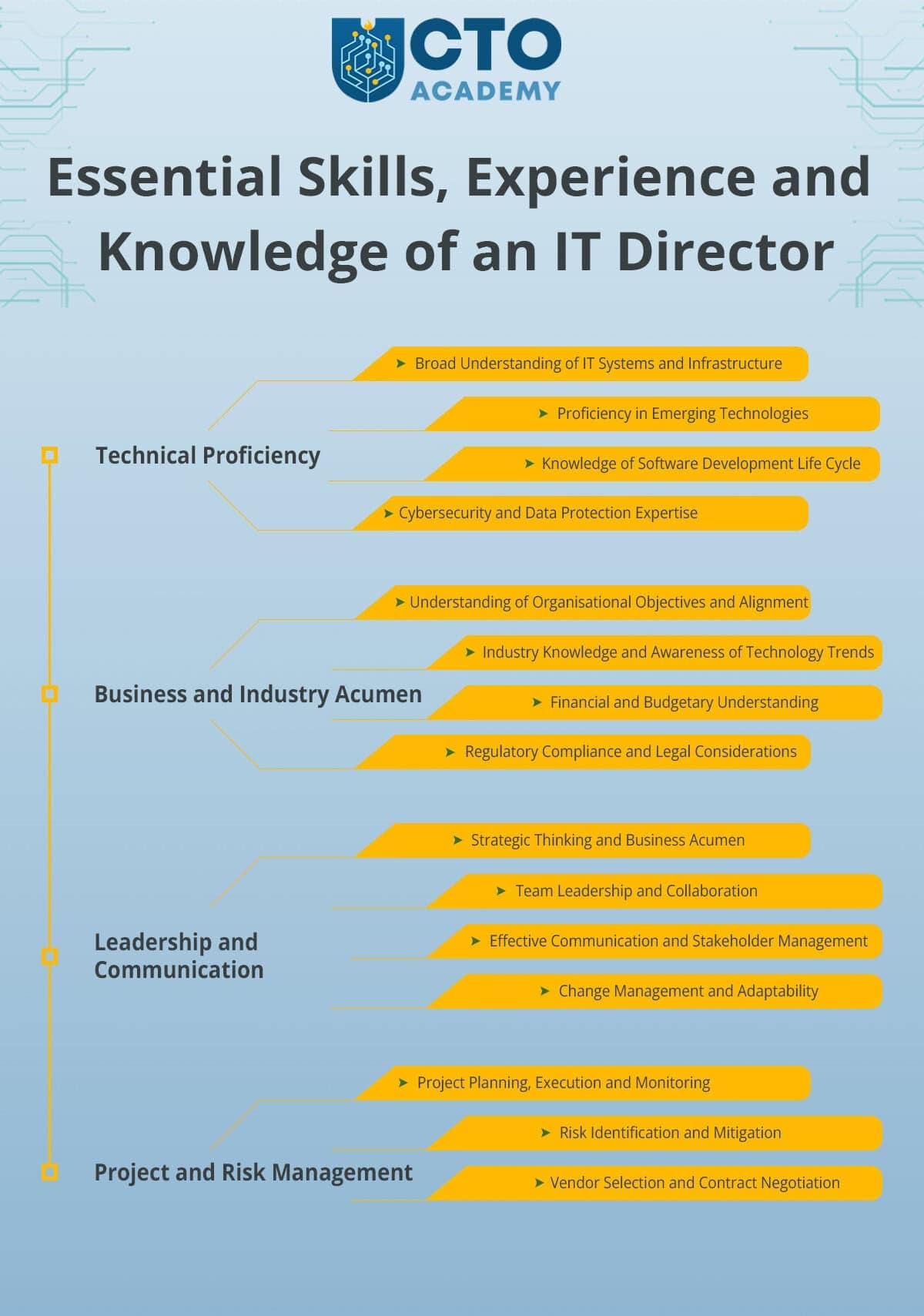
Information technology management requires a perfect blend of six skill sets:
Technical skills
Management skills
Soft skills
Operation management
Marketing management
Sales management
While marketing and sales management skills can be rudimentary, technical skills must be at the highest level possible. We are talking about the whole package here as you will soon find out.
Technical skills
Exceptional technical proficiency
Infrastructure and systems management
A strong grasp of cybersecurity principles and best practices
Knowledge of software development practices, programming languages and application lifecycle management
Familiarity with cloud platforms
Understanding of data management and analytics
Experience with networking concepts, protocols and technologies
Understanding of IT service management frameworks (eg, ITIL)
Knowledge of virtualisation technologies and containerisation platforms
Familiarity with various operating systems
Proficiency in managing hardware components and end-user devices
At least basic scripting skills
The same goes for management and soft skills. This is a skill set that is forged through experience above anything else because the list is quite challenging for some.
Management and soft skills
Strong leadership skills, strategic thinking abilities and emotional intelligence
Clear and effective communication skills
Strong problem-solving and decision-making skills
Adaptability
Effective team and project management
Conflict resolution and negotiation skills
Efficient time management skills
Operational skills
And then come operational skills. They involve the day-to-day activities such as:
IT Operations Management
Monitoring system performance.
Managing system updates and patches.
Implementing and enforcing IT policies and procedures.
Incident Response and Problem Resolution
Creating and implementing incident response plans.
Developing and enforcing change management processes.
Communicating changes to relevant stakeholders.
Mitigating risks associated with changes.
Vendor Management
Selecting and evaluating vendors.
Negotiating contracts.
Ensuring vendor performance meets expectations.
IT Asset Management
Conducting regular asset audits.
Managing hardware and software inventories.
Optimising asset utilisation.
Documentation and Reporting
Documenting IT processes and procedures.
Creating regular reports on system performance, incidents and changes.
Compliance and Security Management
Implementing and enforcing security policies.
Conducting compliance audits.
Responding to security incidents.
Disaster Recovery Planning
Creating and testing disaster recovery plans.
Identifying critical systems and data for recovery.
User Support and Helpdesk Management
Managing support staff.
Ensuring timely resolution of user issues.
Implementing self-service options.
Time Management and Prioritisation
Prioritising tasks based on urgency and importance.
Balancing operational demands with strategic initiatives.
The ability to balance operational efficiency with long-term strategic goals is key to success in this role.
Sales and marketing skills
Now, regardless of what you might think, sales and marketing skills are necessary because a good IT manager should have a customer-centric mindset. It’s irrelevant whether their “customers” are internal employees or external clients. One way or another, they need to understand and meet the needs of end-users. And that is only possible if you know how marketing and sales work.
Of course, the ideal candidate will also have at least a bachelor’s degree in computer science plus a high-level leadership education (ie, a master’s degree in technology leadership).
To Whom Do IT Managers Report?
Reporting largely depends on the size of an organisation, industry and strategic goals. In other words, it depends on the structure of the company. That said, IT managers can report to either of the following executives:
In the US, IT managers make between $101K and $157K. The base salary ranges from $94K to $143K while bonuses add between $7K and $14K. Hence, the annual median total pay is around $125,550 while the average for 2023 is $115,944.
An IT Manager is the operational leader of IT delivery, responsible for keeping systems stable and secure while executing strategy day-to-day.
The job is best understood as a portfolio of responsibilities, not a single function: operations, projects, security, people leadership, budgeting, and vendors all sit under the umbrella.
The “how” matters: successful IT Managers use structured decision-making—needs discovery, environment assessment, roadmapping, cost-benefit analysis, vendor evaluation, prioritisation, and risk assessment.
Great IT Managers measure outcomes, not activity, using KPIs across reliability, service delivery, change/project delivery, security, and cost control.
The role demands a hybrid skill set: deep technical breadth + strong leadership/communication + operational discipline (ITSM, incident/change/capacity management).
Career-wise, the role often serves as a launchpad toward IT Director and ultimately CTO, as scope expands from execution into higher-level ownership and strategy.
Compensation depends heavily on region and scope.
Conclusion
Becoming and working as an IT manager is undoubtedly challenging, but is also rewarding because it sets the stage for the next step on a career path and that’s the role of a Chief Technology Officer. It’s the crown of years of effort, hardship, experience and personal development.
Think about it; why walk alone in the darkness trying to find your way out of the woods when you have a ten-thousand-strong global community of technology leaders to guide you?
Frequently Asked Questions (FAQ)
What is an IT Manager?
An IT Manager oversees and manages IT operations, systems, and infrastructure, and connects technology execution to broader organisational goals.
What are the main responsibilities of an IT Manager?
Common responsibility areas include strategic planning and alignment, leading and developing the IT team, budgeting and resource management, project management, IT operations and support, security and risk management, and vendor/stakeholder management.
Is the IT Manager role more strategic or operational?
It’s typically more operational and tactical than executive roles (e.g., CTO). IT Managers translate strategy into execution and ensure daily reliability and delivery.
What does “strategic planning and alignment” mean for an IT Manager?
It usually includes identifying technology needs with stakeholders, creating an IT roadmap (priorities, timelines, investments), and evaluating/selecting vendors and solutions that fit business goals and constraints.
How does an IT Manager manage projects from scratch?
They generally start by clarifying business needs, assessing the current environment and gaps, building a roadmap, running cost-benefit analysis, evaluating vendors (RFPs/demos/scoring), and then prioritising work based on strategic fit, resources, viability, and risk.
What skills make a good IT Manager?
A strong IT Manager combines technical breadth (infrastructure, cybersecurity, cloud, networking, ITSM), leadership and communication (team management, decision-making, conflict resolution), and operational discipline (incident response, change management, capacity planning, compliance, documentation).
Why are “sales and marketing skills” mentioned for IT Managers?
Because effective IT management often requires a customer-centric mindset—understanding and meeting the needs of end users, whether they’re internal teams or external clients.
Who does an IT Manager report to?
It depends on company structure, but IT Managers commonly report to leaders such as the CIO, CTO, COO, CEO, or an IT Director.
What is the average salary for an IT Manager?
In the US, the article cites a broad range (roughly $101K–$157K), with a cited median total pay of around $125,550 and an average (for 2023, as referenced) of around $115,944.
What’s the next career step after IT Manager?
The role often sets the foundation for more senior leadership paths (e.g., IT Director and, eventually, CTO), especially as scope expands from operations into strategy, ownership, and business impact.
What are the common types of IT Managers?
Depending on organisation size and needs, common variants include Infrastructure Manager, Operations Manager, Security Manager, Project Manager, Application Development Manager, and Service Manager.
No matter how hard you might try, you simply can’t avoid it; AI is everywhere and is here to stay.
But what’s the view of today’s technology leaders about tomorrow’s reality? How will it impact their role as they face ever-increasing expectations around the how, where and when of implementing an AI strategy?
Because it seems that every day brings fresh claims, courses and newly minted experts on the topic and it’s multiple variants with a mixture of the utopian, dystopian and much else in between.
In one corner, it will elevate humanity to as yet unthinkable levels of freedom and potential.
In the other, warnings about the complete destruction of the human race by AI-powered autonomous robots and weaponised state machines.
Download the AI Integration Blueprint
Move beyond pilots and integrate Gen AI into core systems, without losing control of cost, security, or compliance. Get the practical roadmap tech leaders use to modernize infrastructure, prioritize the right use cases, and set governance that scales.
In stark contrast to the unfolding nightmare described by Dr Hinton, we have Marc Andreessen, software engineer, entrepreneur and famous venture capitalist who is firmly on the utopian side of the argument.
In an article which announced his optimistic take, “Why AI Will Save the World”, he predicts that AI can ‘make everything we care about better’, with education, healthcare, government, productivity, the arts and sciences all immeasurably improved.
Naysayers are dismissed as either naive ideologues or self-interested opportunists.
Public statements about the dangers of AI are stoking ‘an irrational moral panic’, he says.
Andreessen’s view challenges AI critics such as the aforementioned Dr Hinton and also tech heavyweights like Elon Musk and Steve Wozniak who in March 2023 signed an open letter calling for a six-month pause in AI development.
Now, not so long ago it was Andreessen Horowitz which hyped the shattered cryptocurrency bubble in which they had a significant vested interest. But leaving aside that cynical take on his utopian vision for AI, Andreessen has a strong track record in the prediction game and the article is a worthy and uplifting contribution to the frenzied debate.
But is he likely to be more correct than the naysayers?
Our own co-founder and CTO lecturer and coach, Jason Noble, acknowledges that ‘there’s a lot of hype’. He also points out that the opinions of many prominent figures are at risk of being seen as ‘self-promoting’.
Jason’s main concern centres on deskilling. He warns that if basic tasks are devolved to AI, essential skills will be lost.
‘This makes me nervous — if low-value jobs disappear, how will people then gain the core skills needed to fill the higher-value jobs?’
For Jason, the development of AI must be accompanied by a revolution in education, with a particular emphasis on the importance of critical thinking.
‘In the future, we’ll need problem solvers and engineers, so we need a fundamental change in the educational system around teaching people how to think.’
The Role of Regulation
One of the biggest areas of contention in the AI debate is the role, if any, of regulation. More specifically, the introduction of laws at national and international levels to control the development and application of AI.
Jason is clear on this point, ‘It is very difficult to regulate innovation and many laws become outdated before they are even ratified. However, the current process of releasing AI algorithms without extensive testing is concerning. Regulating the impact of AI would make companies think twice about releasing, but not necessarily slowing innovation. Only a handful of companies have the budget to run the massive server farms and thus could be regulated.’
(Which, in defence of Andreessen, is the only note of caution in his otherwise ebullient perspective.)
Where are the Dangers for Tech Leaders?
Jason also warns that the uncontrolled availability of AI software poses a danger for CTOs.
‘As software becomes more of a commodity, the management will become harder and, like departments creating shadow IT, non-tech departments will become shadow software developers which opens the debate on compliance, security and maintenance.’
He also points out that ‘it is unrealistic to rely on self-regulation. Computer scientists ask if we can solve a problem, not should we. There’s little morality involved.’
Given these reservations, you might be surprised to find that Jason is actually an optimist about AI.
‘With all the caveats mentioned before, overall, I am optimistic about its potential within society and within our roles as tech leaders. Though I also believe we have bigger problems — debt and crashing economies and the environment — AI might help us address some of these issues, particularly on the environment and economic growth which has been particularly slow in many OECD countries.’
Someone who is firmly and without hesitation in the Andreessen camp is Kiran Palla, based in Chicago.
Alongside being a member of CTO Academy, Kiran is a CIO/CTO, a US Federal Government executive with the Department of Treasury and a Forbes and Harvard Advisory Council Member.
He is also heavily involved in discussions on the impact of AI, particularly in the publishing industry, and advises the US government on the issue.
His unequivocal opinion?
‘It will result in utopia.’
Expressing his personal view, Kiran predicts that ‘there will be a lot of positive effects of the AI revolution in our lifetime — great advancements in medicine, disaster management, public health and [combating] the climate crisis’.
During the last three to four months I have attended at least 20 or 30 sessions and roundtables. The first question is always about AI. It’s like there is a fear of missing out. All the major players are integrating generative AI into their products. So, it’s going in a positive direction.
‘Yes, there will be a lot of stress and there will be a lot of negative views in the beginning, but I think the temperature is already starting to lower.’
In Kiran’s view, the areas that will benefit will include healthcare — ‘surprisingly, because healthcare usually lags behind, because of [regulations around] privacy and patient information’ — the financial sector, manufacturing, marketing and the space industry.
But we need rational optimists in this debate and Kiran acknowledges the downsides.
Risks and Concerns
His number one concern?
‘Fake data, faking information… it could be anything, a fake Wall Street report for example. With fake data like that, it can bring companies down. There is also a lot of fear that personal reputations can be targeted.’
Number two and three are risks to privacy and bias.
‘A lot of HR policies will be impacted by unwanted bias,’ he says.
And finally reliability. ‘The data is not clean, it is not validated that much, and large language models are already generating a lot of outputs that are not reliable.’
It seems we’re all in agreement that regulation is pointless.
‘You can regulate. Italy banned ChatGPT right away, and a couple of European countries came in and then everybody started to ban ChatGPT. But how long can you do that? You let development go for more than a decade and all of a sudden you want to put [in] some controls and regulations.’
An early example?
‘Microsoft and OpenAI shocked the world with the power of large language models in March. Everybody started learning, including myself. I’m familiar with it but I said OK, let me dig deeper into it. And surprisingly, there were already large language model optimisers available, already in place, like LangChain. This is a model that works against large language models, optimising their performance. So how are you going to regulate it? There is no way.’
The CTO challenges ahead
Kiran foresees particular challenges ahead for CTOs.
Simply keeping pace with developments is paramount given that CTOs will have to guide their colleagues through the fast-changing AI landscape.
‘For CTOs, the biggest challenge is learning. It’s not like at C-level, [where] you can just oversee [the change]. There is no such thing anymore. You’ve got to learn because your engineers need upskilling, your architects need upskilling.
You can no longer ask an engineer for input. Your engineers will be fumbling. You have got to provide the input, the learning [and] the leadership. Your own hands-on involvement is critical, otherwise, you’re going to be outdated. I myself am learning every day.’
We have to communicate a clear vision but the task is daunting
‘CTOs must provide a clear roadmap to AI adoption, complete with training and mentoring provision. Technical adoption is going to be the biggest challenge,’ he says.
‘With regulation, with [the risks of] bias, fake data, how can you even provide a roadmap? There are challenges with [working out] a clear roadmap, challenges with a product roadmap, challenges with adoption, challenges with strategy — that is going to be the biggest.
‘I can’t stress enough — every day is a challenge,’ he says.
Challenging it may be, but for Dallas Goldswain down in Johannesburg, there are a few downsides to the rapid development of AI.
‘I am not worried at all,’ says Dallas, who is head of engineering at consumer intelligence platform ProQuo AI, ‘I think it will only [adversely] affect people who are not willing to change and adapt, but that goes for all new tech. Using AI as a 2IC both as a leader and engineer will add value to getting the little things done quicker.
‘For code, I feel there is a long way to go, but for writing, getting skeletons for articles, reports, processes etc, I think it’s great.’
The economic potential of generative AI
In July 2023, McKinsey published “The Economic Potential of Generative AI: The Next Productivity Frontier Report”. It contained some key insights on generative AI and work productivity which are worth listing here:
– Half of the work activities to be automated with then-existing technologies.
– Technology performance is most likely to match or even surpass human performance quicker due to generative AI.
– The potential work hours that can be automated have risen from about 50% to 60-70% due to generative AI advancements, especially in natural language processing.
– Adoption scenarios have accelerated due to generative AI, with a potential shift of 50% in work activities occurring approximately a decade earlier than previous estimates.
– Automation adoption will likely be quicker in developed countries with higher wages, as the cost-benefit analysis will tilt in favour of automation sooner.
– Generative AI will mainly affect knowledge work, especially decision-making, collaboration and application of expertise.
– Its natural language capabilities mean it can automate activities that require understanding and using language, thereby transforming occupations like education and technology.
– Contrary to previous automation technologies that majorly affected low-skill workers, generative AI will make an impact on more educated workers, challenging the current educational credential system.
– Generative AI could aid in countering declining global economic growth, compensating for slowing employment growth.
– From 2023 to 2040, generative AI could boost global productivity growth by 0.2 to 3.3% annually, based on the rate of adoption.
The Impact on CTOs
Alex Velinov, CTO at Tag Digital in Glasgow and another CTO Academy member, comments that this report raises many issues, not least the need for education reform, as noted by Jason earlier.
Alex says, ‘Most jobs we currently recognise will be automated or taken over by AI. However, a new set of roles will emerge, particularly related to managing and programming AI systems.’
‘We need to equip the next generation with transferable soft skills that are valuable across all professions, such as critical thinking, creativity, and empathy.’
Alex acknowledges the challenge CTOs face in keeping up with the rapid changes in AI development.
‘How to stay on top of everything really depends on where your passion is. The first step is identifying what you genuinely love to do.’
He further elaborates on that by saying, ‘For those in the tech industry or skilled professions, it’s crucial to learn about AI and its applications in your domain. Stay updated on new trends and tools, and be proactive rather than waiting for direction from employers.’
‘If your current job doesn’t align with your passion, now is a prime time to pivot towards skill-based careers like plumbing, electrical work or landscape design, and pursue what you truly desire.’
Who will govern AI?
Another emerging issue facing CTOs and their organisations is AI governance. According to Gartner Peer Community Data, the three biggest challenges are:
Lack of skills
Lack of clarity about business impact
Production-first mentality
The report cites other interesting themes as well around fragmented technologies, poor collaboration and a lack of underlying data governance.
For a final view, we reached out to our CEO here at CTO Academy, Andrew Weaver, to take the temperature of the debate within our wider tech leadership community.
Andrew says, ‘I host live debate sessions each month with our community of tech leaders from around the world. There is definitely some anxiety about the uncertainty ahead because no one can predict the direction of travel. But most of our members are by nature excited and intrigued with the potential of new technologies and how they can adapt to existing models.’
‘The biggest pressure we see is less about the technology and more about the expectations. Suddenly, every CEO and board is demanding an AI strategy, even if AI is not yet central to their model. Because of this, the expectations and the pressure on tech leaders have just ramped up.’
‘As is ever the case with tech leadership, it’s less about the management of the technology and more about the management of the people.’
2 key parts of the AI debate
To sum up, there seem to be two key parts to the AI debate. This is particularly true from our perspective as technology leaders. After all, it is we who must grapple with the uncertain direction of travel.
First, the effect of AI on society.
There are many potential gains, including greater efficiencies, especially in healthcare. But there are going to be some unwanted effects as well. For example, the manipulation of people through fake news and videos. Or, to a much greater extent, revenge porn and security breaches by impersonation.
Second, the effect of AI on businesses.
It will change the core of the software development process, making it more accessible but harder to control, secure and maintain. There is pressure on CTOs to ‘include AI in their products’ for investment and fund-raising. This can muddy the waters and set different expectations of what is possible. Hence, we need to teach the next generation of engineers differently. If we don’t, their skills could be obsolete as they enter the workforce.
Putting one’s head in the sand is not an option.
The more we understand how AI can affect society and businesses in good and bad ways, the more we can educate our colleagues, friends and families to prevent us from sleepwalking into dystopia but to embrace the use of AI for the greater good.
It is now common for a team leader or project manager to find themselves placed in the CTO’s shoes at a moment’s notice. Often, this brand-new executive is forced to form a Chief Technology Office out of thin air and without any help. This is the challenge facing what we call the accidental CTO.
At the same time, existing CTOs can suddenly end up as Group CTOs after a merger or as a result of rapid expansion.
While both instances present an excellent career jump, it does not come without predicaments — especially for those with no real experience in high-level executive roles (eg, IT directors, Deputy CTOs or Fractional CTOs).
To assist with the transition, we have created a detailed insight into the organisational structure of the Technology Office with individual roles, critical responsibilities, hierarchies and reporting schemes. It is a handy cheat sheet that will a) save you much time, and b) prevent serious mistakes.
You will also see an example of a typical Group Chief Technology Office with a brief overview of the GCTO’s role and responsibilities.
Additionally, this article lists and provides solutions to the most common challenges of the CTO role and the Office itself while briefly explaining the necessary skills required for the position of a Chief Technology Officer.
In a nutshell, the Office oversees all aspects of technology within an organisation. Led by the Chief Technology Officer, a vital member of the executive team, it plays a pivotal role in shaping the company’s technological vision, driving innovation and ensuring that technology aligns with the overall business strategy.
Let’s examine that role in more detail.
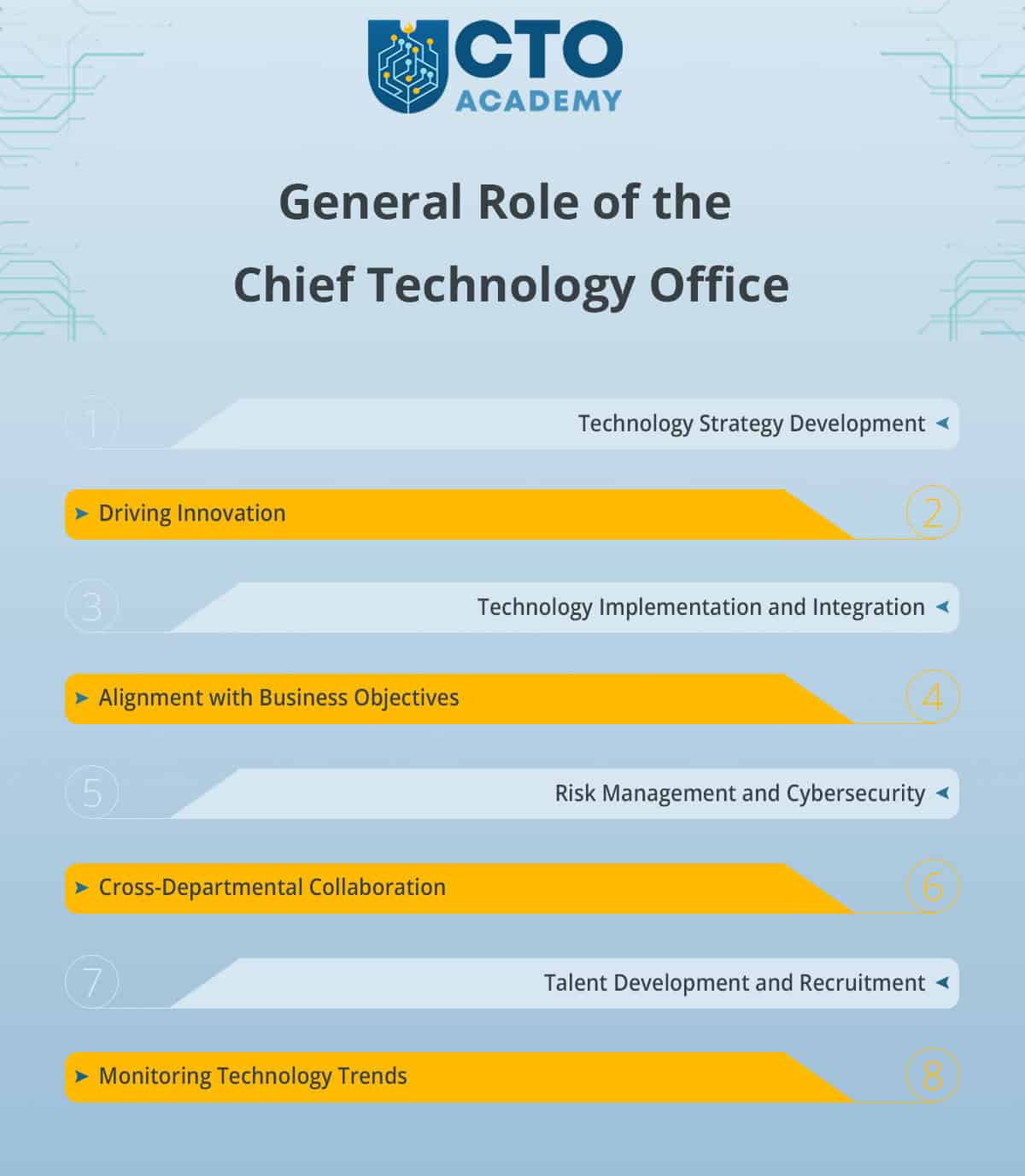
1.1.1 The General Role of the Office
(click to enlarge/download)
#1 – Technology Strategy Development
The Office has a responsibility to formulate a visionary technology strategy that aligns with the organisation’s short- and long-term goals. This is done by:
Identifying emerging technologies.
Evaluating their potential impact.
Charting a path for technology adoption and implementation.
#2 – Driving Innovation
Many of humanity’s greatest advancements have been the result of mistakes. These errors are frequently the result of creative experimentation. And that’s exactly how technology officers and the Office itself drive innovations.
#3 – Technology Implementation and Integration
There are three essential elements of a successful implementation and integration of new technology:
Effective project management.
Collaboration with cross-functional teams.
Addressing technical challenges.
#4 – Alignment with Business Objectives
Or, in other words, the necessity to understand the needs of different departments and stakeholders. It is a prerequisite for the successful tailoring of technology solutions to support their specific goals.
#5 – Risk Management and Cybersecurity
The Office safeguards the organisation’s digital assets, customer data and intellectual property from potential threats and breaches.
#6 – Cross-Departmental Collaboration
To ensure that technology enhances overall business operations and contributes to the company’s growth, the Office collaborates with other departments (eg, marketing, product development, finance and operations).
#7 – Talent Development and Recruitment
The main responsibilities in this segment are:
Attracting top technology talent.
Providing opportunities for professional growth.
Fostering a positive work culture that motivates the team to excel.
#8 – Monitoring Technology Trends
The job of the Office is to continuously assess how emerging technologies can be leveraged to gain a competitive advantage and drive innovation.
In summary, the Chief Technology Office is a dynamic and multifaceted environment that combines technical expertise with a strategic vision. By spearheading technology initiatives and ensuring their alignment with business goals, the Office contributes significantly to the growth and success of the companies in the ever-evolving digital landscape.
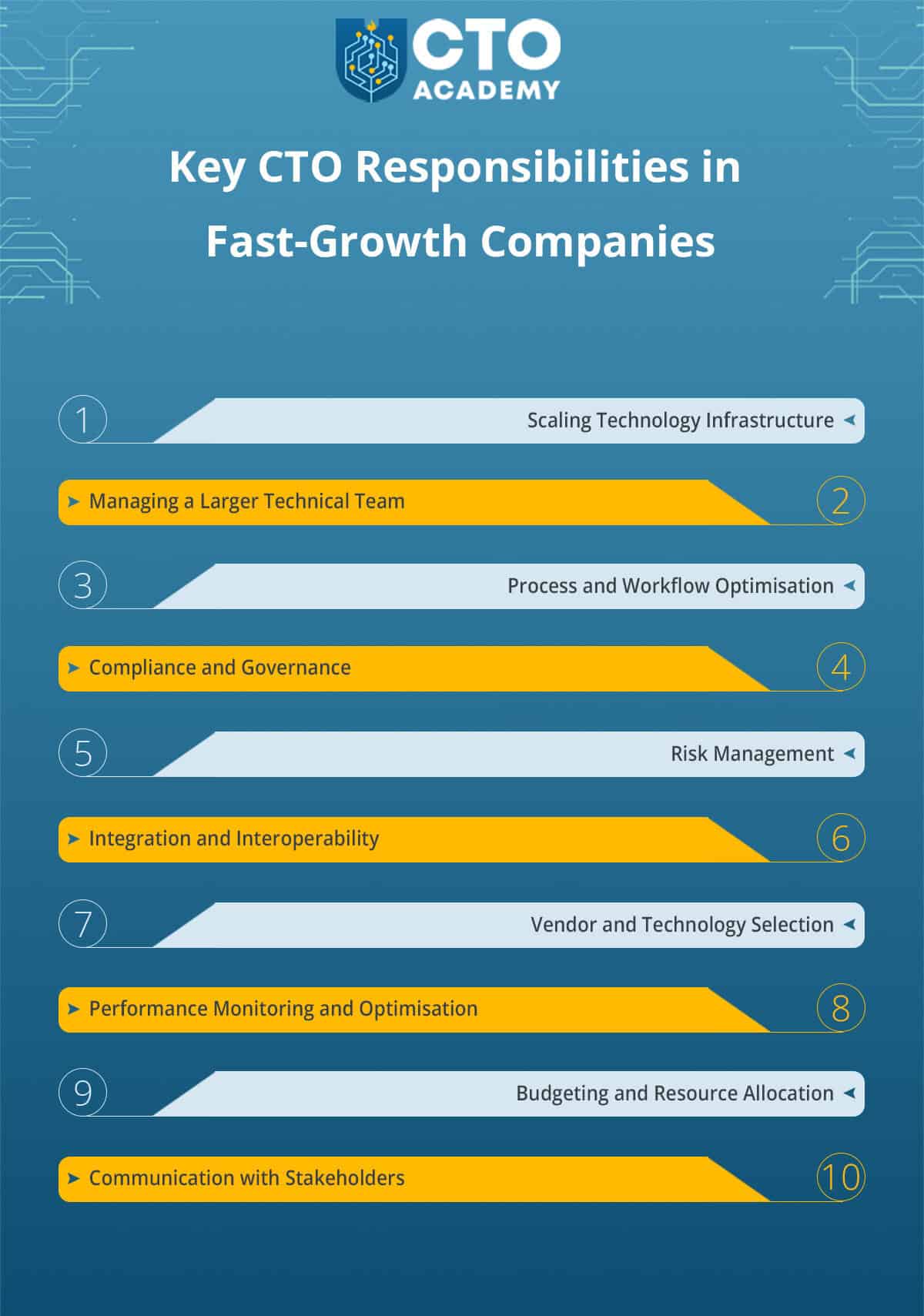
1.2 The Impactful Role of a Chief Technology Office in Start-ups and Fast-Growth Companies
The most distinct challenge for the Office is most certainly rapid scaling and growth.
Start-ups and fast-growth companies experience exponential growth, requiring the CTO to rapidly scale the technology infrastructure and systems to meet increasing demands.
But here lies the opportunity as well. The Chief Technology Officer can drive technological innovation to create scalable solutions that support the company’s growth trajectory by leveraging cloud services, automation and agile development practices.
Still, start-ups and fast-growing companies are notorious for their limited resources and budget constraints. This makes balancing technological aspirations with financial realities quite challenging.
But it also acts as an incentive for the Office to invest time in the exploration of cost-effective technologies, open-source solutions and strategic partnerships. Because somewhere in that mesh lies the solution that can, ultimately, enable the Office to optimise resources and deliver high-value outcomes.
This exploration, since it is happening in such a fast-paced environment, requires agile decision-making on the one hand and the thoughtful consideration of long-term implications on the other. In other words, the Chief Technology Officer and the Office itself must always balance the need for rapid action against the potential long-term negative impact of their decisions.
To address these two challenges, the CTO must work out the agile decision-making processes. These, in turn, will empower teams to make informed choices while maintaining alignment with the company’s vision and strategy.
And with everything so well synchronised, attracting and retaining top talent becomes that much easier.
Let’s not forget that the competition for skilled technology professionals is fierce. Start-ups must often compete with larger, established companies for talent. But if the Office succeeds in the creation of a compelling company culture that fosters innovation and offers professional growth opportunities, it will attract top talent motivated by the start-up’s mission alone. Lately, this is becoming a more significant factor than salaries and bonuses.
Another important role of the Office is risk management and cybersecurity. This is even more emphasised in start-ups because they often tend to underestimate the importance of robust cybersecurity measures. As such, they are vulnerable to data breaches and security threats.
To tackle this problem, CTOs implement and enforce proactive security protocols, conducting risk assessments and prioritising data protection. This is necessary to safeguard the company’s reputation and customer trust.
Cybersecurity can come with significant costs, and so too can managing technical debt.
Quick iterations and product launches may lead to accumulating technical debt, resulting in maintenance challenges and reduced development speed over time.
Common measures to minimise the debt and, thus, ensure long-term product stability and sustainability, are:
Implementing sound development practices.
Allocating time for refactoring.
Prioritising reduction of technical debt.
Often, this may be further facilitated by adopting emerging technologies.
This, however, requires careful evaluation because, in the end, AI, blockchain, IoT and similar ETs must also align with the company’s unique needs.
The role of the Office here is to design and lead pilot projects to find out if these technologies and their possible applications can potentially enhance products or services and, ultimately, give a competitive advantage in the market.
After all, isn’t it the job of the Office in any start-up to constantly balance short-term vs. long-term technological vision? Can there be hidden opportunities in emerging technologies that we do not yet see?
Here’s the problem. As a rule of thumb, start-ups often focus on immediate priorities, possibly overlooking the importance of a coherent long-term technology vision.
The CTO must, therefore, strike a balance between short-term goals and a visionary approach, ensuring technology decisions align with the company’s future aspirations. And that balancing act directly influences the company’s outlook and future directions. So we can say that, at some level, the CTO and the Office pave the way for the company’s future.
But…
What happens when a start-up eventually evolves into a fast-growth company?
In this common scenario, cultural shifts and organisational changes can be disruptive to existing workflows and employee dynamics. Consequently, cultural adaptation and change management quickly rise on the list of responsibilities.
The Chief Technology Office of a company suddenly becomes instrumental in three major areas of change management:
Driving a culture of innovation and continuous learning.
Encouraging adaptability.
Embracing change to foster a positive work environment.
Fast-growth companies have one additional challenge that suddenly becomes elevated and that’s the ability to navigate regulatory compliance.
Module 2 of our Digital MBA for Technology Leaders, for instance, delivers a series of comprehensive lectures that explain compliance challenges and their individual solutions in practice. That’s how intricate and complex this role of the Office truly is. Almost an entire module is dedicated to helping CTOs navigate regulatory compliance.
Because, as start-ups grow, they may face complex regulatory requirements in various industries, necessitating adherence to sometimes far-reaching compliance standards.
The Office and its Chief Technology Officer must, therefore, collaborate with legal and compliance teams to ensure the technology infrastructure and products meet industry-specific regulations and standards.
This only proves the underlying importance of cross-departmental collaborationand effective relationships. But it also goes to show how critical it is for the CTO to balance innovation and regulations.
Being at the forefront of the company’s technological advancement, the Chief Technology Office often spearheads the crossing into the white space of the innovation landscape. A good example is Chris Gaudreau, CTO of Gordian; the company that is, under his technology lead, effectively redefining the entire industry.
Gordian’s technology and data solutions enable public and private owners to effectively manage their budgets and tackle maintenance backlogs. This leads to quicker repairs of schools, resulting in safer environments for students. Healthcare facilities can remain updated, providing affordable and quality care. Workspaces such as offices, factories and warehouses can also be modernised, promoting productivity for workers.
All thanks to the Chief Technology Office which is ensuring the company’s leading position by adding top technological advancements as part of their three-fabric strategy.
2. Organisational Structure of the Chief Technology Office and the Group CTO Office
2.1 Building the CTO Office: Teams and Departments
The organisational structure of the Office can vary depending on the size of the company, its industry and specific technological needs. As a general rule of thumb, the CTO Office should be designed to effectively manage and drive technology-related initiatives within the organisation.
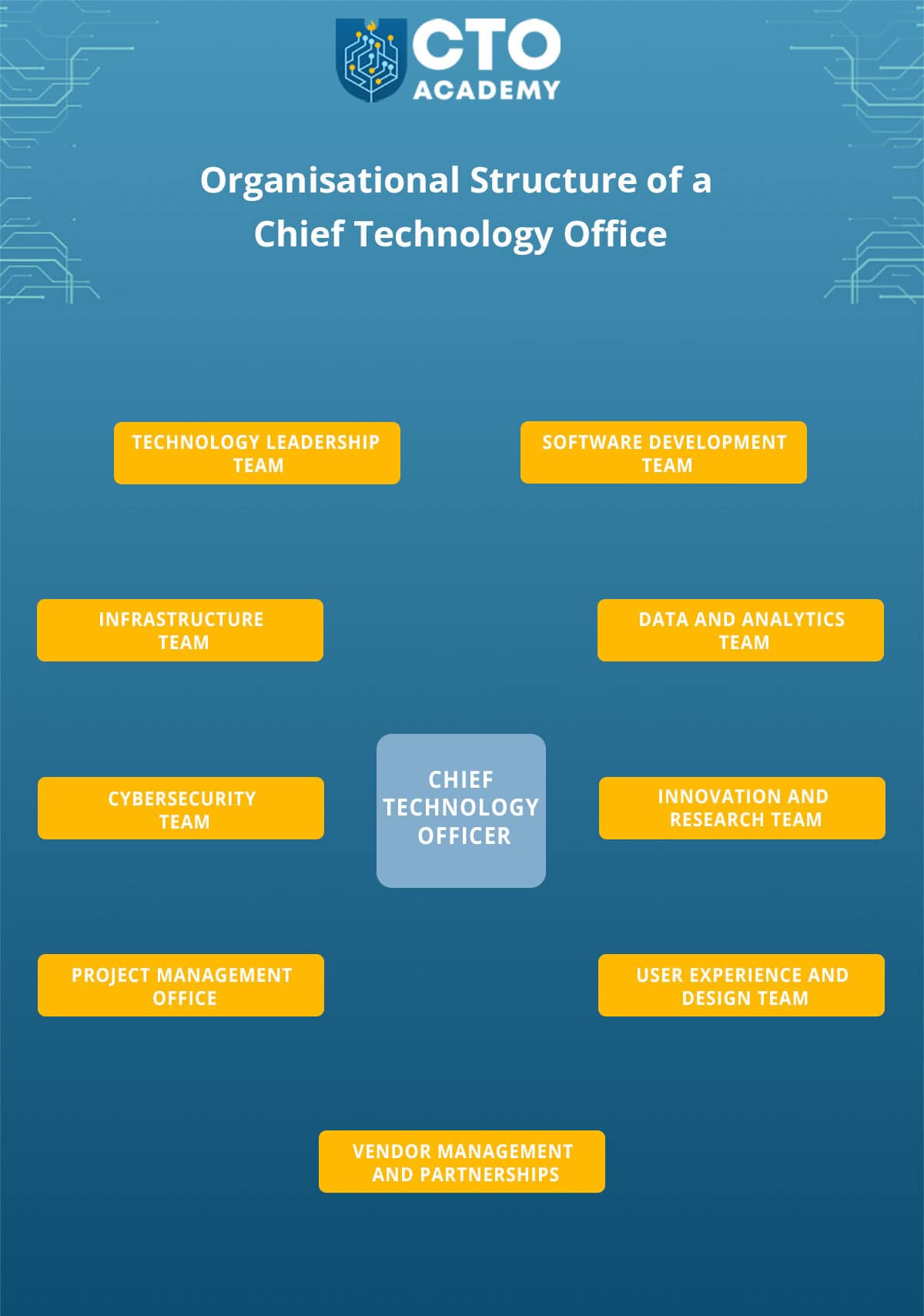
An example of a typical organisational structure, featuring key teams and their respective functions
(click to enlarge/download)
1. Chief Technology Officer (CTO)
Resides at the top of the organisational structure and is responsible for providing strategic leadership, setting the technological vision and ensuring technology initiatives align with the company’s business goals. CTOs report directly to the CEO or other top executives and may be part of the company’s board of directors.
In fast-growth companies, the CTO may be supported by a team of technology leaders who directly manage specific functional areas of the CTO Office; for example, the VP of Engineering or IT Director.
3. Software Development Team
The job description here is to design, develop and maintain software applications that cater to the company’s needs. The Dev Team(s) works closely with other departments to understand requirements and deliver software solutions that align with business objectives (eg, customer service, marketing, sales, etc).
4. Infrastructure Team
Responsible for the management of the company’s hardware and software infrastructure, including servers, networks and cloud services. Their primary focus is on ensuring the stability, security and scalability of the company’s IT infrastructure.
5. Data and Analytics Team
Managing data assets, conducting data analysis and providing data-driven insights to support decision-making across the organisation. They may also work on data governance and data security.
6. Cybersecurity Team
Safeguarding the company’s digital assets from potential threats and breaches. They implement security measures, conduct security audits and educate employees about best practices for data protection.
7. Innovation and Research Team
Researching emerging technologies, evaluating their potential applications and conducting experiments and prototypes to drive innovation. They collaborate with other teams to explore new possibilities for technological advancement.
8. Project Management Office
Oversees the planning, execution and monitoring of technology-related projects. The PMO ensures that projects are delivered on time, within budget and meet the specified quality standards.
9. User Experience and Design Team
Responsible for enhancing the user experience of the company’s digital products and services. They work closely with software development and innovation teams to create user-friendly and visually appealing interfaces.
10. Vendor Management and Partnerships
Manages relationships with technology vendors and strategic partners. They evaluate potential vendors, negotiate contracts and ensure that partnerships align with the company’s technology roadmap.
Note that the actual organisational structure of the CTO Office may vary from one company to another, and some companies may have additional teams or functions depending on their specific technological requirements and business goals. Additionally, in smaller start-ups, the CTO Office might be leaner, with the CTO directly overseeing multiple teams or functions.
But what about conglomerates or large companies with multiple verticals each responsible for an individual project/product?
2.1.1 A Group CTO role and responsibilities
A Group Chief Technology Office has a more encompassing role that commonly involves coordinating and aligning technology strategies across multiple companies within a group. In a nutshell, this means that the Group CTO oversees several technology leaders. The role is similar, but, as you can imagine, there are differences.
The obvious one is the scope of responsibilities. A Group CTO oversees the technological strategy and operations of a group of companies or subsidiaries within a larger corporate structure. As such, they are responsible for aligning technology initiatives and strategies across multiple entities, ensuring that technology investments are coherent and synergistic.
In practical terms, this means that the Group CTO is responsible for coordinating technology efforts and strategies across multiple companies. They need to identify opportunities for synergy, shared resources and technology collaboration among multiple business units
The same applies to innovation and R&D. Group CTOs might have a broader perspective on technological innovation that spans the entire group. In other words, they can guide R&D efforts that have a cross-company impact.
You can see an example of the Group CTO job requirements here.
A typical organisational structure of a Group CTO Office
1. Group Chief Technology Officer
The GCTO sits at the top of the technology leadership hierarchy and is responsible for overseeing the technology strategies, innovation and operations of the entire group. They report to the CEO, President, or another highest-level executive.
2. Technology Leadership Team
Business Unit CTOs– Report to the Group CTO and are responsible for aligning technology initiatives with the specific needs of their respective units.
Group Technology Strategy Head – Focuses on formulating and refining the overarching technology strategy for the entire group. They collaborate closely with business unit CTOs and the Group CTO to ensure alignment with group-level goals.
3. Group Technology Council
This council includes key technology leaders from each business unit or subsidiary. It meets regularly to discuss group-wide technology strategies, share best practices and address cross-company technology challenges.
4. Innovation and Research Labs
The group might establish innovation labs or centres of excellence that focus on exploring emerging technologies, conducting research and developing prototypes or proofs of concept with cross-company impact.
5. Centralised Functions
Technology Architecture Team – Defines and manages technology architecture standards and guidelines across the group, ensuring consistency and interoperability.
Vendor and Partnership Management – A centralised team might manage relationships with technology vendors, negotiate contracts and assess partnerships for their relevance to the entire group.
6. Support Functions
Project Management Office (PMO) – A centralised PMO could oversee technology project management processes, ensuring that projects are aligned with the group’s technology strategy and are executed efficiently.
Data Governance and Compliance – The team that ensures that data handling practices across the group adhere to regulations and standards.
7. Technology Advisory Board
Comprising of technology experts, executives and possibly external advisors, this board might provide strategic guidance to the Group CTO and assist in making technology-related decisions.
It’s important to note, however, that this is what a common structure of the GCTO Office may look like. The specific roles and organisation can vary widely based on the nature of the conglomerate and its subsidiaries.
The structure is, therefore, always designed to facilitate effective communication, collaboration and alignment of technology strategies while supporting the unique goals and challenges of each business unit within the group.
2.2 Reporting Hierarchies and Responsibilities
2.2.1 Reporting hierarchies of the Chief Technology Office
In a typical scenario, the reporting hierarchy of these departments looks like this:
The CTO reports directly to the CEO, COO (Chief Operating Officer) or directly to the company’s board of directors, depending on the organisation’s structure.
If there is a Group CTO, all the CTOs of the group report to the GCTO.
The leaders of the different functional areas within the CTO office (effectively deputies), such as the heads of Development, Infrastructure, Data and Analytics, Cybersecurity, Innovation and Research, etc, report directly to the CTO.
Teams report to their heads.
2.2.2 Responsibilities and decision-making authority of the CTO
As the top technology leader, the CTO plays a critical role in shaping the company’s technological vision and driving innovation. Their responsibilities and decision-making authority can be broadly categorised into the following areas:
Strategy Development
Innovation
Investments and Budgeting
Implementation and Integration
Risk Management and Cybersecurity
Vendor and Technology Partner Selection
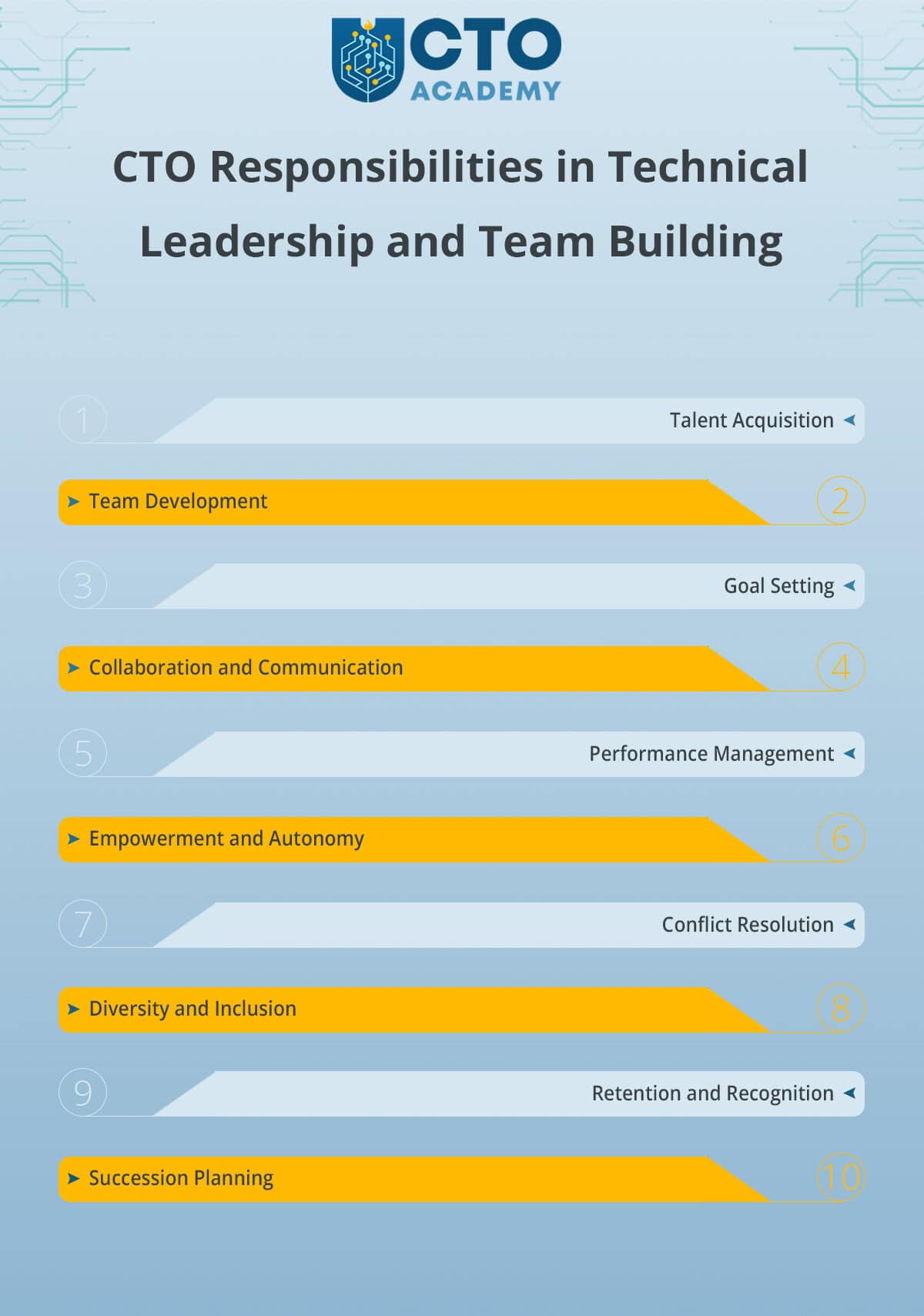
Talent Acquisition and Team Management
Cross-Functional Collaboration
Technology Governance and Compliance
Technology Roadmap and Vision
Evaluation of Technical Partnerships and Alliances
Technology Evaluation and Assessment
The decisions made by the CTO have a profound impact on the organisation’s technological landscape and its ability to adapt and thrive in a rapidly changing digital world.
3. Functions and Responsibilities of the Chief Technology Office
3.1 Developing a Visionary Technology Strategy
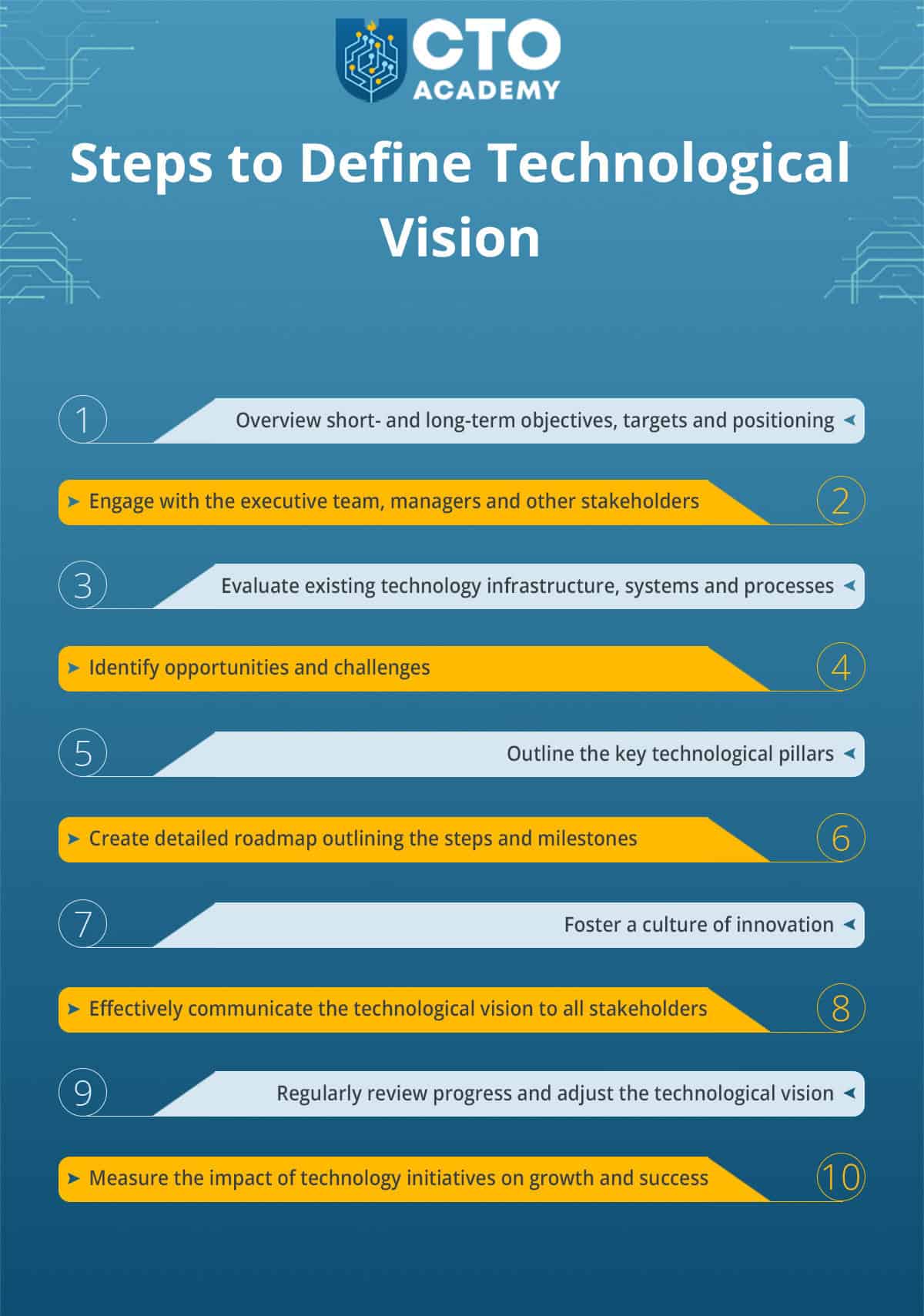
This process involves thorough analysis, strategic planning and continuous evaluation to ensure that technology initiatives drive the company’s success. It can be divided into 12 steps:
1. Understanding Business Goals and Objectives (ie, identifying the strategic priorities that technology should support).
2. Assessing the Current Technology Landscape (ie, identifying strengths, weaknesses and areas requiring improvement in the existing technology infrastructure).
3. Identifying Technology Trends and Innovations
4. Aligning Technology Initiatives with Business Objectives
5. Setting Long-Term Vision and Goals
6. Developing Actionable Roadmap
Outlining the steps and projects necessary to achieve the technology vision and goals.
Prioritising initiatives based on their potential impact, resource requirements and timeframes.
7. Engaging with Technology Stakeholders
Understanding their challenges.
Involving them in the process.
8. Addressing Risks and Challenges (associated with technology adoption and implementation).
9. Resource Allocation and Budgeting
10. Continuous Monitoring and Evaluation
11. Communicating the Technology Strategy
Effectively communicating the technology strategy to all stakeholders.
Ensuring that it is well-understood and embraced throughout the organisation.
Demonstrating the alignment between technology initiatives and the company’s overall success.
12. Practising Iterative and Agile Approach
This process enables organisations to formulate a forward-thinking and perfectly aligning technology strategy. It is necessary to create an environment of innovation, growth and sustained success in the technology landscape.
How to anticipate future technology trends?
It comes down to using a combination of strategic foresight, continuous learning and proactive engagement with the technology landscape. It is an iterative process that, in reality, never stops.
First, the Office conducts in-depth research and analysis of industry trends, customer demands and emerging technologies. The goal here is to identify potential opportunities and challenges.
Now comes the so-called technology scoutingwhere the teams effectively hunt out emerging technologies and innovations. They do so by attending conferences and seminars and by engaging with technology vendors. But the best opportunities often hide in the start-up landscape.
That’s why networking and collaboration are of vital interest. By fostering collaborations with industry peers, academia and research institutions, the Office gains insights into cutting-edge developments and best practices.
This also helps to stay updated with reports and insights from technology research firms, think tanks and industry publications.
Still, the only way for the Office and its CTO to know what the company truly needs is to maintain high levels of cross-departmental and cross-functional collaboration. For example, a Sales Team might radically improve its efficacy if the existing PaaS is replaced with a more practical upcoming solution. And that solution is often a flagship product of some relatively unknown start-up. As such, it needs thorough research and testing because start-ups are notorious for launching half-baked products.
How do you test such a product?
You organise hackathons and innovation challenges that will encourage employees to ideate and experiment with new technologies.
But if they experiment and fail to share the outcomes for one reason or another, it’s all in vain. That’s why successful CTOs promote fully open and completely inclusive internal knowledge-sharing sessions where team members can share insights and discuss potential technological advancements but also acknowledge accidents and mistakes.
If you doubt this approach, consider the number of NASA’s failed launches before they managed to put the man on the Moon. If they weren’t allowed to experiment and crash things, the only walk Neil Armstrong would have taken would have been in his local park.
And just like NASA, every Chief Technology Office seeks advice and guidance from external technology consultants or subject matter experts. It’s a proven way to gain fresh and objective perspectives because the Office can easily fall into singular reasoning. And where everybody thinks the same, nobody’s really thinking.
All this research and experimentation builds a necessary foundation for developing pilot projects and prototypes. It’s the only sure way to test and evaluate the feasibility and potential impact of new technologies.
The last and probably most important element of this entire process is continuous training and professional development. That’s why successful CTOs relentlessly encourage all team members to participate in workshops, webinars and courses to stay updated with the latest industry trends.
This is the common process the Office uses to:
Proactively anticipate future trends.
Enable the organisation to make informed strategic decisions.
Maintain a competitive edge in the ever-evolving technology landscape.
3.2.1 Overcoming hurdles in implementing new technologies and systems in fast-paced environments
Examples of strategic approaches and best practices:
1. Thorough Planning and Roadmapping – Outlines the steps, resources and timelines.
2. Agile Methodology – Enables quick adaptation to changing requirements and continuous improvement of the technology implementation processes.
3. Cross-Functional Collaboration – Ensures technology solutions meet their specific needs and align with overall objectives.
4. Clear Communication – To foster understanding, cooperation and collective problem-solving.
5. Addressing Resistance to Change
Identifying potential resistance to new technologies and addressing it proactively.
Educating employees about the benefits of the new systems.
Offering training and support during the transition.
6. Pilot Projects and Prototyping – To validate the feasibility and potential benefits of the new technologies before full-scale deployment.
7. Risk Mitigation Strategies – To address unexpected issues.
8. Prioritise User Experience – To enhance adoption rates and minimise disruptions during the transition.
9. Performance Metrics and Evaluation
Establishing performance metrics to evaluate the success of technology implementation.
Continuously monitoring performance and gathering feedback to make data-driven improvements.
10. Celebrate Successes – To boost morale and encourage future innovation.
The key phrase here is adaptive mindset. Because if the mindset is adaptive, it is also proactive which means that there is no limbo.
3.2.2 Examples of successful strategies for achieving seamless technology integration
1. Thorough Planning and Assessment
Conduct a comprehensive assessment of the existing technology infrastructure and systems to identify potential integration challenges.
Develop a detailed integration plan that outlines specific goals, milestones and resource requirements.
2. Clear Definition of Objectives
Define the objectives and expected outcomes of the technology integration.
Ensure alignment with the company’s overall business strategy to maximise the impact of the integration.
3. Cross-Functional Collaboration
4. Open Communication and Change Management
5. Testing and Validation
Conduct extensive testing of the integrated systems to identify and resolve potential issues before full deployment.
Validate data integrity and ensure compatibility with existing processes.
6. Incremental Implementation – ie, phased approach for easier management of risks and course corrections if needed.
7. Data Migration and Integration
Develop a robust data migration strategy to ensure the seamless transfer of data from legacy systems to the new integrated platform.
Pay close attention to data mapping, validation and data security.
8. Training and Support
9. Performance Monitoring and Optimisation
Continuously monitor the performance of the integrated systems post-implementation.
Analyse data, gather feedback and make iterative improvements to optimise the integration’s efficiency.
10. Vendor Collaboration
Ensure clear communication, well-defined roles and a shared commitment to achieving successful integration.
11. Contingency Planning
12. Post-Integration Review
Conduct a post-integration review to assess the success of the integration and gather lessons learned for future projects.
Use feedback to continuously improve integration processes.
A well-executed integration enhances the company’s ability to leverage technology effectively and adapt to evolving market demands.
3.3 Aligning Technology with Rapid Business Growth
There are three primary objectives here:
Enable the organisation to seize market opportunities.
Streamline its operations.
Help enhance customer experiences.
To meet these objectives, the Office must scale the technology infrastructure to cater to the expanding business needs. This is achieved through an array of practical approaches:
Cloud Migration
Horizontal Scaling
Microservices Architecture
Automated Provisioning and Orchestration
Containerisation
Elastic Storage Solutions
Content Delivery Networks (CDNs)
Monitoring and Performance Optimisation
Outsourcing and Managed Services
Proactive Capacity Planning
Resilient Architecture Design
Collaborative Decision-Making
3.4 Practical Ways of Managing Different Departments in Start-Ups and Fast-Growth Companies
In start-ups and fast-growth companies, the CTO Office must adopt practical strategies to manage verticals effectively. It is more of a hands-on approach to management and here are a few examples:
Software Development
Implementing agile practices like Scrum or Kanban to facilitate iterative development, quick feedback loops and adaptive planning.
Setting up automated CI/CD pipelines to streamline code integration, testing and deployment, ensuring faster and more reliable releases.
Enforcing coding standards, conducting regular code reviews and prioritising code quality to prevent technical debt and maintain a high level of consistency.
Infrastructure
Leveraging cloud platforms (e.g., AWS, Azure, Google Cloud) to scale infrastructure dynamically, reducing the need for extensive upfront investment.
Implementing Infrastructure as Code (IaC) to automate infrastructure provisioning, making it efficient and repeatable.
Active monitoring to track system performance, set up alerts and address issues promptly, ensuring high availability.
Compliance and Security
Working closely with legal and compliance teams to understand relevant regulations and translate them into technical requirements.
Ensuring sensitive data is encrypted both at rest and in transit to maintain security and regulatory compliance.
Implementing role-based access control (RBAC) and multi-factor authentication (MFA) to prevent unauthorised access.
Talent Acquisition and Retention
Creating clear career growth paths within the teams, allowing employees to see their potential advancement and development opportunities.
Offering training and workshops to enhance skill sets, encourage continuous learning and keep team members engaged.
Recognising and rewarding exceptional performance through promotions, bonuses or other incentives, thus boosting morale.
Budget Constraints
Allocating resources based on strategic goals and prioritising initiatives that have the most impact on the company’s growth.
Exploring and implementing cost-effective solutions like open-source tools and technologies that provide value without high licensing costs.
Monitoring (and optimising) cloud resource usage to avoid unnecessary expenses and maintain cost efficiency.
Communication and Alignment
Conducting regular cross-functional meetings to ensure departments are aligned with business goals and that they share progress updates.
Creating clear and understandable technology roadmaps that align with the company’s vision, facilitating communication of priorities across the organisation.
Translating tech to business, helping non-technical stakeholders understand the impact of technology decisions on business outcomes.
Technological Innovation
Dedicating time for innovation through innovation labs or hackathons to allow teams to explore new ideas and technologies.
Collaborating with other start-ups, research institutions and industry partners to stay ahead of emerging trends and technologies.
Encouraging the development of PoCs (Proof of Concepts) to validate the feasibility and potential impact of innovative ideas before full implementation.
4. Interactions and Collaboration with Other Departments
4.1 Driving Cross-Functional Innovation
When Nike decided to engage customers directly in 2017, they quickly realised that they must create an Apple-like ecosystem; especially during the pandemic when it became obvious that the company needed a larger footprint in the digital landscape.
Up until then, 80% of their profit was coming through wholesale channels. But now they had a different objective on their mind: enhance the e-commerce strategy to transform online retail into a strong revenue-generating channel.
For that to happen, Nike had to harness the power of technology to develop applications that expanded the company’s services. By using these apps, users gained access to a wide range of training programs but, more importantly, became part of Nike’s now thriving community.
This shift in perspective quickly transformed the company from merely a retailer to a brand that fosters a healthy lifestyle, offering top-notch apparel and footwear tailored for sports enthusiasts.
Was it a successful transformation in terms of revenues?
Currently, e-commerce sales account for approximately 43% of Nike’s total revenue. However, the company anticipates this figure to rise to 50% by the year’s end.
This achievement primarily stems from the company’s profound understanding of customer needs beyond traditional shopping behaviours. However, it was only after they managed to seamlessly integrate business technology that they successfully established a direct and personalised connection with their audience. Even the understanding of customer needs came as a result of data gathering and organisation.
So how did Nike’s Technology Office achieve this success?
In short, through fully inclusive cross-functional collaboration. As we have repeatedly stated, the CTO Office maintains open and transparent communication with other departments to understand their pain points, challenges and technological needs.
Once they gather the intel, they conduct workshops and brainstorming sessions that involve employees from different departments. This collaborative environment encourages idea-sharing and sparks innovative solutions.
From there, the Office moves to organise innovation challenges and hackathons where employees from various departments form teams to address specific business problems using technology.
These are complemented by regular innovation forums or knowledge-sharing sessions where technology experts present emerging trends and advancements relevant to different departments.
To avoid confusion and ensure accurate information flow, the Office identifies and empowers the so-called innovation ambassadors within each department. These individuals champion technology-driven ideas, acting as liaisons between their departments and the CTO Office.
As the situation heats up, the Office initiates joint pilot projects that again involve multiple departments. These projects offer an opportunity to experiment with new technologies and assess their potential benefits across the organisation. At the same time, the CTO Office encourages departments to adopt agile methodologies and experimentation.
Now comes the necessary feedback and iterative improvement to foster a culture of continuous learning and adaptation to evolving business needs.
But to enable, for example, the Sales Team to seamlessly integrate the new technology into their processes, the CTO Office must also provide technology training to employees outside the technology department. This helps enhance their digital literacy and ability to leverage technology effectively. During the process, they also learn to use data and analytics to drive decision-making when attempting to identify new opportunities and optimise existing processes.
For any of this to happen, the Office must first develop a detailed resource allocation and support plan and practices. This may include funding, access to technology expertise and necessary infrastructure.
And when a spark of inspiration doodled on some napkin turns into a viable business idea or MVP, we must recognise and celebrate these successful technology-driven ideas and projects, either through internal awards or public acknowledgement. Celebrating successes reinforces the value of innovation.
It is a collaboration that inevitably creates an environment that values innovation, encourages technology-driven ideas and one where employees across the organisation actively contribute to the company’s technological advancement and growth.
And just like in the Nike example, bit by bit, iteration by iteration, they become part of a thriving community. Pretty soon, the customers join in.
What was once a struggling start-up, it’s now a fast-growth business all thanks to the efforts of the Chief Technology Office.
4.2 Maximising Resources and Budgets
Collaboration between the CTO, finance and operations teams is crucial to optimise technology investments and utilise resources efficiently. Here’s how this collaboration can take place:
1. Strategic Alignment – Collaboration with finance and operations to understand the company’s financial goals and operational needs and ensure that technology investments are directly tied to business objectives.
2. Budget Planning and Allocation – Working with the finance team to develop the technology budget and allocate resources effectively (involves discussing upcoming projects and prioritising initiatives based on their potential impact on operations and financial returns).
3. Cost-Benefit Analysis – Together with finance, the CTO conducts cost-benefit analyses for technology investments (helps in identifying projects that deliver the highest value to the company while optimising costs).
4. ROI Assessment – The Office and finance team evaluate whether the expected benefits were achieved and use these insights to inform future investment decisions.
5. Risk Management – Collaboration with operations and finance helps identify potential risks associated with technology initiatives to expose operational vulnerabilities.
6. Business Case Development – Used when proposing new technology projects together with finance (outlines the expected benefits, costs and potential risks).
7. Lifecycle Cost Analysis – The CTO and finance team consider the entire lifecycle cost of technology solutions, including implementation, maintenance and upgrades to ensure long-term cost-effectiveness and sustainability.
8. Resource Optimisation – Together with operations, the CTO assesses the utilisation of technology resources to identify opportunities for consolidation, virtualisation or automation.
9. Negotiating Vendor Contracts – Working with finance to secure favourable terms and ensure cost efficiency.
10. Operational Efficiency – Understanding operational workflows in collaboration with the operations team.
11. Reporting and Accountability – To finance and operations teams.
12. Long-Term Technology Roadmap – Involves close collaboration with finance and operations teams.
By actively fostering robust collaboration among the CTO, finance and operations teams, the organisation guarantees optimised technology investments, efficient resource utilisation and substantial contributions of technology initiatives to the company’s success and growth.
But there is one additional dimension in the entire effort to maximise budgets and resources and that’s the cost-effective approach to technology procurement and implementation. It involves intelligent decision-making, resource optimisation and, most of all, strategic planning.
4.2.1 Cost-effective approaches to technology procurement and implementation
The first thing to do is to conduct a thorough evaluation of technology vendors, considering factors like reputation, capabilities and pricing. The point is to (re)negotiate contracts to secure the best terms, including discounts and favourable payment schedules.
In some scenarios, exploring open-source software options can also provide cost-effective alternatives to commercial solutions.
Open-source or commercial, both require leveraging cloud services and SaaS solutions to avoid upfront infrastructure costs. Cloud providers, for instance, often offer scalable and pay-per-use models. It is a practical way to optimise resource utilisation.
When choosing technologies, the CTO always considers scalability because scalable solutions allow for incremental growth without significant additional investments.
The Office will also consider leasing technology equipment or exploring financing options rather than making large upfront purchases. This approach spreads costs over time, making it more manageable.
For complex products, a good strategy is a modular implementation that focuses on high-priority features and delivers them incrementally. This allows for quicker returns on investment and ongoing improvements based on user feedback.
While existing solutions undergo continuous evaluation and optimisation, to evaluate the feasibility and potential benefits of new technologies before full implementation, the Office conducts proof of concept. This allows the CTO to reduce the risk of investing in solutions that may not meet business needs.
All of this requires the implementation of effective asset management practices to track hardware and software assets, thus, reducing the risk of unnecessary purchases while ensuring optimal utilisation.
Let’s not forget internal resource utilisation; for example, maximising the expertise of existing IT teams and retraining employees where necessary. Internal teams can be cost-efficient for maintenance and support. At the same time, they can reduce reliance on external support if combined with training and knowledge transfer that equips employees with the skills needed to operate and maintain new technology solutions effectively.
Finally, the Chief Technology Office will place much emphasis on security and compliance awareness. By prioritising these two instances, the CTO avoids costly breaches or penalties.
As a general rule of thumb, implementing robust security measures from the start is more cost-effective than dealing with security incidents later.
By incorporating these cost-effective approaches, organisations can procure and implement technology solutions in a financially prudent manner, optimising the use of resources and maximising the value derived from technology investments.
4.3 Cultivating a High-Performing Technology Team
The Chief Technology Office plays a vital role in talent acquisition, development and retention within the technology department. CTOs, as leaders, are directly responsible for defining the department’s talent strategy, identifying the skills and expertise needed to achieve technology objectives and attracting top-notch professionals.
To do that, the CTO collaborates with HR and conducts interviews to ensure the right cultural fit and technical proficiency.
Once talents are onboard, the CTO oversees their development through mentorship, training and professional growth opportunities.
By creating a conducive and innovative work environment, the Office fosters a culture that encourages learning and creativity, increasing employee satisfaction and retention. Additionally, the CTO ensures competitive compensation packages and career advancement prospects, making the technology department an attractive place for talented individuals to thrive and contribute to the company’s success.
4.3.1 Strategies for building a cohesive and motivated technology team in a competitive job market
To build such a team, the Office should:
Articulate a compelling vision and purpose for the team, emphasising the impact of their work on the organisation and society.
Offer competitive salary packages, benefits and perks to attract top tech talent.
Provide opportunities for skill development, certifications, and attending industry events to demonstrate a commitment to employee growth.
Foster a culture that values collaboration, diversity and open communication to create a positive and inclusive work environment.
Acknowledge and reward team members’ achievements and contributions to boost motivation and morale.
Assign challenging and meaningful projects that allow team members to showcase their skills and make an impact.
If applicable, offer flexible work arrangements and remote work options to accommodate diverse lifestyles.
Organise team-building events and activities to strengthen relationships and trust among team members.
Encourage regular feedback and involve team members in decision-making processes to increase engagement and ownership.
Provide a clear career progression roadmap to demonstrate opportunities for growth and advancement within the organisation.
To build a highly efficient Chief Technology Office that drives innovation, supports growth and positions the company for sustained success in the dynamic landscape of start-ups and fast-growth companies, you must:
Strategically align technology initiatives with the company’s overall business strategy.
Attract and retain top tech talent.
Optimise resources.
Foster innovation and agility.
Prioritise cybersecurity and compliance.
Cultivate strong vendor relationships.
Communicate effectively with stakeholders.
Proactively manage risks.
Implement scalable infrastructure.
Focus on customer needs.
Continuously iterate and improve technology solutions.
It is not an easy job because none of this takes the so-called unknown unknowns into account (eg, the recent pandemic or any other black swan event).
To prepare you for any possible scenario, CTO Academy has created a robust Digital MBA for Technology Leadersthat consists of no fewer than 220 micro lectures delivered by tech and business leaders that are spread over nine strategic modules focused on your growth as a technology leader.
It has only one goal: to prepare you for what lies ahead and help you navigate the complexity of the Chief Technology Office.
CTO responsibilities stem from their pivotal role in today’s rapidly evolving technological landscape. Chief Technology Officers, as the top executives, hold the reins of the organisation’s technical vision, strategy and execution.
What is the primary responsibility of the CTO?
The Chief Technology Officer leads the development and execution of the company’s technical strategy. Hence, the CTO is responsible for:
Aligning the organisation’s technological vision with its business goals.
Ensuring that the technology infrastructure, systems and processes support the company’s overall objectives.
In this article, we will specifically focus on CTO responsibilities in start-ups and fast-growth companies. These two environments impact the responsibilities by altering the scale, complexity and scope of a CTO role. For instance, a start-up CTO focuses on building the technology foundation and driving innovation to get products market fit. In a fast-growth company, on the other hand, leaders must scale and optimise the technology infrastructure to support rapid expansion and ongoing success.
Comparative overview of general responsibilities
START-UP
FAST-GROWTH COMPANY
Technology Strategy Product Development Technical Leadership Technology Stack Team Building and Management Infrastructure and Security Innovation and Research Collaboration with Other Departments Budgeting and Resource Allocation Vendor and Partner Management
Scaling Technology Infrastructure Managing a Larger Technical Team Process and Workflow Optimisation Compliance and Governance Risk Management Integration and Interoperability Vendor and Technology Selection Performance Monitoring and Optimisation Budgeting and Resource Allocation Communication with Stakeholders
In start-ups, the CTO’s responsibilities are centred on leveraging technology to drive innovation, efficiency and growth while keeping a keen eye on the company’s long-term vision and objectives.
Translated to real life, this means that a CTO in a start-up company has a more hands-on role since the team is still relatively small. At the same time, the expectations are unrealistic and budget-limited. So to get that product market fit as we mentioned earlier, a CTO is called into frequent firefighting.
These fires ignite unexpectedly in different hotspots and require a prompt and effective response. Here, we are going to list the most common challenges so you can get a better sense of the actual situation in start-ups.
Number one, scaling challenges. Often, rapid growth can strain the technology infrastructure, causing performance bottlenecks. To solve this, start-up CTOs opt for scalable architecture, leverage cloud services and implement caching and load balancing.
Then, the inevitable resource constraints. Budget limitations can hinder technology investments, affecting development speed. To effectively fight this common fire, you should:
Prioritise essential features
Consider open-source tools
Optimise resource usage for cost-effectiveness
However, these measures often have limited impact because rapid scaling and accompanying constraints can easily cause technical debt accumulation.
You see, time constraints can lead to shortcuts. As we all know, shortcuts are notorious for their ability to accumulate technical debt. That’s why you need to: plan for regular refactoring, automate testing and allocate time for code quality maintenance.
On top of this, the constant pressure to get the MVP out asap. has one additional serious consequence – product quality issues. It happens because quick iterations lead to bugs and unstable releases. You can fight this fire (to some extent) by implementing robust testing practices, adopting continuous integration and establishing a rigorous QA process. But if you are managing a small team, all these countermeasures will have a limited effect. It is almost an unsolvable problem and the main reason why start-up CTOs must have a literal hands-on approach.
Another problem with rapid development is security vulnerabilities. It is increasingly easy to overlook security measures and unwittingly expose the product to risks. That’s why it is imperative to integrate security practices from the start, conduct regular audits and prioritise user data protection.
And then, all of a sudden, the market can shift, causing an immediate change of priorities. To pivot when necessary, you must stay flexible (ie, embrace Agile) and maintain open communication.
All this time, the CTO must stay on top of technical support and maintenance. Unfortunately, this can divert focus from product development.
There are three measures that you can implement to prevent this diversion. One is to establish efficient support channels. A second is to use monitoring tools to identify issues early on. Both, however, demand the allocation of dedicated resources for maintenance. Do you see the problem? If the team is small, who is going to be responsible? The logical solution is the third measure, outsourcing. But can your start-up afford $100/h professional support times five or even 10?
To, at least, minimise these outbreaks, the CTO must:
Timely define the technological vision.
Lead and manage an engineering team efficiently.
Organise the right technology stack and create an optimal architecture.
Foster innovation.
Oversee product development with hawk eyes.
1.1 Defining the Technological Vision (the process)
(click to enlarge/download)
Commonly, it is a four-stage process that develops in 10 consecutive steps. The process ensures the perfect alignment of the vision and business objectives.
Stage 1 – Intel gathering
Step 1
The CTO starts by overviewing the company’s short-term and long-term business objectives, growth targets and market positioning to align the technological vision with the overall strategy.
Step 2
To do so, the CTO engages with the executive team, product managers and other stakeholders to gather insights, understand pain points and identify technology gaps.
Step 3
The final step at this stage is to evaluate the existing technology infrastructure, systems and processes to identify strengths, weaknesses and areas for improvement. This assessment helps in setting the baseline for the technological vision.
Stage 2 – Roadmapping
Step 4
From evaluation, a Chief Technology Officer moves to identify opportunities and challenges by analysing market trends, emerging technologies and industry disruptors.
Step 5
Based on the gathered insights, the CTO outlines the key technological pillars that will drive the company’s growth. These pillars could include scalability, security, user experience, data analytics or other business-relevant factors.
Step 6
Now comes a detailed roadmap outlining the steps and milestones required to achieve the technological vision. Here, it is necessary to prioritise initiatives based on impact and feasibility while considering resource constraints and timeframes. It is a start-up after all which means that time is short and money is still pretty much scarce.
Stage 3 – Execution
Step 7
What a CTO needs to effectively execute the vision is to foster a culture of innovation within the engineering team and the broader organisation. The only way to do so effectively is to encourage experimentation and risk-taking while promoting continuous learning to stay ahead in this dynamic market.
Step 8
To be perfectly sure that the vision aligns with the goals, the CTO must effectively communicate the technological vision to all stakeholders. This is the reason why highly efficient CTOs always encourage feedback and input from team members. It allows them to refine the vision further.
Stage 4 – Reviews and measurements
Step 9
As the software teams move to development, it is the start-up CTO responsibility to regularly review progress and adjust the technological vision as needed. They must consider market changes, customer feedback and internal developments while, at the same time, remaining agile and adaptable to seize new opportunities.
Step 10
Finally, as CTOs in start-ups, we must measure success. That means, a) defining key performance indicators (KPIs) that align with the technological vision, and b) tracking progress against these metrics. What we want to ultimately achieve is to measure the impact of technology initiatives on the company’s growth and success.
This is how a start-up Chief Technology Officer can establish a clear technological vision that serves as a roadmap for the company’s future success. The alignment of technology with business goals ensures that every technical decision contributes to the overall mission and drives the company toward sustainable growth and innovation.
But for any of that to happen, the CTO must place special emphasis on the team building initiatives.
In a start-up environment, providing technical leadership to the engineering team sets the direction for technology development, fosters a culture of innovation and ensures the efficient execution of projects.
The expert CTO’s guidance empowers the team to:
Make informed decisions.
Maintain product quality.
Adapt swiftly to evolving challenges.
(click to enlarge/download)
The key phrase here is soft skills — encapsulating several critical responsibilities in building and managing a skilled and motivated technical team in a start-up company:
1. Talent Acquisition – identifying skill gaps, conducting interviews and ensuring the right people are brought on board.
2. Team Development – providing mentorship and guidance to nurture the team’s professional growth while encouraging continuous learning and skill development to foster a high-performing and adaptable team.
3. Goal Setting – collaborating with team members to set clear goals and expectations while ensuring that each team member understands their role in achieving the company’s technological vision.
4. Collaboration and Communication – promoting a collaborative work environment where ideas and knowledge are shared freely while ensuring that the team is aligned with business objectives and works cohesively through effective communication.
5. Performance Management – establishing performance metrics and conducting regular evaluations (identification of strengths and areas for improvement) while providing constructive feedback.
6. Empowerment and Autonomy – trusting the team members to take ownership of but also accountability for their projects and decisions (combined, it leads to improved motivation!).
7. Conflict Resolution – addressing conflicts and challenges within the team promptly and constructively to facilitate a healthy work environment and, thus, maintain productivity and morale.
8. Diversity and Inclusion – ensuring diversity and inclusion within the team to foster creativity, innovation and different perspectives (a diverse workforce contributes to a well-rounded and adaptable team).
9. Retention and Recognition – implementing strategies to retain top talent by recognising achievements and contributions
When team members feel valued and appreciated, it is easier to build an engaging workplace.
10. Succession Planning – identifying potential leaders and developing a succession plan to ensure the team’s long-term stability and growth.
These 10 responsibilities are a template for building cohesive, skilled and motivated technical teams that drive innovation and meet technical challenges regardless of the company’s size.
Everything that is and everything that will be relies solely on the effectiveness of the engineering team. You can have the best technology stack and architecture, but without the team, it’s like having a chassis without the engine.
1.3 Technology Stack and Architecture:
Selecting the right technology stack and architecture forms the foundation upon which the entire technical infrastructure is built. The choices a CTO makes can greatly influence the start-up’s scalability, performance, development speed and cost-effectiveness.
These selections can affect how well the product adjusts to evolving market needs and advancements in technology. A strategic choice, therefore, enables seamless integration of components and efficient maintenance, ensuring that the start-up is positioned for growth and innovation while minimising technical roadblocks.
So before making technology decisions for a tech start-up, CTOs should consider the following factors:
1. Scalability
Consider how well the chosen technology can handle increased user demand and data volume as the start-up grows.
Evaluate whether the technology stack and architecture can be easily scaled horizontally or vertically to accommodate future expansion.
2. Development Speed
Assess how quickly the technology stack allows developers to build, iterate and deploy new features or products.
Choose technologies with robust libraries, frameworks and tools that accelerate development without sacrificing quality.
3. Cost
Calculate the overall cost of implementing and maintaining the technology stack, including licensing fees, infrastructure costs and development efforts.
Strive to balance cost-effectiveness with the long-term benefits the chosen technologies offer.
Many cloud providers subsidise costs for the first year or two but once finished, costs can be significant.
4. Compatibility and Integration
Ensure that the technology stack can seamlessly integrate with existing systems and third-party services.
Evaluate how well the chosen technologies can communicate and share data with other components of the ecosystem.
5. Performance
Test the performance of the technology stack under different conditions, including peak load scenarios.
Choose technologies that deliver optimal speed and responsiveness to provide an excellent user experience.
6. Flexibility and Adaptability
Consider how easily the chosen technologies can adapt to changing requirements, market trends and technological advancements.
Prioritise solutions that allow for flexibility and future-proofing the start-up’s technical infrastructure.
7. Community and Support
Evaluate the size and activity of the technology’s developer community. A strong community often translates to better support, updates and resources.
Consider the availability of documentation, tutorials and online forums for troubleshooting and learning.
8. Security
Examine the security features and best practices provided by the technology stack to protect user data and sensitive information.
Address potential vulnerabilities and ensure compliance with industry security standards.
9. Talent Pool
Assess the availability of skilled developers and engineers experienced in the chosen technology stack and assist with the hiring process. Keep in mind that a technology stack with a larger talent pool can make recruitment and team-building much easier.
10. Longevity
Consider the technology’s track record and how well it has been adopted in the industry.
Avoid adopting technologies that may become obsolete quickly or lack long-term community support.
By carefully evaluating each aspect, the start-up CTO can choose a technology stack that aligns with the goals and supports the company’s growth trajectory and market position. The choices will also have a profound impact on the development process and innovation.
The collaboration between the CTO, product managers and engineering team is crucial for driving innovation in a start-up’s products. It is an intricate process that relies on careful planning on one hand and experimentation on the other.
It starts with ideation and conceptualisation. The product managers and CTOs collaborate to brainstorm ideas and concepts for new features or products. The CTO is here to bring technical insights to the discussions, helping to assess the feasibility and technical implications of different ideas.
Product managers then gather input from customers, market trends and stakeholders to prioritise features and enhancements. The CTO provides technical input on the feasibility, complexity and potential impact of different prioritisation options.
Once the priorities are set, the CTO and engineering team work together to create technical roadmaps that outline the implementation plan for new features or products. These roadmaps incorporate considerations such as architecture design, technology choices and development timelines.
The development team now dives deep into Agile. Guided by the technical roadmap, they iterate on building and refining the product. Frequent collaboration between the CTO, product managers and developers during sprint planning, reviews and retrospectives ensures alignment and rapid progress.
But it doesn’t come without problems.
When challenges or technical hurdles arise during development, the CTO must closely collaborate with the engineering team on problem-solving to find creative solutions. They work together to ensure that technical limitations don’t compromise the product’s overall vision and user experience.
To make these problem-solving sessions more effective, the CTO may initiate innovation workshops where cross-functional teams brainstorm and prototype innovative solutions. Engineers contribute their technical expertise, while product managers provide insights into user needs and market trends.
At this point, we have our MVP.
Product managers now gather user feedback on existing features or prototypes, which is then shared with the CTO and development team. This feedback loop guides refinements and improvements, ensuring the final product aligns with user expectations.
Once the product is launched, the CTO collaborates with product managers to monitor performance and user engagement metrics. Together, they analyse data to identify areas for optimisation and enhancement, driving iterative improvement.
The success of these implementations (improvements) is fueled by the continuous learning practice. The CTO provides developers with opportunities to experiment with new technologies and techniques. It is this learning through trial and error that ultimately contributes to ongoing innovation and the ability to adapt to evolving market demands.
As you can see, the CTO, product managers and engineering teams collectively contribute their expertise to create innovative, user-centric products that meet market demands and position the start-up for growth and success.
How a start-up chief technology officer fosters such a culture
The CTO sets the tone by demonstrating a commitment to learning, experimentation and embracing new technologies. In other words, they lead by example so that their actions can inspire the team to adopt a similar iterative mindset.
At the same time, leaders must create a supportive environment that encourages open and transparent communication. Team members should feel comfortable sharing ideas, suggestions and even failures without fear of criticism. With established feedback loops where team members provide honest input on experiments and improvements, the environment creates a sense of collective refinement.
Without such an environment, organising innovation workshops and hackathons is futile. The dysfunctional team cannot effectively brainstorm, prototype and experiment with new concepts.
Encouraging a “fail fast, learn fast” mentality promotes quick experimentation and learning from failures rather than dwelling on them.
Assuming that we managed to create such an environment, we need to allow engineers to dedicate a portion of their work time to exploring new technologies, tools or approaches. This, in turn, fosters a sense of ownership and curiosity. Combined with the metrics and data-driven decision-making, the process helps team members objectively assess the outcomes of their experiments and improvements.
But curiosity without learning has its limits. That’s why providing resources for continuous learning, such as training, courses and conferences is critical. The CTO role here is to empower the team to stay up-to-date with industry trends and advancements.
At the same time, the technology leader should foster collaboration across different teams and departments to encourage the exchange of ideas and perspectives. Subsequently, this leads to innovative and, more importantly, effective solutions.
And such solutions must be recognised and celebrated. We are talking about both small and big wins that come as a result of experimentation. Such practice reinforces the value of continuous improvement and encourages others to join the effort.
This culture of continuous improvement and experimentation ensures that the company remains agile, adaptable and innovative and, thus, at the forefront of technological advancements and market trends.
2. Key CTO Responsibilities in Fast-Growth Businesses
(click to enlarge/download)
A fast-growing business is a different kind of beast. A good example is the trading platform Robinhood.
Founded in 2013, Robinhood disrupted the traditional brokerage industry by offering commission-free trading through a mobile app. The platform’s simplicity and accessibility attracted a younger audience and democratised access to financial markets. But then it began to grow. Fast.
By 2021, the crypto engineering team quadrupled and the plan was to double the size of the group in the next year to improve the trade flow systems. So Robinhood’s board appointed a new CTO to oversee this process.
Before this appointment, the technology leadership was in the hands of the founders. But at some point, it became clear that they could no longer handle the growing responsibility.
Because as the business is scaling, so does the technology infrastructure.
2.1 Scaling Technology Infrastructure
Scaling the infrastructure to accommodate rapid growth presents several formidable challenges.
User demand surge, for instance, can cause performance bottlenecks, affecting application speed and responsiveness, and potentially leading to a poor user experience. Experienced CTOs solve performance bottlenecks by:
Identifying specific areas of code causing bottlenecks through performance profiling tools.
Refining database queries to minimise unnecessary or slow operations.
Implementing caching mechanisms to store frequently accessed data and reduce database load.
Scaling by adding more servers to distribute the workload and improve response times (horizontal scaling).
When a company scales, it is commonly transitioning from a “slap it together” architecture to a distributed, scalable one. This process requires careful planning to ensure seamless communication and data synchronisation. Some of the proven ways to address scalability architecture are:
Breaking down applications into smaller, independent microservices for easier scaling and maintenance (not the most favourable option for some CTOs though).
Using container technologies like Docker for consistent deployment across various environments.
Implementing load balancers to distribute traffic evenly among multiple servers or instances.
Leveraging cloud services to automatically adjust resources based on traffic patterns to handle varying loads.
As our environment grows, so do datasets. It’s the CTO’s job to ensure efficient data storage, retrieval and management strategies to maintain performance and prevent data loss. The three most common ways to tackle this problem are:
Partitioning or dividing large datasets into smaller partitions for faster retrieval and improved performance.
Archiving; ie, moving older or less frequently accessed data to archival storage to optimise the database’s performance.
Compression, to reduce storage space and improve data retrieval speed.
Rapid growth also dictates demand fluctuation. So allocating resources effectively across various components becomes a daily struggle. This is where operational management skills come into play because it is a Chief Technology Officer’s responsibility to solve this problem either by implementing monitoring tools and using automation or, at the very least, historical data and predictive analysis to forecast the needs and allocate accordingly.
All of this can lead to shortcuts or inefficient solutions that accumulate technical debt. It is in every technology leader’s job description to prevent this from happening or at least keep it on acceptable levels. To do so, seasoned CTOs employ an array of methods such as:
Enforcing regular code reviews to identify and address inefficient or non-scalable code.
Allocating time for planned refactoring to improve code quality and eliminate accumulated debt.
Documenting code, architecture and decisions to make future enhancements and maintenance easier.
Implementing automated testing to catch issues early, thus reducing the risk of introducing more debt.
Prioritising small, incremental improvements to avoid overwhelming the development team.
Evaluating the impact of addressing debt versus business priorities to make informed decisions.
Other notable challenges
Availability and Reliability
Solutions:
Implementing redundancy across servers, databases and critical components to ensure failover capabilities.
Designing applications as distributed systems to mitigate single points of failure.
Setting up robust monitoring systems with alerts to detect and respond to downtime or performance issues.
Developing comprehensive disaster recovery plans to restore systems quickly in case of failures.
Security Concerns
You can address them with:
Regular audits to identify vulnerabilities and weaknesses in the system.
Security protocols (encryption, access controls, etc) to protect sensitive data.
Employee training to educate the team about security best practices and potential threats.
Cost Management
Actions:
Continuously monitoring and optimising cloud resources to eliminate unnecessary expenses.
Adjusting resource allocations to match actual usage patterns, hence avoiding over-provisioning.
Implementing tools to track and analyse costs, thus ensuring transparency and informed decision-making.
Negotiating with technology vendors for better pricing and more favourable contract terms.
Complexity
Proven actions to address the inevitable growing complexity of operations are:
Designing systems with clear module boundaries to improve maintainability.
Creating comprehensive documentation to help teams understand system components and interactions.
Enforcing coding standards and best practices to ensure consistency and ease of understanding.
This is what you can do as part of an overall effort to implement such a shift:
Articulate a clear vision of the company’s growth trajectory and the role of technology in achieving it.
Ensure alignment among C-suite executives and leadership on the need for cultural evolution.
Develop a comprehensive communication plan to convey the reasons, benefits and roadmap of the shift.
Start engagement initiatives by organising workshops and cross-functional meetings to engage employees and gather input.
Implement training programs to equip teams with the skills needed for the fast-growth phase.
Empower teams to take ownership, experiment and contribute to the evolving culture.
Establish mechanisms for ongoing feedback and adaptation to refine the cultural shift.
Integration Challenges
Practical solutions:
Prioritising the use of standardised APIs to facilitate smooth communication between different systems.
Designing integrations with scalability in mind, thus ensuring they can handle increased data flow and system interactions (eg, implementing Infrastructure as Code to automate the provisioning and management of resources).
Implementing data mapping and transformation processes to ensure data consistency and accuracy between systems.
Communicating changes resulting from integrations and providing training and support to help teams adapt to new workflows.
As you can see, overcoming these challenges demands strategic thinking, robust planning, impeccable project management, ongoing monitoring, adaptability and some formidable technical skills. It is the only way to ensure a smooth scaling process and position the start-up for continued success.
Therefore, to accommodate increased user demand and data volumes, implement scalable architecture, optimise database performance and leverage cloud resources. Also, conduct regular monitoring, load testing and capacity planning.
All these measures will, ultimately, prevent any bottlenecks or issues that could arise as the user base and data grow.
To ensure efficient collaboration, swift product iterations and timely releases, the CTO must optimise development processes. This is done by streamlining tasks, automating repetitive processes and maintaining code quality. The purpose of this is to ensure that the team can adapt to increased demands while delivering high-quality products, sustaining the start-up’s momentum and competitive edge.
There is an array of methodologies that assist with these processes, but the two most notable are Agile and DevOps.
Agile promotes iterative development and collaboration. DevOps, on the other hand, bridges development and operations, enabling seamless and rapid deployment. It does so by promoting continuous integration and continuous delivery (CI/CD) pipelines, automating testing, deployment and monitoring. This accelerates releases, reduces errors and enhances overall software quality.
Error management is particularly important when we are attempting to integrate security throughout the development cycle (ie, secure coding practices, regular vulnerability assessments and automated security checks) to proactively identify and address all security concerns.
The success of that integration largely depends on the CTO’s ability to standardise version control by using, for example, Git to ensure proper code management, collaboration and version tracking. What we want to ultimately achieve is to minimise conflicts, simplify code reviews and support a smooth development workflow.
Some CTOs utilise a microservices architecture to enable teams to work on isolated components independently. It enables faster development, testing and deployment since they work with smaller units.
By implementing these methodologies and practices, the CTO ensures a streamlined, efficient and collaborative development and deployment process. This, ultimately, enables the now fast-growing company to respond rapidly to market changes, deliver high-quality products and maintain a competitive edge in the fast-growth environment.
2.3 Risk Management and Security
If not managed effectively, rapid expansion creates an environment prone to cybersecurity threats. As the attack surface expands with new systems and users, there’s less time for comprehensive security measures. This vulnerability makes fast-growing companies attractive targets.
CTO roles and responsibilities in this segment of operations consist of implementing and executing robust security measures such as:
Risk Assessment
Incident Response Planning
Disaster Recovery Planning
Monitoring and Detection
Security Frameworks Implementation
Security Policies Development
Infrastructure Security Measures Implementation
Penetration Testing
Vendor Security
Regular Audits
Stakeholder Communication
Employee Training
The CTO’s strategic leadership is vital in establishing a strong security posture and disaster recovery capability that safeguards the business, its assets and its reputation in the face of evolving cyber threats.
2.4 Communication and Alignment with Stakeholders
Effective communication with C-level executives, investors and board members ensures alignment on technology strategies, investment decisions and risk management. Transparent communication fosters trust, enables informed decision-making and empowers stakeholders to support growth and innovation.
As you can clearly see, the problem but also the goal here is to ensure the alignment between the technology strategy and the overall business strategy.
To achieve this goal, the CTO must therefore:
Understand business goals (ie, the company’s short-term and long-term business objectives, market positioning and growth targets).
Collaborate and regularly communicate with other C-level executives.
Rely on data and metrics to demonstrate how technology efforts contribute to revenue growth, customer satisfaction and operational efficiency.
Create mechanisms for continuous feedback and adjustment.
Translate technical concepts (ie, present technology strategies in a way that resonates with non-technical stakeholders).
Anticipate potential challenges or opportunities and align technology plans accordingly.
Ensure that technology projects are prioritised based on their alignment with business goals and the potential value they deliver.
By meticulously integrating technology strategies with broader business objectives, the CTO ensures that the company’s technological investments and innovations directly support its overall growth and competitive success.
Conclusion
For the longest time, it wasn’t entirely clear what the responsibilities of a Chief Technology Officer were in start-ups and fast-growth companies. Today, however, we know that effective CTO leadership ignites technological innovation, subsequently propelling companies to unprecedented growth.
By aligning technology with business goals, fostering agility and driving strategic advancements, the CTO’s influence shapes a resilient and visionary trajectory.
The path, however, is anything but easy and it is the main reason why even existing CTOs frequently enrol in digital MBA programs for technology leaders.
As is obvious by now, it is a major struggle to move from start-up to fast growth. There is no switch that will enable you to step away from the coalface mentality and immediately start providing definitive leadership. Because when your company transforms into a fast-growing business, they are expecting you to bring in the structure via processes and people and to effectively deal with tech debt. They also need you to implement proper strategies and roadmaps. And unlike before when the CEO was responsible for managing investors, now you, as the CTO of the fast-growth company, must get used to a more formal reporting to those investors.
Overnight, you must forget about Slack, getting your hands dirty or deliberating between a dozen cheap or open-source solutions to get around budget constraints. You are now behind the wheels of a serious vehicle with many more eyes assessing your every move.
It is no wonder that some CTOs struggle to make this transition and this is where programmes such as the digital MBA can help.
Being actively tutored by seasoned professionals is, arguably, the only way to amplify your tech prowess for imminent leadership challenges. Because, by uniting strategic business acumen with technological excellence, these programs sculpt leaders who mastermind innovation, navigate complexities and drive growth. In other words, they transform them from ambitious technologists into high-impact technology leaders who are not only aware of their responsibilities but are also entirely capable of executing them.
In short, a Digital MBA for Technology Leaders is teaching you the ‘how’ of every single action, practice, strategy or methodology. For example, how to best ‘evaluate whether the technology stack and architecture can be easily scaled horizontally or vertically to accommodate future expansion’ so you can select the right technology stack and architecture.
The significance of your role and responsibilities as the CTO in a start-up or fast-growth organisation cannot be overstated, particularly in tech companies that heavily depend on the effectiveness of technology leadership. It is your job as the CTO to put the company on a growth trajectory and keep it there. But no pressure…
Summary of the key responsibilities of a CTO in start-up and fast-growth business environments:
An IT director is a senior-level executive overseeing the technology infrastructure, systems and operations. Sometimes called a director of technology, this type of tech leader plays a crucial role in ensuring that the organisation’s technology supports its strategic objectives and provides efficient solutions for the business.
Generally speaking, the job requires a balance between strategic thinking, technical expertise, leadership and effective communication. All of this is necessary to drive technology initiatives and support the organisation’s success.
This guide, therefore, provides aspiring technology leaders, such as software engineers, with valuable insights into the responsibilities, skills, experience and knowledge necessary to embark on a successful journey towards this influential role.
Make no mistake; you will need this cheat sheet because as a director of information systems, you not only oversee the strategic direction and management of technology, but you also play a pivotal role in driving innovation, ensuring operational efficiency and aligning technology with business goals.
So first, let’s explain the most common misconception.
Is the IT Director the same as the Head of IT Department?
Most commonly, no. The head of the IT dept typically refers to the individual who is specifically responsible for managing and leading the IT department. Their focus is primarily on the operational aspects of the department, such as infrastructure management, systems administration, software development and user support. They work under the guidance of the IT director and are responsible for executing the IT strategy and ensuring the smooth operation of IT services.
The IT director, on the other hand, is a leadership position that encompasses broader responsibilities beyond just managing the IT department. This role typically involves overseeing the strategic planning, technology vision and overall management of technology within the organisation — including the IT department.
Understanding the Significance of the IT Director Role
As stated earlier, you hold a pivotal position at the intersection of technology and business strategy. Your job description involves shaping the organisation’s technology vision, driving innovation and ensuring that technology initiatives align with business goals. By overseeing the management of IT infrastructure, projects and teams, you have the power to optimise operations, enhance cybersecurity and enable digital transformation.
What’s perhaps even more important to understand is that the role is not just about technical expertise; it’s about being a strategic leader who can harness the power of technology to drive organisational success.
1. The Role of an IT Director
From strategic planning to team management, budgeting to project oversight, an IT director plays a pivotal role in shaping the organisation’s technology vision and ensuring the alignment of technology initiatives with business objectives. So in this section, we will delve into the diverse responsibilities that define the role of an IT director, providing valuable insights for aspiring leaders seeking to make a significant impact within the technology landscape.
1.1. Defining the Responsibilities of an IT Director Role
(click to enlarge/download)
Strategic Planning and Technology Vision
Developing a long-term roadmap for technology initiatives that align with the organisation’s overall business strategy.
Identifying emerging technologies, assessing their potential impact and formulating strategies to leverage them effectively.
Understanding of the organisation’s goals and objectives to define a clear vision for technology implementation, innovation and digital transformation. This drives growth, enhances operational efficiency and helps maintain a competitive edge.
Team Management and Leadership
Overseeing and guiding the IT department’s personnel; ie, fostering a collaborative and productive work environment.
Providing direction, setting performance goals and empowering team members to achieve their full potential.
Effective communication, mentorship and resource allocation.
Ensuring the availability of skilled professionals, promoting teamwork and maximising productivity to deliver successful technology outcomes.
Budgeting and Resource Allocation
Managing the financial aspects of the IT department, including creating and overseeing the IT budget, ensuring cost-effectiveness and allocating resources efficiently.
Prioritising investments, evaluating vendor contracts and optimising IT spending while considering the organisation’s strategic objectives.
Ensuring that technology initiatives are adequately funded, aligned with business needs and that they deliver value to the organisation — all while maintaining financial stability.
Systems and Infrastructure Oversight
Ensuring the smooth operation and reliability of the organisation’s technology infrastructure.
Overseeing the design, implementation and maintenance of systems, networks, servers and software.
Ensuring optimal performance, scalability and security of the infrastructure (while staying updated with technological advancements).
Identifying areas for improvement.
Implementing strategies to enhance the organisation’s overall technological capabilities.
Security and Compliance Assurance
Implementing and maintaining robust security measures to protect the organisation’s information assets from cyber threats.
Ensuring compliance with relevant regulations and industry standards.
Developing security policies and procedures.
Conducting risk assessments, and establishing incident response plans.
Overseeing security awareness training and staying updated on the latest security trends to proactively address potential vulnerabilities and mitigate risks to the organisation’s data and systems.
Project Management and Delivery
Overseeing the planning, execution and successful completion of technology projects.
Defining project objectives, creating project plans, assigning tasks and monitoring progress to ensure projects are delivered on time and within budget.
Coordinating with stakeholders, managing resources, and mitigating risks to achieve project goals.
Employing effective project management methodologies to ensure the smooth implementation of technology initiatives, innovation and organisational growth.
Vendor Management and Relationship Building
Selecting and managing technology vendors, negotiating contracts and maintaining strong relationships with them.
Ensuring that vendor solutions align with the organisation’s needs, budget and quality standards.
Overseeing vendor performance, resolving issues and facilitating effective communication.
Fostering collaborative relationships with vendors to:
a) Maximise the value derived from vendor partnerships
b) Promote innovation
c) Ensure the delivery of high-quality technology solutions to support organisational objectives.
User Support and Service Excellence
Ensuring end-users receive prompt and effective technical assistance, troubleshooting and problem resolution.
Establishing and maintaining user support processes, overseeing the help desk function, and monitoring customer satisfaction.
Provide exceptional service, improving user experience and continuously enhancing support procedures.
Prioritising user needs and delivering high-quality support to:
a) Foster a positive technology environment
b) Increase productivity
c) Strengthen the organisation’s overall technological capabilities.
1.2. How to Obtain the Necessary Knowledge and Experience to Fulfil These Responsibilities
We recommend adopting a holistic approach. It involves a combination of formal education (ie, a relevant degree in technology, computer science, information systems or business administration), professional certifications (eg., ITIL, PMP, CISSP, CISM or technology leadership courses), hands-on experience, continuous learning and mentorship opportunities.
Beyond technical expertise, this role demands a blend of leadership, communication and strategic thinking abilities. This section, therefore, focuses on the key competencies that enable IT directors to effectively navigate the complex landscape of technology leadership. From technical proficiency and business acumen to project and risk management skills, we will explore the essential qualities that aspiring IT Directors should cultivate.
2.1. Technical Proficiency
Broad Understanding of IT Systems and Infrastructure
You must possess comprehensive knowledge of networks, hardware, software, databases and cloud computing. This will allow you to:
Make informed decisions.
Oversee system performance.
Identify improvement opportunities.
Ensure effective integration and compatibility among different technology components.
Only then you can effectively lead and guide technology initiatives, ensuring their alignment with the organisation’s goals and objectives.
Proficiency in Emerging Technologies
This includes artificial intelligence, machine learning, blockchain, cybersecurity, cloud computing and data analytics.
TIP: Some of the good sources of up-to-date information on emerging tech are definitely TechRadar, Gartner and Tech Brew.
By being well-versed in emerging technologies, you can:
Identify opportunities to leverage these innovations for strategic advantage.
Drive digital transformation initiatives.
Ensure the organisation remains competitive in an evolving technological landscape.
Make informed decisions regarding the adoption and implementation of cutting-edge technologies that align with business goals.
Knowledge of Software Development Life Cycle (SDLC)
In other words, understanding the structured process of developing software applications. This encompasses familiarity with various stages of the SDLC, including requirements gathering, design, development, testing, deployment and maintenance.
It allows you to:
Effectively oversee software development projects.
Collaborate with development teams.
Manage project timelines.
Ensure the delivery of high-quality software solutions.
Identify potential risks.
Optimise development processes.
Align software development efforts with organisational objectives.
Cybersecurity and Data Protection Expertise
This refers to possessing in-depth knowledge and skills related to safeguarding digital assets from threats and ensuring data confidentiality, integrity and availability.
More specifically, it entails:
Understanding security frameworks.
Conducting risk assessments.
Implementing security measures.
Staying updated on emerging threats and industry best practices.
This, in turn, will allow you to effectively mitigate risks, proactively address security vulnerabilities and maintain a secure technology environment that safeguards sensitive information from unauthorised access, breaches and data loss.
2.2. Business and Industry Acumen
Understanding of Organisational Objectives and Alignment
Comprehending the goals, values, and strategic direction of the organisation.
Aligning technology initiatives with objectives to drive business success.
Understanding the industry, market trends and competitive landscape to make informed decisions about technology investments; hence, to better prioritise projects that deliver value and support the organisation’s overall strategic objectives.
Industry Knowledge and Awareness of Technology Trends
Staying informed about the latest advancements and trends within the industry and how they impact technology landscapes.
Understanding industry-specific challenges, emerging technologies and market dynamics.
Anticipating industry shifts.
Identifying opportunities for innovation.
Strategically aligning technology initiatives with industry trends (to gain a competitive edge and drive organisational success).
Financial and Budgetary Understanding
In other words, comprehending financial principles and budgetary processes relevant to technology initiatives. This is important because you want to ensure that technology initiatives contribute to the organisation’s profitability and long-term financial sustainability and not become a heavy overload that can sink the ship.
This predominantly includes the following:
Managing budgets, tracking expenses and making informed decisions regarding resource allocation and cost optimisation.
Understanding financial statements, financial forecasting and return on investment (ROI) analysis to effectively align technology investments with financial goals.
Regulatory Compliance and Legal Considerations
Technology operations are governed by relevant laws, regulations and industry standards. So one of the responsibilities is to mitigate potential legal and reputational risks.
The IT director must:
Ensure data privacy, protection and ethical use of technology.
Manage risks associated with legal and compliance requirements.
Stay updated on changing regulations, assess their impact on technology initiatives and implement measures to ensure compliance.
2.3. Leadership and Communication
Strategic Thinking and Business Acumen
It comes down to the ability to analyse the broader business landscape, identify opportunities and align technology initiatives with organisational goals.
Requirements:
Understanding the organisation’s strategic objectives.
Making informed decisions.
Effectively communicating the value of technology solutions to stakeholders.
Gains:
Drive innovation.
Foster collaboration between technical and business teams.
Ensure that technology initiatives contribute to the overall success and growth of the organisation.
Team Leadership and Collaboration
This involves effectively leading and managing teams, fostering a collaborative work environment and empowering team members to achieve their full potential.
You do all of that by:
Setting clear goals.
Providing guidance and support.
Promoting open communication.
Fostering a culture of trust and teamwork.
Keep in mind that one of your primary responsibilities as an IT director is to create a system that drives innovation, enhances productivity and creates a cohesive and high-performing team that delivers successful technology outcomes. That’s the backbone of everything.
Translated, it means that your #1 focus is on the team because, without a well-performing cohesive team, you can forget about success.
Effective Communication and Stakeholder Management
Effective communication and stakeholder management facilitate collaboration, build trust and ensure alignment between technology initiatives and stakeholder needs.
That said, how do you effectively advocate for technology solutions and influence decision-making to drive successful outcomes? In other words, how do you convey ideas, information and expectations clearly and concisely?
The following will help::
Active listening.
Learning how to articulate complex technical concepts to non-technical stakeholders.
Fostering strong relationships with various stakeholders.
Change Management and Adaptability
One of your jobs as IT director is to foster a culture of resilience, facilitate smooth transitions and ensure that the organisation can effectively respond to evolving technology landscapes and business needs.
You need to do the following:
Embrace a flexible mindset.
Navigate and guide teams through organisational changes.
Effectively communicate those changes.
Efficiently address resistance.
Support individuals in adapting to new technologies and processes.
2.4. Project and Risk Management
Project Planning, Execution and Monitoring
To be able to mitigate risks, address issues promptly and ensure successful project outcomes, you have to:
Effectively plan project objectives.
Allocate resources.
Create realistic timelines.
Oversee project execution.
Coordinate tasks.
Monitor progress (to ensure milestones are achieved and deliverables are met).
Risk Identification and Mitigation
By effectively managing risks, the IT director increases project success rates and safeguards the organisation’s investments in technology initiatives. This depends on the highly efficient execution of the following tasks:
Identification of potential risks that may impact project success.
Implementation of strategies to minimise the impact of the risks.
Risk assessments, potential threats analyses and continuous development of mitigation plans.
Active risks monitoring throughout the project lifecycle and taking proactive measures to address them.
Ensuring appropriate risk mitigation strategies are in place to protect project timelines, budgets and deliverables.
This is, by and large, the single most severe challenge for any IT leader. Tim Plumridge, Head of IT, breaks down risk analysis in a dedicated lecture in Module 6 – Information Management of our Digital MBA for Technology Leaders. As you can imagine, mitigating risks is at the very top of the list of duties for every IT director. So having a straightforward formula like the one Tim provides in the lecture comes in extremely handy.
Vendor Selection and Contract Negotiation
One of the responsibilities of an IT director is to maximise the value derived from vendor partnerships, minimise contractual risks and ensure successful project outcomes.
This is done through a series of steps, most notably:
Identifying and choosing the most suitable vendors for technology projects.
Negotiating contractual agreements and terms to ensure alignment with project requirements and mitigating potential risks.
Conducting vendor assessments.
Evaluating proposals (ie, considering factors such as expertise, reputation and cost.
The list is long. The responsibilities are many. In some instances, failure can result in catastrophic consequences. All of that is a compelling argument for additional professional education before applying for the position of IT director.
But what is the job outlook? What are the trends in the US and the UK?
The US Bureau of Labor Statistics reports that employment of tech leaders, including IT directors, is projected to grow by 16 per cent from 2021 to 2031. That is a significantly faster rate than the average for all occupations.
According to the World Economic Forum, 97 million new roles may emerge by 2025. These roles will be more adapted to the new division of labour between humans, machines and algorithms. Roles already growing in demand include:
Data analysts and scientists
AI and machine learning specialists
Robotics engineers
Software and application developers
Digital transformation specialists
It’s logical to assume that the emerging tech landscape will require an army of IT directors to lead these newly formed teams.
Impact of Digital Transformation
As digital technologies continue to reshape industries, many companies are pursuing large-scale change efforts to capture the benefits of these trends or simply to keep up with competitors. According to a McKinsey Global Survey on digital transformations, more than eight in 10 respondents say their organisations have undertaken such efforts in the past five years.
Some notable industry sectors that often offer significant opportunities for IT directors include:
Healthcare (currently undergoing digital transformation, focusing on electronic health records, telemedicine, healthcare analytics and cybersecurity).
Financial Services (the sector that relies heavily on technology for services such as mobile banking, digital payments, blockchain and cybersecurity).
E-commerce and Retail (the rapid growth of online shopping and the need for robust e-commerce platforms, supply chain management systems and data analytics).
Technology and Software Development
Manufacturing and Industrial Sectors (as industries embrace automation, robotics and the Internet of Things, they need qualified employees to implement and manage technology infrastructure and systems).
Government and Public Sector (require IT Directors to manage large-scale IT projects, enhance cybersecurity measures and implement digital transformation initiatives for improved citizen services).
3.2. U.K. Job Outlook
Current Demand
Tech employment in the UK reached 2,043,622 workers in 2022, which is a 1% increase over the previous year. The projected increase in 2023 is almost 1%.
A Tech Nation report claims that there’s been a huge push to encourage talent to enter the industry. There were over two million vacancies in 2021.
The demand for IT directors will only grow.
Technology Sector Growth
A press release from the Department for Digital, Culture, Media & Sport, states that the UK tech sector achieved its best year ever in 2021, with more VC investment, more unicorns, more jobs and more future corns. There has been a 50 per cent rise in overall UK tech jobs advertised in 2021 compared to 2020’s figures, with vacancies hitting 160,887 in November 2021.
Emphasis on Cybersecurity
The Cyber Security Skills in the UK Labour Market 2022 report explores the nature and extent of cyber security skills gaps (people lacking appropriate skills) and skills shortages (a lack of people available to work in cyber security job roles) in the UK. According to the findings, there is a serious issue with skill gaps in critical technology areas.
How does that impact the job outlook?
The existence of skills gaps and shortages should have a positive impact on the job outlook for IT director roles. Since companies must address these issues, there may be an increased demand for IT directors, particularly for those specialised in cybersecurity.
Influence of Brexit on Hiring Trends
The impact of Brexit can be both a challenge and an opportunity. On the one hand, changes in immigration policies may create more competition for talent. On the other, there’s an opportunity for aspiring IT directors to showcase their skills and expertise.
Strategies to attract and retain skilled IT professionals will include more competitive compensation packages and career advancement opportunities.
Additionally, the evolving business landscape may provide tech leaders with a chance to make significant contributions and drive innovation.
Skill Requirements and Market Competition
The demand for highly skilled directors of information technologies remains competitive, as organisations are making every effort to attract and retain top talent. Aspiring IT directors who possess a potent combination of technical proficiency, leadership skills and industry-specific knowledge enjoy far better odds in the job market. Additionally, they can count on greater opportunities for career advancement.
4. Conclusion: The Making of an Exceptional IT Director
The success of IT directors lies in their ability to align technology with business objectives, lead teams effectively, communicate with stakeholders, adapt to change and stay updated on industry trends.
The job requires a combination of technical expertise, leadership abilities, strategic thinking and business acumen.
To sum up, if you want to be an exceptional director of IT, the following 10 skills and qualities are indispensable:
Leadership – to inspire and motivate teams, make strategic decisions and drive change.
Strategic Thinking – to align technology initiatives with business objectives to achieve goals.
Technical Proficiency – for effective decision-making and guidance to technical teams.
Business Acumen – to make informed decisions and drive value through technology.
Communication Skills – to effectively convey complex technical concepts, collaborate with stakeholders and build strong relationships.
Team Management – to lead and manage teams, foster a collaborative work environment and empower team members to achieve their full potential.
Project Management – to ensure successful project outcomes within budget and timeline constraints.
Risk Management – to ensure the protection of assets and achievement of objectives.
Vendor Management – to select and manage technology vendors, negotiate contracts and maintain strong vendor relationships.
Adaptability – to embrace change, navigate complex technology landscapes and stay updated on emerging trends and advancements.
Hence, to unlock your full potential, keep investing in continuous learning and personal growth.
Our Digital MBA for Technology Leaders, for instance, is tailored specifically for IT professionals and equips you with the business acumen, leadership skills and technical expertise needed to excel in your new role. It enables you to stay ahead of the curve, drive innovation and shape your future as a technology leader.
Take a few moments to explore this unique executive program, which features over 5,500 individual lecture reviews from technology leaders around the world.
Cybercriminals are getting better at threatening the cybersecurity of your company
There is no doubt that improving the cybersecurity of your company is more important than ever.
Cybersecurity Ventures predicts cybercrime will cost the world in excess of $6 trillion annually by 2021, up from $3 trillion in 2015. Hackers are always looking for new ways to target organizations, steal their data and extort them.
As tech leaders, and specifically CTOs, are faced with the main responsibility of preventing leaks and eliminating threats, we want to give an overview of the best actions you can do as a tech leader to improve the cybersecurity of your company.
What is the importance of improving cybersecurity in your company?
Cybersecurity is a key issue that has been rising in importance over the last few years. The internet and computer networks are integral to our society and economy, with almost every company on the planet having a web presence.
Cybersecurity is not just about preventing cyberattacks but also ensuring that systems are secure enough to withstand any attack as well as protecting them from data breaches and hacks.
The main problem is, that there are more incentives for hacking than ever before, with companies spending millions on cybersecurity products yearly while many of them still fall victim to an attack.
5 Methods for securing and improving the Cybersecurity of your Company
As we’re a tech leadership academy, we have some great alumni and current leaders with us. We reached out to get the recommendations from them and here’s our collected list of the best advice.
Make sure to communicate potential security threats, including (and perhaps especially) ones involving social engineering – that’s key to improving the cybersecurity of your company
Not everyone in the company will have as high a level of tech literacy and awareness of these things, let alone know what a cyber defense strategy is, so don’t take it for granted.
Anecdotally, I sent an email blast to the entire company warning of scam emails from people pretending to be clients or even other staff members. Not two hours later, our CEO had a message from an acquaintance on linked in asking for his input on something if he could click a link. My email set alarm bells ringing. He phoned the guy directly and indeed, his account had been hacked and was sending out phishing messages.
2. Engage your team in training, scans, and testing
“After doing a couple dozen buyer/investor-side technical due diligence projects over the last 9 months, I see 6 consistent gaps in security practices of organizations. “
We’ve turned these points into actionable items:
Make security awareness training for employees
Many companies are failing to train employees on how to avoid cyber attacks. With hackers becoming more skilled, it’s important that we do all we can to protect ourselves from these security threats. Encrypting passwords, 2-factor authentication, and securing inboxes, should all be on the list of items.
Make regular external vulnerability scans
It is important to keep your website secure. A regular external vulnerability scan can help you identify vulnerabilities and fix them before they become a major problem.
Start penetration testing for security threats
Penetration testing is the process of simulating an attack on a computer system or network. Penetration testers are asked to try to get into a company’s system, whether it’s through social engineering, hacking, or other means. The goal is for companies to test their actual security risks and determine where they’re vulnerable before real hackers can break in. You can get software for this like www.invicti.com or www.getastra.com/pentest
Build an understanding and improve response to applicable compliance requirements (e.g., PCI DSS, HIPAA)
Whether it’s PCI DSS, HIPAA, or GDPR, companies of all sizes must be aware of and implement new compliance regulations to ensure that their data is safe and secure.
Improve management/oversight of vendors (who often have these same security gaps)
Make sure to have management and/or oversight of the vendors you’re collaborating with. Their security threats can easily become your security threats.
Build regular internal IT risk assessments
The best way to protect your company is to make sure you have a strong, reliable IT infrastructure. That’s why it’s important to regularly assess the risk of your system and take steps to minimize them.
Starting simple. Start with People. they’re a double-edged sword. Their awareness and behavior are paramount before implementing specific tools. e.g our most basic tool is company values.
For example, our values are professional, focused, creative, and collaborative. We’ve given our team examples of behaviors that support staying secure in relation to company values.
The best way to avoid security issues is to get InfoSec involved in the design and development process of software. If security is only considered after features are developed, vulnerabilities will get through.
We can measure:
Whether features undergo a security review
Whether security review slows down the development cycle
How well security is integrated into the delivery lifecycle
As was mentioned here already, security awareness training is of paramount importance.
Zero trust is also critical for improving the cybersecurity of your company. You’ll have to implement network segmentation within the environment with least permissive access always.
A shift I have also seen is not if you will be hacked, but when.
Ensure your incident response plans are adequate and test them. See how long it take you to detect, respond, contain, and recover from an attack. Many companies invest in AV, IDS/IPS technology, among many others, but the human response is weak.
Although these tools are essential, as well as frequent vulnerability management and mitigation, making sure you are able to really respond to an incident effectively is key.
Remember, it’s not if you will get hacked, but when!
You can try software like Riot. We just started using it and it is a really amazing tool.
Conclusion
It’s clear that improving the cybersecurity of your company clearly has technical elements and human elements to them.
The security of your organization is dependent on the members within it. There are many systems, processes, and software that can be used to defend against cybersecurity attacks but if your team and organization are not trained to prevent or avoid them then your chance of it happening is getting higher.
When fellow CTO Academy member André asked the community for assistance with the bottleneck of code reviews, it sent the cogs whirring.
It’s a problem I’m facing with my own teams and have been for some months. So it was almost comforting to hear another tech leader facing the same issues.
I had experienced efficient code review practices before, so the question led me to articulate what had worked in the past.
Here are some thoughts … (thanks also to Nathan Danielsen and Ahmet Kara for their input to this article)
Well Specified Tickets
It was a large cooperation, so the team had a project manager and business analysts involved that would make sure each ticket was well refined with a clear scope.
This had the benefit of the developer assigned to the ticket knowing exactly what to develop and that anyone collecting the ticket for code review knew the scope of what they needed to look at.
Not all teams have the luxury of a business analyst and project manager but where possible, try and bring more than just technical input into ticket specification where it might help.
Keep Work Atomic
Keep the scope of tickets and pull requests in check.
This kept pull requests small. It reduced side effects of the work being done and made reviewing the code itself much faster.
Pull requests with >1000 lines of changes are a red flag and no one is going to read through that many lines of code.
Aim For Complete Code Coverage With Tests
Include both unit tests and integration/end to end testing.
Every new piece of work should have associated unit and integration tests as part of the review. This enables a high amount of confidence in the work being reviewed and allows for easy automation.
Ensure time for this testing has been included in your estimates and sprint planning.
“Right to Left” Working
We had a sprint board with the columns “ready for dev”, “in progress”, “peer review”, and “done”.
We adopted a process of “Right to Left” working.
It’s tempting as a developer to create a PR, drag your ticket to the peer review column on the sprint board, and go immediately left to see what’s in ready for dev. Instead, we’d go right.
When you submitted a piece of work, you first checked the peer review column.
If there was work there that needed reviewing, you did it BEFORE looking in ready for dev.
Automated Linting (ND) and Static Analysers
Make heavy use of linting / style checking tools, especially in a pre-commit hook.
Styling feedback on CRs isn’t a good use of time and static analysis tools can provide even deeper insights in to code quality such as amount of duplication, code smells, and the aforementioned code coverage.
Code Review Guidelines (ND)
Set up some code review guidelines on what a good code review is and what isn’t.
Sometimes a checklist has been helpful in normalising what requires a look and what doesn’t.
Using markdown in the pull request, and Github’s (or equivalent) PR templates automate the writing process. Include a “how to test” section, including new dependencies, database migrations, or reproduction steps.
This stops the reviewer fumbling around in the dark to even get the branch up and running.
Not All Reviews Are Created Equal (ND)
Does that one line change really need two developers for approval?
Security and pricing changes will need more/more senior review over small CSS changes.
Pairing Up (ND)
Instead of having async code reviews, try having engineers pair up to look at CRs together, or alternatively pair up on writing the code in the first place.
While this on the face of it doubles the man hours required on a piece of work, the level of knowledge sharing, and increase in quality of code makes it a worthwhile investment.
Time
Ensure time is given for code review in your estimates.
In many teams it’s all too common for every possible man hour of the sprint was filled with tickets.
If you have 5 people on a team, and each day is two points, it’s tempting to fill the sprint with 100 points of tickets. No time for meetings, discussion, or code reviews. In the team where the review process worked well, we calculated the number of points the team could handle in a sprint and immediately cut it in half.
This allowed team members to feel like they had TIME to code review, and correctly set expectations for management.
Treat code reviews like an investment. Investing an hour of time now to avoid 3 hours of rework later. Use metrics to track the number of story points tackled in a sprint.
If its high, but code reviews are not being done, dial it back. Give 20% time to code reviews and revaluate your metrics after a trial period.
Where its worked, it was also a team that was very process orientated as a whole. So, no one thing acted as a silver bullet for solving the problem. I certainly don’t profess to be an expert, but that team was the best experience I’ve had as a developer and I can count on one hand the number of times I undertook rework.
The struggle I’m finding now, is building habit.
We’re a young team, both in our time together and levels of experience.
Getting the team to build the habit of, and confidence to code review is proving to be an ever-present challenge.
We’ll be implementing many of these solutions as we move forward, ensuring buy-in from team each step of the way.
Written by Andrew Ryan – Engineering Manager @ Intuety.io
We live in a dynamic era one in which a new trend today can become a way of life tomorrow.
Those who don’t adapt to these changes are at risk of falling significantly behind.
It can be worse for organisations because those who don’t adapt are at risk of perishing.
The Pandemic Has Accelerated Everything
Today we live in a truly digital era.
The penetration of mobile phones and the internet has completely changed our lives with the pandemic accelerating digital innovation further and deeper into our societies and everyday way of life than we could have possibly imagined just 18 months ago.
Social distancing forced people to be confined inside their homes and virtually connected to the rest of the world. As a result of the global lockdowns, digital platforms including e-commerce, remote work, changed from being “nice to have” to “need to have” capabilities in running our lives – personal and business.
Governments, businesses, schools, colleges, etc. had to dramatically shift their entire models and transactions online from meetings/classes to offering services through digital platforms.
Even those people who were not familiar or particularly comfortable with online platforms pre-COVID had to become accustomed to more regular use.
So the world of 2021 is more heavily dependent on the outcome of digital transformation than ever before, but here is the question I hear many times …
What Exactly Is Digital Transformation?
As every organization approaches digital transformation differently, it may be hard to define, however, I came across the following definition from The Enterprisers Project :
“Digital transformation is the integration of digital technology into all areas of a business, fundamentally changing how you operate and deliver value to customers. It’s also a cultural change that requires organisations to continually challenge the status quo, experiment, and get comfortable with failure“
Focus is on transforming the business and reimagining of business in the digital age, with technology serving to support the changed or new business model.
Typically, a company’s digital transformation includes:
Enhancing customer experience
Optimization of business processes
Integration of digital technologies
Digital Innovation
Changing the organizational culture
To follow a famous example, Audi completely changed the way customers buy cars with its digital transformation by introducing an innovative showroom concept in 2012 called Audi City.
Audi City promised to provide a one-of-a-kind brand experience and allowed customers to browse through the entire catalog of the Audi range hands-on in stores, where large showrooms were not possible to set up.
At Audi City, London, sales went up by 60% as compared to the traditional Audi showroom that previously occupied the site.
Moreover, the digital showroom only stocks four cars, thus reducing the cost of having to hold a large volume of stock that often outnumbers the periodic profit.
But is digital endeavor easy?
Most definitely not. What should be a positive change for organisations can go terribly wrong and rebound against them.
In this article, I highlight five of the potential challenges an organisation might encounter and fail, if not mitigated against.
Potential Challenges
1. Ignoring organizational culture
Culture is the integration of values, practices, behavior, and experiences of the employees as well as the vision, mission, and values of an organization.
According to Capgemini Consulting’s 2017 study on “The Digital Cultural Challenge: Closing the Employee-Leadership Gap” the majority of respondents (62%) consider culture as the number one hurdle to digital transformation.
Capgemini defines digital culture as a set of seven key attributes integrated with employee centricity.
Customer Centricity: Use of digital solutions to transform the customer experience
Innovation: Behaviors that support risk-taking, disruptive thinking, and the exploration of new ideas.
Data-driven decision making: Use of data and analytics to make better business decisions
Collaboration: Creation of cross-functional, inter-departmental teams to optimize the enterprise’s skills
Open Culture: Partnerships with external networks such as third-party vendors, start-ups, or customers
Digital First: Adopting digital solutions as default
Agility and Flexibility: Speed and dynamism of decision-making and the ability of the organization to adapt to changing demands and technologies
Organizations that failed to nurture such a digital culture, failed to empower their employees to innovate in delivering value propositions that deliver better value creation and better experience for the customers can find it very challenging to remain competitive.
According to Michael Porter, there are three potentially successful generic strategic approaches to outperforming other firms in an industry, as a competitive strategy that is relevant for digital strategy as well:
Overall Cost Leadership — increasing market share, enhancing the production capabilities
Differentiation — being unique
Focus — market segmentation or product segmentation
Organizations may encounter unexpected competitors from the marketplace due to the low barrier to entry that digital technologies provide.
To remain competitive and successful, an organization shall implement a competitive strategy considering the strategic approaches based on the analysis of the threat of new entrants, threat of substitutes, bargaining power of suppliers, bargaining power of customers, and industry competitive rivalry.
3. Stand-alone digital strategy
HBR’s recent article Digitizing isn’t the same as Digital Transformation articulates the differences between mere digitization and digital transformation. Digitization is just an optimization initiative rather than a transformation initiative.
An organization’s strategy shall embed digital as part of it while considering strategic approaches for being competitive. Organizations that tend to define a separate stand-alone digital strategy may not sustain the competition.
To remain successful in the digital era, an organization shall implement a competitive strategy that embeds digital strategy and implement transformation initiatives rather than isolated digital optimization initiatives.
4. Lack of agility
In the rapidly changing environment, organizational agility is another critical factor to become successful with digital transformation initiatives.
Organizations shall develop various capabilities including:
Awareness — be aware of market, competition, technology, business models, etc
Data-driven decision making — make better and informed decisions through the use of data and analytics
Faster execution — execute the decisions faster
While building the capabilities to enhance organizational agility, organizations shall consider capitalizing on internal cross-functional collaboration rather than silos and external ecosystem collaboration with partners in the supply chain for optimizing and digitalizing integrated processes in providing faster, cheaper, better products and services to enhance the digital experience for the customers.
Organizations that don’t invest in developing such capabilities and building agile culture may find it challenging to remain successful.
5. Outdated skill-sets
Organizations shall invest in upskilling, re-skilling their employees to nurture the capabilities for the digital era supporting the digital transformation and empower them to innovate.
Best innovations are results of contribution from the empowered employees who understand the products, services, and customer needs.
The creative factor of innovation and human adaptability to upskill and re-skill augmented with technology is more effective.
People determine the success of digital transformation combined with organizational agility capabilities.
Organizations must consider people’s aspects and upgrade their skill sets to ensure a successful rollout of digital transformation initiatives.
About the Author
Gunasundaram Gnanamuthu is a Digital and Agile Transformation Leader with a fantastic career journey from humble South Indian village to his current role as Head of IT at NLG Oman. He is a lifelong learner and a great friend of CTO Academy.
Disclaimer: The views, thoughts, and opinions expressed in the text above belong solely to the author, and don’t reflect views of the author’s employer, organisation, committee, or other group or individual.
Here is a scenario familiar to many us, from engineer to CTO.
A shiny new and exciting concept has emerged. Might be a new idea for your startup, an internal application for your company or a new customer offer.
What’s the first thought that whizzes across your mind … well, it used to whizz across mine! How about …… “Let’s build this baby from scratch. Then I can be in full control”.
Hold on a moment, are you sure?
This is the article I wish I’d read once or twice in the past. (more…)